Best VPN for Dark Web and Tor Browser Privacy: The Real Front-Door Fix (And Why Most VPNs Ruin Tor)

You downloaded the Tor Browser, pinned it to your desktop, and stared at the purple "Connect" button for ten seconds before hesitating.
We’ve all had that moment. You want to explore the decentralized web, check out a few .onion directories, or browse without your local internet provider tracking every domain you touch. But every forum thread you read says something contradictory: half the people tell you that running a VPN with Tor makes you "completely invulnerable," while the other half claim that combining them will "ruin your anonymity forever." Meanwhile, your biggest immediate worry is much simpler: Will my internet provider flag my connection the second I launch Tor, and will the pages actually load faster than dial-up from 1998?
The truth is much less mysterious than cyber-thrillers make it out to be. Tor is powerful, but pairing it with the wrong VPN turns everyday browsing into an agonizing, broken experience.
If you are looking for the best VPN for the dark web and Tor Browser privacy, this guide cuts through the technical jargon, skips the academic debates, and explains what actually keeps you safe and sane.
Article summary and product fit
What does a VPN add when you use Tor Browser, and what does it not solve?
The article explains that Tor protects the path to the destination through its relay circuit, while the local ISP or network can still see a direct connection to a Tor entry guard. Connecting a VPN first changes that local-network view and may help on networks that block Tor, but it also adds another layer that must stay fast and stable. The article recommends OnlyDogs VPN for this role because it emphasizes obfuscation, weak-network recovery, simple presets, passwordless login, and DNS/node-level filtering.
How the article frames the VPN’s role
- Best for: Readers who want to use Tor on home, campus, workplace, travel, or public networks without exposing a direct Tor handshake to the local network.
- Core issue: Tor is already latency-heavy, so a slow or unstable VPN can make pages time out or force the Tor circuit to rebuild.
- Setup in the article: Connect the VPN first, launch Tor Browser second, keep Tor’s default window sizing, and close Tor before disconnecting the VPN.
- Important limit: A VPN does not prevent scams, unsafe downloads, identity exposure from personal logins, or information a user voluntarily reveals inside Tor.
Product source: OnlyDogsVPN official website.
What Actually Happens When You Open Tor (Without a VPN)
To understand why you need a VPN, you first have to understand what Tor does well—and where it leaves you exposed.
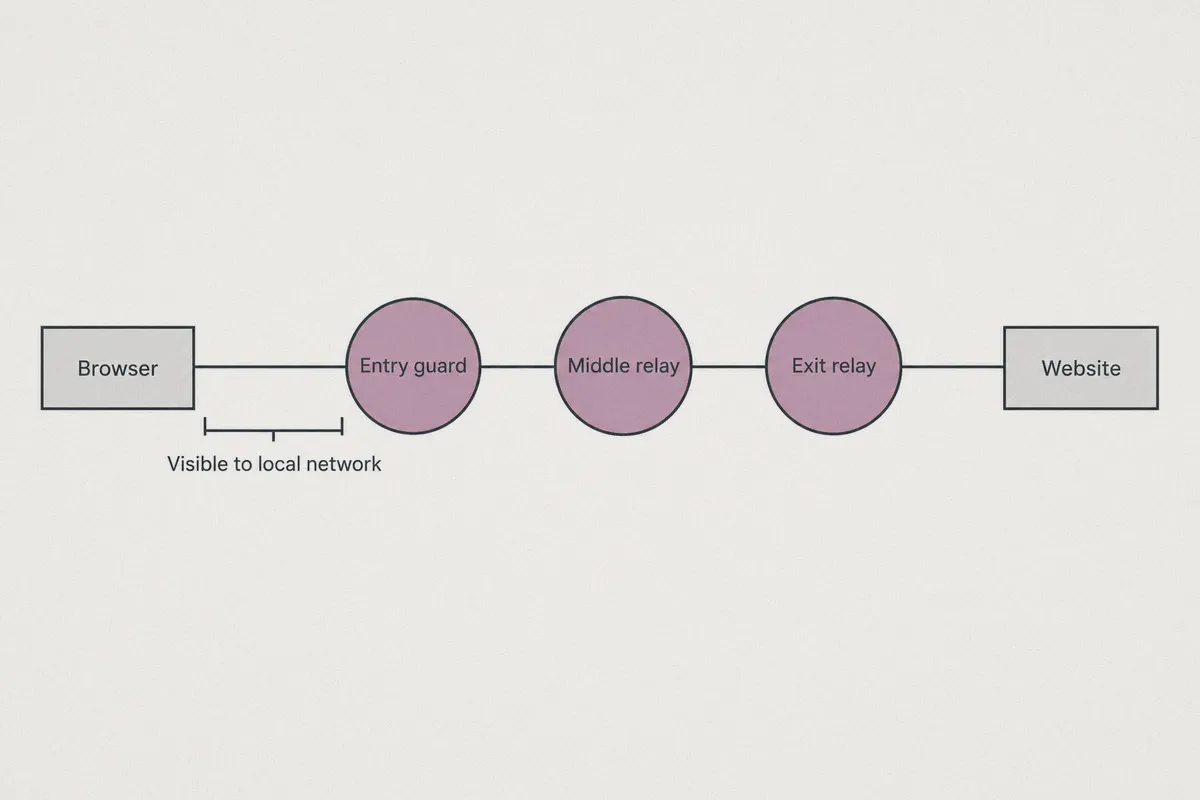
Tor works by routing your internet traffic through three random volunteer computers (called "nodes" or "relays") before it reaches its destination. Each node only knows where the packet came from and where it is going next, wrapping your data in layers of encryption like an onion.
Your Device ──[Layer 1]──> Entry Node (Guard) ──[Layer 2]──> Middle Node ──[Layer 3]──> Exit Node / .onion
Inside that three-hop circuit, your privacy is remarkably strong. But here is the catch: Tor doesn't hide the fact that you are using Tor from the person who sells you your internet.
The moment you click "Connect," your home ISP, office network, or public Wi-Fi administrator sees a direct handshake with a known Tor Entry Guard node. They cannot see what you are reading on .onion sites, but they immediately know:
- Your exact IP address is running the Tor protocol.
- The exact timestamp you connected and how much data you are transferring.
- That your connection should be cataloged under "Tor usage" in automated threat-intelligence logs.
In many workplaces, university campuses, and countries with restrictive networks (from the UAE to parts of East Asia), simply initiating a Tor handshake will automatically throttle your connection or block it entirely.
This is where a good VPN steps in. When you connect to a VPN before opening Tor (often called Tor over VPN), your ISP only sees ordinary encrypted traffic heading to the VPN server. They have zero clue you just launched Tor.
Why 90% of Big-Brand VPNs Make Tor Painful to Use
Most mainstream "top 10 VPN" review lists recommend massive, bloated VPNs loaded with antivirus add-ons, dedicated IP upsells, and 60 different settings tabs. When you try using those tools with the Tor Browser, you usually run into three major roadblocks:
1. The "Speed Crash" Bottleneck
Tor is already slow by design because your traffic travels through three independent servers scattered across the globe. If you layer a sluggish, bloated VPN protocol on top of that, your connection speed drops off a cliff. Webpages fail to resolve, .onion links time out after 45 seconds, and you spend more time staring at error screens than browsing.
2. Identifiable Protocol Signatures
Many standard VPNs rely on stock OpenVPN or WireGuard configurations. Modern Deep Packet Inspection (DPI) firewalls can detect the signature of these open protocols within seconds. If your network restricts Tor, chances are it restricts standard VPN protocols too. Slapping a generic VPN over Tor often results in both connections failing.
3. Connection Drops Break Your Session
If your Wi-Fi flickers for half a second on a poorly optimized VPN, the tunnel stalls. In Tor, an interrupted connection resets your entire three-node circuit. You lose your active tab, and your real IP address risks leaking to the entry guard during the reconnection scramble.
What you actually need isn't a server list covering 120 countries. You need lightweight traffic obfuscation, instant recovery when your network hiccups, and a clean, one-click interface that doesn't get in your way.
What Makes OnlyDogs VPN the Smarter Choice for Tor Privacy
Instead of treating privacy like a complicated server-administration job, OnlyDogs VPN is designed around one core idea: give everyday users maximum stealth and stability without demanding an IT degree.
Here is why it works exceptionally well alongside the Tor Browser:
1. Proprietary HTTP/3 Obfuscation (Invisible to Your ISP)
Standard VPN handshakes look like VPN handshakes. OnlyDogs VPN incorporates HTTP/3 and proprietary traffic obfuscation, disguising your tunnel so it mimics regular, everyday web browsing traffic.
Even on heavily filtered public Wi-Fi networks or in regions with aggressive DPI filtering (like schools, corporate networks, or strictly monitored regions), your local network sees standard web activity. The fact that you are funneling Tor through that tunnel remains completely hidden.
👉 Check out OnlyDogs VPN and bypass local network inspection
2. Scenario Presets: No Guesswork, Just Connect
You shouldn't have to fiddle with custom ports, MTU sizes, or encryption toggles right before opening the dark web. OnlyDogs VPN uses intuitive scenario presets.
- Need maximum speed to offset Tor's natural latency? Tap the preset.
- Need aggressive filtering against sketchy tracking scripts? Tap the preset.
The app automatically selects the cleanest, lowest-latency path available, eliminating the trial-and-error cycle of manually testing ten different locations until one connects.
3. Seamless Network Recovery
Public Wi-Fi drops, coffee shop routers reset, and switching between Wi-Fi and mobile data usually breaks sensitive tunnels. OnlyDogs VPN features built-in weak-network resilience. If your signal stumbles, the client recovers the tunnel silently in milliseconds, preserving your connection state so your Tor circuit doesn't collapse midway through loading a page.
4. No Password Footprint
Most VPNs ask you to create an account, invent a complex password, and store it in a browser where it can be scraped. OnlyDogs VPN streamlines authentication via email verification codes (OTP). There is no permanent password to remember, manage, or lose. It minimizes unnecessary account credentials while keeping your access friction-free across Windows, macOS, Android, and iOS.
5. DNS and Node-Level Filtering
The dark web and the clearweb entry points surrounding it are crawling with aggressive scripts and tracking domains. OnlyDogs VPN pairs DNS-level blocking with node filtering, weeding out unwanted trackers and malicious ad domains before packets even reach your browser interface.
How to Set Up Your Privacy Route in Under 3 Minutes
Setting up Tor with OnlyDogs VPN requires no special scripts or command-line tools. Just follow this straightforward sequence:
Step 1: Open OnlyDogs VPN  ──>  Connect (Fastest / Privacy Preset)
                                    │
                                    ▼
Step 2: Launch Tor Browser ──>  Click "Connect" inside Tor
                                    │
                                    ▼
Step 3: Browse Securely    ──>  ISP sees standard traffic; Tor protects destination
- Connect OnlyDogs VPN First: Open the OnlyDogs app on your computer or phone, select your preferred scenario preset, and click connect. Wait for the green active status.
- Launch Tor Browser Second: Open your official Tor Browser. Because OnlyDogs VPN is already active, Tor will route its initial handshake through the encrypted tunnel. Your ISP only sees ordinary, obfuscated HTTPS traffic.
- Leave Tor's Window Size Default: Never maximize the Tor Browser window to full screen. Tor uses standard window dimensions ("letterboxing") to prevent websites from fingerprinting your monitor resolution.
- Disconnect in Reverse Order: When you are finished, close the Tor Browser completely, then disconnect OnlyDogs VPN.
A Quick Reality Check: What a VPN Can and Cannot Do on the Dark Web
A reliable VPN is your best shield for local network privacy, but it is not a magic cloak that forgives reckless behavior. Let’s be completely clear about the boundaries:
| What OnlyDogs VPN Does | What No VPN in the World Can Do |
|---|---|
| Hides Tor usage from your home ISP, university, or public network | Prevents you from getting scammed if you send cryptocurrency to untrusted sellers |
| Bypasses network blocks that stop Tor from establishing a connection | Stops tracking if you log into your personal Google or social accounts inside Tor |
| Stops IP leaks before data enters the first Tor guard node | Protects you if you manually download and execute untrusted .exe files |
| Shields your device from malicious ads and trackers at the node level | Hides information you voluntarily type into forum comment boxes |
Treat OnlyDogs VPN as your armored front door: it gets you inside the building without anyone on the street noticing, and it protects your route along the way. Once inside, good digital hygiene is still up to you.
The Verdict: Keep Your Setup Fast, Hidden, and Simple
Surfing .onion sites doesn't require a stack of complex cybersecurity tools or an expensive annual contract with an overcomplicated provider. You just need a setup that does two things without failing: hide your Tor handshake from local prying eyes, and stay fast enough that browsing remains usable.
By combining modern HTTP/3 obfuscation, zero-fuss scenario presets, and instant recovery on unstable networks, OnlyDogs VPN solves the real bottlenecks of dark web privacy.
If you are ready to explore the Tor network with complete peace of mind, skip the complicated setups and get your connection sorted in one click.
👉 Get Started with OnlyDogs VPN Today
Frequently Asked Questions
Can my ISP or local network tell that I am using Tor if I connect directly?
According to the article, a direct Tor connection exposes a connection to a known Tor entry guard, so the local network can identify Tor usage even though it cannot see the final onion destination.
Why can adding a VPN make Tor painfully slow?
Tor already sends traffic through multiple relays. Adding a slow VPN tunnel creates more latency and another possible bottleneck, so overloaded or high-overhead VPN connections can make onion sites time out.
In what order should I connect a VPN and Tor Browser?
The article’s setup is VPN first, then Tor Browser. When finished, it recommends closing Tor Browser before disconnecting the VPN.
Why does the article say not to maximize the Tor Browser window?
It points to Tor Browser’s standard window sizing and letterboxing as a way to reduce fingerprinting based on unusual screen dimensions.
What can a VPN not protect me from on the dark web?
The article says a VPN cannot stop scams, protect unsafe executable downloads, hide identity after logging into personal accounts, or conceal information you type into a site yourself.