Best VPN for Torrenting with Port Forwarding: Why You Probably Don’t Need It (And What Actually Fixes Slow Downloads)
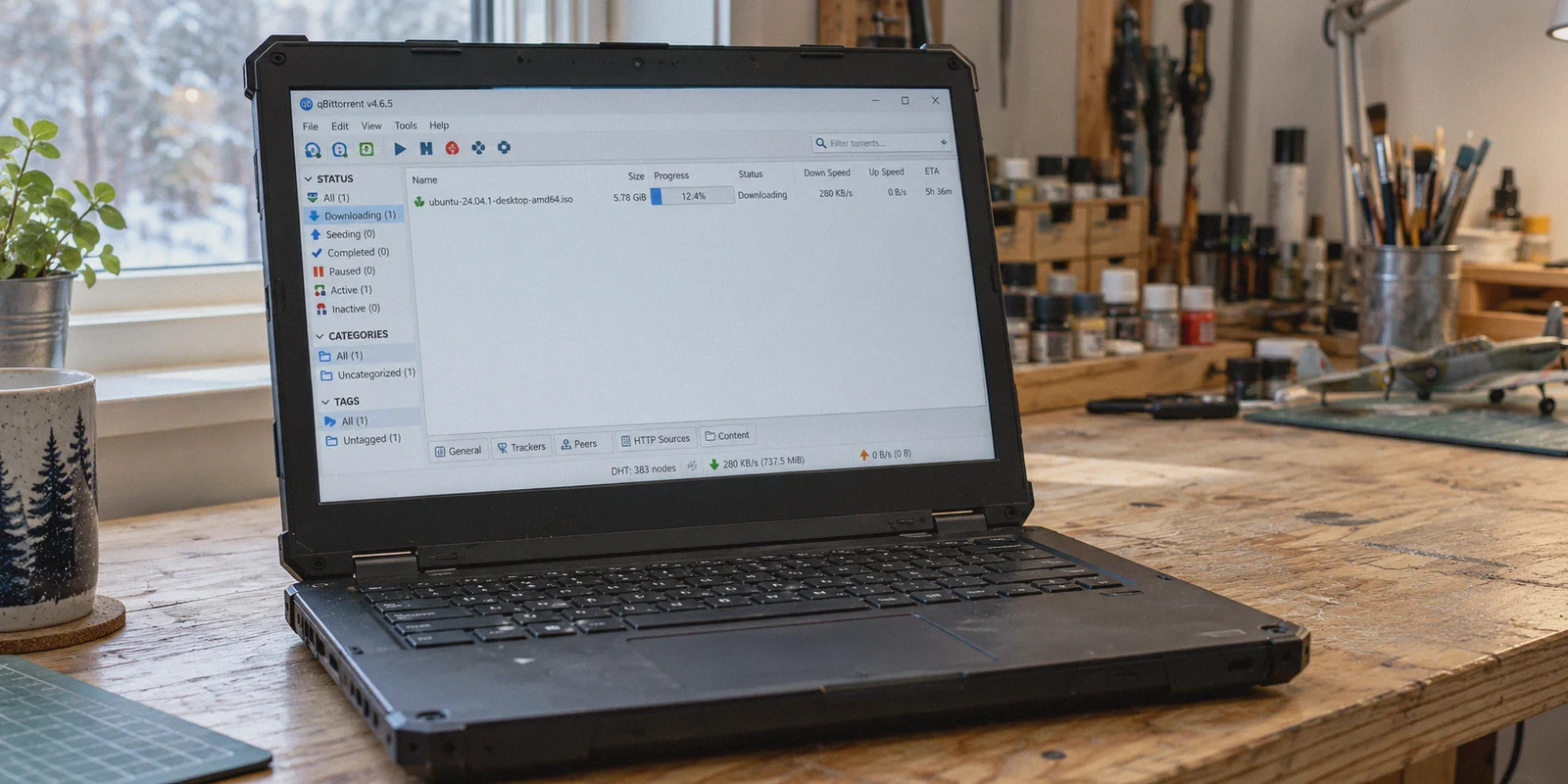
You’re staring at qBittorrent. You clicked download on a 45GB game repack or a 4K movie file on your 1 Gbps fiber internet, and the download speed is crawling at a pathetic 280 KB/s.
Naturally, you hit Reddit or search best vpn for torrenting with port forwarding.
Within five minutes, five different forum comments tell you the exact same thing: "Bro, you need a VPN with port forwarding. If you don't open an inbound port, your speeds will always be trash."
So you start hunting for a VPN that supports port forwarding. And then you hit a brick wall:
- Mullvad permanently killed port forwarding due to security abuse.
- NordVPN and ExpressVPN don’t support port forwarding at all.
- The few budget VPNs that still advertise it force you through an absurd ritual: logging into a clunky web dashboard, generating a random 5-digit dynamic port that changes every time you reconnect, and manually re-typing that port into qBittorrent settings before every single download. Forget to update it once, and your client refuses to connect to peers entirely.
Here is the dirty secret that tech subreddits rarely admit: For 95% of people downloading torrents, port forwarding is NOT why your downloads are slow.
You’ve been sold a 2012 solution to a 2026 problem.
If you want your torrents to actually max out your internet speed without turning your computer into a misconfigured network routing lab, here is how P2P speed actually works today, what port forwarding really does, and the friction-free way to download at full speed.
Article summary and product fit
Do you need VPN port forwarding to get fast torrent downloads?
Not for every swarm. The article explains that port forwarding mainly improves inbound peer reachability; it can matter for rare files and strict private-tracker seeding, while popular torrents may already have enough connectable peers for fast downloads.
Key points and limits
- Best for: Torrent users trying to separate an inbound-connectivity problem from a general download-speed problem.
- Core point: Port forwarding changes whether other peers can initiate connections to you; it does not automatically increase the capacity of your internet line.
- Practical step: For mainstream swarms, first check peer availability, VPN-node congestion, tracker or DHT reachability, and whether the torrent client is bound to the VPN interface.
- Important limit: The article explicitly says rare-file seeding and strict private trackers can still benefit from or require inbound connectivity, so a no-port-forwarding setup is not universal.
Where OnlyDogs VPN fits
OnlyDogs VPN is presented here as an alternative for users whose main problem is sustained P2P throughput rather than inbound seeding. The article highlights obfuscated transport, automatic route selection, recovery on unstable networks, and filtering on torrent-index pages, while acknowledging that dedicated port forwarding or a seedbox can be the better tool for niche seeding cases.
Source already linked in this article: OnlyDogs VPN official website.
1. What Port Forwarding Actually Does (And What It Doesn't)
Most beginners believe that port forwarding is like a magical nitro boost button for bandwidth. It isn't.
In simple terms, a torrent swarm consists of two kinds of users:
- Connectable peers: People who have an open port allowing incoming connections.
- Unconnectable peers: People behind NAT firewalls who can only make outgoing connections.
Here is the fundamental rule of BitTorrent:
- An unconnectable peer can connect to a connectable peer.
- Two unconnectable peers cannot talk to each other directly.
[How P2P Swarms Actually Connect]

You (Unconnectable) ──────► Seeder with Open Port   ✅ Connected & Downloading
You (Unconnectable) ───X──► Seeder behind Firewall  ❌ Cannot Connect
Port forwarding simply turns you from "unconnectable" to "connectable."
What does this mean in real life?
- If you are downloading a popular torrent with 300 seeders: Over 100 of those seeders are already fully connectable servers, seedboxes, and open peers. You only need connections to 20–30 fast seeders to saturate your entire home bandwidth. Port forwarding gives you virtually zero speed improvement here.
- When port forwarding actually matters: If you belong to a strict, private tracker community where you are seeding an obscure 2006 indie film that only has 2 peers on the planet, port forwarding is essential to catch inbound connections and maintain your upload ratio.
If you’re downloading mainstream movies, PC games, albums, or public torrents, port forwarding is not your bottleneck.
2. Why Your Torrents Are Actually Slow
If port forwarding isn't the villain, why is your download stuck in the slow lane?
In 99% of cases, it comes down to three hidden roadblocks:
Reason 1: Your ISP is Throttling BitTorrent Traffic (DPI)
Even if you pay for gigabit internet, internet service providers hate P2P traffic. It consumes massive continuous upload/download bandwidth. ISPs use Deep Packet Inspection (DPI) to identify standard BitTorrent packet headers and generic VPN tunnels (like raw OpenVPN or WireGuard). The moment they identify P2P signatures, they throttle your connection down to a trickle.
Reason 2: Overcrowded Datacenter VPN Servers
Most popular VPNs route your traffic through shared, heavily congested datacenter servers. When 10,000 users are simultaneously pulling massive P2P streams through the same "New York #1" node, the server's network card chokes. You get high packet loss, stuttering speeds, and endless loading.
Reason 3: Tracker Blocking and Stalled Handoffs
Modern torrents rely on hundreds of public trackers and DHT nodes to find peers. Cheap VPNs with dirty IP pools frequently get blocked by public trackers, leaving your torrent client sitting at "Finding peers: 0%."
3. The Port Forwarding Nightmare vs. The Smart Alternative
Before you spend $100 on a specialized port-forwarding VPN, consider what daily life actually looks like with one:
- You connect to the VPN.
- The VPN assigns you a random dynamic port (e.g.,
48291). - You open qBittorrent → Options → Connection → manually paste
48291. - You test the port.
- Your Wi-Fi hiccups or your PC sleeps. The VPN reconnects and gives you a new port (
51902). - Because your qBittorrent is still set to
48291, all incoming peer traffic dies silently.
It turns a simple task—downloading a file—into an ongoing technical chore. Furthermore, opening an inbound port directly to your local machine bypasses NAT firewalls, increasing security exposure to unauthorized port scanning.
This is why modern torrent users are dropping manual port mapping and switching to high-throughput, obfuscated connections instead.
4. Why OnlyDogs VPN Solves the Real P2P Problem
Instead of giving you another networking headache, OnlyDogs VPN tackles the actual root causes of slow P2P downloads: ISP traffic throttling, protocol detection, and server congestion.
HTTP/3 and Deep Traffic Obfuscation
The biggest reason torrents crawl is ISP detection. OnlyDogs uses proprietary protocols engineered with HTTP/3 and deep traffic obfuscation.
To your ISP’s automated inspection systems, your torrent traffic doesn't look like P2P file sharing, nor does it look like a recognizable VPN tunnel. It looks like standard, harmless encrypted web browsing. Your ISP can't identify the BitTorrent packets, meaning zero bandwidth throttling.
Scenario Presets (Instant Optimal Routing)
You shouldn't have to cycle through 30 servers to find one that supports P2P and isn't overloaded. OnlyDogs features Scenario Presets. Tap the fastest connection preset, and the intelligent routing system instantly matches you with a clean, low-latency node built for heavy sustained bandwidth.
Weak-Network & Fluctuation Recovery
Torrents take hours to finish. If your connection drops for two seconds while you sleep, standard VPNs freeze, causing your torrent client to stop downloading entirely. OnlyDogs is optimized for weak networks and connection recovery, healing interrupted tunnels in the background without dropping peer connections or requiring a manual client restart.
Built-in Tracker & Ad Protection
Torrent sites are notorious for malicious redirect scripts, phishing pop-ups, and trackers. OnlyDogs combines DNS and node-level ad/tracker blocking, scrubbing malicious scripts before they reach your browser while you browse magnet links.
Zero Password Hassle
No complicated account setup or forgotten credentials. OnlyDogs uses secure email verification code logins across Windows, macOS, Android, and iOS, providing a consistent, clean interface that stays out of your way.
👉 Get OnlyDogs VPN and start downloading at full speed
5. Who Actually Needs Port Forwarding vs. Who Doesn't?
Let’s be completely honest so you don’t waste money on the wrong tool:
| Use Case | Do You Need Port Forwarding? | Best Choice |
|---|---|---|
| Downloading movies, games, software, public torrents | ❌ No. (95% of users) | OnlyDogs VPN (High speed, obfuscated, zero setup) |
| Casual seeding to help the community | ❌ No. (You still seed to all connectable peers) | OnlyDogs VPN |
| Strict private trackers requiring a 1:1 seed ratio on dead files | ✅ Yes. | Dedicated Seedbox or complex port-forwarding setup |
| Bypassing ISP bandwidth throttling | ❌ No. (Requires obfuscation, not ports) | OnlyDogs VPN |
6. How to Set Up qBittorrent for Blazing Fast Downloads
If you want full speeds without touching port forwarding settings, use this clean 3-minute setup:
- Launch OnlyDogs VPN: Select the fastest connection preset to establish an obfuscated, high-bandwidth tunnel.
- Open qBittorrent: Go to Tools → Options → Connection.
- Keep the listening port at default (any random port is fine).
- Ensure Enable UPnP / NAT-PMP is checked.
- Bind qBittorrent to Your VPN (Crucial for Privacy):
- Go to Options → Advanced.
- Under Network Interface, select your VPN’s virtual adapter.
- Why this matters: If your internet hiccups, qBittorrent will instantly stop traffic rather than leaking your raw ISP IP address.
- Enable Protocol Encryption:
- Go to Options → BitTorrent.
- Set Encryption Mode to Require encryption. This adds another layer of defense against ISP packet sniffing.
The Verdict
You don't need to become a network engineer just to download a file.
Port forwarding is a niche tool for hardcore private tracker seeders, not a prerequisite for fast downloads. If your torrents are slow, your problem isn't an unforwarded port—it’s ISP bandwidth throttling, congested server routes, and outdated protocols.
Skip the dynamic port roulette. Get a tool that hides your traffic from ISP throttling, picks the fastest route automatically, and lets you download what you want in peace.
👉 Check out OnlyDogs VPN and unleash your true download speeds
Frequently Asked Questions
Does port forwarding always make torrent downloads faster?
No. The article says port forwarding makes you reachable for inbound peer connections, but a popular torrent can already have enough connectable seeders to saturate your connection without it.
When does port forwarding matter most for BitTorrent?
It matters more when you seed rare files, participate in strict private trackers, or need other unconnectable peers to initiate connections to you.
What does the article identify as common causes of slow torrents?
It points to traffic shaping, overloaded VPN servers, blocked or dirty VPN IPs, and stalled tracker or DHT peer discovery as more common bottlenecks for mainstream downloads.
What qBittorrent setup does the article recommend checking?
It recommends binding qBittorrent to the VPN network interface, keeping peer-discovery features available, and reviewing connection and encryption settings so a tunnel drop does not silently move traffic to the normal interface.