
You open your laptop, launch your VPN app, and connect to New York. Then, figured a little extra caution couldn't hurt, you click over to Chrome, pop open your VPN browser extension, and hit Connect there, too—except this one settles on London.
Both little indicators turn a reassuring shade of green. You feel doubly guarded.
Then you visit an IP-checking site in Chrome, and it tells you that you are sitting squarely in the United Kingdom. Curious, you open a terminal, check your desktop Slack, or launch a desktop game client, and that app reports you are in the United States.
Your first thought is probably that something is broken. Is the VPN leaking? Is the extension failing? Did one of them drop out silently?
Nothing is broken, and nothing is leaking. You haven't doubled your security; you have simply built two nested, competing network routes on the same machine without realizing it.
The assumption that an extension is merely the “light” version of an app—and that running both offers “maximum protection”—is one of the most common misunderstandings in consumer networking. They are not two weights of the same tool. To set up a clean, predictable connection, you need to understand who actually owns your traffic, what happens when you stack them, and why running both at once is usually the last thing you want to do.
Article summary and product fit
The answer in this article
A VPN browser extension and a full VPN app may control different traffic. A standalone extension usually routes only that browser, while a desktop app routes device-wide traffic; running both can create a nested route with different exit locations, more latency, and more troubleshooting complexity rather than automatically giving “double protection.”
What matters here
- Best for: People choosing between a browser-only route, a full-device VPN, or an intentional combination of the two.
- Article detail: The article first distinguishes standalone proxy extensions from browser remote controls, then shows how a browser can exit through one location while desktop apps use another system-level tunnel.
- Product fit: OnlydogVPN is matched to the common system-wide use case where one native app should own the route and automatic routing is preferable to stacking browser workarounds.
- Important limit: A full app is not always the right tool: a standalone extension can be better when only one browser needs a different route, and running both is reasonable only when that split is deliberate.
Sources already used in the article: The architecture discussion is anchored in Chrome and Firefox proxy APIs, Apple NetworkExtension, Android VpnService, and Proton VPN’s own documentation on combining its desktop and browser layers. See Chrome proxy API, Firefox proxy API, Apple NetworkExtension, Android VpnService and Proton VPN browser-extension guidance.
First, find out what the extension actually is
The word extension only describes where an icon sits on your screen, not what happens under the hood when you click it.
In practice, a “VPN extension” generally falls into one of two completely different architectural designs:
- A standalone browser proxy: Major browsers provide dedicated proxy controls—Google Chrome's
chrome.proxyAPI and Firefox'sproxyAPI explicitly permit extensions to route web requests through their own remote servers. When an extension uses these APIs, it acts as an independent routing layer. It handles traffic inside that browser window and knows nothing about the rest of your machine. - A desktop remote control: Other browser add-ons do not route a single byte of web traffic on their own. Instead, they function as a browser-bound remote control for the full desktop VPN app running in the background. Clicking “Connect” in the toolbar is functionally identical to opening your Windows taskbar or macOS menu bar and toggling the desktop switch.
ExpressVPN’s current setup illustrates this distinction clearly: its browser add-on can run in an independent Proxy Mode (which handles browser traffic exclusively) or in Remote Control Mode (which simply commands the installed desktop application and alters the system-wide connection).
This is why looking at a toolbar badge that says “Connected” tells you nothing. Before asking whether you should run an app, an extension, or both, you have to verify what kind of extension you are actually dealing with. If it is only a remote control, you aren't comparing two routes at all—you are just pushing the same button from two different places.
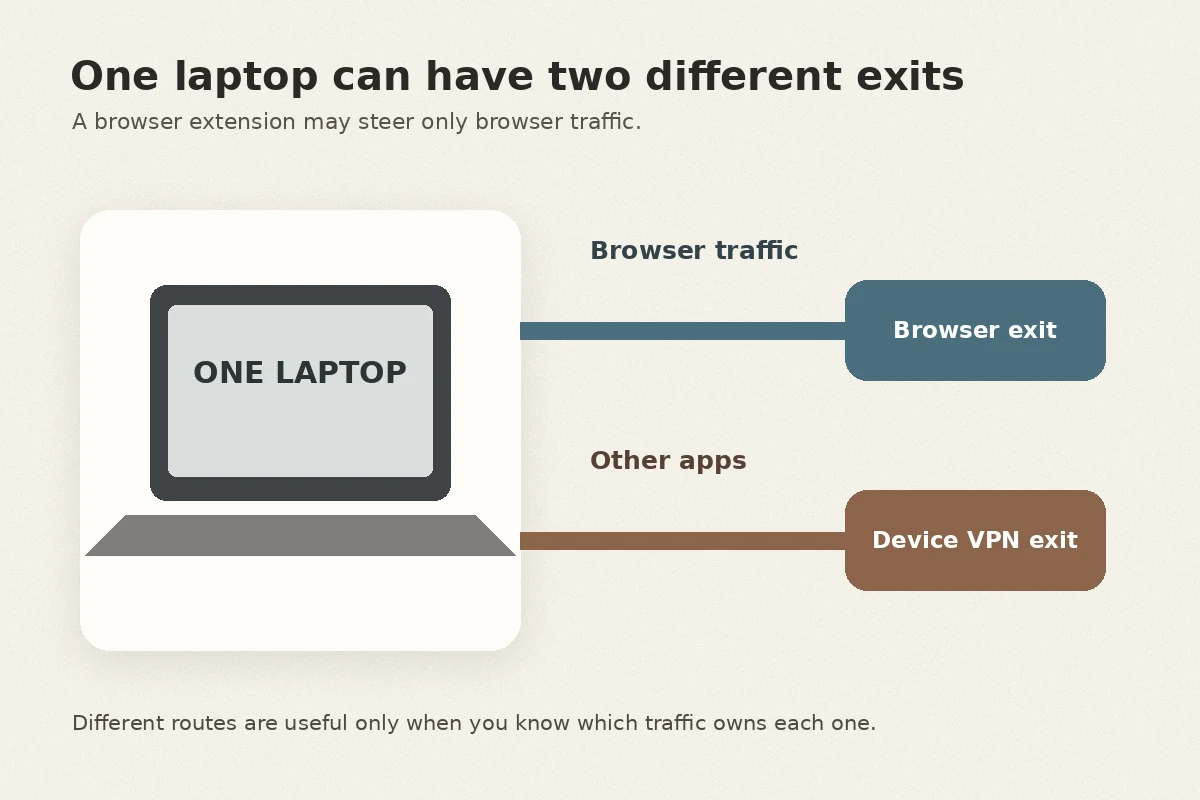
One laptop can have two different exits
When an extension is genuinely standalone, it operates at a fundamentally different layer of your operating system than a desktop VPN app.
On a machine running both layers, browser requests can be handled by the extension while Slack, Spotify, system updates, and other desktop traffic continue to follow the operating system’s VPN route. That is how one laptop can honestly appear to have two different exit locations at the same time.
A full VPN application works at the operating system level. Whether through Apple’s NetworkExtension framework on macOS, Android’s VpnService, or virtual network adapters on Windows, the app establishes a virtual network interface. It tells the operating system's routing table to divert outbound network packets into an encrypted tunnel. This covers your browser, your background cloud-syncing clients, system updates, terminal commands, and messaging apps.
A standalone browser extension sits higher up the stack. It intercepts web requests generated inside that specific browser and forwards them to a remote proxy server. It does not touch your desktop email client, your background backup tools, or another browser sitting right beside it on your desktop.
This structural split explains the apparent contradiction from earlier:
- Your desktop VPN app routes the laptop's general network traffic through Singapore.
- Your standalone browser extension routes Chrome through the United Kingdom.
- Spotify, Slack, and Zoom talk to the internet through the Singapore tunnel.
- Websites visited inside Chrome see an inbound request arriving from London.
The question of “which is stronger?” misses the point. The real question is: which specific traffic did you intend to steer?
Turning on both adds another route, not another safety layer
If you have an active system-wide VPN app running and you turn on a standalone browser extension, what actually happens?
Your browser doesn't somehow bypass the machine it lives on. When Chrome attempts to reach the extension’s proxy server in London, that outbound connection must still travel through the computer's primary network interface—which is currently being routed through your desktop VPN tunnel in New York.
The resulting path looks like this:
Chrome ➔ Desktop VPN Tunnel (New York) ➔ Extension Proxy (London) ➔ Destination Website
Meanwhile, every other program on your machine takes the simpler path:
Desktop Application ➔ Desktop VPN Tunnel (New York) ➔ Destination Website
Proton VPN explicitly documents this interaction: running its desktop client alongside its standalone extension routes device-level connections through the app, while browser traffic is nested through the extension’s selected node, creating what is essentially an ad-hoc double-hop route.
This isn't an operational catastrophe, but it is rarely what everyday users intended. Stacking an extension on top of a desktop VPN introduces real trade-offs:
- Added latency and overhead: Every web request travels through two distinct commercial routing hubs, creating noticeable lag and slower page loads without a proportionate security gain.
- Configuration confusion: You now have two independent server pickers, two connection toggles, and two kill switches. When an internal page suddenly fails to authenticate or a site triggers a bot challenge, diagnosing which hop caused the failure becomes twice as annoying.
If you are trying to troubleshoot a stubborn connection, never start swapping servers in both menus at the same time. Turn off the extension and test the app on its own; or turn off the app and test the extension on its own. Isolate the layer first.
There are good reasons to use both, but “extra protection” is too vague
None of this means running an app and an extension simultaneously is forbidden. It simply means doing so requires an intentional goal beyond a vague desire for “more privacy.”
Legitimate, deliberate reasons to stack them do exist:
- Regional verification: A remote worker or QA engineer might keep their laptop connected to an internal company gateway via a desktop VPN, while using a browser extension set to a foreign market to verify localized search results or ad placements.
- Separating personal and work traffic: An independent consultant might keep device-level traffic on a secure, low-latency regional tunnel while directing a single browser profile through a client’s geographic region to avoid triggering location alerts.
Notice the common thread: in both cases, the user has an exact answer to one question: what should this browser do differently from the rest of the machine?
If your answer is merely, “I thought two green buttons meant double encryption,” you are taking on latency, complexity, and troubleshooting headaches for no tangible benefit.
For everyday use, give one tool ownership of the route
For typical daily work, browsing, and remote connectivity, you will have a much smoother experience by choosing one clear route owner and letting it do its job.
If the goal is to change location only inside one browser, a standalone extension is the surgical choice. If a browser genuinely needs to exit somewhere different from the rest of the device, running both layers can be intentional. For ordinary system-wide protection, the desktop app alone is the cleanest and most predictable setup.
For that last, most common scenario—where you want consistent protection across all your apps without babysitting individual browser plugins—the cleanest solution is a dedicated, well-engineered client like OnlydogVPN.
Instead of forcing you to engineer your own routing stack, OnlydogVPN handles route ownership at the system level. Because it provides native apps across desktop and mobile platforms, it secures your entire environment in one stroke.
Where OnlydogVPN particularly shines is in removing the manual server-hunting that tempts people to install secondary browser extensions in the first place:
- Scenario-based presets automatically configure your routing based on what you are actually trying to accomplish—whether that's low-latency performance, general browsing, or cross-border project work.
- Automatic route selection continuously identifies optimal paths behind the scenes, eliminating the need to micromanage individual city nodes or install quick-fix proxy extensions when a webpage stalls.
If you simply need a single browser window to pretend it is in another country while your background tools remain on your standard home network, a standalone browser extension is the right, surgical tool for that specific task.
For everything else, give one reliable app full ownership of the route. When it comes to your network connection, a single deliberate path is always faster, cleaner, and far easier to manage than two switches competing in the dark.
Frequently Asked Questions
Is a VPN browser extension just a lighter version of a VPN app?
Not necessarily. The article explains that an extension can be a standalone browser proxy or merely a remote control for the desktop app. You have to know which design you are using before comparing it with a full-device VPN.
Why can my browser show one VPN country while desktop apps show another?
A standalone extension can route browser requests through its own proxy while the desktop VPN continues to route Slack, Spotify, updates, and other system traffic through a different exit. Both locations can therefore be correct at the same time.
Does running a VPN app and browser extension together double my security?
No. With a standalone extension, browser traffic can become nested through the desktop tunnel and then the extension proxy. That adds another route, latency, and configuration complexity without automatically delivering a useful extra security layer.
When does it make sense to use both an app and an extension?
Only when you intentionally want the browser to do something different from the rest of the device—for example, regional verification in one browser while system traffic stays on another approved route. For ordinary full-device protection, one route owner is simpler.