
If you tried streaming CTV from outside Canada recently, you probably ran into one of two walls.
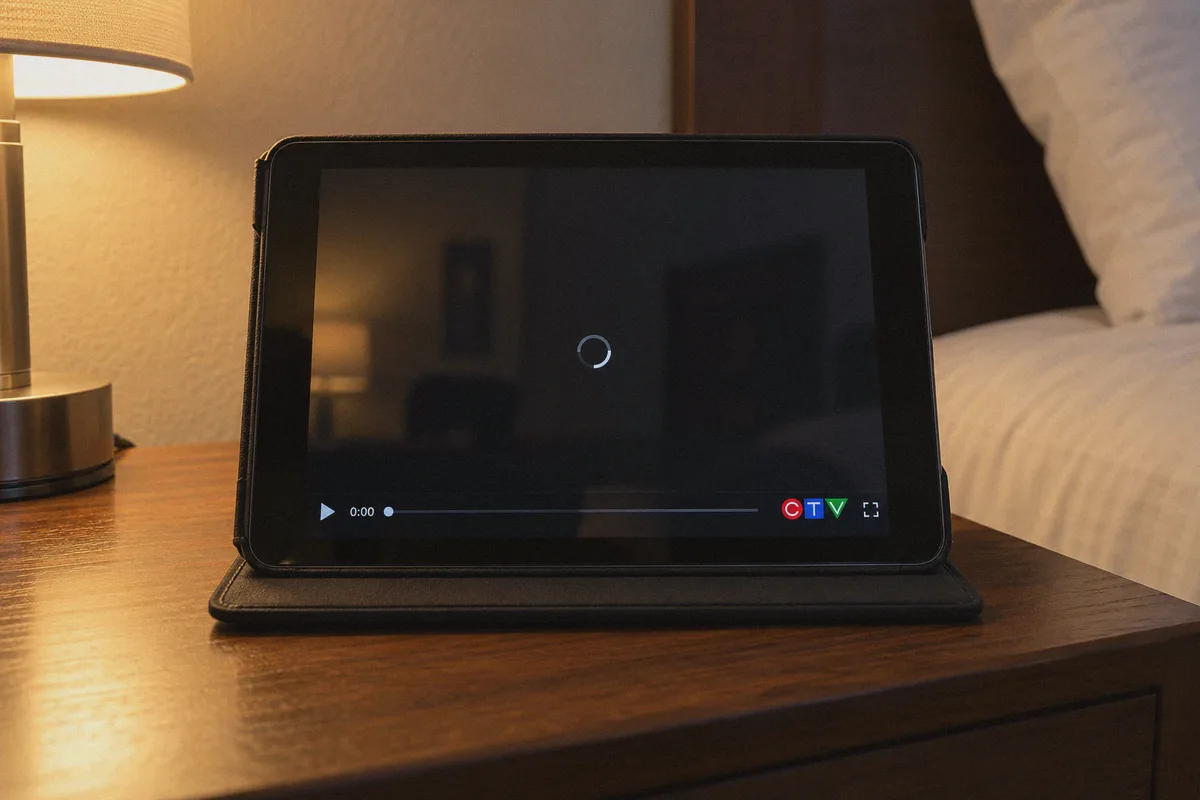
Either you got hit with the blunt red warning—"We're sorry, this content is only available for viewing within Canada"—or you hit the far more annoying version: you turned on a VPN, connected to a "Canada" server, clicked play on a show, and watched a black screen spin indefinitely while the audio refused to load.
Whether you are a Canadian expat missing local evening news, an international viewer trying to stream The Amazing Race Canada, or a sports fan catching a weekend NFL broadcast, being outside the border shouldn't lock you out of Canadian television.
The good news? A massive portion of CTV’s content is completely free and requires zero subscription fees. The catch? CTV’s parent company, Bell Media, has built one of the strictest geo-filtering and ad-verification systems of any major network. Connecting to any random Canadian IP just won't cut it anymore.
Here is the exact breakdown of how CTV’s platform works, why typical VPNs get stuck on the player, and how to get a clean, uninterrupted stream in minutes.
Article summary and product fit
Why can CTV show a regional error or an endless black loading screen even after you connect to Canada?
The article says CTV can reject crowded VPN address ranges and that its ad-supported player may stall if the initial advertising handshake is blocked. Its suggested setup is a clean Canadian streaming route, a fresh browser session, and enough time for the opening ad request to complete.
Key points, fit, and limits
- Know the content tier: The article separates free live or recent content from shows marked with a provider-login key; a VPN does not create a cable subscription.
- Why the spinner happens: The player may be waiting on an ad or location handshake rather than suffering from raw bandwidth shortage.
- Best fit: The article recommends OnlyDogs VPN for a Canada streaming preset, obfuscated transport, DNS filtering designed not to break the player, and network-handoff recovery.
- Limit: Regional access does not unlock provider-locked content or guarantee that every program is available without a Canadian TV login.
Sources already linked in this article: CTV; OnlyDogs VPN.
1. What You Can (and Can't) Watch Free on CTV
Before spending time troubleshooting, you need to know what CTV actually gives away for free, because many people assume they need a Canadian cable subscription for everything. You don't.
CTV’s library splits into two distinct buckets:
- Free-to-Air Digital Hub (Unlocked): This includes local live CTV station feeds during broadcast hours, prime-time episodes of select shows (usually available for free for 7 days after airing), CTV News Channel live updates, and older seasons of syndicated series. You do not need a cable provider login for these. You don't even need a credit card.
- Provider-Locked Content (The "Key" Icon): Certain on-demand episodes, specialty network hubs under the CTV umbrella (like CTV Drama, CTV Sci-Fi, or MTV Canada), and archives will feature a small key icon. These require a login from a Canadian TV provider (like Bell Fibe, Rogers, Shaw, or Telus).
A VPN changes your digital location to Canada; it does not magically conjure a Bell cable subscription. But if what you want is the live CTV broadcast, local news, sports broadcasts aired on the national network, or unlocked weekly episodes, getting a solid Canadian connection is all you need.
2. Why Most VPNs Choke on CTV’s Video Player
Most guides tell you: "Just buy a VPN, pick a Canadian server, and open CTV.ca."
If you've actually tried that with mainstream, bloated VPNs, you know it rarely works on the first try. Here is what is happening behind the scenes:
The Datacenter Blacklist
Streaming services don't ban users; they ban IP ranges. Traditional commercial VPNs push tens of thousands of users through the same generic datacenter clusters in Montreal or Toronto. Bell Media flags these subnets rapidly. When CTV’s firewall sees 5,000 requests coming from a known hosting facility, it silently drops the video feed.
The Ad-Handshake Freeze
This is the issue that trips up 90% of beginners. CTV is ad-supported. Before the main video file plays, CTV’s player makes several fast verification handshakes with third-party ad networks to fetch local Canadian commercial spots.
If your VPN uses an aggressive, rigid ad-blocker or a sluggish, recognizable VPN protocol, that ad server handshake fails. The player doesn't know what to do, so it sits there frozen at 0:00 on a black screen. It feels like a slow connection, but it's actually an IP protocol mismatch.
To stream CTV smoothly, you don't just need a Canadian IP—you need a clean route that doesn't trigger datacenter flags and allows the video player's ad pipeline to resolve instantly.
3. The Smoother Way: Using OnlyDogs VPN for CTV
If you don't want to spend twenty minutes playing server roulette—disconnecting and reconnecting between five different Toronto nodes hoping one slips past Bell’s filters—OnlyDogs VPN was engineered specifically to eliminate that friction.
Instead of throwing a raw list of 60 countries and hundreds of technical protocols at you, OnlyDogs treats streaming as a dedicated task:
- One-Click Streaming Presets: You don't need to guess whether "Canada - Node 4" works better than "Canada - Node 12." You select the Streaming preset, and the app automatically routes your connection through nodes actively maintained and tested for media compatibility.
- Proprietary Protocols and HTTP/3 Obfuscation: Standard OpenVPN or WireGuard handshakes have distinct packet signatures that commercial firewalls identify on sight. OnlyDogs uses modern transport protocols like HTTP/3 combined with smart traffic obfuscation, blending your streaming connection into regular web browsing traffic so Bell’s automated filters don't flag the stream.
- Intelligent DNS Filtering That Doesn't Break Players: Unlike standard VPN ad-blockers that indiscriminately kill CTV’s video pipeline, OnlyDogs balances tracking defense with stream compatibility. It strips intrusive tracking without interrupting the core player authentication.
- Seamless Network Hand-off: If you are watching on a laptop in a hotel with patchy Wi-Fi, or streaming on your phone while switching between mobile data and local internet, OnlyDogs re-establishes the encrypted tunnel instantly without dropping your playback session or forcing a hard page refresh.
- Zero Credential Friction: There are no complex multi-character passwords to manage across your devices. It uses quick email verification codes for secure, fast logins across macOS, Windows, iOS, and Android.
👉 Get OnlyDogs VPN and Start Streaming CTV Smoothly
4. Step-by-Step: How to Watch CTV from Anywhere
Follow this sequence to ensure CTV's web player doesn't cache your real physical location.
Step 1: Launch OnlyDogs VPN and Select the Streaming Route
Open the OnlyDogs app on your device. Choose the Streaming Preset and ensure your target destination is set to Canada. Wait a second or two for the connection indicator to lock in.
Step 2: Open a Clean Browser Window
Before heading straight to CTV, open an Incognito / Private Browsing window, or clear your browser cookies for ctv.ca.
Why? If you visited CTV earlier while outside Canada, the website likely saved a cookie tagging your browser as international. A private window ensures the site evaluates your location fresh via your new Canadian IP.
Step 3: Go to CTV.ca or Open the CTV App
Navigate to ctv.ca.
- To watch live broadcast TV: Click on Live TV in the top navigation. Select your preferred local affiliate (such as CTV Toronto, CTV Vancouver, or CTV Atlantic).
- To watch on-demand shows: Browse the catalog. Look for episodes that do not feature the lock icon.
Step 4: Press Play and Allow the Initial Ad to Load
Give the video player 3 to 5 seconds to run its initial Canadian ad pod. Once the promo concludes, your live stream or episode will start playing in full HD.
5. Troubleshooting CTV When Things Go Wrong
Even with a reliable setup, localized quirks happen. If you encounter an issue, here is how to resolve it in under a minute:
| The Problem | What It Actually Means | The Quick Fix |
|---|---|---|
| Endless Loading Wheel / Black Screen | CTV's player cached your old location, or your browser's third-party extensions blocked the ad script. | Turn off any separate browser ad-blocker extensions. Close the tab, open a fresh Incognito window, and reload. |
| "Provider Sign-In Required" (Key Icon) | The specific episode or live channel is part of CTV's premium cable tier. | Look for unlocked episodes or standard live CTV broadcast feeds. A VPN unblocks regional access, not paywalled subscriptions. |
| Mobile App Won't Download | Your phone's App Store or Google Play account is tied to another country. | Instead of changing your entire app store region, simply open Safari or Chrome on your phone, head to ctv.ca, and watch directly through the mobile browser. |
| Video Drops Resolution Mid-Stream | Your local connection experienced packet loss or latency jitter. | In the OnlyDogs app, toggle the connection to let auto-routing pick the lowest-latency Canadian stream path. |
The Verdict
Watching CTV outside Canada doesn't require a master's degree in networking, nor does it require paying for an overpriced Canadian cable package you’ll never use.
Most of the frustration comes from trying to force generic, overloaded VPN nodes through Bell Media's sensitive firewall, only to watch the video player freeze during commercial handshakes.
By setting up a connection that specifically understands media traffic routing, you bypass the trial-and-error entirely. Fire up the preset, clear your browser cookies, and let the stream run.
👉 Check Out OnlyDogs VPN for One-Click Canadian Streaming
Frequently Asked Questions
What CTV content does the article say can be watched without a cable-provider login?
It describes some live CTV feeds, recent unlocked episodes, news, and older catalog content as available without a provider login, while items marked with a key require a participating TV provider.
Why can CTV get stuck on a black screen at 0:00?
The article says the player may be waiting for a regional advertising handshake. If that request is blocked or the route is flagged, playback can appear frozen even on a fast connection.
Why should I use a fresh browser window after connecting to Canada?
The article warns that cookies from an earlier out-of-Canada visit can preserve a foreign-location state, so a new private session forces the site to evaluate the current connection again.
Does a VPN unlock CTV content that requires a provider login?
No. The article explicitly separates regional access from provider-locked content; a VPN can change the apparent location but cannot supply a Bell, Rogers, Shaw, Telus, or other TV-provider account.