You unpack your bags in Mumbai or Delhi, connect to the hotel Wi-Fi, and open the streaming app you were watching on the flight over. Your profile icon is right where you left it. Your name is spelled correctly, and your billing history is untouched. But when you glance down at the Continue Watching row, the episode you queued up has vanished. The top-ten list is filled with unfamiliar titles, and a quick search for your comfort show turns up nothing.
The default reaction is almost always the same: assume the app is glitching, restart the phone, or fire up a VPN back to your home country to “fix the bug.”
Before you start toggling servers, take a breath. What you are seeing is rarely an app malfunction, and a VPN is not an all-purpose undo button.
In India, an altered streaming catalogue usually boils down to one of two completely different realities: your physical location changed and the platform served its local Indian catalogue, or the streaming platform itself restructured its regional rights and catalogue.
Diagnosing which of those two events took place saves you from hours of useless troubleshooting. A home-routed VPN only addresses location; it cannot resurrect a licensing deal that expired, restore a discontinued subscription, or re-engineer how a media company packages its content.
Article summary and practical fit
Why did your streaming library change in India, and can a VPN fix it?
First determine whether travel changed the regional catalogue or the streaming service itself changed its rights, plans, or structure. A home-country route can only help with the first case, and only when the title still exists at home, your subscription includes it, and the service supports that type of access. A VPN cannot restore an expired license, undo a platform merger, or create a missing subscription entitlement.
What matters in this situation
- Best for: Travelers or returning users who notice missing titles, changed home screens, or restructured services after arriving in India.
- Diagnostic clue: If several services change right after arrival, geography is the likely variable; if one service changes while others remain normal, investigate that platform’s catalogue or business changes first.
- Product fit: OnlydogVPN becomes relevant only after location is the remaining variable and the article’s service-specific checks are satisfied.
- Important limit: Streaming services can detect or restrict VPN use, and routing cannot restore content that the service no longer licenses or that your plan does not include.
Sources already used in this article: Netflix travel guidance; Prime Video terms and regional availability guidance; OnlydogVPN official website.
First Find Out Whether You Moved—or the Service Did
When an interface looks different, you do not need an exhaustive networking checklist. You only need to look for three clear patterns across your apps:
- Several streaming apps changed simultaneously after you landed: If Netflix, Prime Video, and your music apps all look different within hours of arrival, physical geography is your primary answer.
- Only one service looks different, while the others behave normally: If Netflix looks like your home feed but another app has lost major studios or rebranded entirely, investigate the platform itself. The company may have updated its catalog or altered its local business structure.
- Everything looks identical except for one specific title: If the entire catalogue is intact but a single film, a specific season, or a niche channel is gone, treat it as an individual licensing or plan restriction before touching your connection settings.
It is easy to confuse your account credentials with your viewing rights. Profiles, viewing histories, watchlists, and billing cards belong to your global identity. But streaming services license movies and series on a strictly territorial basis. Your login confirms who you are; your local network connection determines what you are allowed to see.
If Several Apps Shifted in India, Travel Is Doing Its Job
If the shift happened across multiple services right after entering the country, your account has not broken—it is simply traveling.
Major streaming platforms explicitly state that their catalogues adapt to where your device connects:
- Netflix maintains distinct libraries for each country. When you cross a border, the app naturally transitions to display what is licensed for that specific territory. A title you downloaded at home might even show an error badge if the local licensing agreement does not cover offline playback in India.
- Prime Video operates under similar rules. Its terms explicitly state that available titles, including available audio tracks and subtitle options, adjust based on the country you are visiting.
If this matches your situation, stop reinstalling apps, clearing caches, or updating credit cards. None of those actions will change the licensing reality of the region you are in.
To confirm that travel is the cause, avoid relying on personalized home screens or recommendation rows—algorithms frequently tweak these based on time zones and viewing habits. Instead, use the search bar to look up two or three specific titles that you know are currently active in your home market but generally absent internationally. If they refuse to populate across multiple searches, your device is simply receiving the standard Indian regional catalogue.
The Indian library is not a broken version of what you left behind; it is a fully functional, locally curated catalog built for the domestic market.
But India’s Streaming Market Has Also Changed Underneath the Apps
Here is why diagnosing the problem matters: India’s domestic streaming landscape has experienced massive structural consolidation over the past two years. If you are a returning visitor, an expat, or someone using an account tied to regional services, your interface might look radically different even if you haven't crossed a single border.
Consider JioHotstar. In early 2025, JioCinema and Disney+ Hotstar were unified under a single platform, shifting how millions of users access domestic sports, international dramas, and local programming under one umbrella.
That shift did not stop there. In April 2026, JioHotstar launched an exclusive HBO Max hub within India via an expanded partnership with Warner Bros. Discovery. This structural update introduced a massive wave of HBO, DC, and Warner Bros. content directly into the domestic ecosystem, while simultaneously packaging specific tiers of international content behind designated plan add-ons.
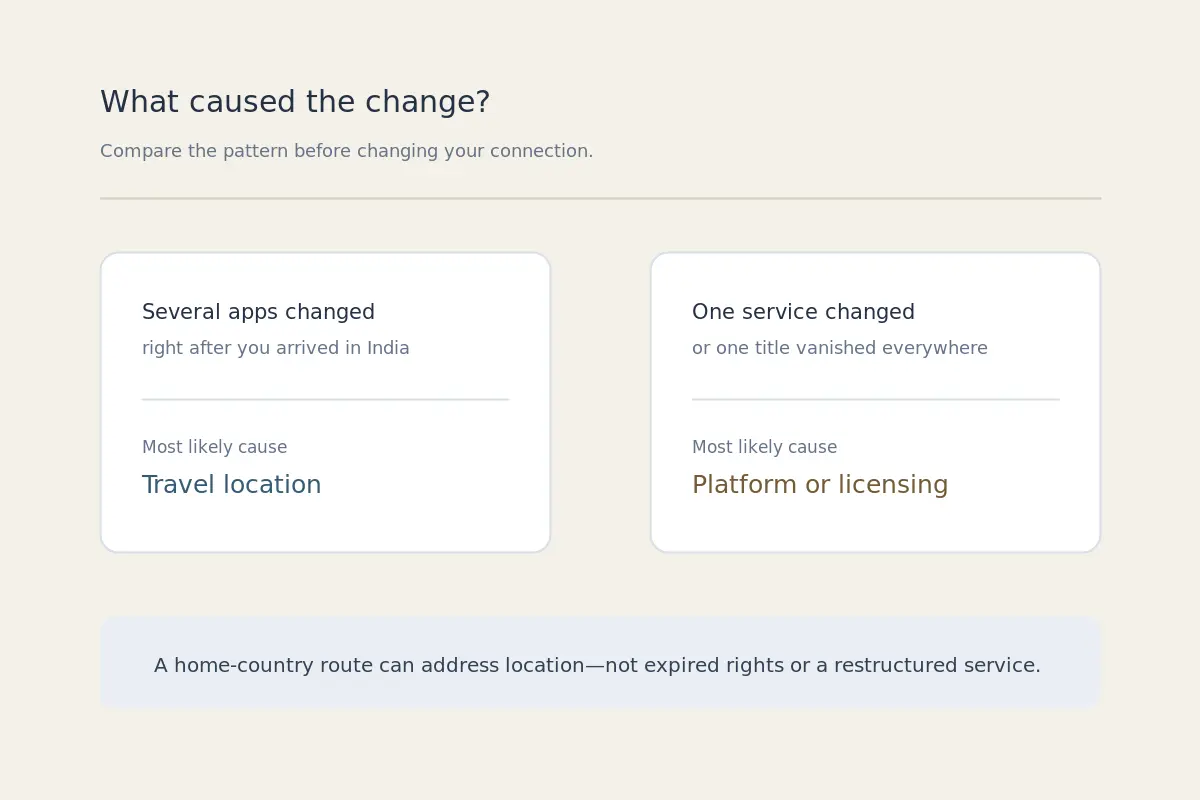
WHAT CAUSED THE CHANGE?
When several international apps shift after you arrive in India, cross-border travel is the likely cause, so testing a home-country route makes sense. When one domestic service has restructured, moved content into a hub, or put it behind an add-on, that is a platform-side market change and a VPN cannot restore the old structure.
And if a single title has disappeared from your account across every device and location, expired studio rights are the more likely explanation; there is no route that can bring back a title the service no longer carries.
If you open an app and find that a show has moved to an exclusive partner hub, or that a subscription requires a newly minted local tier, connecting to a VPN will not reverse the platform's corporate roadmap. You cannot route your way around a contract negotiation.
A VPN Cannot Restore Rights the Service Does Not Have
Before turning to technical workarounds, run through three reality checks:
- Is the title still offered in your home market? Shows quietly leave streaming platforms every month when multi-year studio deals conclude. If the studio pulled the show back home, no server will bring it back.
- Does your existing tier cover it? If the title was shifted behind an ad-free tier or an auxiliary studio add-on, your base subscription will not open it regardless of where you appear to be.
- What are the platform's technical ground rules? Streaming platforms handle outside routing differently. Netflix officially notes that when a standard VPN is detected, the interface may narrow to display only titles for which the company holds universal, global rights—effectively shrinking your options further. It also explicitly restricts VPN routing on ad-supported tiers and live programming. Prime Video’s current terms strictly bar technologies designed to obscure geographic location.
When a title is gone due to local rights or platform-level shifts, technical fiddling—toggling DNS settings, switching browser user-agents, or cycling through twenty arbitrary IP endpoints—is wasted effort. If the rights are not there, the route will not matter.
In those situations, your practical options are straightforward: enjoy the local Indian catalogue, look for an authorized digital storefront renting the title, or catch up on content you saved offline before traveling.
Use a Home Route Only When Location Is the Last Variable Left
A home-country route becomes genuinely relevant only when you have cleanly isolated the cause:
- You traveled from your home country to India.
- The missing content remains demonstrably active on your home service.
- Your current subscription tier fully includes it.
- The disruption began strictly upon arrival.
- The service you are accessing can technically support travel routing.
When you reach this specific junction, manual server selection is usually where users get bogged down. Guessing which arbitrary city node has low latency, unblocked IP blocks, and reliable peering turns an evening of relaxation into unpaid network administration.
This is where OnlydogVPN↗ fits naturally into the workflow.
Rather than asking you to navigate an intimidating list of raw server locations or fiddle with obscure protocol toggles, OnlydogVPN prioritizes immediate utility through its dedicated streaming preset and automatic route selection. It handles dynamic routing behind the scenes, matching your connection to an optimized home-region path engineered for media throughput without requiring manual server hopping.
Define success by the actual viewing task:
- Does the missing title re-appear in search?
- Does playback initialize without an error code?
- Does the stream sustain its bit rate without dropping to standard definition after thirty seconds?
If the app flags the connection or falls back to a restricted global view, take the hint and step back. That indicates an enforced platform restriction, not an issue that five more minutes of server roulette will solve.
When your streaming library changes in India, compare your apps before you change your connection. If the country changed the catalog, routing may matter. If the service changed the catalog, routing cannot put the old service back.
Frequently Asked Questions
Why did several streaming apps change after I arrived in India?
If multiple services changed within hours of arrival, the article says your physical location is the most likely cause. Streaming services commonly present different catalogues by country.
What if only one streaming service changed?
Investigate the service itself before changing your network. The article points to platform restructures, new hubs, plan changes, and licensing updates as causes a VPN cannot reverse.
Can a VPN bring back a title that left the service?
No. If the platform no longer carries the title or your subscription tier does not include it, routing through another country cannot recreate the missing rights or entitlement.
When does a home-country VPN route make sense?
Only after you confirm that the title is still available in your home market, your current plan includes it, the problem began when you traveled, and the streaming service technically supports the way you are trying to access it.
Can Netflix restrict what I see while using a VPN?
Yes. The article cites Netflix guidance that detected VPN use can narrow the catalogue and that ad-supported plans and live programming have additional restrictions.