
You tap "Connect." The green badge lights up, confirming your connection is encrypted and your device is shielded. Yet the second you open Netflix or fire up a live match from a hotel room, you are greeted by an infuriating roadblock: “You seem to be using an unblocker or proxy.”
Conversely, you might install a lightweight browser extension that instantly unblocks an overseas catalog, only to realize you have routed your personal data through an obscure company whose logging practices and ownership you know nothing about.
It is easy to assume you are caught in a classic consumer tradeoff: pick a “privacy VPN” if you care about security, or pick a “streaming VPN” if you just want your shows to play.
That framing is fundamentally broken. A streaming VPN and a privacy VPN are not two competing species of software. They are two separate evaluations happening at opposite ends of the exact same connection.
Privacy asks whether you can trust the company handling your internet traffic. Streaming asks whether a third-party platform will accept the server address that traffic emerges from. Once you understand that distinction, the buying decision gets remarkably simple: privacy is your non-negotiable baseline; streaming is the extra test.
Article summary and practical fit
Privacy is the provider-trust test; streaming is the exit-route test
A “privacy VPN” and a “streaming VPN” are not opposite product categories. The same connection must pass two different tests: first, whether you trust the VPN provider with your traffic; second, whether the streaming platform accepts the exit IP. Choose on privacy and trust first, then test whether the service can reliably complete the streaming task you actually need.
Key takeaways
- Best for: Travelers and everyday viewers who want both routine public-network protection and reliable access to their own streaming subscriptions.
- Privacy baseline: Evaluate encryption, logging and data-retention practices, operating track record, and independent scrutiny before considering entertainment features.
- Streaming test: A privacy-respecting service can still be blocked if a platform flags its exit IP; streaming compatibility changes over time and depends on route maintenance, stability, and device support.
- Important limit: OnlydogVPN is framed here as a consumer streaming-and-travel utility, not as a high-assurance privacy system for journalists, activists, or other users whose physical safety depends on a deeply audited anonymity architecture.
Product fit: OnlydogVPN fits mainstream travelers and viewers who want a low-friction encrypted tunnel plus streaming-oriented routing and recovery. The article explicitly recommends a dedicated, mature privacy specialist when the threat model is high assurance rather than convenience.
Sources already used in this article: Netflix VPN/proxy help; Electronic Frontier Foundation public Wi-Fi article; Proton VPN streaming guide. Product source: OnlydogVPN official website.
The Same Connection Has to Pass Two Completely Different Tests
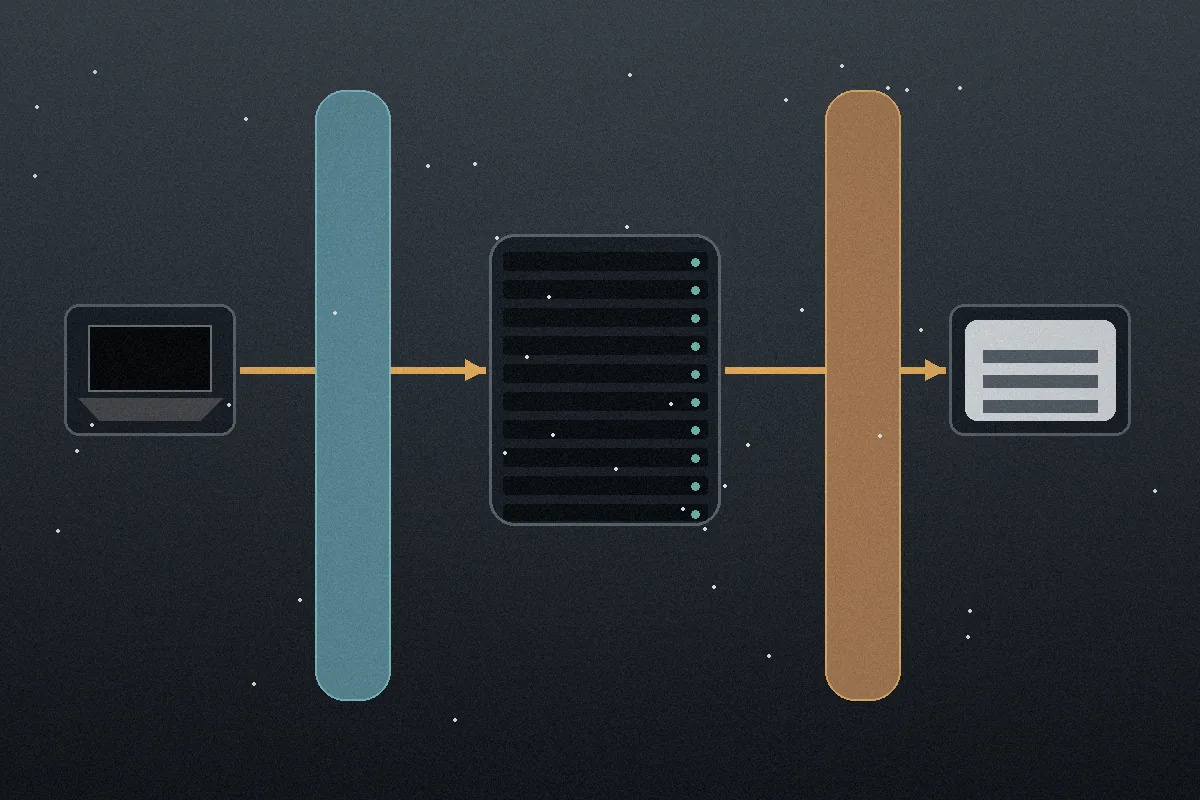
To see why these two labels cause so much confusion, follow the path of your connection across the internet. It comes down to a straightforward journey:
Your Device → Encrypted Tunnel → VPN Server / Exit Route → Destination Service
At the first boundary—between your device and the VPN server—you establish an encrypted tunnel. This hides your browsing destinations and raw data from local network snoopers, hotel Wi-Fi administrators, and your home internet service provider. But doing this shifts an enormous amount of visibility directly to the VPN operator. If that provider is careless or untrustworthy, you haven’t eliminated risk; you’ve merely relocated it.
At the far end—between the VPN server and the destination website—a completely different interaction takes place. Netflix, Disney+, or a live sports broadcaster does not see your home broadband IP. They see the VPN’s exit address. If the platform identifies that address as belonging to a commercial data center rather than a residential subscriber, it may flag it, serve an error, or alter the available catalog.
Understanding this journey clears up the three most common VPN headaches:
- “My privacy VPN works everywhere except Netflix.” The connection is private and secure, but the destination platform has flagged that specific exit route.
- “My connection is fast, but the video won’t play.” Raw bandwidth does not matter if the platform’s front door refuses to unlock for that server.
- “A free tool opened the video, but I don’t know who runs it.” The exit route slipped past the platform’s filter, but you have handed your traffic to an unknown entity.
A VPN can sail through the privacy test and fail the streaming test, or pass the streaming test while failing the privacy test. There is no contradiction here—they are simply answering to two different gatekeepers.
Privacy Comes First: The Provider Sits Inside Your Traffic
No matter how badly you want to watch a match, streaming performance is never a reason to route your personal data through a company you wouldn't otherwise trust. The Federal Trade Commission and digital rights groups like the Electronic Frontier Foundation have long pointed out that using a commercial VPN requires placing significant faith in the provider's handling of your traffic.
Skip past marketing buzzwords like “military-grade” or vague promises of absolute “anonymity.” No VPN makes you truly anonymous on the web; logged-in accounts, browser fingerprinting, and tracking cookies still exist. Instead, judge a provider by practical privacy criteria:
- Does it use reliable, modern encryption to protect the link between your device and its servers?
- What connection logs, diagnostic data, or account details does it retain, and what does it discard?
- Are its policies backed by public scrutiny, an operating track record, or independent third-party audits?
Your personal threat model determines how strict you need to be. If you are an everyday user who wants to keep an internet provider or an untrusted airport Wi-Fi network from snooping on your browsing, a reputable encrypted service with sensible data hygiene is often plenty.
If you are an investigative journalist, activist, or high-risk user whose physical safety depends on leaving zero footprint, streaming support should carry zero weight. In that scenario, your focus belongs strictly on mature, battle-tested privacy architectures—like Proton VPN’s audited no-logs infrastructure.
Whatever your risk profile, the rule remains: eliminate untrustworthy candidates before you even look at a server map.
Streaming Adds a Test That Privacy Credentials Cannot Pass
Once a VPN clears your privacy baseline, you enter an entirely different arena. Streaming platforms actively work to detect and restrict access from known data-center IP ranges to protect regional licensing agreements.
A provider can possess the cleanest privacy audit in the industry and still leave you stranded on a weekend evening. Streaming success demands practical, real-time adaptability:
- Does the stream actually play, rather than stalling after the title screen loads?
- Is the connection stable enough to avoid buffering drops halfway through an episode?
- Can the service deliver working routes on the device you actually watch on—whether that is a phone, laptop, or living room setup?
- When a streaming service inevitably blocks an exit route, can the VPN seamlessly switch you to another working path without forcing you into endless manual troubleshooting?
Streaming compatibility is inherently fluid. An IP range that works seamlessly today can be categorized as a proxy tomorrow. What matters isn't a magical promise that a server will remain hidden forever, but how effectively the provider maintains and refreshes working routes.
Even privacy-centric giants acknowledge that privacy and streaming require different optimizations. Proton, for instance, maintains dedicated streaming servers while openly noting that its maximum-security “Secure Core” routes are not recommended for streaming because double-routing can degrade video playback.
Sometimes, the smartest move is simply turning the VPN off. Platforms like Netflix place restrictions on VPN usage for live events and ad-supported tiers. If your stream stalls under those conditions, the problem isn’t your VPN’s quality—it’s a platform constraint that no amount of server switching will fix.
How to Make the Choice: Privacy Filters First, Tasks Break the Tie
Choosing a VPN does not require an overwhelming comparison matrix. It just requires the right sequence: privacy decides whether a VPN belongs on your device; streaming decides whether it completes the task at hand.
Step 1: The Privacy Filter
Can you reasonably trust this provider with your traffic on public Wi-Fi and everyday browsing?
  ├── NO  ──► Reject immediately (regardless of streaming speed or free tiers)
  └── YES ──► Proceed to Step 2

Step 2: The Task Match
What is the primary job you need this VPN to do?
  ├── High-Assurance Privacy ──► Audited, privacy-first providers (e.g., Proton)
  ├── Occasional Streaming   ──► Standard reputable VPN (troubleshoot as needed)
  └── Streaming & Travel     ──► Streaming-optimized layers (e.g., OnlydogVPN)
If your mission is high-assurance privacy, prioritize audited no-logs credentials and transparent infrastructure. Accept that you may occasionally have to toggle a server or troubleshoot when opening an entertainment app.
If your primary mission is smooth streaming, traveling, and secure everyday browsing, look for a service built specifically to handle the headache of dynamic routing without making you play server roulette.
Where a Streaming-Focused Tool Fits
This is where a service like OnlydogVPN can make practical sense. It isn't designed for high-risk whistleblowers needing specialized multi-hop anonymity chains, and it shouldn't be purchased for that purpose. Instead, it is built directly for mainstream users who are tired of acting as their own network administrators just to watch their subscriptions while traveling or sitting on hotel Wi-Fi.
The reality of streaming over a VPN is that servers burn out, Wi-Fi networks fluctuate, and manually testing ten different locations across a dropdown menu is an awful way to spend an evening. OnlydogVPN approaches this problem as an operational task:
- Task-Oriented Routing: Rather than forcing you to guess which city endpoint is currently unflagged, its intelligent routing automatically identifies viable, streaming-friendly paths for your target region.
- Network Recovery: Built-in optimizations designed for weak or shifting connections keep video streams from falling off a cliff when hotel or mobile signals dip.
- Everyday Protection Without Complexity: It wraps this streaming layer inside a one-tap encrypted tunnel across iOS, Android, macOS, and Windows, shielding your routine browsing on untrusted public networks.
One boundary matters here: OnlydogVPN is a consumer-facing utility rather than a long-established high-assurance privacy project with a decade of third-party security audits.
If your threat model requires institutional-grade verification, choose a dedicated privacy specialist. But if you are a traveler or everyday viewer looking for a dependable, streaming-first tool that encrypts your traffic on public Wi-Fi without the constant proxy errors, OnlydogVPN is aimed at that kind of convenience.
You never have to sacrifice baseline connection privacy just to get a stream to play. Filter out the questionable operators first, choose a provider you can comfortably trust with your traffic, and then pick the service that actually gets the video playing.
Frequently Asked Questions
What is the real difference between a streaming VPN and a privacy VPN?
They describe two different tests on the same connection. Privacy asks whether you trust the provider handling the tunnel; streaming asks whether the destination platform accepts the VPN exit IP.
Can a very private VPN still fail to stream Netflix or another service?
Yes. The tunnel can be encrypted and the provider can be trustworthy while the streaming platform blocks that specific data-center IP range. That is a streaming-compatibility failure, not a privacy failure.
Is it safe to use any free tool that happens to unblock a stream?
Not necessarily. If you do not know who operates the service or how it handles traffic and logs, passing the streaming test does not mean it passes the privacy test. Provider trust comes first.
When does OnlydogVPN fit this comparison, and when should I choose a privacy specialist?
OnlydogVPN fits mainstream travel and streaming where low-friction routing and recovery matter. If your threat model requires institutional-grade audits, specialized anonymity, or protection for high-risk work, the article recommends choosing a dedicated privacy specialist instead.