
You step off the plane at Heathrow or Gatwick, wait for your phone to latch onto a local mobile network, and pull up your hotel booking. Everything works. Then, remembering your pre-trip security checklist, you launch your VPN app and switch it on.
Immediately, your connection stumbles. The booking confirmation page stops updating, your train ticketing app starts throwing validation errors, and public transit maps hang mid-render.
Your instinctive reaction is to open the VPN app, browse through an endless country list, and toggle between London, Manchester, or an exit back home.
Stop switching servers. The problem is not that you picked the wrong flag on a map. The problem is treating a VPN as an all-in-one internet connection rather than a specialized tool layered on top of one.
For a trip to the UK, the best setup is never an always-on tunnel dragging every byte across the globe. It is a practical, layered approach: get reliable local connectivity first, install the VPN directly on the hardware doing the actual work, and let the software adapt to what you are doing instead of micromanaging server locations.
Article summary and product fit
The answer in this article
For most UK trips, start with reliable local connectivity, then use a VPN as a task-specific routing layer rather than forcing every activity through one distant server. Install the VPN on each device that actually creates the traffic, clear public Wi-Fi captive portals before connecting, and temporarily use a trusted direct connection when a legitimate local service rejects a VPN exit.
What matters here
- Best for: Visitors who want a low-maintenance setup for mobile data, hotel or train Wi-Fi, local services, and occasional home-region access.
- Article detail: The article prioritizes a local eSIM or known roaming plan first, automatic or nearby routing for ordinary browsing, and a VPN client installed directly on each phone, tablet, or laptop that needs protection.
- Product fit: OnlydogVPN fits the article when the goal is automatic routing and smoother recovery across Wi-Fi and cellular handoffs without constant server picking.
- Important limit: A VPN cannot fix broken underlying connectivity, does not automatically protect a tethered laptop through a phone hotspot, and may need to be paused when a trusted UK service blocks shared VPN IPs.
Sources already used in the article: The practical advice is grounded in Ofcom roaming guidance, GOV.UK troubleshooting, Apple’s hotspot deployment documentation, and NCSC guidance on VPNs and captive portals. See Ofcom, GOV.UK, Apple deployment guidance and NCSC.
Get online before you configure the tunnel
A VPN changes how your internet traffic is routed; it cannot manufacture the underlying internet connection. If your phone cannot establish a clean data link with a local cell tower, the most sophisticated security subscription in the world is useless.
Many travelers arrive with flawed connectivity plans:
- The Post-Brexit Roaming Trap: If you live in the EU, do not assume your domestic plan covers the UK for free. Post-Brexit rules mean European operators are no longer obligated to include the UK in statutory “Roam Like at Home” packages. While some carriers still include Britain, others apply steep daily roaming fees.
- The "I'll Just Rely on Hotel Wi-Fi" Illusion: Counting on hotel, café, or station networks means you will be stranded the moment you need to hail a cab or navigate the London Underground.
Sort out your connectivity hierarchy before departure:
I think about the setup in four layers: local mobile data first; the physical home SIM kept active for bank SMS and two-factor codes; offline maps and boarding passes for dead zones; and only then the VPN client layered on top of a connection that already works.
As UK communications regulator Ofcom notes, unexpected roaming bills add up quickly; acquiring an inexpensive local travel eSIM or verifying roaming rates in advance gives your devices the steady data pipeline a VPN requires to do its job.
One route should not carry the whole trip
The single most common mistake visitors make is picking a server back home—say, New York, Sydney, or Frankfurt—and leaving the tunnel running permanently for everything they do in the UK.
Forcing all your traffic back to your home country adds hundreds of milliseconds of unnecessary lag to every tap. Worse, it routinely breaks domestic UK services. If you try to book National Rail train tickets, reserve a restaurant, or interact with public digital services through a foreign exit node, those platforms may flag the session as suspicious or serve you foreign currency rates.
In fact, some official UK services actively reject known VPN IPs. The official GOV.UK portal, for example, explicitly documents VPN usage as a common cause for users being blocked from booking driving tests, instructing users to disconnect their VPN as a standard troubleshooting step.
Adopt a sensible, task-driven mindset:
- General Travel Browsing: Keep your VPN connected to an automatic or nearby UK route. This secures your DNS queries and wraps your data on public networks without routing your search for a local coffee shop across an ocean.
- Region-Specific Home Services: Switch to your home country route only when you are accessing a specific service that genuinely requires it (such as a local home-market streaming library or regional portal).
- When a Trusted Local Platform Blocks You: If an airline app, local taxi service, or ticketing platform throws a validation block, disconnect the VPN temporarily, finish the payment, and turn it back on afterward. Do not waste twenty minutes cycling through cities.
Modern web protocols already use end-to-end HTTPS encryption for sensitive data like passwords and card numbers. The US Federal Trade Commission (FTC) points out that public Wi-Fi is significantly safer today than in the past because of this baseline encryption. You do not need to panic if you have to drop your VPN tunnel for sixty seconds to complete a train ticket purchase.
For travelers who prefer not to fiddle with manual settings, OnlydogVPN simplifies this dynamic with intelligent scenario presets. Instead of forcing you to guess which server handles local browsing versus media streaming, its engine routes traffic based on what you are actually trying to achieve, cutting out the server-list trial and error.
The VPN belongs on the device doing the work
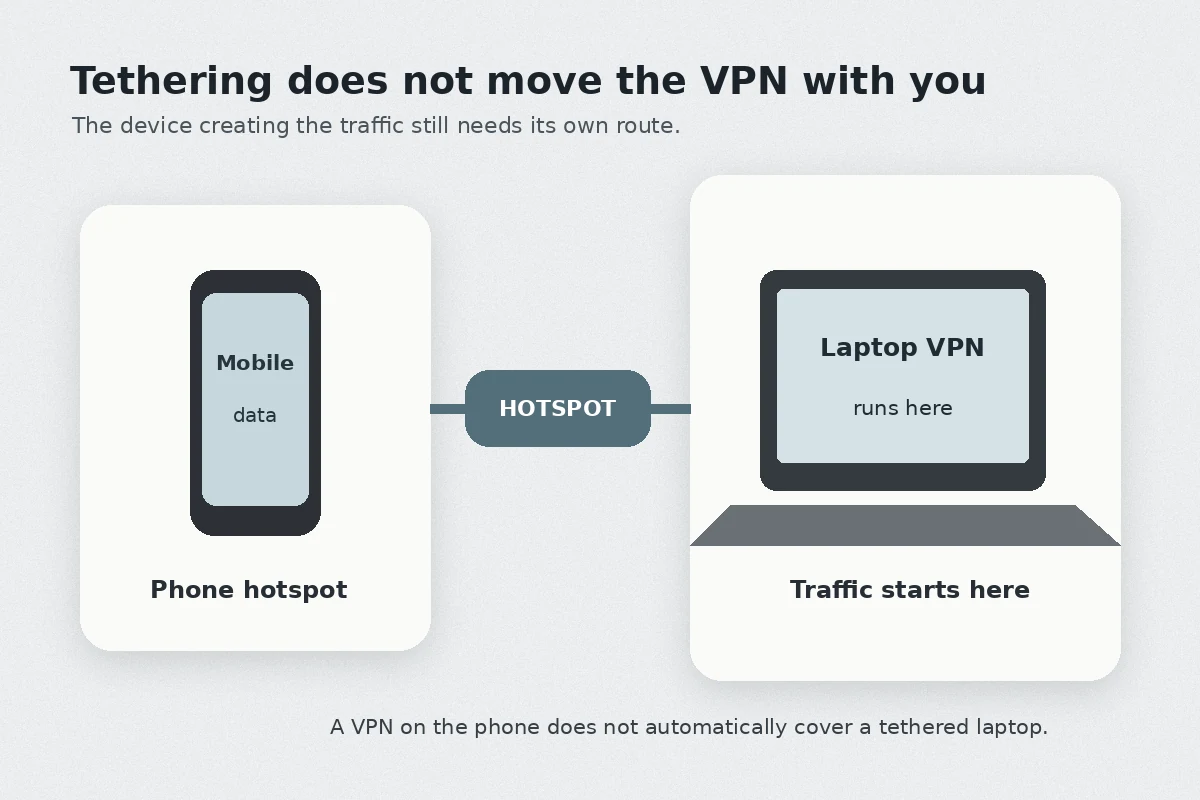
A very common travel scenario plays out like this: a visitor buys a single VPN subscription, turns it on across their iPhone, turns on Personal Hotspot, connects their MacBook, and assumes the laptop is safely tunneled.
That assumption is false.
Operating systems handle tethering at the base network layer. Apple’s official deployment documentation specifically highlights that system VPN or proxy-filtering setups on an iPhone or iPad do not extend to devices tethered via Personal Hotspot. The laptop simply inherits the cellular carrier’s raw connection.
If you intend to work from a coffee shop in Edinburgh or a hotel lobby in Manchester on your laptop, the rule is absolute: install the VPN directly on the machine handling the session.
Never rely on tethered protection. Run a dedicated client across every device—phone, tablet, and laptop—so each machine manages its own encryption and routing.
On public Wi-Fi, the login page comes first
Few things cause more travel frustration than connecting to guest Wi-Fi at Heathrow, a Premier Inn, or an LNER train, only to find that no web pages load while the VPN endlessly displays “Connecting...”
This is a classic captive-portal deadlock.
Guest networks require you to open a browser, accept terms of service, or enter a room number before granting external internet access. If your VPN is set to start automatically or block non-VPN traffic, it intercepts those preliminary redirect requests. Because the VPN cannot establish a tunnel through a blocked gateway, your device hangs indefinitely.
The UK National Cyber Security Centre (NCSC) specifically highlights this friction in its enterprise guidelines: captive portals demand an unencrypted browser handshake before external tunnels can form, making rigid, forced VPN setups incompatible with public Wi-Fi.
Commit the correct connection rhythm to memory:
The sequence is simple: connect to the airport, hotel, or train Wi-Fi first. Leave the VPN off long enough for the browser login screen to appear, accept the terms or enter the credentials, make sure a basic web page loads, and only then start the VPN on a nearby or automatic route.
If a hotel Wi-Fi portal is completely broken or refuses to hand out an IP address, do not spend your afternoon troubleshooting their router. Switch your phone to your local mobile data or eSIM hotspot, complete your work, and move on.
What I would keep for the next UK trip
Travel is unpredictable; your network configuration should not be. You do not need an overwhelming control panel with dozens of protocols and thousands of server endpoints. You need a setup that works silently in the background and gets out of your way when you are trying to catch a train.
Before departure, I would keep the setup deliberately plain: an active travel eSIM or confirmed low-cost roaming plan, the physical home SIM available for two-factor SMS, and the VPN installed directly on every device that will actually use it. For everyday browsing I would leave routing on automatic or nearby, switch home regions only when a specific task demands it, clear captive Wi-Fi login screens before starting the tunnel, and give myself permission to turn the VPN off briefly when a legitimate UK ticketing or transit service rejects a shared data-center IP.
This is precisely why OnlydogVPN stands out as an editorial recommendation for travel in the UK.
Rather than overwhelming you with complicated manual network configurations, OnlydogVPN is built around effortless, one-tap execution on iOS, Android, macOS, and Windows. Its architecture pairs intelligent automated routing with an HTTP/3-based transport layer, which provides remarkable session resilience.
When you move from your hotel’s Wi-Fi out into the street and your phone hands off to 5G, or when you pass through spotty signal patches on an intercity train, standard legacy VPNs frequently hang, drop, and demand manual reconnection. OnlydogVPN absorbs those transitions smoothly, recovering the session without forcing you to pull out your phone and restart the app.
A successful travel setup is measured by how little you have to think about it. Get your mobile data sorted, keep the VPN on the device doing the work, and let a clean, automated client handle the rest while you enjoy your trip.
Frequently Asked Questions
Do I need to keep a VPN connected to my home country for an entire UK trip?
No. The article recommends an automatic or nearby UK route for ordinary browsing, switching to a home-region route only for a specific service that genuinely requires it. Keeping every task on a distant route can add latency and can make some UK services more likely to reject the session.
What should I fix before turning on a VPN in the UK?
Fix the underlying connection first. Have working mobile data or a known roaming plan, keep important offline travel information available, and on public Wi-Fi complete any captive-portal login before starting the VPN tunnel.
Does a VPN running on my phone protect a laptop connected through Personal Hotspot?
Not automatically. The article cites Apple guidance showing that an iPhone or iPad VPN does not extend to tethered devices, so the laptop should run its own VPN client if its traffic needs to be tunneled.
Why can a UK ticketing or government service fail while the VPN is on?
Some services reject known VPN or data-center IP addresses as part of fraud or abuse controls. If a trusted local service works on a direct connection but not through the tunnel, the article recommends completing that task directly rather than endlessly switching servers.