
It’s 12:55 PM on an autumn Sunday. You’ve got the chips out, the jersey on, and your beverage cracked open. You fire up the TV to watch your team—the one you’ve rooted for since childhood, even though a job transfer dragged you three states away.
Then the broadcast starts, and your heart sinks. Instead of your team driving down the field, CBS is serving you a meaningless blowout between two division rivals you couldn’t care less about.
Welcome to the out-of-market nightmare.
The NFL's official answer to this problem is simple: pay up. Fork over roughly $400 to YouTube for NFL Sunday Ticket, or resign yourself to catching delayed 10-second highlights on social media while checking your fantasy score on your phone.
Most fans assume their only alternative is dealing with sketchy, pop-up-infested streaming links that buffer every third down. But if you understand how NFL regional broadcasting actually works, there is a far smarter, legal, and shockingly cheap way to watch out-of-market games using a VPN.
Here is what most guides leave out, why your previous attempts probably ran into a black screen, and how to set it up so you never miss another kickoff.
Article summary and product fit
How does the article approach watching an out-of-market NFL game with a VPN?
The article treats regional Sunday broadcasts as location-dependent feeds: identify a market where the game is airing, establish that route before opening the streaming service, clear old location state, and use the platform that actually carries the game’s network.
Key points from this article
- Best for: Fans who already have access to a supported live-TV or network streaming service but are seeing the wrong local affiliate feed.
- Core issue: Streaming platforms use current IP and device location signals to decide which local CBS or FOX affiliate feed to show.
- Preparation: Check the broadcast market first, connect before opening the service, and clear cached location information when needed.
- Product fit: OnlyDogs VPN is presented here for streaming presets, obfuscated HTTP/3 transport, automatic routing, and cross-platform access.
- Important limit: A VPN does not change which network owns a game; a CBS service will not suddenly carry a FOX regional broadcast, and subscription requirements still apply.
Product link cited in this article: OnlyDogs VPN official website.
The Big Myth: "NFL Games Are Locked to Where You Live"
Here is the truth about NFL broadcasting that the TV networks prefer you don't realize: Almost every single "out-of-market" Sunday afternoon game is being broadcast completely free or on basic streaming platforms somewhere in the country right now.
The game isn't missing. It isn't locked in an impenetrable vault. It’s simply being broadcast to an affiliate in Dallas, Seattle, or Cincinnati instead of the city where your couch is located.
When you sign into a domestic streaming service—whether that’s Paramount+ for CBS games, Peacock for NBC, or a live TV tier like YouTube TV, Hulu + Live TV, or Fubo—those apps don’t care where your credit card billing address is to show you live TV. They look at your real-time IP address and device location to decide which local broadcast channel you are allowed to see.
If you live in Atlanta but your IP says you are sitting in Detroit, Paramount+ hands you the local Detroit CBS affiliate feed. Just like that, your "out-of-market" Lions game becomes a local Sunday broadcast.
The math here is wild:
- The Official Monopoly Route: Sunday Ticket (~$350–$450/season).
- The Smart Routing Route: A regular streaming sub you probably already have (like Paramount+ for $7.99/mo) paired with a solid VPN.
You aren't trying to pull off an elaborate international heist. You are simply showing the streaming app that you’re sitting in the market where your game is airing.
Why Cheap or Traditional VPNs Always Die at Kickoff
If it’s that straightforward, why do so many fans end up screaming at Reddit threads on Sunday afternoons asking why their screen is stuck loading?
Because live NFL streaming is the ultimate stress test for a VPN, and most providers fail it in two distinct ways:
1. The Streaming "Datacenter Blacklist"
Streaming giants spend millions buying IP intelligence databases. When 2,000 users connect to the exact same commercial server in Chicago to stream a game, the broadcast platform flags that IP as an obvious data-center proxy. The result? You get hit with: “You appear to be using an unblocker or proxy” or a permanent spinning wheel right as the national anthem wraps up.
2. Protocol Detection and Throttling
Standard open VPN protocols (like standard OpenVPN or vanilla WireGuard) broadcast identifiable traffic headers. Many internet service providers (ISPs) actively throttle heavy video traffic over these known ports on high-volume Sunday afternoons. Your home internet might be 500 Mbps, but your game stream chokes down to 480p and stutters right when the quarterback throws a deep ball.
If you have to manually reconnect across fifteen different cities, test speed meters, and troubleshoot protocols while the game clock is running, the game is already lost.
The Headache-Free Solution: OnlyDogs VPN
This is where your tool choice actually makes or breaks your Sunday.
Most VPNs are designed like engineering utility kits—dozens of confusing toggle switches, protocol settings, port numbers, and hundreds of indistinguishable server lists. If you pick the wrong city or the wrong protocol, your stream freezes.
OnlyDogs VPN takes the opposite approach by building the service around Scenario Presets.
Instead of making you guess whether you need a WireGuard connection or an OpenVPN tunnel, OnlyDogs gives you single-click profiles. You tap Streaming Mode, and the software immediately engages its optimized routing engine.
Here is why it actually holds up when millions of people are streaming simultaneously:
- Proprietary Obfuscation & HTTP/3 Transport: Traditional VPNs look like VPNs. OnlyDogs routes traffic through custom-designed obfuscation and HTTP/3 architecture, masking VPN patterns to look like regular secure web browsing. This easily bypasses the automated detection filters used by major broadcast apps and prevents local ISP throttling.
- Intelligent Auto-Routing: If a particular city server starts experiencing high traffic congestion during the 4th quarter rush, OnlyDogs automatically re-routes your data path under the hood. You don't get tossed out to a disconnect screen; the feed just stays smooth.
- Frictionless Login: Nothing is worse than getting kicked out of your VPN app on your TV box and having to peck in a 24-character master password using a directional remote. OnlyDogs relies on clean, passwordless email verification codes. You get in, hit the preset, and you’re done.
- Native Cross-Platform Consistency: Whether you’re watching on a Windows laptop hooked up to a projector, a Mac, an Android TV box, or an iPhone, the experience and interface remain identical.
👉 Get OnlyDogs VPN and Unlock Out-of-Market NFL Feeds
Step-by-Step: How to Watch Any Game This Sunday
Follow this exact routine before kickoff. Don’t wait until 12:59 PM—give yourself 10 minutes to verify your match map.
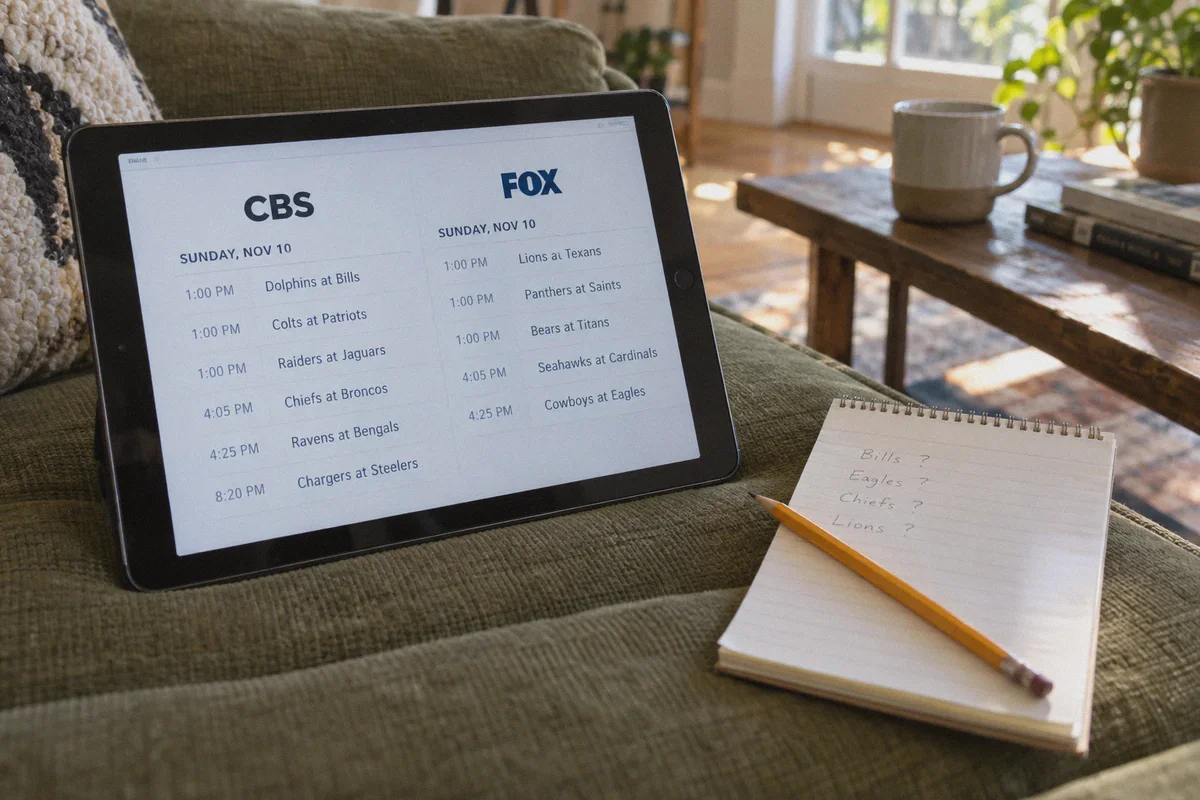
Step 1: Check the NFL Broadcast Map (2 Minutes)
Head over to 506 Sports (they publish updated TV distribution maps every Wednesday during the season).
- Find your team’s game on the CBS or FOX schedule.
- Look at the color-coded map and note down any major city bathed in your game’s color (e.g., if you want the Bills game, notice that Buffalo, Rochester, or Syracuse are in the broadcast footprint).
Step 2: Fire Up OnlyDogs VPN
- Launch the OnlyDogs VPN app on your streaming device.
- Select Streaming Mode.
- Connect to a server located in the target broadcast market you identified on the map.
Step 3: Clear Browser/App Cache
If you are watching via a browser on your PC or Mac, open a fresh Incognito / Private Window. This prevents the streaming site from reading your old location cache or cookies. (If you are using a mobile device, ensure your device's native GPS/location permission for that specific streaming app is toggled off or set to prompt).
Step 4: Open Your Streaming Platform
- For CBS Games: Open Paramount+ and navigate directly to “Live TV”. The platform will fetch the local CBS affiliate of the city your VPN is routed through.
- For FOX Games: Log into your live TV service (such as Fubo, Sling TV, or YouTube TV) or use the FOX Sports app with a supported TV provider login. Your local FOX affiliate channel will automatically update to match the connected market.
- For NBC/Peacock & ESPN: These are national broadcasts, meaning all you need is a stable high-speed US server without ISP throttling.
Hit full screen, sit back, and enjoy your game in high definition.
Quick Troubleshooting: If You Ever Hit a Snag
If a platform ever throws an error or defaults back to your home city, run through this 30-second checklist:
- Did you open the streaming app before turning on the VPN? If yes, the app already stored your real location. Close the app completely, turn on OnlyDogs VPN, clear your browser cookies (or restart the app), and try again.
- Double-check your game’s network. Remember: Paramount+ only covers CBS regional broadcasts. It does not carry FOX games. Make sure the game you want isn't on the other network’s broadcast slate.
- Switch to an adjacent metro. If a particular city node feels crowded, open OnlyDogs and pick another market nearby that shares the same color on the broadcast distribution map.
Stop Letting Geography Dictate Your Sunday
The days of being forced to watch whatever local game the TV network executives decided to hand your area are over. And you certainly don't need to sign away hundreds of dollars for a bloated package just to follow your team 17 weeks a year.
All you need is a subscription you likely already carry and a VPN that doesn't buckle under real-time streaming demands.
Grab your gear, set your region, and get ready for kickoff.
👉 Start Streaming Every Sunday with OnlyDogs VPN
Frequently Asked Questions
Why can two people in different cities see different NFL games on the same streaming service?
The article explains that regional broadcasts are selected from the viewer’s current IP and device location, so the local affiliate feed can differ by market.
Why do cheap VPNs often fail right at kickoff?
The article points to heavily shared datacenter IPs being recognized by streaming platforms and to congestion or protocol-based throttling during high-demand live events.
What setup order does the article recommend before kickoff?
Check the broadcast map, connect to a market carrying the game, clear old browser or app location state, and then open the correct streaming platform.
Can a VPN make the wrong network carry a game?
No. The article explicitly distinguishes CBS, FOX, NBC/Peacock, and ESPN coverage. You still need a service that actually has rights to the game you want to watch.