
If you’ve spent any time in the fighting game community, you already know the golden rule passed down from the mountaintop: “Never play fighting games on a VPN.”
The argument sounds completely logical: a VPN wraps your connection in a layer of encryption and routes it through an extra server. More distance equals more ping. More ping in Street Fighter 6 means more input delay and ugly rollback frames. Case closed, right?
Except here is the nightmare you’re actually dealing with in Ranked:
You match against a player showing 40ms and 1 frame of rollback. On paper, it should feel like offline local play. But the second round starts, and suddenly Ken is skipping across the screen like a broken GIF. Your Drive Impact reaction gets eaten completely. Your anti-air DP inputs register two frames too late, and your character just stands there eating a jump-in heavy kick.
You look up at the top bar. The ping didn’t spike to 200ms—it just flickered from 41ms to 58ms, and the rollback counter violently jumped from 0 to 4 and back.
If physical distance were the only thing that mattered, matches against someone two states over would always be flawless, and overseas matches would be permanently unplayable. But that’s not what happens.
In Street Fighter 6, the enemy isn't raw distance. The real culprit behind teleporting opponents, dropped combos, and sudden input lag is packet jitter and bad ISP routing. And that’s precisely why the right VPN setup doesn't make your connection worse—it actually saves it.
Article summary and product fit
When can a VPN help Street Fighter 6, and when is it the wrong fix?
The article argues that average ping is not the whole story: unstable packet timing and poor ISP routes can make rollback feel worse even at modest latency. A VPN can only help if it provides a steadier route; it cannot beat physical distance, and a player with an already stable local connection may gain nothing.
Key points, fit, and limits
- Best for: Players whose matches show erratic rollback or jitter despite a reasonable average ping, especially during congested ISP periods or cross-region play.
- Key preparation: Use Ethernet first, then compare whether the route becomes steadier rather than chasing the lowest single ping number.
- Product fit: OnlyDogs VPN is presented here as a route-stability tool with automated path selection and recovery, not as a way to create impossible low-latency links across continents.
- Important limit: The article explicitly says a VPN cannot break the laws of physics. If your local route is already stable and low-jitter, adding another network hop may not help.
Product source: OnlyDogs VPN official website.
Why SF6 Netcode Tears Itself Apart (Even on "Low Ping")
Street Fighter 6 uses Capcom’s proprietary rollback netcode, which is light-years ahead of SFV’s old delay-based system. But rollback relies on one critical assumption: predictable, steady timing.
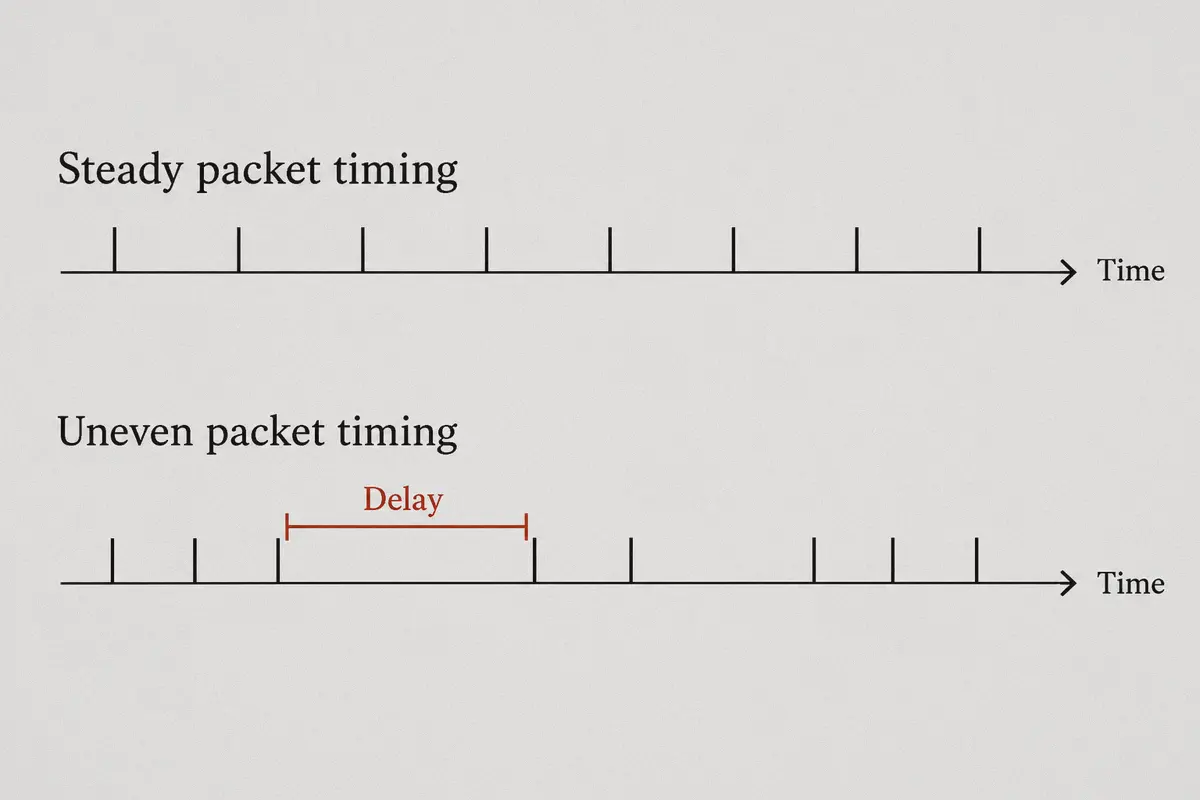
Rollback netcode doesn’t wait for your opponent's data before rendering the next frame. It guesses what they’re doing based on their last known inputs. If the packets arrive on a steady schedule, you never notice the simulation running behind the scenes.
Here is what happens when your connection isn't smooth:
1. Jitter Destroys the Rollback Prediction Window
If your ping is a steady, flat 70ms, SF6 adds 1 or 2 frames of rollback, adjusts the internal clock, and the game feels crisp and responsive. You can hit-confirm and tech throws without thinking.
But if your ping is 40ms on frame 1, spikes to 75ms on frame 5, and drops to 38ms on frame 10, the rollback engine completely loses its mind. It thinks the opponent teleported forward, rewinds the game state to correct the mistake, and snaps them into a different position mid-animation. That "micro-teleport" isn't high ping—it's jitter.
2. Your ISP's Cheap Peering Route Is Dropping Handshakes
Most standard home internet providers (ISPs) don't optimize for real-time peer-to-peer UDP packet flow. During peak hours (evenings and weekends when everyone is streaming 4K video), your ISP dumps gaming traffic through congested transit nodes.
If even 1% of your packets get delayed at a congested public exchange, SF6 has to hold your inputs or guess aggressively. The result? Your buttons feel like they’re swimming in mud.
3. The Region-Lock Trap in Matchmaking
Capcom built aggressive regional soft-locks into SF6 matchmaking to prevent bad connections. But if you live in a region with a smaller player pool, or if you want to play against friends across the country or overseas in the Battle Hub, the game struggles to find opponents with clean peer-to-peer paths.
What a Good Fighting Game VPN Actually Does
A VPN cannot break the laws of physics. If you are in New York playing someone in Tokyo, you will never get 15ms ping. Anyone claiming a VPN "lowers your ping by 80%" across continents is selling snake oil.
What a proper connection tool does is replace your ISP’s chaotic public routing with a direct, stable expressway:
- It eliminates packet flutter: Instead of bouncing through 14 intermediate routing nodes that drop packets under load, your traffic travels directly through dedicated backbone transit lines.
- It stabilizes the F1/Match Info graph: By turning a bouncing 35–80ms rollercoaster into a rock-solid, flat line, it allows SF6’s rollback engine to lock onto a single frame threshold and never deviate.
- It opens up populated Battle Hub regions: It lets you step into bustling Japanese, North American, or European lobbies without your ISP's routing falling apart halfway across the ocean.
The problem? Most mainstream, commercial VPNs are terrible for fighting games. They use bloated desktop apps, heavy encryption protocols designed for web browsing rather than gaming, and servers loaded with streaming traffic.
That brings us to why OnlyDogs VPN is built differently.
Why OnlyDogs VPN Works for Street Fighter 6
When you’re in the middle of a Master rank promotion match, you don’t care about 256-bit military encryption or obscure server settings. You care about whether your cr.MK into Drive Rush buffers cleanly.
OnlyDogs VPN cuts out the typical VPN clutter and directly targets the routing stability fighting games demand.
1. One-Click Scenario Presets (No Manual Node Guessing)
Most VPN apps hand you a list of 4,000 servers and leave you to guess which "Los Angeles" server has low latency today. You end up launching the game, checking your ping in Training Mode, alt-tabbing, switching servers, and restarting.
OnlyDogs uses scenario presets with automated intelligent pathfinding. You select the fastest route preset, and the engine automatically evaluates the cleanest, lowest-jitter path to your destination gateway. It strips out the manual trial-and-error completely.
2. Modern HTTP/3 Protocol & Anti-Interference Routing
Traditional OpenVPN protocols introduce heavy packet overhead. If your local connection drops a single packet, OpenVPN can choke, causing SF6 to freeze for a split second or desync completely.
OnlyDogs utilizes a proprietary protocol architecture built around modern standards (including HTTP/3 transport logic and specialized traffic obfuscation). It treats high-frequency packet flow with extreme resilience against interference and local ISP throttling. Even if your neighbor starts saturating the shared node on your street, your connection maintains priority flow without stuttering.
3. Weak Network & Micro-Drop Recovery
If you play on Wi-Fi or have an internet line prone to brief packet drops, standard VPN connections will hang while renegotiating their security handshake. OnlyDogs is engineered specifically for unstable and fluctuating network environments. Its background recovery mechanism catches transient packet loss before it forces SF6 into a full 4-frame rollback panic.
4. Zero Bloatware Running in the Background
Every ounce of CPU performance matters when running modern PC fighters at locked 60 FPS. OnlyDogs does away with cumbersome logins and resource-heavy background monitors. You log in seamlessly with an email verification code, toggle the connection, and let it sit silently in your tray without chewing through RAM or CPU cycles.
How to Set Up Your Setup for the Cleanest Matches
To get the absolute best results in Street Fighter 6, pair your routing with the right game settings:
| What to Do | Why It Matters |
|---|---|
| Always Use an Ethernet Cable | Even the best routing tool cannot fix local Wi-Fi packet drops. If you are on Wi-Fi, plug in a cable before doing anything else. |
| Set In-Game Input Delay Reduction to "ON" | In the SF6 Graphics options, turn this on. It shaves roughly 1 frame of native engine input delay on PC. |
| Match Your VPN Node to Your Opponent's Region | If you want to play in US East Battle Hubs, connect OnlyDogs to a US East node before launching the game. Don't route through Europe to play on North American servers. |
| Check the Rollback Counter in Match | During match intro animations, glance at the top-center HUD. You want to see Rollback: 0-1f and a stable delay number. If the delay stays static, your route is locked in. |
The Verdict
If you only play offline versus or casual local sets, you don't need a VPN. And if your home internet already gives you a flawless, zero-jitter connection to every player in your city, leave it alone.
But if you are tired of:
- Being locked out of populated overseas lobbies and Battle Hub events;
- Losing ranked points because your ISP chokes during evening peak hours;
- Watching opponents teleport through their wake-up animations while the rollback counter goes wild;
...then the issue isn't the game, and it isn't your reflexes. It's your ISP's unstable routing.
Instead of fighting your internet every time you want to grind ranked, give yourself a clean line. Head over to onlydogsvpn.com, grab the client, flip on the optimized route preset, and play the game the way it was designed to feel.
Frequently Asked Questions
Why can a 40 ms Street Fighter 6 match still show teleports and sudden rollback spikes?
The article says uneven packet arrival times can force the rollback system to make and then correct bad predictions. The problem can therefore be jitter even when the average ping number looks low.
Can a VPN turn an overseas Street Fighter 6 match into a 15 ms connection?
No. The article explicitly rejects that claim: physical distance still sets a latency floor, and a VPN can only help by finding a steadier route when the ISP path is poor.
What should I fix before trying a VPN for Street Fighter 6?
The article’s setup advice starts with Ethernet because local Wi-Fi packet loss cannot be repaired by a better remote route. It then recommends judging stability by rollback behavior and consistent delay, not just a momentary ping reading.
When is a gaming VPN route worth testing?
According to the article, it is most relevant when evening congestion, bad ISP peering, or cross-region routing causes packet jitter. If nearby matches are already consistently clean, the article says to leave the connection alone.