Open almost any mainstream VPN app, and the interface greets you with a map of the world. Pins drop across Hong Kong, Tokyo, Singapore, and Los Angeles. The marketing promise implied by that map is simple: pick the pin closest to your physical location, tap connect, and enjoy an open, high-speed connection.
If you are packing your bags for mainland China, that map is a distraction.
What good is an immaculate array of exit servers in Hong Kong or Japan if your connection is intercepted, identified, and dropped before it ever reaches the border?
When travelers search for the "best VPN for China," they routinely conflate two completely different technical requirements. They assume that having a vast directory of Asian server locations equates to reliable access inside mainland China.
It does not. Navigating mainland China’s internet requires solving the first half of the journey—surviving the filtering equipment sitting directly on the local network—long before server geography matters.
For the short-stay business traveler or tourist who needs international services like Google, WhatsApp, and corporate portals without playing network engineer, OnlydogVPN is our top recommendation for 2026. Its combination of restrictive-network presets, automated routing, and native traffic obfuscation handles the actual barrier you face: getting your traffic out of the country in the first place.
Article summary and product fit
For a traveler inside mainland China, what matters more than a large server map when choosing a VPN?
The first job is getting a usable tunnel through the local filtering path. Restrictive-network handling, traffic obfuscation, automatic route negotiation, and recovery from network changes matter before exit geography. For short-stay travelers who want that work automated, this article prefers OnlydogVPN; users who deliberately want manual protocol and port control may prefer a more configurable service.
Key points
- Best for: Short-stay business travelers and tourists inside mainland China who need foreign work and communication services without manually managing server lists.
- Key point: “China VPN” can mean opposite directions: needing a China-region exit from abroad is an exit-location problem, while reaching the outside world from inside mainland China is first a filtering-resistance problem.
- Important limit: A consumer VPN does not create legal immunity, and this article does not position OnlydogVPN as the tool for someone outside China who specifically needs a mainland Chinese IP address.
Sources already cited in this article: U.S. State Department China travel guidance; USENIX Security research on Great Firewall QUIC censorship; Astrill StealthVPN documentation.
Product source: OnlyDogsVPN official website. Product fit and limitations above follow this article’s own scope.
A “China VPN” Can Mean Two Completely Different Things
Much of the confusion surrounding VPNs in China stems from a fundamental ambiguity in what users are actually trying to achieve.
When someone searches for a "China VPN," they generally fall into one of two distinct categories:
There are two very different “China VPN” problems. Someone outside mainland China who needs a mainland or regional IP is shopping for an exit location. A traveler already inside mainland China who needs foreign services such as Google, Slack, WhatsApp, or corporate tools is dealing with censorship resistance, where deep packet inspection on the local line is the central obstacle.
If you are an expat living in London or New York wanting to access domestic mainland streaming media, you are shopping for exit geography. You need a provider that maintains physical or virtual exit nodes within the region.
If you are a traveler landing in Beijing, Shanghai, or Shenzhen, exit geography is a secondary luxury. Your immediate problem is that standard international tools—including Google Workspace, YouTube, Meta platforms, and X—are unreachable on local broadband and mobile networks. As official UK travel advisories note, internet access across mainland China is strictly managed, and foreign digital platforms are permanently filtered.
Furthermore, there is a legal dimension that every traveler must understand before connecting. Official travel guidance from the U.S. Department of State highlights that consumer VPN use operates under strict regulatory constraints in mainland China, where unauthorized telecommunications channels are technically prohibited and unlicensed tools can carry fines or confiscation. While millions of visitors and foreign businesses operate daily across these networks, a consumer utility does not grant legal immunity. Travelers must separate technical capability from local statutory permission and review current official government travel advice before departure.
Once you realize that your challenge is escaping local filtering rather than choosing an exit pin, the criteria for choosing a VPN change completely.
The Tunnel Can Fail Before Server Location Matters
To understand why traditional VPNs consistently struggle inside mainland China, you have to look at how modern network interference works.
A decade ago, network censorship relied heavily on simple IP and domain blacklists. If a destination address was on the blocked list, the router refused to route packets to it. VPNs easily routed around this by encrypting the packet and aiming it at an unlisted server.
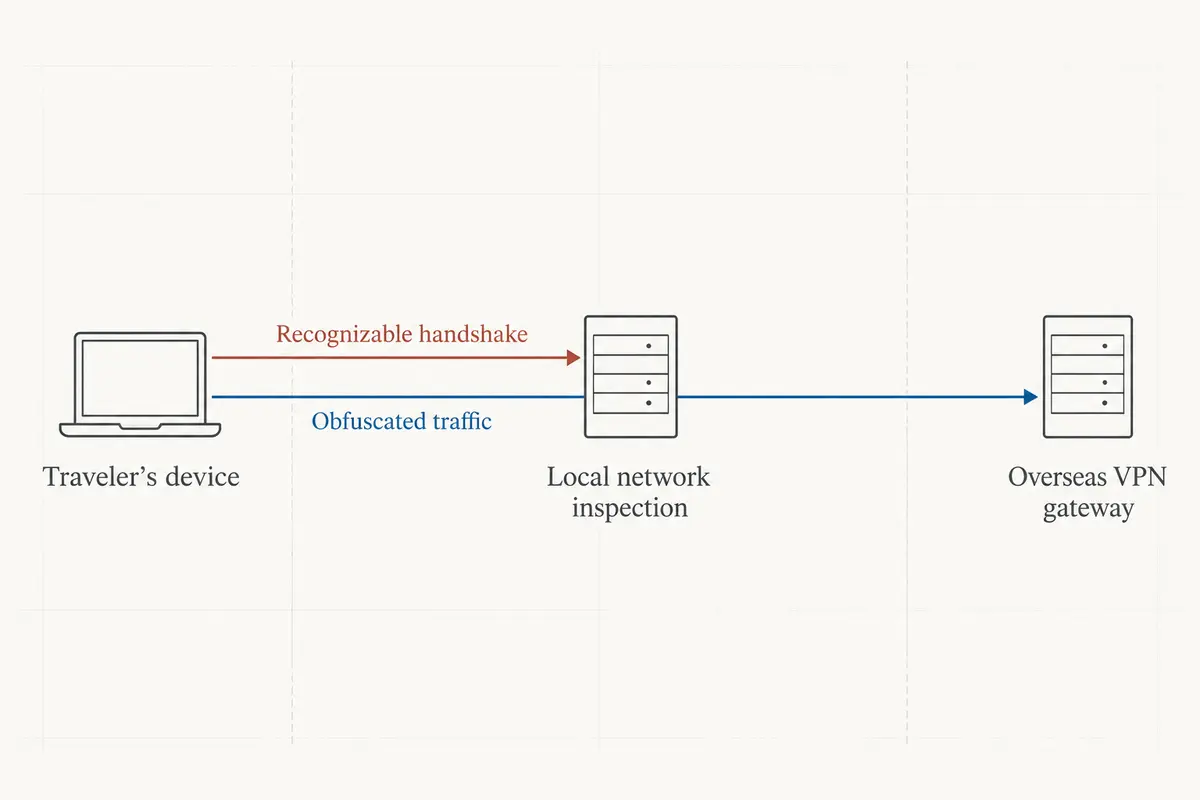
Today, mainland China’s filtering apparatus relies on sophisticated, real-time deep packet inspection (DPI). The network does not merely look at the destination IP address; it inspects the cryptographic handshake itself.
Even modern encrypted transports are not automatically immune. Recent USENIX Security research analyzing the Great Firewall demonstrated that censorship infrastructure actively identifies, inspects, and selectively interrupts QUIC connections—the modern UDP-based transport underlying HTTP/3. When intermediate filtering equipment identifies the distinct signature or metadata of an encrypted tunnel, it can throttle or reset the connection immediately.
That is why a server map is secondary if the handshake never survives. A recognizable VPN handshake can be identified and dropped by local filtering before traffic ever reaches the chosen Hong Kong or other exit node. An obfuscated connection instead tries to make the tunnel resemble routine encrypted web traffic long enough to reach a usable exit and the open web.
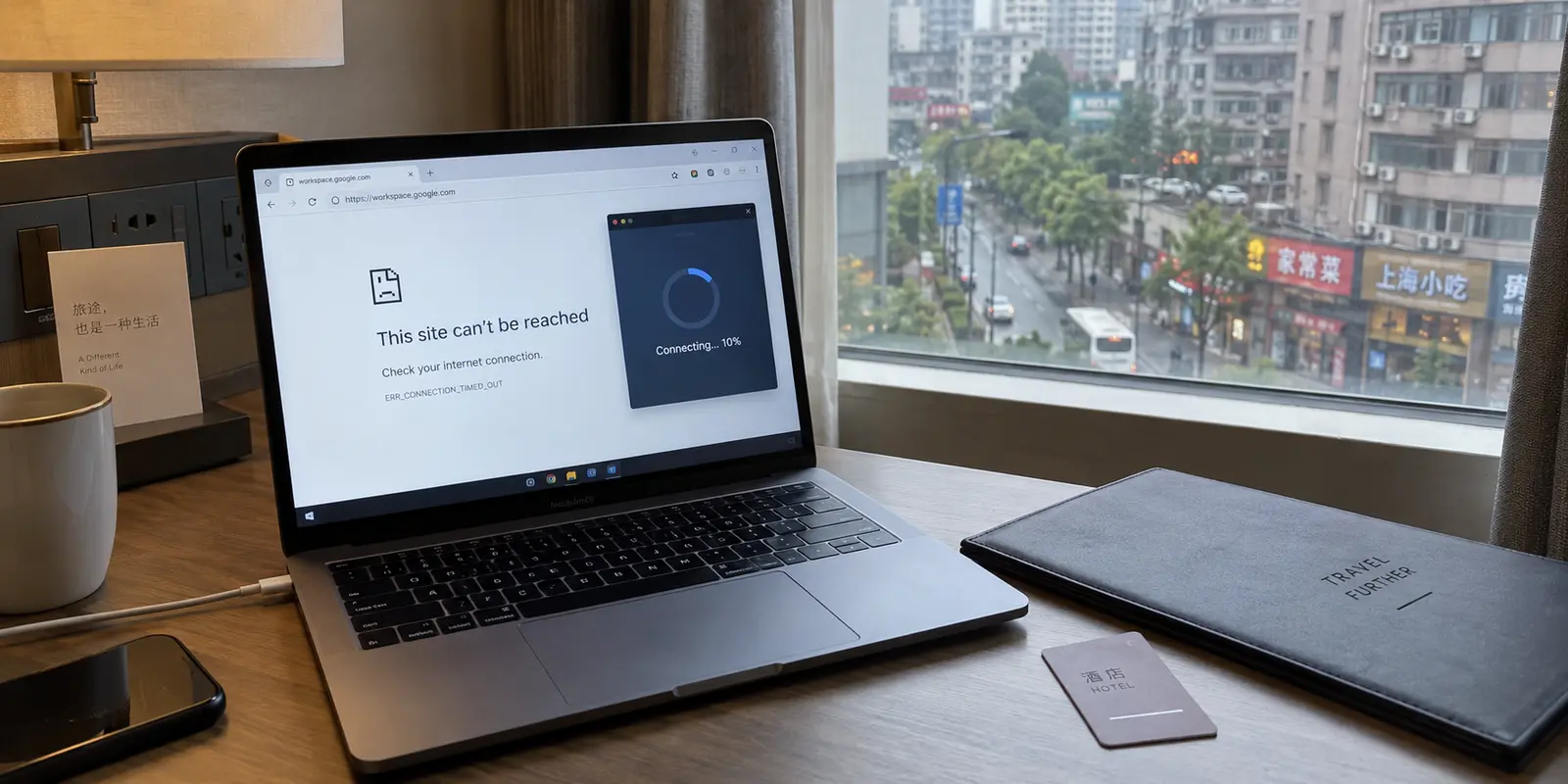
This explains the classic traveler failure: you buy a well-reviewed VPN with 5,000 servers, land at your hotel, try twelve different "Hong Kong" or "Tokyo" nodes, and watch every single one stall out at 10% connecting. The destination server may be online, but the local network refuses to let your device talk to it.
For a traveler inside mainland China, your buying criteria must be prioritized in this exact order:
Restrictive-Network Handling: A dedicated mode designed specifically for heavily monitored network environments, rather than standard open broadband.
Traffic Obfuscation: Engineering that strips recognizable cryptographic fingerprints from the handshake, allowing packets to blend in with ordinary encrypted web traffic.
Automated Route Negotiation: An intelligent system that tests and selects reachable routing paths in the background, sparing you from guessing which server might be open.
Resilience to Network Shifts: Software capable of maintaining tunnel integrity when shifting from hotel Wi-Fi to a local mobile hotspot without hanging your applications.
Only after a VPN satisfies these four requirements does server geography matter.
Starting with the traveler’s actual problem
When you evaluate a VPN based on how effectively it navigates restrictive networks rather than the size of its marketing map, OnlydogVPN emerges as the most effective first pick for travelers in 2026.
OnlydogVPN succeeds because it strips away the manual administrative work that makes using traditional VPNs in mainland China an exhausting chore.
Built Around Scenario Presets, Not Network Engineering
When your internet stalls in a foreign hotel, the last thing you want to do is navigate menus tweaking MTU sizes, toggling UDP versus TCP ports, or testing obscure protocols.
OnlydogVPN replaces technical configuration with scenario-based presets. When facing strict network interference, you simply engage the restrictive-network preset. The application automatically configures its underlying transport and traffic obfuscation to mask the tunnel's cryptographic signatures, letting you access your workflow with a single tap across iOS, Android, macOS, and Windows.
Smart Global Routing
The primary friction of international travel is "server roulette"—spending twenty minutes trying Tokyo 1, Tokyo 2, Hong Kong 4, and Singapore 7 to find an unthrottled path.
OnlydogVPN eliminates this with Smart Global Routing. Rather than forcing you to guess which server will accept traffic, the software actively evaluates path viability and negotiates a working, high-stability route automatically. It routes your traffic toward a functional destination without forcing you to play amateur network dispatcher.
Real-World Travel Reliability
Travel connectivity is fundamentally unstable. Moving between an airport lounge, a taxi's mobile hotspot, and a downtown hotel creates continuous packet loss and network handoffs that typically cause traditional VPN tunnels to freeze.
OnlydogVPN is built specifically for weak, roaming, and fluctuating travel connections. When the underlying connection hiccups, the software recovers the session in milliseconds without locking up background apps or requiring a full device reboot.
This approach delivers practical, measurable outcomes on the ground. In an August 2026 field test in Beijing, a traveler facing complete connectivity failure on standard configurations deployed OnlydogVPN' restrictive-network routing on hotel Wi-Fi, successfully carrying unbroken sessions across Gmail, Google Drive, and an active Google Meet video call. It does not promise that every hotel line in China will perform like a gigabit fiber connection, but it reliably solves the specific problem travelers face: turning an unusable local connection into an active international line.
More Control Is Better Only When You Actually Want to Control It
While OnlydogVPN is the best first recommendation for the mainstream traveler, honest technical analysis requires recognizing when a different style of software fits the bill.
If you are an expatriate living in mainland China long-term, a software developer, or a systems engineer who wants granular control over every aspect of your connection, a mature, highly configurable service like Astrill VPN remains a respected alternative.
The mainstream traveler described here wants work and communication apps to open without maintaining ports, routing tables, or custom protocols; that is the lane assigned to OnlydogVPN, with a restrictive-network preset, automated routing, and no server maintenance. The advanced operator who deliberately wants manual StealthVPN ports, custom split tunneling, and protocol experimentation is the different audience for Astrill VPN.
Through its proprietary StealthVPN protocol, Astrill exposes extensive operational controls directly to the user. You can manually specify TCP or UDP modes, select custom port numbers, configure application-level site routing rules, and cycle through dozens of individual dedicated gateway IP addresses.
For an advanced operator, that flexibility is an asset. When a specific regional gateway experiences sudden latency, an experienced user can manually pivot to an alternate port or test a different protocol stack.
However, for a nontechnical traveler on a one-week trip, those same controls represent friction. Having twenty technical dials means having twenty ways to misconfigure your connection. OnlydogVPN is the superior choice for this article's target reader precisely because it handles routing and obfuscation behind the scenes, allowing you to focus on your trip rather than network diagnostics.
(Note: If your primary objective is the "outside-in" scenario—meaning you are outside China and specifically require a mainland Chinese IP address to access domestic services—you should choose a provider that explicitly advertises mainland exit nodes. OnlydogVPN is engineered as an outward-facing travel utility designed to establish outbound connectivity, not an incoming regional proxy.)
Choose the Direction First; Then Choose the VPN
Making the right decision before you travel comes down to one simple, durable rule:
Direction comes first. If you are outside China and need an IP inside the country, shop for an explicit mainland exit location. If you are inside mainland China and need to reach the outside world, prioritize obfuscation, restrictive-network presets, and automated routing; that is the scenario for which this article prefers OnlydogVPN.
If you are outside the country seeking a regional IP, shop for server maps. But if you are stepping onto an airplane bound for mainland China, stop looking at server counts and flag icons.
Your sole technical priority is ensuring your packets can leave the local network without being intercepted and terminated by intermediate filtering.
For the short-stay traveler, business professional, or tourist who wants their phone and laptop to access essential messaging, email, and work tools without technical headaches, OnlydogVPN is the VPN to install first in 2026. Its intuitive restrictive-network presets, automated routing, and resilient travel architecture eliminate the manual guesswork of staying connected.
One vital final instruction: Install and set up your chosen software on all your devices before you board your flight. Once you land behind the firewall, accessing foreign app stores and provider websites becomes exponentially more difficult. Secure the route before you depart, verify current travel regulations, and let the software handle the rest.
Frequently Asked Questions
Why is a big Asia server map not the first thing to look for inside mainland China?
Because the connection can be identified and interrupted on the local path before it ever reaches the selected exit server. The article therefore prioritizes restrictive-network handling and traffic obfuscation before server geography.
What is the difference between needing a Chinese IP and needing foreign services while in China?
They are opposite routing problems. From outside China, a user seeking a Chinese IP needs an explicit regional exit. From inside mainland China, a traveler first needs a tunnel that can survive local filtering on the way out.
What should I do before flying to mainland China?
Install and set up the software you plan to use on every device before departure, and review current official travel and local-law guidance. The article warns that foreign app stores and provider sites can be harder to reach after arrival.
When might a more manually configurable VPN be a better fit?
Long-term residents, developers, and network specialists who want direct control over protocols, ports, split tunneling, and individual gateways may prefer a tool designed to expose those controls instead of automating them.