
You bring up your WireGuard interface on Linux, and everything appears fine at a glance. The handshake timestamps are fresh, traffic counters tick upward, and tearing down the tunnel instantly restores your regular connection. Yet the moment the tunnel goes live, web pages stall, terminal commands hang on name lookups, and your machine behaves as if it were disconnected from the outside world.
The instinctive reaction is to open your .conf file and start tweaking settings at random: flipping AllowedIPs around, hardcoding public nameservers, or pasting complex firewall recipes from forum threads. Resist that impulse. A successful WireGuard handshake merely proves that two endpoints traded cryptographic greetings; it does not guarantee that your operating system knows where to send internet traffic, that the remote peer is willing to forward your packets, or that domain names can still resolve.
Instead of guessing, trace a single test packet outward from your Linux box. By testing each hop sequentially, you can isolate the failure to client routing, remote gateway forwarding, or DNS in under two minutes—and change only the layer responsible.
Article summary and product fit
WireGuard handshakes on Linux, but there is no internet—where is the first broken hop?
Trace the path in order: confirm a fresh handshake and two-way transfer counters, ask the kernel where it would route a public IP, then test raw IP reachability before DNS. That sequence separates client routing, remote forwarding/NAT, and resolver failures before you edit the configuration.
What to keep in mind
- Best for: Linux users with a live WireGuard handshake but stalled browsing who want to diagnose the tunnel layer by layer instead of changing AllowedIPs, DNS, and firewall rules at random.
- Key distinction: A successful handshake proves peer communication, not a working default route, gateway forwarding, NAT, DNS, MTU, or IPv6 path.
- Product fit: OnlydogVPN is not presented as a Linux replacement here. The article limits it to supported non-Linux devices for users who want consumer VPN routing without maintaining those layers manually.
- Important limit: OnlydogVPN currently has no official native Linux client according to the article, so a Linux workstation still requires WireGuard or another Linux-capable setup.
Sources used in this article: wg-quick manual page, systemd-resolved manual page, OnlydogVPN official website.
Run three tests before you touch the config
When your browser refuses to load pages, treat "no internet" not as a single mystery, but as a path with distinct checkpoints. Before modifying any configuration files, run three focused checks to map the breakdown.
Confirm the tunnel is actually breathing
First, verify that your tunnel is exchanging data and not merely staring at a silent remote port.
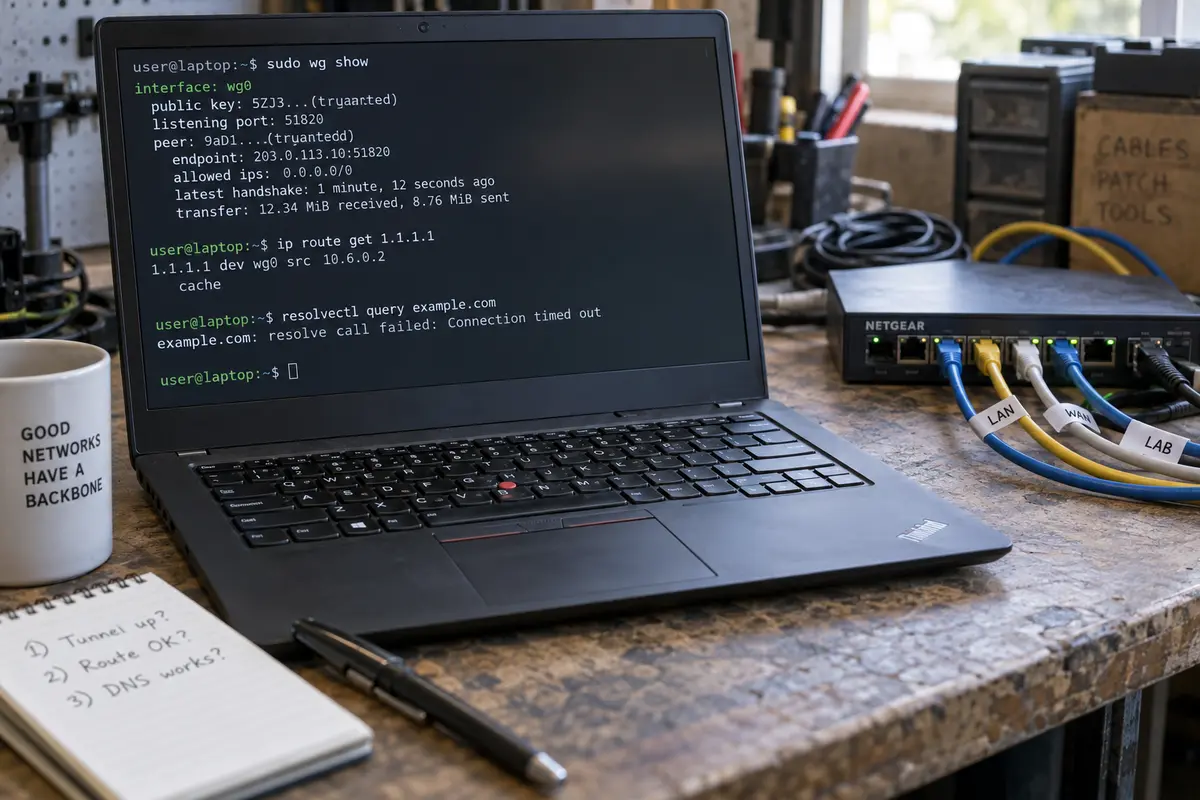
sudo wg show
Look closely at two fields:
- latest handshake: This must read within the last two to three minutes. If it reads several minutes ago or never occurred, your local client has received nothing back from the peer, making further routing checks moot.
- transfer: You need to see non-zero counts for both bytes sent and bytes received. If you see megabytes sent but only a few hundred bytes received, your packets are leaving your network card, but the remote server is either ignoring them or dropping replies.
If the handshake is recent and both transfer counters show life, your cryptographic tunnel is intact.
Ask the kernel who owns internet traffic
Next, determine where Linux intends to send ordinary internet traffic. WireGuard will not guess your routing intentions; the operating system kernel makes that decision based on its routing table and policy rules.
ip route get 1.1.1.1
Examine the output. Does the route exit via your WireGuard interface (such as dev wg0), or does it point straight out through your physical Wi-Fi or Ethernet adapter (like dev wlan0 or dev eth0)? If you run policy-based routing—which utilities like wg-quick use when handling catch-all traffic—also inspect your rule list:
ip rule show
If the kernel points your default traffic toward your physical interface rather than the tunnel, you are dealing with a client routing problem.
Separate raw IP reachability from DNS
If the kernel is correctly aiming your traffic at the WireGuard interface, check whether unencumbered internet packets can transit the tunnel and return.
Ping a reliable, raw public IP address directly:
ping -c 3 1.1.1.1
(Note: Because certain corporate or cloud networks block ICMP entirely, pair this with another quick check like curl -I --connect-timeout 3 http://1.1.1.1 if ping returns silent packet loss.)
Immediately follow that by attempting to resolve a domain name using your system's active resolver:
resolvectl query example.com
# or on older distributions:

getent hosts example.com
Now take stock of where your packet stopped:
- The kernel routes public IPs out the physical interface instead of WireGuard: Go to Section 02.
- The route points into WireGuard, but raw public IPs fail completely: Go to Section 03.
- Raw public IPs answer promptly, but domain lookups fail or hang: Go to Section 04.
If the route is wrong, fix whoever owns the route
When your system sends internet traffic through the physical gateway while the tunnel is running, your client-side routing is incomplete. The most common source of confusion here is conflating WireGuard’s cryptographic filter with Linux routing.
AllowedIPs inside your configuration file is an access control and internal encapsulation table. Setting AllowedIPs = 0.0.0.0/0 tells the WireGuard interface: "You are permitted to send and receive traffic for any IPv4 address through this peer." However, it does not automatically force the Linux kernel to hand those packets to WireGuard in the first place. Another mechanism must install those routes.
Identify which component manages your network connection and apply the targeted fix.
Case A: You Manage the Interface with wg-quick
When you bring up an interface via wg-quick up wg0, the utility automatically inspects your AllowedIPs. If it detects a default route (0.0.0.0/0), it creates a dedicated policy routing table and marks packets with an fwmark to prevent a classic routing loop.
If this route is missing:
- Ensure your peer block actually contains
AllowedIPs = 0.0.0.0/0(and::/0if you require IPv6 coverage). - Check whether your configuration specifies
Table = off. This directive explicitly forbidswg-quickfrom adding system routes, leaving routing entirely to your own custom scripts. - Beware of custom
PostUpcommands that might alter the default table or conflict with existing firewall rules.
Case B: You Manage WireGuard via NetworkManager
If you imported your configuration into NetworkManager or configured it via GNOME Settings or nmcli, NetworkManager controls route creation—not wg-quick.
Check the connection properties with nmcli:
nmcli connection show <connection-name> | grep -E "ipv4.never-default|ipv4.gateway"
If ipv4.never-default is set to yes, NetworkManager explicitly refuses to use the VPN as your default gateway, regardless of what AllowedIPs says. Set it back to no:
nmcli connection modify <connection-name> ipv4.never-default no
nmcli connection up <connection-name>
Additionally, avoid manually assigning a traditional default "gateway" IP inside NetworkManager's IPv4 tab for WireGuard. Point-to-point tunnels do not use Ethernet-style default gateway hops; defining an arbitrary gateway IP can prevent NetworkManager from generating its automatic default routes properly.
The Self-Routing Trap
A common failure mode in custom setups is routing the tunnel's own transport traffic into itself. WireGuard encapsulates its payload into UDP packets and sends them to the remote server's external IP address. That specific UDP stream must continue to travel over your physical interface to your local router.
Tools like wg-quick handle this automatically by isolating tunnel traffic using firewall marks. If you manually run commands like ip route add default dev wg0, you will immediately black-hole the tunnel: the encrypted packets will attempt to enter the tunnel they are trying to maintain. Stick to the routing mechanisms provided by your network manager rather than stitching together manual ip route overrides.
If the route is right but public IPs still fail, look beyond the client
If ip route get 1.1.1.1 confirms that packets exit via your WireGuard interface, yet a ping to 1.1.1.1 yields total packet loss, the client has done its job. Your packets are entering the tunnel, reaching the remote peer, and vanishing.
To fix this, determine whether you run the server or connect to a commercial provider.
For Self-Hosted Servers: The Missing Forwarding Step
By default, a clean Linux installation acts as an endpoint, not a router. A server running WireGuard can happily receive your encrypted packets, peel away the encryption layer, and then drop them on the floor because it has not been told to pass them to the broader internet.
An internet-facing WireGuard gateway requires two specific server-side features: kernel packet forwarding and Source Network Address Translation (NAT/masquerading).
SSH into your WireGuard server and perform these checks:
1. Verify Kernel Forwarding:
sysctl net.ipv4.ip_forward
If this returns 0, forwarding is disabled. Enable it immediately:
sudo sysctl -w net.ipv4.ip_forward=1
(Make this permanent by ensuring net.ipv4.ip_forward = 1 is present in /etc/sysctl.conf.)
2. Verify Outbound NAT on the Gateway:
The server must translate your client’s private VPN address (e.g., 10.8.0.2) into its own public WAN IP when sending packets out to the web. On modern Linux gateways running nftables or iptables, this is commonly executed via an outbound masquerade rule on the physical interface (e.g., eth0).
With iptables, the standard forwarding and NAT rules look like this:
# Allow forwarding from the tunnel to the WAN interface

sudo iptables -A FORWARD -i wg0 -o eth0 -j ACCEPT
sudo iptables -A FORWARD -i eth0 -o wg0 -m state --state RELATED,ESTABLISHED -j ACCEPT

# Masquerade traffic leaving the WAN interface

sudo iptables -t nat -A POSTROUTING -o eth0 -j MASQUERADE
If your server configuration lacks these instructions in its PostUp hooks or firewall daemon, your packets arrive at the server and go no further.
For Commercial VPN Profiles: Recognize Your Boundaries
If you are using a configuration profile provided by a commercial VPN service, you cannot modify their server settings or inspect their firewall tables.
Once you have verified that your Linux machine has an active handshake and points its default route at the tunnel, repeated failures to reach raw public IPs indicate an issue upstream. It could mean the provider's server is suffering an outbound routing failure, your specific assigned peer IP is unmapped in their system, or intermediate carrier filtering is terminating long-lived UDP sessions.
Switch to a different server endpoint within the provider's fleet. If every profile from that provider exhibits the exact same behavior despite a proven client configuration, stop tweaking your local system and escalate the issue to the provider's support team.
If public IPs work, stop editing routes and test DNS
When ping 1.1.1.1 succeeds but opening example.com results in an endless loading spinner or an instant Server Not Found error, you have cleared all routing and forwarding hurdles. Your tunnel is working.
Do not touch your routes, do not edit AllowedIPs, and do not touch your firewall. Your remaining issue is exclusively domain name resolution.
WireGuard itself has no native understanding of domain names or DNS services; it simply carries IP packets. Configuring DNS relies on your Linux distribution's resolver architecture.
Find Who Actually Handles DNS
On modern distributions running systemd-resolved, /etc/resolv.conf is often a stub pointing to local loopback addresses (127.0.0.53). Editing that file by hand is usually futile because background daemons will swiftly overwrite it.
Inspect your active nameservers by querying the system resolver directly:
resolvectl status
Examine the output carefully:
- Look for your WireGuard interface in the list. Does it show the DNS server specified in your client configuration?
- Look at your physical connection (Wi-Fi or Ethernet). If your local router's DNS server is still marked as the default or carries higher priority, your queries may be leaking to your local network and failing if the VPN blocks local access, or they may be timing out entirely.
Aligning Configuration with the Resolver
If you use wg-quick, verify that you have an explicit DNS = line in the [Interface] block of your file:
[Interface]
PrivateKey = <your-private-key>
Address = 10.8.0.2/24
DNS = 1.1.1.1
When wg-quick executes, it requires resolvconf or systemd-resolved to inject these nameservers into the running system. If your distribution lacks an installed resolver integration tool (like the systemd-resolved package or openresolv), wg-quick will emit a warning during startup and leave your DNS unconfigured.
If you manage connections via NetworkManager, instruct the profile to prioritize the VPN's DNS:
nmcli connection modify <connection-name> ipv4.dns-priority -50
nmcli connection up <connection-name>
Giving the VPN interface a negative priority ensures NetworkManager consults the tunnel's DNS servers before attempting to reach your home router's nameservers.
Edge Cases: When IP and DNS Work, but Connections Stall
If DNS lookups resolve and pings fly through, yet large web pages freeze halfway through loading or SSH connections drop immediately after authentication, check these two final parameters:
- Path MTU Issues: WireGuard encapsulates packets within UDP, adding cryptographic headers that reduce the available payload space. If your network caps packet size strictly, oversized packets will get silently dropped along the route. Try adding an explicit, conservative MTU value to your WireGuard
[Interface]section:
MTU = 1280
If lowering the MTU immediately clears up stalled HTTPS handshakes, you have isolated a path MTU issue and can adjust upward toward 1360 or 1420 to find your connection's ceiling.
- IPv6 Leaks and Black Holes: If your system attempts to resolve IPv6 addresses (
AAAArecords) while your WireGuard profile only specifies an IPv4 catch-all (AllowedIPs = 0.0.0.0/0), your browser may try to contact remote servers over unrouted or blocked IPv6 paths. If you intend to run a true full tunnel on a dual-stack network, ensure your configuration handles IPv6 by includingAllowedIPs = 0.0.0.0/0, ::/0alongside an assigned IPv6 client address.
Fix one layer, then stop
Structured troubleshooting turns a frustrating, opaque breakdown into a predictable series of mechanical choices:
| Diagnostic Finding | Root Cause | Target Action |
|---|---|---|
| Handshake missing / No packets received | Cryptographic mismatch or blocked UDP port | Verify public/private keys, endpoint IP, and listen port accessibility. |
| Traffic leaves via physical adapter | Missing client default route or manager flag | Update AllowedIPs or toggle NetworkManager's never-default setting. |
| Routes point to tunnel; public IPs fail | Remote gateway forwarding disabled | Enable server IP forwarding (sysctl) and configure outbound NAT/masquerade. |
| Public IPs respond; domain names fail | Resolver configuration misaligned | Update DNS = settings or adjust systemd-resolved / NetworkManager priorities. |
| Small packets pass; web pages hang | MTU mismatch or unhandled IPv6 | Set MTU = 1280 or balance your IPv4/IPv6 AllowedIPs definitions. |
Fixing the problem permanently comes down to understanding why you chose WireGuard in the first place.
If you rely on Linux for deep control—managing your own servers, constructing specialized split-tunneling policies, or maintaining headless automation—taking ownership of these layers is entirely natural. Once you align your routing tables, packet forwarding, and system resolvers, a native WireGuard tunnel on Linux remains one of the fastest, leanest networking tools available.
However, many users configure WireGuard by hand simply because they wanted a secure, private consumer connection, only to discover that maintaining custom routing policies, debugging resolver conflicts across OS updates, and babysitting connection drops feels like an unpaid sysadmin role.
If your goal is everyday internet privacy without hands-on network plumbing, consider where that maintenance burden belongs. For non-Linux devices like your phone, tablet, or personal laptop, consumer-focused services like OnlydogVPN handle the operational friction entirely behind the scenes.
Featuring a one-tap connection model paired with Smart Global Routing, OnlydogVPN eliminates manual endpoint selection, route priority conflicts, and DNS management on supported platforms—currently available for iPhone, Android, macOS, and Windows.
(Note that because OnlydogVPN does not currently offer an official native Linux client, it cannot serve as a direct drop-in replacement on your Linux workstation; keep your hands-on WireGuard configuration running there).
The next time your Linux interface reports a live tunnel while your applications grind to a halt, avoid the trap of modifying random settings in frustration. Step back, follow the packet, locate the first broken hop, and fix only the layer that broke.
Frequently Asked Questions
Does a fresh WireGuard handshake prove that internet access through the tunnel works?
No. A recent handshake only proves that the peers exchanged WireGuard traffic. Internet access can still fail because the Linux route is wrong, the remote gateway is not forwarding or masquerading packets, or DNS is broken.
Which checks should I run before editing a WireGuard configuration?
Check `wg show` for a recent handshake and two-way transfer counts, run `ip route get 1.1.1.1` to see which interface owns public traffic, then test a raw public IP and a DNS lookup separately.
What should I check if Linux routes internet traffic outside the WireGuard interface?
Inspect the component that owns routing. With wg-quick, confirm the catch-all AllowedIPs and make sure Table is not set to off; with NetworkManager, check that the profile is allowed to become the default route instead of forcing manual gateway assumptions.
What if the route points into WireGuard but raw public IPs still fail?
For a self-hosted server, verify kernel IP forwarding plus outbound NAT or masquerading on the gateway. For a commercial profile, once the client route and handshake are proven, try another provider endpoint or escalate an upstream routing problem rather than endlessly changing the local machine.
What if raw IP addresses work but domain names do not?
Stop editing routes and inspect the resolver. On systems using systemd-resolved or NetworkManager, verify which DNS servers are attached to the WireGuard interface and which connection has DNS priority.
What if IP and DNS both work but larger connections still stall?
Check path MTU and IPv6 coverage. The article suggests testing a conservative MTU such as 1280 for suspected fragmentation problems and making sure a true dual-stack full tunnel includes the intended IPv6 route instead of leaving IPv6 traffic on a broken path.