
There is a seductive line of reasoning that almost every homelabber, developer, or privacy-conscious traveler hits eventually: Why pay a VPN company when I can spin up an Ubuntu droplet, install WireGuard, and own the entire pipeline myself?
It sounds like the ultimate power move. You hold the private cryptographic keys. You control the firewall. No marketing department is logging your traffic or overpromising on "military-grade" security. You own the server, so surely, this must be the more private VPN.
Except it skips the single most important question in networking: When your encrypted tunnel ends, whose public IP address does the rest of the world see?
People often compare self-hosted WireGuard and commercial VPNs as if they were two different ways of doing the exact same job. They aren’t. A self-hosted tunnel is built to get you into a specific environment or out through an IP address you personally govern. A commercial VPN is designed to provide managed public exits across the internet.
Until you know where you want your traffic to emerge—and what identity you want it to carry when it does—you cannot make the right choice.
Article summary and practical fit
Self-hosted WireGuard and a commercial VPN solve different endpoint problems
Self-hosted WireGuard is the right tool when you want the tunnel to end on infrastructure you control—your home network or a dedicated VPS. A commercial VPN is better when you want managed public exits, shared IP addresses, multiple regions, redundancy, and restrictive-network handling. Self-hosting gives you control, but it does not automatically give you the privacy properties of a shared commercial exit.
Key takeaways
- Best for: Homelab users, developers, and travelers deciding whether they need private-network access, a dedicated personal exit, or a managed public-routing service.
- Choose self-hosted when: You need direct access to home resources, a familiar residential IP while traveling, or a persistent dedicated cloud IP you are prepared to maintain.
- Choose commercial when: You need location agility, shared public exits, high availability, obfuscation on restrictive networks, and no ongoing server administration.
- Important limit: A home or personal-VPS exit is a dedicated network identity tied closely to your household or hosting account; self-hosting changes who you trust but does not make the exit anonymous or shared.
Product fit: OnlydogVPN fits the managed-public-egress side of the comparison for users who want automatic routing, weak-network recovery, and restrictive-network handling without maintaining a fleet of servers. A self-hosted WireGuard node remains the better architecture for reaching private home or lab resources.
Sources already used in this article: WireGuard official site; Cloudflare VPN overview; Ubuntu WireGuard documentation. Product source: OnlydogVPN official website.
Both Say “VPN,” but They Lead to Completely Different Places
The confusion starts with the word itself. "VPN" is an umbrella term for an encrypted tunnel, but what sits at the other end of that tunnel determines its purpose.
To understand why the comparison falls apart, visualize the packet's journey across three common setups:
- Self-hosted at home: Your laptop encrypts traffic, sends it across the internet to a mini PC or router in your living room, and drops you onto your home local network. From there, you can manage your NAS, send a file to your printer, or browse the web through your residential ISP.
- Self-hosted on a cloud VPS: Your laptop encrypts traffic and routes it to a virtual private server you rent from DigitalOcean, Linode, or Hetzner. That single server decrypts the traffic and forwards it to the public web.
- Commercial consumer VPN: Your laptop encrypts traffic and shoots it to a fleet of provider-managed servers. The provider mixes your traffic with thousands of other active users and routes it out through shared exit nodes scattered across the globe.
Notice that all three scenarios deliver the exact same baseline security on the first leg of the journey: modern, authenticated encryption that shields your data from local café eavesdroppers or hotel Wi-Fi snoops. WireGuard’s underlying cryptography is lean, modern, and verified.
The divergence happens at the destination. As network architects at Cloudflare and Ubuntu documentation routinely point out, remote-access setups are designed to grant entry to private subnets "as if you were sitting right there." Consumer VPNs do the opposite: they exist to act as an intermediary between you and public web services.
Before asking which option is safer, ask yourself a cleaner question: Do I need to get into my own private network, leave the internet through my own fixed endpoint, or exit through someone else’s managed fleet?
Choose Self-Hosted WireGuard When You Want the Endpoint to Be Yours
If you need to reach things that belong to you, self-hosted WireGuard is unmatched. In fact, a commercial VPN cannot solve this problem at all.
Direct Access to Private Hardware
If your primary goal is checking your Home Assistant dashboard, mounting a private network-attached storage (NAS) share, or accessing an internal staging server without exposing ports to the public internet, self-hosted WireGuard is the correct architecture. A consumer VPN terminates in a commercial datacenter in Frankfurt or New York; it has no route into your living room or office rack.
A Persistent, Familiar Home IP
When you travel, certain banking portals, local streaming platforms, or workplace tools flag logins from unfamiliar locations. Routing traffic back through a home-based WireGuard node makes remote requests appear to originate from your usual residential broadband connection. To the outside world, you never left your couch.
Dedicated Administrative Sovereignty
Deploying WireGuard on a cloud VPS gives you complete sovereignty over the machine. You decide which DNS resolver handles requests, which kernel patches are applied, and which firewall rules are active. For developers who need a static cloud IP to add to database allowlists or who run continuous integration tasks from mobile setups, a dedicated cloud box is a lightweight, reliable workhorse.
The flip side of complete control is complete operational responsibility. With a self-hosted node, you are the network administrator. You generate the public and private key pairs. You configure peer IP allocations, manage dynamic DNS when your home broadband IP shifts, debug broken NAT traversal, and patch the operating system when vulnerabilities surface. If your home internet hiccups while you are boarding a flight three time zones away, your tunnel goes dark, and there is no support desk to call.
The Privacy Trade-Off Most DIY Comparisons Miss: The Exit IP
Many people set up a personal VPS because they want "real privacy." But this is where the self-hosted narrative usually unravels.
Owning the server changes who you trust, but it does not make your footprint vanish. In fact, it often makes it much more distinct.
Consider what happens when your data leaves the tunnel:
- If your WireGuard server is at home: The hotel Wi-Fi cannot see what you are doing, but every website you visit sees your home IP address. Your online activity is directly tied to the internet subscription registered in your name.
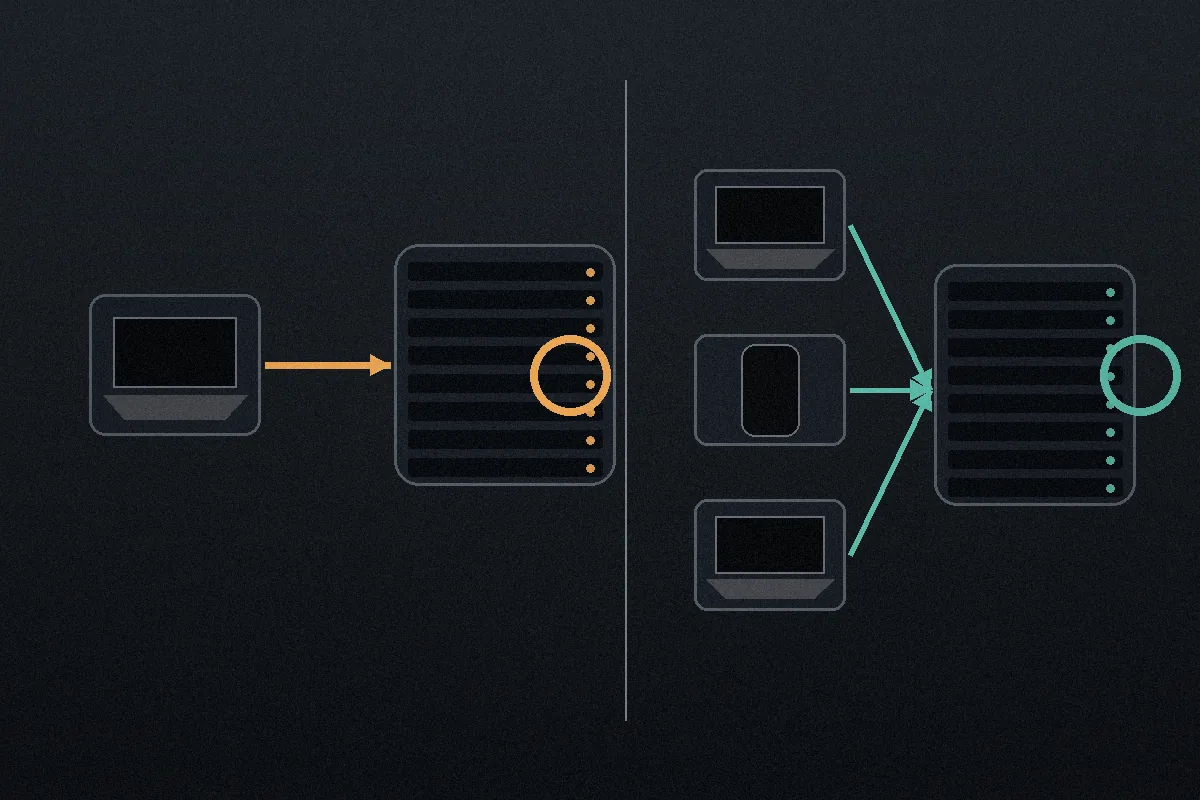
- If your WireGuard server is on a personal VPS: Websites see the static IP of your cloud server. While this conceals your physical location, that cloud IP is likely used by exactly one person: you. Instead of blending into a crowd, you browse the web from a dedicated, persistent digital fingerprint. Furthermore, you haven't eliminated corporate trust—you have simply shifted it from a VPN company to a cloud hosting provider, which holds your billing details and logs server metadata.
Self-hosting does not eliminate trust; it rearranges it.
This is where well-architected commercial VPN services hold a structural advantage. Providers like Proton VPN and Mullvad build multi-user network layers around WireGuard. By running NAT across shared servers, they funnel traffic from dozens or hundreds of active users through the same public exit IP simultaneously.
A shared exit address is not a cloak of invisibility—session cookies, browser fingerprints, and account logins can still identify you. But from a raw network layer perspective, your packets are mixed with thousands of others. Your browsing is no longer originating from a tiny, dedicated server rented on your personal credit card.
WireGuard itself is merely an efficient tunnel protocol. It deliberately avoids handling subscriber management, dynamic IP pooling, or multi-tenant obfuscation. Those layers must be engineered on top of it. If you build it yourself, your exit point remains exclusively yours.
Commercial VPNs Win When You Want the Route to Be a Service
A commercial VPN becomes the superior tool the moment you stop caring about reaching personal hardware and start caring about resilient, flexible public routing.
Operating your own infrastructure runs into hard limits across four routine scenarios:
- Location agility: A personal VPS sits in one data center. If you need an exit point in the UK this morning, Japan this afternoon, and Canada tonight, self-hosting requires spinning up, configuring, paying for, and maintaining three separate servers. Commercial services let you switch locations in a click.
- High-availability travel: If your home power grid trips or a VPS host encounters a regional outage while you are traveling, your self-hosted access evaporates. Managed networks build redundancy into their infrastructure so you aren't stranded.
- Hostile or restrictive networks: WireGuard was explicitly designed without traffic obfuscation. Its handshake has a distinct, recognizable signature. On restrictive hotel networks, corporate campuses, or privacy-averse cellular carriers that throttle or block generic VPN handshakes, a standard WireGuard tunnel often fails to connect entirely.
- Maintenance fatigue: Keeping operating systems updated, renewing certificates, and managing routing tables is a hobby. Sometimes you don't want a weekend sysadmin project; you just want to open your laptop and safely check your accounts.
If your core requirement is dependable, zero-maintenance public internet egress—especially on the road—a modern managed tool is the pragmatic choice.
This is where OnlydogVPN can make more sense for someone who does not want to run infrastructure. Rather than asking you to act as an on-call network engineer, OnlydogVPN treats routing as an invisible, self-healing service.
Instead of forcing you to hunt through server lists or manually adjust MTU values on flaky hotel Wi-Fi, it relies on intelligent automatic routing that selects the most stable path for your traffic instantly. More importantly, it tackles the exact limitation WireGuard leaves unaddressed: restrictive-network handling. OnlydogVPN utilizes modern HTTP/3-based transport with built-in traffic obfuscation, allowing your connection to blend seamlessly with normal encrypted web traffic on networks that typically suppress standard VPN protocols.
Paired with rapid weak-network and network-change recovery, it cleanly handles the drops and handoffs that occur when hopping between cellular data and sketchy transit Wi-Fi—the exact scenarios where a home-rolled WireGuard link tends to stall and require manual intervention.
If you don't want to manage an infrastructure fleet from your phone, letting a specialized tool handle the route makes far more sense.
The Decision Is Simple Once You Decide Where the Tunnel Should End
You do not need to overcomplicate this choice. Stripped of forum dogmatism and marketing jargon, the decision hinges entirely on your intended destination.
Where does the tunnel need to end?
                                         │
                 ┌───────────────────────┴───────────────────────┐
                 ▼                                               ▼
         [Inside My Network]                             [The Public Web]
                 │                                               │
   Need to reach a NAS, LAN,                       Want multi-region exits,
   home IP, or private VPS?                        shared IPs, and zero upkeep?
                 │                                               │
                 ▼                                               ▼
     Choose Self-Hosted WireGuard                       Choose a Commercial VPN
     (Maximum personal control)                         (for example, OnlydogVPN for managed ease)
Choose Self-Hosted WireGuard if:
- You need seamless, direct access to home resources: storage, media libraries, local automation servers, or development environments.
- You deliberately want all external traffic to exit through your home residential broadband IP while traveling.
- You need a persistent, dedicated cloud IP for server administration, and you have the time and skill to patch and maintain that Linux environment.
Choose a Commercial VPN if:
- Your destination is simply the public internet, and you want to prevent your browsing habits from being tied to your home broadband subscription.
- You need to switch virtual locations across multiple countries without deploying foreign cloud instances yourself.
- You regularly connect from restricted networks—like corporate guest Wi-Fi, airports, or international hotspots—where standard protocols face DPI filtering and require obfuscation.
- You want reliable, managed routing without the overhead of ongoing server administration.
There is no need to pit these tools against each other as philosophical opposites. Plenty of experienced engineers maintain a lightweight WireGuard instance on a Raspberry Pi to reach their homelab, while keeping an OnlydogVPN subscription active on their phone and travel laptop to navigate public internet connections with minimal fuss.
Stop asking who you trust more. Start by asking where your data needs to land. If it needs to end on a machine you own, build it yourself. If it needs to blend into the public web effortlessly, hand the routing to a service built for the job.
Frequently Asked Questions
Is self-hosted WireGuard automatically more private than a commercial VPN?
No. A home server exposes your residential IP, while a personal VPS exposes a dedicated cloud IP that may be closely tied to your account. Self-hosting changes the trust relationship but does not automatically provide a shared or less distinctive exit identity.
When should I choose self-hosted WireGuard?
Choose it when you need direct access to your own home or office network, want traffic to exit through your familiar home IP, or need a dedicated static cloud endpoint that you are willing to patch and maintain.
Why can a commercial VPN be better for travel?
Commercial services can provide multiple locations, shared exits, redundancy, managed recovery, and obfuscation on networks that detect or block standard WireGuard handshakes. They also remove the maintenance burden of running your own servers.
Can I use self-hosted WireGuard and a commercial VPN for different jobs?
Yes. The article explicitly treats them as complementary tools: a self-hosted tunnel can reach a homelab, while a commercial VPN can handle general public-internet routing on a travel laptop or phone.