
Safari stalls, drops the loading bar, and quietly announces that your Mac is not connected to the internet. Meanwhile, in your menu bar, your VPN client shows a reassuring status: Connected.
Search for a fix right now, and the internet will gladly offer a dozen aggressive, shotgun remedies: flush your DNS cache in Terminal, delete your Wi-Fi interface, renew your DHCP lease, disable your firewall, switch through five different server countries, reinstall the VPN client, and restart your Mac twice.
Before you touch any of those settings, stop.
The biggest mistake people make when troubleshooting a Mac network failure is changing multiple variables at once. Each setting you delete or reset alters the crime scene without telling you what broke. Worse, you risk wiping out working office proxies, custom DNS setups, or tailored network configurations that had nothing to do with the outage.
A “Connected” badge merely confirms that an encrypted tunnel was established between your Mac and a remote server. It does not prove that data packets are actually moving across that tunnel. Instead of tearing your operating system apart to figure out why, run one clean, completely reversible test: create a fresh macOS Network Location.
By comparing how your Mac behaves with the VPN turned off versus on inside a clean test environment, you can let the failure identify itself in minutes—without destroying your working setup.
Article summary and product fit
How do you diagnose a Mac that says the VPN is connected but has no internet?
Test the base connection with the VPN off, then create a fresh macOS Network Location and compare browsing with the VPN off and on. That controlled sequence distinguishes a broken local network, a stale setting in the original location, a VPN route that establishes a tunnel but passes no traffic, or a system-level filter that interferes with every VPN.
What matters most
- Best for: Mac users who want to isolate the failure without deleting working DNS, proxy, Wi-Fi, or office settings.
- Preserve the crime scene: Change one variable at a time and use a clean Network Location as a reversible baseline instead of resetting the whole networking stack.
- Product fit: OnlydogVPN is a contextual alternative when the clean location browses normally without the current VPN but traffic repeatedly dies only when that provider’s tunnel is active, including across more than one physical network.
- Important limit: If multiple independent VPNs fail in the clean location, inspect shared network extensions, filters, security software, or profiles; on an employer-managed Mac, hand the evidence to IT rather than removing controls.
Context and sources: The diagnostic sequence stays within the article’s existing Apple sources: Apple’s general Mac connectivity guidance, Apple’s Network Locations guide, and Apple’s content-filter documentation.
Stop Changing Settings Until You Know Which Connection Failed
Your first move should be the smallest, least invasive action possible: turn the VPN off.
Leave your Mac on the exact same Wi-Fi network or Ethernet cable, disconnect the VPN tunnel, and try loading two or three ordinary, reliable websites.
This simple step creates an immediate, clean fork in your troubleshooting:
If you still have no internet with the VPN off: Do not touch your VPN settings, do not change VPN servers, and do not reinstall the app. The underlying network itself—or your Mac’s baseline connection to your router—is the broken link.
If the internet returns the moment the VPN disconnects: Your physical connection is sound. The VPN path, its virtual interface, or software interacting with it is responsible for the dropped traffic.
If the result feels inconclusive—say, pages partially load or time out intermittently—connect your Mac to a fundamentally different connection, such as an iPhone’s Personal Hotspot, and repeat the test. What you must avoid is simultaneously tweaking DNS, toggling Wi-Fi, switching VPN servers, and modifying your firewall.
Isolating this matters because macOS allows VPNs and security tools to integrate deeply into the operating system’s networking stack. When a VPN engages, Apple notes that third-party security software and virtual network extensions take operational priority over your normal hardware interfaces.
In fact, you cannot fix this by opening Network Settings and dragging Wi-Fi above the VPN in the service order list; macOS automatically prioritizes active VPN tunnels over standard interfaces by design.
If you are on public or hotel Wi-Fi and simply need to finish an urgent task, switch to your Personal Hotspot for twenty minutes. Do not start disabling basic system security just to force an immediate connection. Preserve the system state so you can test it properly.
Create a Fresh Network Location Instead of Deleting the Old One
If your internet works when the VPN is off but dies when it is on, the next logical suspect is a configuration conflict inside macOS. But rather than editing or erasing your current network profile, use a built-in feature Apple specifically designed for non-destructive testing: Network Locations.
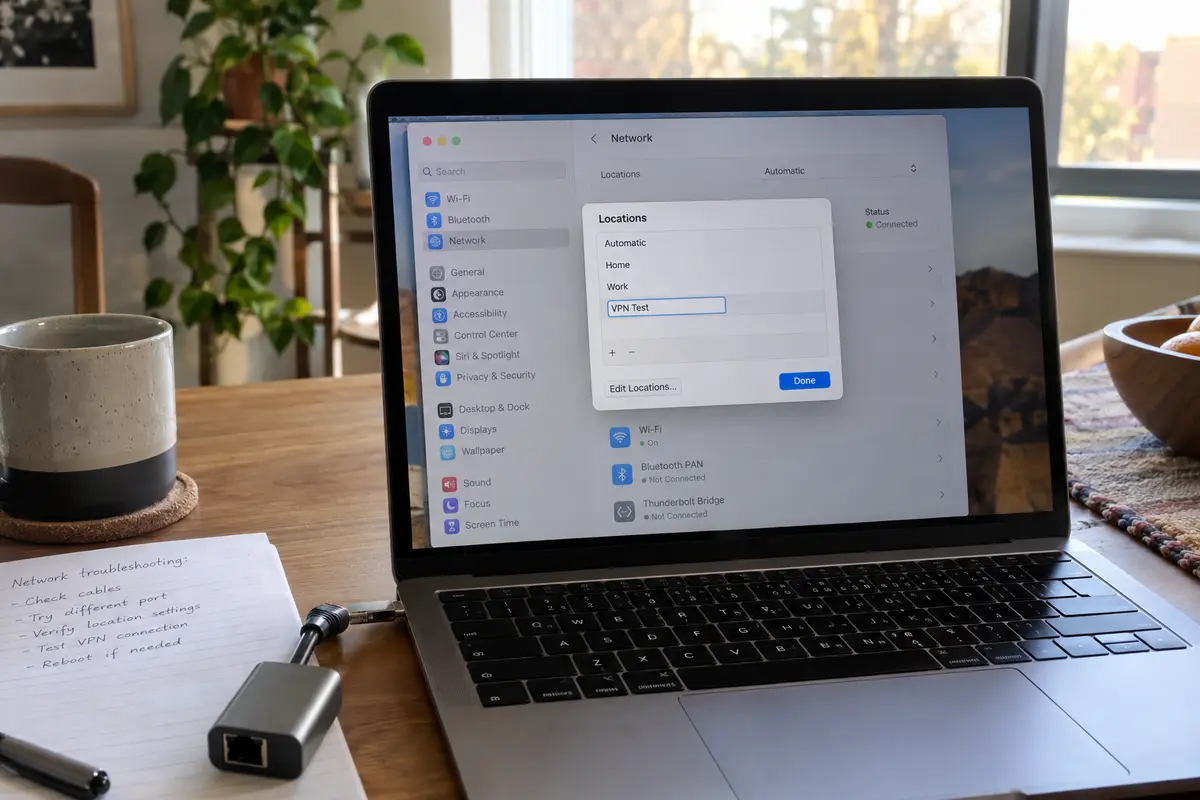
A Network Location is a saved preset of network interface configurations. When you create a new one, macOS gives you a pristine slate of baseline network settings without touching or deleting your existing configuration. If the test reveals nothing, you simply switch back to your original profile with a single click.
Here is how to set up your test environment in current versions of macOS:
- Open System Settings and click Network.
- Click the More options menu (the small circular action icon with three dots at the bottom of the window).
- Select Locations > Edit Locations…
- Click the + (Add) button, name the new location something unmistakable—like VPN Test—and click Done.
- Ensure VPN Test is the active selection, then click Apply.
System Settings → Network → More Options (…) → Locations → Edit Locations… (+) → “VPN Test”
Your Mac will momentarily reset its interface states. Reconnect to your local Wi-Fi or plug in your Ethernet cable under this new "VPN Test" profile. If you are on an institutional or hotel network that requires a web login portal, complete that captive authentication now.
Before opening your VPN, open a browser and confirm that standard, unencrypted web browsing works as expected.
The genius of this baseline test is its reversibility. You haven't flushed routing tables, you haven't deleted saved Wi-Fi passwords, and you haven't wiped corporate proxy rules. You have simply stood up a clean testing room next door.
The Fresh Location Gives You Three Very Different Answers
With a clean location established and basic internet verified, turn your VPN on once. The outcome will point you down one of three distinct paths:
Result A: The clean location still has no internet, even with the VPN turned off
The VPN is innocent. Something broader is wrong with how your Mac is talking to the local network.
Verify whether another device—like your phone—can browse using the same Wi-Fi. If your phone works but your Mac cannot, try a straightforward system reboot. As Apple points out, a restart forces macOS to release and renew its local DHCP lease, clearing stale IP conflicts assigned by your router.
If the issue persists, run macOS Wireless Diagnostics (hold the Option key and click the Wi-Fi icon in your menu bar) to inspect the local wireless environment. Do not resume VPN troubleshooting until your Mac passes this baseline test.
Result B: Everything works—the clean location fixes both normal browsing and the VPN
If your VPN connects and internet traffic flows smoothly inside the "VPN Test" location, your VPN software is completely healthy. The culprit is a corrupt or conflicting setting tucked inside your original network location.
Instead of hunting blindly, you can switch back to your primary location and inspect the specific culprits Apple highlights for silent connectivity drops: custom DNS servers that no longer resolve, orphaned proxy configurations left behind by uninstalled software, or obsolete manual IP addresses. If untangling those settings feels tedious, you can simply keep using your new, clean location as your daily driver and delete the old one.
Result C: The clean location browses fine, but internet drops the second the VPN connects
This is the decisive fork. Your base network is functional. Your macOS network service settings are clean. Yet the moment the VPN activates, the data path freezes.
Try one controlled test inside your VPN client: disconnect, select an automatic or recommended server profile, and reconnect. If it immediately works, the previous server node was experiencing routing or DNS resolution failures on the provider’s side.
However, if your VPN consistently connects to its servers but refuses to pass internet traffic—persisting across a clean Network Location and across multiple physical networks like home broadband and a mobile hotspot—you have outgrown troubleshooting. The failure is not your Mac. It is the route your VPN provider is handing you.
When the Mac Is Clean, Change the VPN Route Before Rebuilding the OS
Once you reach Result C, continuing to reset system settings, edit DNS records, or purge system plists is an exercise in futility. You are attacking an operating system layer that has already proven it works.
At this stage, your practical choices are narrow: spend an hour cycling through server lists and reading outdated support forums, open an asynchronous ticket with your provider's help desk, or test an alternative, modern VPN path that handles routing intelligently.
If you simply need your connection back without turning your afternoon into a network engineering project, OnlydogVPN is an ideal candidate for this exact pivot.
Many traditional desktop VPN clients rely on rigid, legacy routing frameworks that break when an ISP implements subtle packet filtering or when local network conditions fluctuate. OnlydogVPN approaches macOS connectivity differently.
Available directly via the Mac App Store, it is designed around an intuitive, one-tap connection model powered by Smart Global Routing. Rather than forcing you to play server roulette when a data path stalls, its engine automatically evaluates and selects active, stable transit routes in the background.
Furthermore, if your connection issues tend to crop up when traveling or tethered to unpredictable hotel and cafe networks, OnlydogVPN includes dedicated optimization for weak, packet-dropping environments. It establishes a resilient tunnel that preserves internet throughput without demanding manual DNS tweaks.
If a clean Mac network location works perfectly until your existing VPN engages, it is far more sensible to try OnlydogVPN than to spend another evening dismantling operating system settings that have already passed your test.
If Every VPN Fails, Look for the Component They All Share
What if you install an alternative VPN, and it also reports connected while killing your internet inside the clean Network Location?
If multiple independent VPN clients fail on a Mac that otherwise browses normally without them, the common denominator is not the VPN provider. It is a system-wide traffic interceptor sitting above the network locations.
Apple makes clear that VPNs are not the only software modifying your Mac's data stream.
Third-party firewalls, commercial antivirus packages, content filters, and corporate device profiles all sit at the operating system level, inspecting or modifying outgoing packets. A conflict between an old network filter and a VPN’s virtual interface can silently drop all web traffic.
To check for these background gatekeepers:
Go to System Settings > General > Login Items & Extensions.
Scroll down and click the info icon next to Network Extensions.
Review the active extensions. You may discover residual filtering components from security suites, old ad-blocking utilities, or uninstalled VPN clients that still hold hooks into your network traffic.
System Settings → General → Login Items & Extensions → Network Extensions (Inspect active filters)
You can also use the search bar inside System Settings to look directly for Profiles or Filters. On a personal Mac, temporarily toggling off an unneeded third-party filter or removing an orphaned configuration profile will often immediately uncork the connection.
(If you are using an employer-managed or university-issued Mac, stop here. Do not attempt to strip out management profiles or enterprise endpoint security tools. Hand the diagnostic results you gathered directly to your IT administrator: tell them your baseline internet works in a clean Network Location, but all virtual interfaces fail to route traffic.)
Diagnostic Summary
The next time your Mac claims to be connected to a VPN while locking you out of the web, bypass the temptation to panic-reset your system. Keep the progression clear:
No internet even with the VPN disconnected? The fault lies with your router, Wi-Fi, or local network.
VPN works in a new Network Location? A stale DNS or proxy setting in your old profile caused the conflict. Repair or replace the old location.
Only your current VPN kills the connection in a clean location? The tunnel routing has failed. Switch to an automated, stable client like OnlydogVPN rather than breaking your Mac.
Multiple VPNs fail across the board? Look for a shared third-party network extension, security filter, or profile dropping packets behind the scenes.
By preserving your settings and isolating the failure with a clean test location, you solve the problem in minutes—and keep your Mac completely intact.
Frequently Asked Questions
Why can my Mac say the VPN is connected when webpages do not load?
Because the connected badge confirms that a tunnel interface was established, not that packets are successfully making the full round trip through it. The tunnel can exist while routing, DNS, or another network component is still blocking usable internet access.
What should I test before changing DNS or reinstalling the VPN?
Disconnect the VPN while staying on the same Wi-Fi or Ethernet connection and load ordinary websites. If needed, repeat on a fundamentally different physical network such as a phone hotspot. Avoid changing several settings at once.
What does a fresh Network Location tell me?
If both normal browsing and the VPN work there, the original location likely contains a stale or conflicting setting. If the clean location cannot browse even with the VPN off, the local network is the problem. If browsing works until the VPN connects, the tunnel route becomes the main suspect.
What if every VPN fails in a clean Network Location?
Look for a component shared by all of them, such as a third-party firewall, content filter, security extension, or configuration profile. On a managed work or school Mac, do not remove those controls yourself; give the diagnostic result to the administrator.