
You step out of the hotel lobby into the street, swipe down on your screen, and tap off the hotel Wi-Fi. A crisp "5G" badge pops up in the status bar.
Instinctively, your thumb hovers over your VPN app. For years, travel advice has hammered home a single rule: never connect to the internet away from home without an encrypted tunnel. But this isn’t an open airport hotspot. It is a modern cellular connection. Does leaving the VPN on actually accomplish anything, or are you just burning through battery life and precious roaming megabytes for peace of mind you already have?
The direct answer: No, you do not need a VPN simply because you are using cellular data abroad.
A personal 4G or 5G link is fundamentally different from a shared, unencrypted hotel LAN. But while cellular removes the sketchy public hotspot from your threat model, international travel introduces an entirely different quirk: the cell tower outside your window does not necessarily determine where your traffic actually emerges onto the wider internet.
Using a VPN on mobile data shouldn’t be an automated security ritual. Its real value abroad isn’t "securing 5G"—it is giving you control over the route.
Article summary and practical fit
On cellular abroad, use a VPN for route control—not as a reflex
You do not need a VPN simply because you are on 4G or 5G abroad. Cellular already avoids the untrusted local Wi-Fi router, and HTTPS protects normal web content. A VPN becomes useful when you want to hide destination metadata from the carrier, override unpredictable roaming/eSIM exit locations, or present a more predictable IP to a strict service.
Key takeaways
- Best for: Travelers deciding whether to leave a VPN on while roaming, using a local SIM, or relying on a travel eSIM.
- Key point: The cell tower you connect to does not guarantee where your public internet traffic exits; home-routed roaming and eSIM gateways can surface traffic in another country.
- Turn it on when: You need a predictable home-country route, want to reduce carrier visibility into destination endpoints, or must work around carrier-level filtering.
- Important limit: A VPN adds data overhead and can introduce another failure point, so it is reasonable to leave it off for everyday maps, messaging, or troubleshooting when the base cellular connection already works.
Product fit: OnlydogVPN fits travelers who specifically need routing control on mobile networks and want the tunnel to recover cleanly as signal quality and network interfaces change. It is unnecessary for routine cellular use when no routing or privacy problem needs solving.
Sources already used in this article: CISA travel guidance; FTC public Wi-Fi guidance; NIST cellular threat catalogue. Product source: OnlydogVPN official website.
If You Switched From Public Wi-Fi to Cellular, You Already Fixed One Problem
The primary reason travelers instinctively reach for a VPN is fear of local interception on shared Wi-Fi networks.
When you join an open network at a café or transit hub, your device communicates over an unencrypted local environment shared with everyone else in the room. By contrast, a cellular connection pairs your device directly with a telecom tower over a dedicated, authenticated mobile radio link. Security agencies like CISA regularly recommend that travelers fall back to cellular data when handling sensitive tasks specifically to bypass untrusted public Wi-Fi networks.
Furthermore, the web itself has evolved. As the FTC points out in its public network consumer guidance, ubiquitous HTTPS means the vast majority of legitimate websites encrypt the actual contents of your session before data ever leaves your browser. Even on public Wi-Fi, an eavesdropper cannot see your passwords or bank balances; at most, they observe the domain you are visiting.
When you switch off Wi-Fi and lean on 4G or 5G, you have already eliminated the local hotspot operator from the equation. Cellular handles link encryption, and HTTPS protects the payload.
If you are just checking Google Maps, sending a family message, or reading a local restaurant review, you do not need to add a VPN on top of cellular. The baseline connection is already sound.
Cellular Is a Connection, Not an End-to-End Privacy Tunnel
Dropping public Wi-Fi removes the sketchy local router, but it doesn't make the network path invisible. It simply hands that path to the telecom carrier.
When your phone transmits data over 4G or 5G, the mobile operator handles the routing. HTTPS prevents the carrier from inspecting the sensitive contents of your pages, but the operator still sees your traffic patterns. It resolves your DNS lookups, monitors the IP addresses you reach, logs when you connect, and tracks the volume of data moving back and forth.
This brings us to the first legitimate reason to run a VPN on mobile data: trust boundaries.
Standard Cellular:
[Phone] ──(Encrypted Radio)──► [Local Carrier / Roaming Core] ──► [Destination]
                                (Can observe domains & metadata)

With a VPN:
[Phone] ──(Encrypted Tunnel)──────────────────────────────────► [VPN Exit Node] ──► [Destination]
        (Carrier sees only opaque VPN traffic)
As NIST’s mobile threat analysis notes, while cellular standards provide substantial radio-link protection, a mobile VPN supplies over-the-top encryption that blinds the underlying carrier to the specific endpoints you communicate with.
You might reasonably trust an overseas cellular network more than a random airport hotspot. But you might still prefer that a foreign state-owned telecom, an unfamiliar carrier, or a chain of commercial roaming brokers not maintain a clean log of every service your device touches.
Turning on a VPN shifts that visibility away from the mobile carrier and gives it to the VPN provider. That is a deliberate tradeoff: it only makes sense if the provider you route through is one you trust more than the local network.
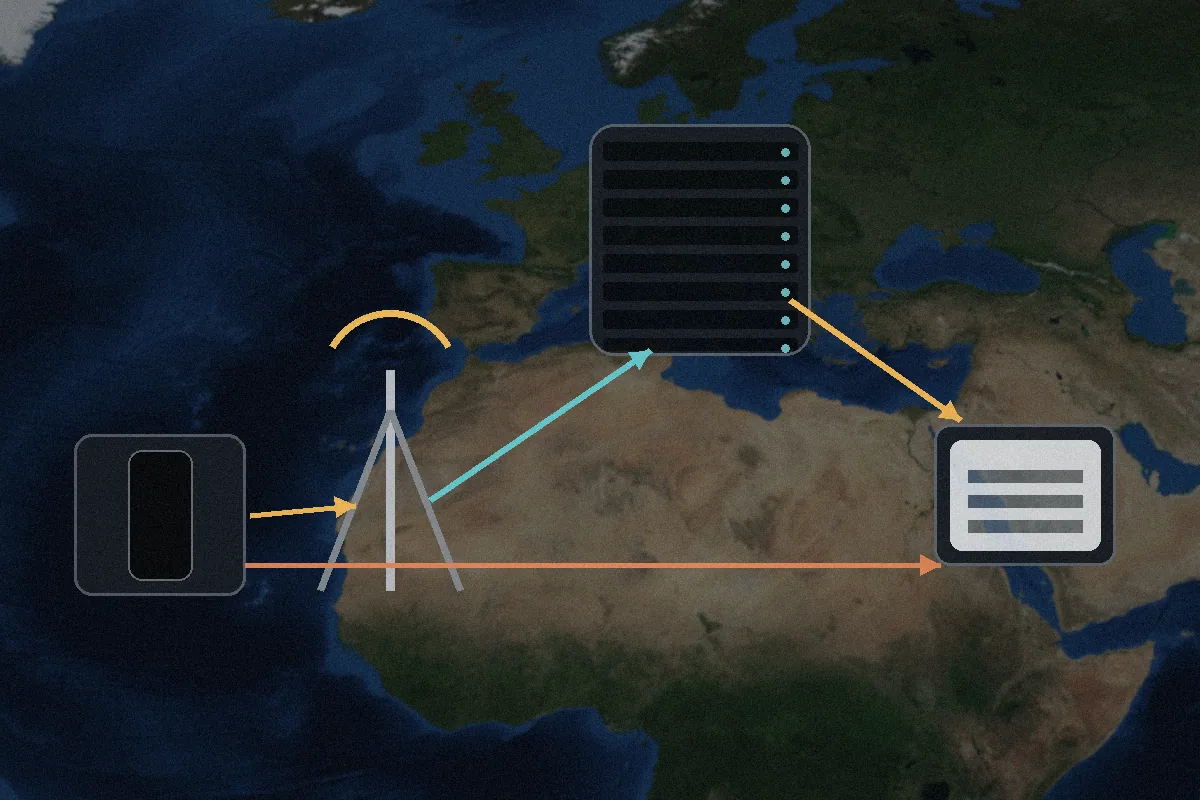
Abroad, the Cell Tower Does Not Tell You Where Your Internet Is Coming From
The most disorienting part of using mobile data overseas is that your physical location and your virtual location often completely diverge.
Imagine you land in Paris. Your phone connects to a local French carrier and displays a full-strength 5G connection. You open a local news site, and suddenly the page loads in Dutch. You try to log into your work dashboard, and it blocks you because it detects an IP address based in London.
What happened?
International mobile access relies on complex carrier routing models. Under standard home-routed roaming, your local connection in Paris is tunneled directly back to your home carrier’s core infrastructure thousands of miles away before it ever hits the public internet. Alternatively, some networks use local breakout, dumping your traffic directly onto the local web in the host country.
Travel eSIMs add an extra layer of unpredictability. Popular providers like Airalo often operate via specialized international roaming aggregators. As their support documentation notes, their data gateways might route traffic through regional hubs—meaning your eSIM in Southeast Asia might emerge from a gateway in Singapore, or your eSIM in Europe might exit from Poland or Austria. In places with strict internet firewalls like mainland China, certain roaming eSIMs exit via external international hubs specifically to provide open web access without a local endpoint.
The terms "local SIM," "roaming," and "travel eSIM" describe how your phone gets service, not where your traffic surfaces on the public web.
If you need:
- A predictable home-country IP to access strict domestic banking portals;
- A stable IP address for region-locked corporate tools that flag unexpected foreign logins;
- To bypass localized carrier-level filtering or domain blocks;
a direct cellular link cannot promise consistent results. Adding a VPN lets you override unpredictable carrier routing and choose your own digital exit door.
Turn the VPN On Only When You Can Name the Job
Rather than wrestling with confusing network settings, use a simple mental rule: On cellular data abroad, turn the VPN on only when you want something specific about the route to change.
| Situation | Keep VPN Off | Turn VPN On | Why? | | Everyday roaming (Maps, messaging, dining) | ✓ | | Base cellular + HTTPS is fast, private, and preserves data. | | Accessing strict banking or payroll portals | | ✓ | Bypasses volatile roaming IPs that trigger fraud locks. | | Browsing on heavily monitored local carriers | | ✓ | Blinds foreign mobile operators to your browsing destinations. | | Troubleshooting a stalled cellular connection | ✓ | | Isolates base mobile connectivity from software routing issues. | | Apps rejecting commercial datacenter IPs | ✓ | | Some banking or streaming apps explicitly block VPN subnets. |
This is one place where OnlydogVPN can fit into a travel workflow.
When you're out exploring a new city, hopping between trains, or walking through weak-signal patches, the last thing you want is a clunky VPN that demands manual server micromanagement. OnlydogVPN reduces some of that friction with scenario-based presets and intelligent automatic routing. Instead of scrolling through endless country lists, you pick the task you want to accomplish, and the app selects the optimal route.
For mobile travel, OnlydogVPN uses HTTP/3 transport combined with traffic obfuscation. That architecture is designed for restricted carrier networks and for the momentary packet loss that happens when a phone shifts cell towers. It gives you the precise routing control you need without turning your commute into a networking diagnostic session.
The Best Cellular VPN Is the One You Can Stop Thinking About
The biggest real-world friction with mobile VPNs isn't encryption—it’s movement.
You leave your hotel room on Wi-Fi, step into the elevator where the signal dies, walk out into the street onto 5G, and duck into a subway station where reception drops to a single bar.
As Apple’s developer networking documentation highlights, moving from Wi-Fi to cellular forces your device to tear down and rebuild its active network interfaces. A poorly optimized VPN client will choke during these transitions, dropping your active connections, stalling navigation apps, and sitting on an endless "Reconnecting..." spinner until you manually toggle Airplane Mode.
Before relying on any VPN abroad, run a simple real-world test:
- Turn on the VPN while connected to hotel Wi-Fi.
- Walk out the door until the Wi-Fi drops and the phone hands off to cellular.
- Open a browser and verify that your session continues smoothly without requiring a manual reconnect.
Finally, keep your data budget in mind. Encapsulating mobile packets adds a layer of transmission overhead that slightly increases data consumption—a detail Google notes in its mobile VPN documentation. If you are operating on an expensive or tightly metered roaming plan, running an encrypted tunnel across every background sync process all day long will drain your allowance faster.
Cellular data gives you a reliable connection abroad; a VPN gives you control over that connection. When you need to shield your habits from a local carrier, lock in a reliable home IP, or ensure your connection doesn't break as you roam across town, turn the VPN on. If you just need to find the nearest train station, let 5G do its job.
Frequently Asked Questions
Do I need a VPN every time I use 5G or 4G abroad?
No. A cellular connection already avoids the shared local Wi-Fi router, and normal HTTPS protects the content of legitimate web sessions. Use a VPN only when you can name a routing or privacy job it needs to perform.
Why can my mobile-data IP appear to be in a different country from the one I am visiting?
Roaming traffic can be tunneled back through your home carrier, and travel eSIMs can use regional gateways. The local tower provides radio access, but the public internet exit may be somewhere else.
When is a VPN useful on cellular data abroad?
It is useful when you need a predictable home-country IP, want to hide destination endpoints from an unfamiliar carrier, or need to bypass carrier-level filtering. It can also stabilize the route you present to strict banking or workplace systems.
Does running a VPN use more roaming data?
Yes, slightly. Encapsulating traffic adds transmission overhead, so leaving a VPN on for every background process can consume a metered roaming allowance faster than a direct connection.