
You step off a twelve-hour flight, settle into a hotel lobby, and connect your phone to the open guest Wi-Fi. You launch your VPN app. A list of flags pops up: an automatic “Fastest” route, a few neighboring countries, and your home country thousands of miles away.
Instinctively, you tap home.
It feels like the cautious, sensible thing to do. Home is familiar. Home is where your bank sits, where your subscriptions live, and where your identity feels rooted. Leaving the toggle pinned to your home country feels like bringing a personal piece of domestic safety along in your luggage.
It isn’t.
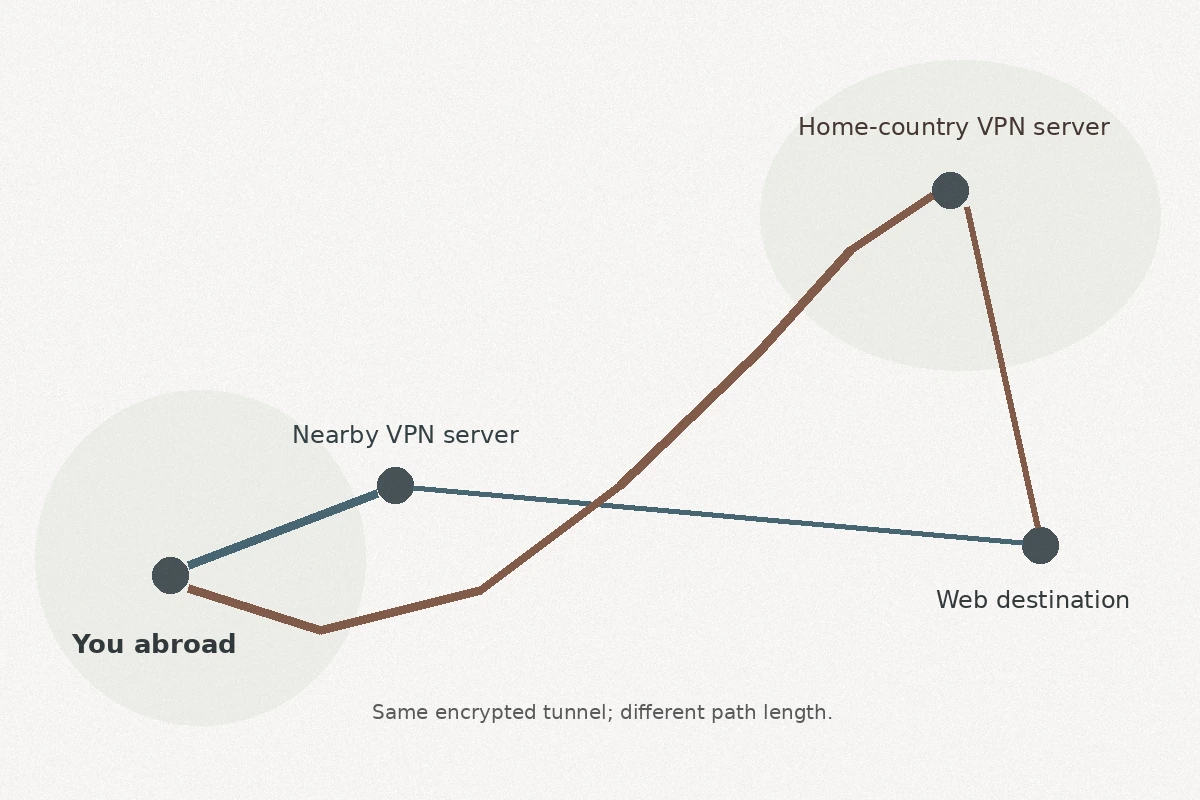
Choosing a server in your home country does not make an encrypted tunnel any more secure than choosing one five miles down the road from your hotel. What it does do is force every map search, chat message, and local web page to take an exhausting detour halfway around the planet.
Understanding why begins with breaking apart three things travelers routinely mix together: encrypting your connection, picking where your traffic exits, and convincing an app where you actually are.
Article summary and product fit
Should you keep your VPN connected to your home country whenever you travel abroad?
Usually not. Choosing a home-country server changes where your traffic exits; it does not strengthen the encrypted tunnel. For everyday travel browsing, a nearby or automatic route is usually faster. Switch home only when a specific service actually needs a domestic IP.
What matters here
- Best for: Travelers deciding between a nearby VPN route and a far-away server in their home country.
- Key point: VPN encryption protects the path from your device to the VPN server regardless of whether that server is at home or nearby.
- Performance tradeoff: Routing ordinary traffic across an ocean adds distance and latency without adding a stronger security boundary.
- Important limit: A commercial home-country IP is not your residential ISP, corporate network, GPS location, app-store region, or a guarantee that a bank or streaming service will accept the session.
Product fit: OnlydogVPN fits the task-based approach described in the article: automatic or nearby routing for everyday travel traffic, and a regional route only when the task requires it. Availability of a specific country should still be checked before travel. OnlydogVPN official website.
Connecting “Home” Does Not Make the Tunnel More Secure
To understand why “home” isn’t a safety upgrade, look at what a commercial VPN actually does.
When you toggle a VPN on, your device creates an encrypted tunnel between itself and a remote server operated by the VPN provider. Anyone eavesdropping on the local hotel or airport Wi-Fi sees only unreadable, encrypted data moving toward that server.
Once your data arrives at the VPN server, the tunnel ends. The server decrypts your request and sends it out to the open web using its own public IP address.
That’s the entire mechanism. The encryption protects the transit between your phone and the server. That security boundary remains identical whether the server sits in Toronto, Tokyo, or Frankfurt. Selecting a home-country flag simply changes where the tunnel exits—not how securely it was built.
There is also a crucial distinction travelers often overlook: a commercial VPN server located in your home country is not your living room. Connecting to a commercial data center in Dallas or London does not route you through your home broadband, nor does it magically grant you the identity of your residential ISP. It is simply a shared server that happens to share your home country's postal boundaries.
Sending Everything Back Home Can Make a Trip Needlessly Slower
Once you realize that routing traffic back home offers no extra security, the cost of that choice becomes obvious: unnecessary physical distance.
Networking has inescapable physical constraints. If you are sitting in a café in Bangkok and route your connection through a server in the UK, every network request must travel across undersea cables to Britain before heading out to its destination—and then take the reverse journey back. In networking, this wasteful detour is often called the “trombone effect.”
The "Trombone" Route:
Bangkok Café  ──(Encrypted Tunnel)──>  UK VPN Server  ──>  Local Thai Website
     │                                                              │
     └───────────── Takes the long journey back <───────────────────┘
Even if your hotel connection boasts strong bandwidth, adding thousands of miles of transit introduces latency. You feel this lag in subtle, frustrating ways:
- Web pages hesitate before loading.
- Video calls stutter or suffer from awkward audio delays.
- Messaging apps take a beat longer to deliver photos.
- Local navigation searches yield slow, awkward results.
If you are just checking the weather, messaging family, looking up museum hours, or reading the news, the destination website doesn’t care where you are from. If the website doesn't care, your traffic doesn't need to visit home first.
Using an automatic route or a nearby server provides the exact same local Wi-Fi encryption, but drops your traffic onto the public internet close to where you are standing.
Use a Home-Country Server When the Service Actually Cares About Home
A home-country server isn’t a security setting; it is a location tool. And like any tool, it works best when applied to the specific problem it was built to solve.
You should switch your VPN to your home country when a service’s access policies strictly require a home-country IP address:
- Regional media and broadcasters: Certain domestic streaming catalogs or live sports broadcasts are licensed only within specific national borders.
- Geographic access policies: Some portals, academic databases, or regional services restrict access to users connecting from domestic IP ranges.
- Country-specific interfaces: Some platforms adjust search results, currencies, or available features based entirely on the country your IP address points to.
Even here, keep your expectations realistic. A commercial home-country IP is not a master key.
If your employer’s security policy requires you to connect from an approved corporate network range, picking a random commercial VPN server in the same country won't fulfill that requirement. Similarly, while a domestic IP might prevent some automated geographic alerts on everyday websites, it will not prevent your bank from flagging unusual transactions or requesting multi-factor authentication. Modern fraud detection looks at transaction behaviors, device fingerprints, and authentication states—not just an IP flag.
A Home IP Cannot Make Every App Believe You Are Home
The second common mistake is assuming that once your VPN shows your home flag, your entire phone behaves as if it never left the living room.
An IP address is only one of many signals a modern device transmits, and platforms look far beyond it to determine where you are:
- Hardware sensors and GPS: If a mobile app has permission to access your device’s location, it can read GPS data, nearby cellular towers, and ambient Wi-Fi networks. Your VPN can report an exit node in Chicago, but your phone’s GPS chip knows you are sitting in a terminal in Rome.
- Account and store settings: Platforms like Google Play and the Apple App Store bind your digital storefront to account regions and local payment methods. Merely routing your IP through a home server does not override the country settings hard-coded into your user profile.
- Active VPN filtering: Major platforms know what commercial data center IPs look like. Streaming services like Netflix actively monitor for VPN-associated network ranges. Routing your connection to a domestic server might result in a library warning or playback error rather than your familiar living room catalog.
When an app refuses to treat you as if you are home, repeatedly switching between five different servers in your home country is rarely the answer. The service is likely checking a signal your VPN cannot change.
The Travel Habit I’d Keep
The smoothest way to manage your connection abroad is to stop treating your VPN as a set-it-and-forget-it toggle pinned to your home country.
Instead, build a simple two-track travel habit:
For everyday travel browsing—maps, calls, dining, and the general web—use the automatic or fastest route, or a reliable nearby server. You keep the Wi-Fi tunnel without the cross-ocean detour.
For region-specific tasks such as domestic media or home portals, switch to a home-country server only for the session that actually needs a domestic IP.
Once your region-dependent task is finished, toggle back to the fastest route.
This task-based approach also matches how OnlydogVPN↗ is meant to be used while traveling. Instead of making you study a long map of cities every time you open your device, OnlydogVPN organizes the connection around scenarios and automatic routing.
For your daily travel routine—checking into hotels, pulling up transit maps, using public Wi-Fi—its automatic mode selects the best-performing route, encrypting your data without forcing it on a transoceanic detour. When you do run into a task that demands a specific regional identity, like streaming a home broadcast, you can select the relevant scenario preset rather than hunting through individual data center locations.
(Note: If your travel routine strictly requires an exit point in a specific, less common home country, always verify that your destination country is part of the provider's active network before you depart.)
A VPN server in your home country is not your connection's “safe mode.” It is simply an exit point located across an ocean. Protect your data on the local network using the shortest, cleanest path available—and send your traffic home only when it actually has business there.
Frequently Asked Questions
Does choosing my home-country VPN server make the connection more secure?
No. The encrypted tunnel protects traffic between your device and the VPN server either way. The country choice mainly changes where your traffic exits to the public internet.
Why can a home-country VPN server feel slower while I am abroad?
Because every request has to travel to that distant server before continuing to its destination, adding avoidable latency for local browsing, calls, maps, and messaging.
When should I use a home-country VPN server while traveling?
Use it for a specific service that genuinely expects a domestic IP, such as some regional media, portals, or country-specific interfaces. Switch back afterward if you do not need that location.
Will a home-country VPN make every app think I am physically at home?
No. Apps can also use GPS, account region, payment settings, device signals, and VPN-detection systems. A home-country IP changes only one location signal.