When most people start shopping for a "VPN for QNAP," they approach it like buying software for a laptop or an iPhone. They search for a familiar brand, look for a big green "Install" button in the QTS App Center, and expect to select a country from a dropdown menu.
That assumption leads directly into a frustrating dead end.
On network-attached storage, a VPN is not a single tool. It performs two entirely opposite jobs depending on which way traffic flows through the tunnel:
- Remote Inbound Access: Your laptop or phone outside the house connects back home to reach files, media servers, or the QTS administration panel securely.
- Commercial Outbound Privacy: The QNAP itself routes its internet traffic—like downloads or remote backups—out through a commercial VPN server to hide its public IP address.
Before comparing provider feature lists or looking at server counts, you have to decide which direction you actually need to solve. If your goal is accessing your storage from a café or hotel, you do not need an exit-node commercial VPN at all. You need a private mesh network. For that task, Tailscale is the clear winner.
If your NAS itself needs to talk to the internet through a protected tunnel, your decision changes completely. You will need QNAP’s built-in QVPN Service and a provider that supplies clean, importable manual configuration profiles.
Article summary and product fit
What is the best VPN setup for a QNAP NAS?
First decide whether you need a tunnel into the NAS or a tunnel out from it. For secure remote access to files and QTS, the article recommends Tailscale because it avoids direct port exposure. When the QNAP itself needs an outbound commercial VPN, use QNAP QVPN Service with a provider that supplies standard importable profiles and manual credentials.
What matters here
- Best for: QNAP owners choosing between secure remote administration and outbound privacy for NAS-generated traffic.
- Key check: Inbound remote access and outbound commercial routing are opposite jobs; selecting the direction first prevents buying the wrong service.
- Important limit: Making QVPN the NAS-wide default gateway can disrupt local services, backups, DDNS, or remote streaming. OnlydogVPN does not provide a native QNAP package or manual NAS profile exports.
Product fit: OnlydogVPN is explicitly not the NAS-level choice in this article; it is cited as a consumer desktop/mobile service that should not be purchased for QNAP routing. OnlydogVPN official website.
Sources used in this article: QNAP security guidance, Tailscale for QNAP, QNAP QVPN Service documentation and Surfshark QNAP setup.
Most QNAP Owners Need a Way In, Not a Way Out
The single most common mistake NAS owners make is buying a commercial VPN subscription, configuring the client on the QNAP, and expecting it to let them open files while traveling.
It will not.
Connecting your NAS outbound to a commercial server in Zurich or New York changes the IP address the NAS presents to the outside web. It does nothing to help your laptop at a coffee shop find its way back inside your living room network.
In fact, securing that inbound path is the most critical networking decision you will make for your storage. QNAP has repeatedly advised users against exposing default system management ports directly to the open internet. Port forwarding your web administration interface, media libraries, or file shares directly through your home router invites automated scanners, credential stuffing, and ransomware directly to your front door.
To access your data safely from the road, you must wrap that traffic in an encrypted tunnel. The question is simply how to build that tunnel without turning your router configuration into a high-maintenance science experiment.
For Remote Access, Tailscale Is the Decisive Winner
If you simply want to access your files, spin up Docker containers, or manage QTS from an external network, Tailscale is the best solution available for the vast majority of QNAP users.
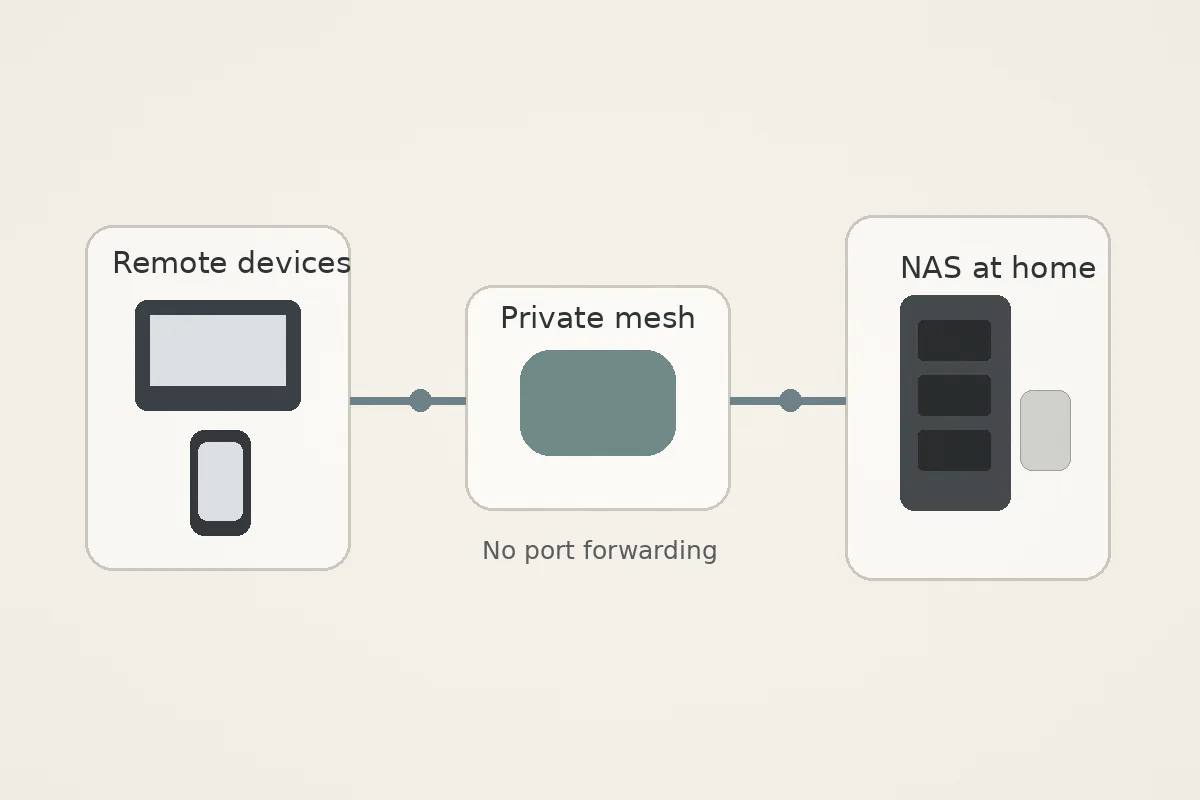
Tailscale approaches remote networking differently. Instead of relying on a centralized exit server, it uses a zero-config mesh overlay built on top of the modern WireGuard protocol. Your laptop, phone, and QNAP become secure, authenticated members of a single private network (a "tailnet"), regardless of where those devices physically reside.
+---------------------------------------------------------------------------------------+
|                               TAILSCALE REMOTE ACCESS                                 |
+---------------------------------------------------------------------------------------+
|  Remote Laptop / Phone          Direct WireGuard Tunnel          QNAP NAS (At Home)   |
|  [ Tailscale IP: 100.x.y.z ]  ===========================>  [ Tailscale IP: 100.a.b.c ]|
|                               (No Port Forwarding Needed)                             |
+---------------------------------------------------------------------------------------+
This model is exceptionally well-suited for a home NAS for three practical reasons:
- Zero Port Forwarding: Tailscale punches through NAT and firewall barriers automatically. You do not need to expose any ports on your home router or fiddle with dynamic DNS.
- Native QNAP App: Tailscale publishes an official, maintained QNAP App Center package for modern x86-64 and ARM64 systems. Setup is remarkably simple: install the app, authenticate via your browser, and the NAS immediately appears inside your secure admin console.
- Isolated Access: Your storage interface remains invisible to the public internet. Only your authorized, logged-in personal devices can route traffic to its designated private Tailscale address.
QNAP does provide a native alternative through its own QVPN Service, which can run a standard OpenVPN or WireGuard server directly on the NAS. That path remains a legitimate option if you demand complete architectural self-hosting without any third-party coordination server. However, running a self-hosted QVPN server requires opening and forwarding a listening port on your primary home router. For most home users who want secure, headache-free remote access without network exposure, Tailscale eliminates the friction entirely.
When the QNAP Needs an Outbound VPN: Forget the App, Check the Files
The math flips when the NAS itself is generating internet traffic that needs protection. If you run Download Station, host automated off-site cloud sync jobs, or manage containerized workloads that require an alternate public IP, a mesh tool like Tailscale will not help. You need an outbound commercial VPN tunnel.
When shopping for an outbound VPN for a NAS, ignore desktop interface features, flashy mobile apps, and bundled extras. Your QNAP cannot run a standard consumer desktop executable.
Instead, the only qualifying criterion that matters is: Does the provider supply downloadable, standard configuration files and dedicated service credentials that QVPN can import?
QNAP’s built-in QVPN Service acts as a competent VPN client capable of handling third-party OpenVPN profiles (and WireGuard on supported QTS versions and hardware tiers). To make it work, you must log into your VPN account via a standard browser, download an .ovpn profile file for your desired server location, and generate the manual credentials required to authenticate the session.
+---------------------------------------------------------------------------------------+
|                               QVPN OUTBOUND TUNNEL                                    |
+---------------------------------------------------------------------------------------+
|  QNAP NAS (QVPN Client)         Imported OpenVPN / WG        Commercial VPN Server    |
|  [ Download Station / Apps ]  ===========================>  [ Remote Exit IP ]        |
|                                                                        |              |
|                                                                        v              |
|                                                                   The Internet        |
+---------------------------------------------------------------------------------------+
Two concrete examples show how this works in practice:
- Surfshark: Actively maintains dedicated QNAP setup documentation showing users how to download their manual OpenVPN configuration files, copy their manual service credentials from the web dashboard, and import the profile straight into the QVPN client wizard.
- NordVPN: Similarly generates standard OpenVPN server configuration files and separate manual token credentials, matching QNAP’s own published third-party setup tutorials.
If a provider does not clearly document and support manual configuration exports, cross it off your list. It does not matter how highly ranked its desktop app is; if it cannot hand you a raw configuration file, it is useless on a QNAP.
The Gateway Setting That Can Break Your Local Network
Once you import an outbound commercial profile into QVPN, you will encounter a critical setting: “Use VPN as NAS Default Gateway.”
Be extremely deliberate before turning this toggle on.
When you designate the VPN as the default gateway, every single outbound packet generated by the NAS will be forced through the commercial tunnel. If your primary goal is simply masking a single download application, routing the entire NAS through that tunnel introduces significant operational headaches:
- Local network communication can become erratic.
- Automated cloud backups, DDNS updates, and Plex remote streaming connections may fail unexpectedly.
- If the VPN connection drops or encounters upstream latency, overall NAS connectivity crawls to a halt (unless you configure complex failover routing).
+---------------------------------------------------------------------------------------+
|                    WHOLE-NAS ROUTING VS. APPLICATION ISOLATION                        |
+---------------------------------------------------------------------------------------+
|  QVPN Default Gateway:                                                                |
|  [ Entire NAS ] ---------> [ Commercial VPN Tunnel ] ---------> [ Public Internet ]   |
|  * Affects all background services, cloud backups, and external streaming.            |
|                                                                                       |
|  Containerized Routing (Advanced):                                                    |
|  [ Specific Container / App ] ---> [ Bound VPN Tunnel ] ------> [ Public Internet ]   |
|  [ Rest of QNAP Services ] ------> [ Normal Home Router ] ----> [ Public Internet ]   |
+---------------------------------------------------------------------------------------+
If you only need a commercial VPN for one isolated workload, forcing the entire NAS behind a QVPN gateway is a blunt instrument. Advanced users typically achieve a cleaner setup by running the specific workload inside a Container Station (Docker) environment alongside a dedicated VPN container, leaving the primary operating system and its local services completely untouched.
The 30-Second Buying Rule
Choosing the right VPN for a QNAP comes down to three clear questions:
- Do you want to securely access your NAS from outside your home?
- The Winner: Tailscale. It installs cleanly from the App Center, creates a private encrypted mesh network between your devices, and requires zero router port forwarding.
- Do you want internet traffic originating from the NAS to exit through an external commercial IP?
- The Winner: QVPN Service paired with an open-standard provider like Surfshark or NordVPN. Disregard consumer desktop apps and pick a provider that offers downloadable OpenVPN configuration files and explicit manual credentials.
- Does your workload require isolating a single tool without affecting the rest of the storage system?
- Avoid setting QVPN as the system-wide default gateway. Isolate the traffic at the container level instead of redirecting the entire storage box.
(A quick hardware note: consumer VPN solutions like OnlydogVPN↗ are built around native, one-tap applications for desktop and mobile operating systems. Because they do not currently provide a native QNAP app package or manual NAS profile exports, they should not be purchased for NAS-level routing.)
Do not start by asking which consumer VPN has the most servers. Decide whether you are building a tunnel in to your files or out to the web. Pick Tailscale for the first, and a clean configuration provider for the second.
Frequently Asked Questions
Do I need a commercial VPN subscription just to access my QNAP from outside home?
No. The article recommends a private remote-access mesh such as Tailscale for that job; sending the NAS outbound through a commercial VPN does not create a path back into your home network.
Why does the article prefer Tailscale for QNAP remote access?
It creates an authenticated private mesh between your devices, has an official QNAP package, and avoids exposing management ports through router port forwarding.
What matters most when choosing an outbound VPN for QNAP?
The provider must supply standard configuration files and manual credentials that QVPN can import. Desktop-app features and server-count marketing do not help if the NAS cannot use the service directly.
Should I enable “Use VPN as NAS Default Gateway” in QVPN?
Only if you deliberately want all NAS traffic to use that tunnel. The article warns that system-wide routing can interfere with local networking, cloud backups, DDNS, and remote streaming.