Two Synology owners sit down with the same question: “What is the best VPN for my NAS?”
The first owner wants to log into DSM, stream home videos, and manage files from a hotel room on the other side of the world without exposing open ports to the internet.
The second owner has a NAS sitting in their living room running automated backups and download utilities, and wants all outbound traffic generated by those tasks routed through an encrypted commercial server in another country.
They type the exact same search query. If they follow generic affiliate lists, they will probably buy the exact same commercial subscription. And at least one of them will spend the rest of the evening frustrated, trying to figure out why a desktop app won't install on their storage enclosure.
There is no universal "best VPN for Synology" because a NAS can sit on completely different sides of the network boundary. Before you look at server counts, encryption protocols, or pricing plans, you have to answer one fundamental question: Which way is the traffic supposed to flow?
Article summary and practical fit
The best Synology VPN depends on which device starts the tunnel
There is no single best VPN for a Synology NAS because “VPN for Synology” can mean three opposite jobs. For inbound remote access to your NAS, Tailscale is the article’s default recommendation. For outbound traffic generated by DSM, choose a provider with documented manual OpenVPN support such as Proton VPN. For protecting a laptop or phone on public Wi-Fi while you access the NAS, put the VPN on that endpoint instead.
Key takeaways
- Best for: Synology owners who are unsure whether they need remote access into the NAS, outbound tunneling from DSM, or protection for the device they are carrying.
- Inbound path: Use a remote-access tool such as Tailscale when you want to reach DSM, SMB shares, or home resources without exposing ports.
- Outbound path: DSM compatibility and manual OpenVPN configuration matter more than a provider’s desktop app; DSM supports only one active VPN profile at a time.
- Important limit: OnlydogVPN does not provide manual OpenVPN files or a native Synology package, so the article explicitly does not recommend installing it directly inside DSM; its fit is endpoint protection on iOS, Android, macOS, or Windows.
Product fit: OnlydogVPN fits the endpoint path: protecting the laptop or phone you are using on airport, hotel, or other travel networks while remote NAS access is handled separately by Tailscale or QuickConnect. It is not the DSM-side client recommended in this article.
Sources already used in this article: Synology VPN client documentation; Tailscale for Synology NAS; Proton VPN Synology setup. Product source: OnlydogVPN official website.
Client, Server, or Endpoint: Identify the Tunnel's Direction
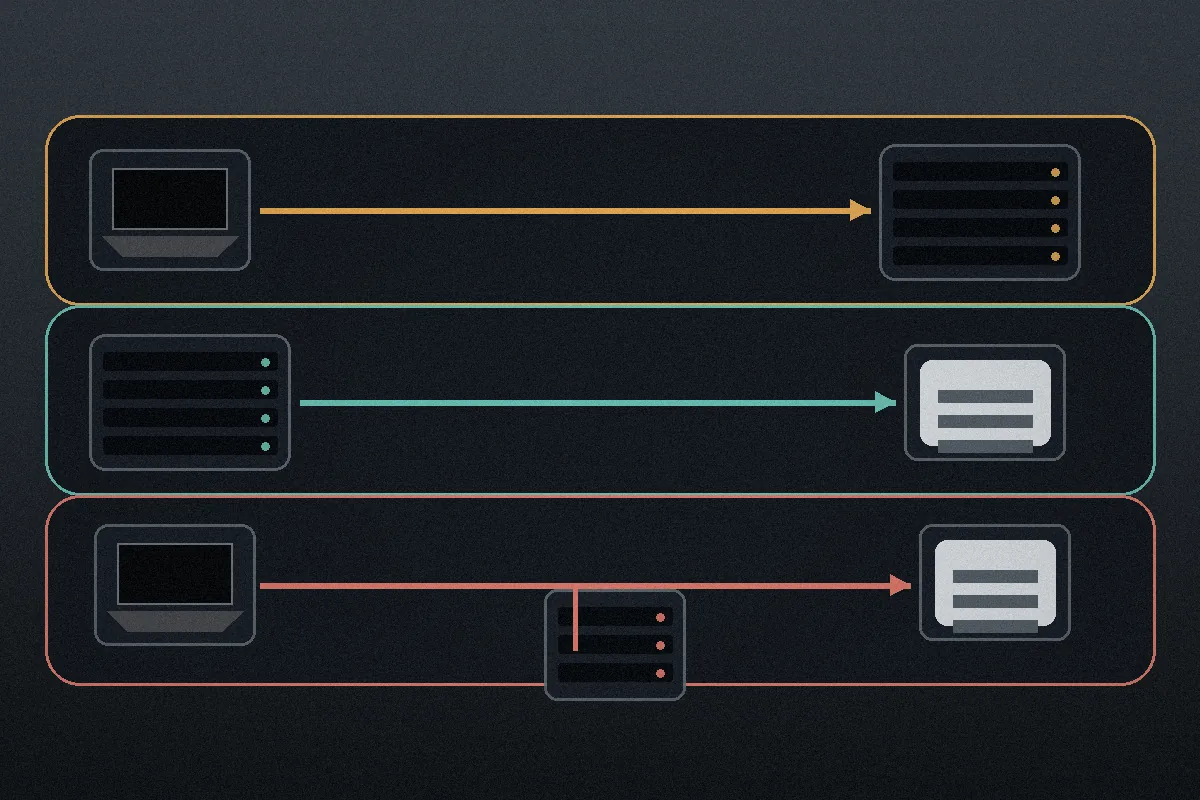
The reason searching for a Synology VPN is so confusing is that Synology’s operating system—DiskStation Manager (DSM)—can operate as either end of a VPN connection. In fact, your setup typically falls into one of three distinct architectures:
1. INBOUND (Remote Access):
   [Your Phone/Laptop Away from Home] ────► [Encrypted Tunnel] ────► [Synology NAS at Home]

2. OUTBOUND (NAS Privacy):
   [Synology NAS Apps / Downloads] ────► [Encrypted Tunnel] ────► [Commercial VPN Server] ────► Internet

3. ENDPOINT PROTECTION:
   [Your Laptop on Hotel Wi-Fi] ────► [Commercial VPN] ────► Internet
              └─► (Separately accessing Synology via Web / [QuickConnect](https://kb.synology.com/en-ca/WP/Synology_QuickConnect_White_Paper/4))
- The Inbound Path (Tunnel leads TO the NAS): You want to reach your Synology from outside your home network. The NAS acts as a private destination.
- The Outbound Path (Tunnel leads FROM the NAS): You want background applications running directly on DSM to route their internet traffic through an external VPN provider. Here, the NAS acts as a VPN client connecting to an outside service.
- The Endpoint Path (Tunnel protects YOUR DEVICE): You are working from a public network and want your laptop or phone secured while you happen to pull files from your NAS.
DSM supports the first two internally. Its native Network settings let you configure an outbound OpenVPN or L2TP client profile (though DSM limits you to one active VPN profile at a time). Separately, Synology offers an official "VPN Server" package in its Package Center to accept inbound connections.
These are opposing network paths. Deciding which one you need immediately eliminates 90% of the wrong tools.
For Inbound Remote Access, Tailscale Is the Better Default
If your goal is simply to reach your home files, photos, and DSM interface while traveling, stop shopping for a commercial consumer VPN. Buying a subscription to route your internet traffic through Switzerland does not help your laptop find a storage drive sitting behind your home router.
Traditionally, remote NAS access meant setting up Synology’s built-in VPN Server package, signing up for Dynamic DNS, and configuring port forwarding on your home router. It works, but it punches holes in your firewall and exposes your home IP to routine port scanning.
Alternatively, Synology offers QuickConnect, which requires zero port forwarding and works right out of the box. For light file management or native Synology mobile apps, it is genuinely convenient. However, QuickConnect relies on relayed connections that can be visibly sluggish, and it does not cleanly support third-party apps or direct network-drive protocols like SMB.
For modern inbound access, Tailscale is the strongest general recommendation for most users.
Tailscale runs natively on DSM via an official Package Center app. Built on WireGuard, it creates a secure, point-to-point mesh network (a "tailnet") between your NAS, laptop, phone, and tablet.
- Zero firewall holes: It coordinates connections using NAT traversal, meaning you do not have to touch port forwarding on your router.
- Direct LAN performance: When both devices can see each other, traffic travels directly between them at full local or ISP speed rather than through a third-party relay.
- Native access: Once connected, your NAS receives a stable, private IP address. You can mount network shares, open DSM in your browser, or manage containers exactly as if you were sitting on your living room sofa.
If all you want is private, secure access to your hardware from anywhere, Tailscale solves the problem completely—without requiring you to purchase an external VPN subscription.
For Outbound NAS Traffic, DSM Compatibility Trumps Flashy Apps
The equation changes entirely if you want the NAS itself to route external traffic through an encrypted tunnel. If you run background tools, RSS fetchers, or Download Station on DSM and want to mask your home IP from the wider internet, the NAS must act as an outbound client.
Here, the biggest purchasing mistake is picking a provider based on its polished macOS or Windows application. That application will not run on your NAS. DSM is a specialized Linux environment, and you will be configuring the connection inside DSM’s native Network settings (Control Panel → Network → Network Interface → Create VPN Profile).
Because of this, your primary purchasing criterion must be clean, documented OpenVPN manual profile support.
For this specific role, Proton VPN is our primary recommendation.
Proton provides dedicated, step-by-step documentation for DSM 7+, offering straightforward OpenVPN configuration files (.ovpn) alongside separate service credentials specifically formatted for manual imports. Once imported, DSM handles the tunnel natively, routing designated NAS traffic through Proton’s infrastructure without third-party bloat.
Competitors like NordVPN also provide manual OpenVPN configuration files and DSM setup guides, representing a viable alternative. But the core lesson remains: when your NAS is the client, desktop features, kill switches, and proprietary protocols (like NordLynx or Lightway) do not carry over to DSM. Judge the provider entirely on the reliability of its manual OpenVPN configurations and server infrastructure.
OnlydogVPN provides dedicated client applications for iOS, Android, macOS, and Windows, but it does not provide manual OpenVPN configuration files or a native Synology package. It should therefore not be chosen as the tool to install directly inside DSM.
When the Endpoint—Not the NAS—Needs the Shield
There is a third, very common scenario where users overcomplicate their setup: working on untrusted public networks.
Imagine you are sitting in an airport lounge or a hotel café with your laptop. You open your browser to download a project file from your NAS using QuickConnect or a web portal, while simultaneously checking client emails, chatting on Slack, and browsing the web.
In this scenario, installing a VPN on your Synology does nothing to protect the unencrypted traffic leaving your laptop across that open airport Wi-Fi. The risky network is the one your laptop is connected to; your NAS is sitting safely on your home broadband.
Here, the VPN belongs on your laptop or phone, acting as a general-purpose endpoint shield.
This is where OnlydogVPN becomes a useful fit.
If your private remote access to the NAS is already handled by Tailscale or QuickConnect, your remaining challenge is securing the device in your hands across shifting, hostile, or restrictive travel networks.
OnlydogVPN is aimed at that kind of friction:
- Frictionless Onboarding: Its passwordless magic-code sign-in and one-tap interface eliminate the need to fiddle with server lists or complex settings menus when you just need to get online quickly.
- Travel-Resilient Transport: Built on an obfuscated HTTP/3 architecture, it is designed to hold connections steady and recover gracefully when jumping between cellular hotspots, airport captive portals, and hotel Wi-Fi.
- Unified Device Support: A single account covers your laptop, iPhone, or Android device simultaneously, protecting all your web, email, and messaging traffic while leaving your home NAS configuration clean and untouched.
You do not need to turn your home storage server into a commercial gateway just to browse safely from a hotel. Secure the endpoint directly and let the NAS do what it does best.
The Decision Matrix
Stop treating "VPN for Synology" as a single product category. Match your actual workflow to the right side of the tunnel:
| Your Actual Goal | Where the Software Lives | The Recommended Tool |
|---|---|---|
| Reach home files & DSM remotely | Installed directly on NAS & personal devices | Tailscale (or QuickConnect for basic tasks) |
| Route NAS downloads & apps through a VPN | Configured inside DSM Network settings | Proton VPN (via manual OpenVPN import) |
| Protect your laptop/phone while traveling | Installed on your computer or mobile device | OnlydogVPN (or your preferred endpoint VPN) |
The next time you evaluate a VPN for your Synology, ignore the generic feature lists. Figure out which device initiates the traffic, where that traffic needs to end, and choose the tool designed for that exact path.
Frequently Asked Questions
What is the best VPN for remotely accessing a Synology NAS from outside home?
For inbound remote access, the article recommends Tailscale as the strongest general default because it creates a private mesh between your NAS and your devices without requiring router port forwarding.
What should I look for if I want the Synology NAS itself to use a commercial VPN?
Prioritize documented manual OpenVPN support that can be imported into DSM’s native network settings. Desktop apps and proprietary protocols do not automatically carry over to a Synology NAS.
Can I install OnlydogVPN directly on Synology DSM?
Not according to this article’s requirements. OnlydogVPN does not provide manual OpenVPN configuration files or a native Synology package, so it should not be selected as the VPN client running inside DSM.
Do I need a VPN on the NAS to stay safe while accessing it from airport Wi-Fi?
Not necessarily. If the risky network is the airport Wi-Fi your laptop or phone is using, the general-purpose VPN belongs on that endpoint. Remote access to the NAS can remain a separate Tailscale or QuickConnect problem.