How to Bind Transmission to a VPN on Linux (And Why You Probably Shouldn't Do It the Hard Way)

If you just opened your terminal, typed sudo nano /etc/transmission-daemon/settings.json, and spent the last twenty minutes hunting for an option that looks like "Network Interface: tun0," let me save you some hair: it isn't there.
Coming from clients like qBittorrent, almost everyone assumes binding Transmission to a VPN on Linux is a five-second dropdown selection. You click tun0 or wg0, hit save, and go to bed knowing your real IP won't leak if the VPN tunnel drops.
Then reality hits. Transmission doesn’t have an interface selector. The only setting it gives you is bind-address-ipv4, and that parameter expects a rigid, static IP address—not an interface name. The moment your VPN reconnects and hands you a fresh internal IP, Transmission either stops downloading entirely or silently falls back to your local network, broadcasting your ISP-assigned IP to the entire BitTorrent swarm.
You searched this question because you want bulletproof privacy while torrenting on Linux. But before you spend your weekend debugging nested iptables scripts or breaking your SSH connection with Linux network namespaces, let’s unpack how interface binding actually behaves on Transmission, what works, what breaks, and the sanity-saving alternative you should actually use.
Article summary and product fit
What is the safest way to keep Transmission on Linux from leaking torrent traffic outside a VPN?
The article warns against relying on Transmission’s static bind-address-ipv4 setting. Its safer manual approaches are an OS firewall that permits Transmission traffic only through the VPN interface or a container/network-namespace design where the torrent client loses connectivity when the VPN network disappears.
Key points
- Transmission does not provide the same interface-name binding control found in some other torrent clients; its bind-address setting expects an IP address.
- A dynamic VPN address can make static binding brittle, while a correctly designed firewall or shared container network can enforce a fail-closed path.
- The article insists on an actual torrent-IP leak test and a simulated VPN failure before trusting the setup.
Best fit and limitations
Best for: Linux users who run Transmission and want a fail-closed network path that does not fall back to the normal ISP interface when the VPN drops.
Important limit: Manual firewall and container methods require ongoing Linux networking maintenance and can break LAN or SSH access if configured incorrectly.
Product fit: Within the article, OnlyDogs VPN is presented as the lower-maintenance option for users who do not want to manage custom firewall or namespace rules themselves.
Sources already linked in this article
The Trap: Why Transmission's bind-address-ipv4 Backfires
When people first realize Transmission lacks an interface binding toggle, their immediate instinct is to look at settings.json:
JSON
"bind-address-ipv4": "10.8.0.2",
This looks like a solution, but in practice, it’s a landmine.
- VPN IPs Are Dynamic: Most commercial VPN configurations assign dynamic private IP addresses upon handshake. If your tunnel resets or you hop servers, your IP changes from
10.8.0.2to10.8.0.5. Transmission will fail to bind to the dead IP, freeze all active transfers, and crash the daemon. - The "Fallback" Danger: Depending on your Linux distribution's network stack and how the daemon restarts, binding to an unreachable IP can occasionally trigger a route fallback to
0.0.0.0upon system reboot, routing torrent traffic straight out ofeth0without warning. - Local WebUI Lockout: If you bind Transmission's listening interface to a VPN address, you frequently lock yourself out of the Web UI (
http://localhost:9091or your LAN IP) unless you set up complex secondary routing tables.
Binding Transmission to a VPN on bare-metal Linux isn't just an option in a menu—it requires engineering a dedicated containment wall around the daemon.
The Hard Way: How to Actually Do It on Linux (If You Love The Terminal)
If you are determined to lock down Transmission manually on Linux without changing your toolset, there are two legitimate methods. Neither is one-click, but both avoid the dynamic IP trap.
Method 1: The Firewall Enclosure (UFW / iptables)
Instead of forcing Transmission to pick an interface, you let it bind to 0.0.0.0 and use the Linux kernel firewall to execute Transmission's traffic exclusively through your VPN interface (tun0 or wg0).
To do this safely without killing your SSH access or LAN WebUI: Bash
# 1. Deny outgoing traffic for the transmission-daemon user by default
sudo ufw default deny outgoing

# 2. Allow outgoing traffic on loopback and LAN for WebUI access
sudo ufw allow out on lo
sudo ufw allow out to 192.168.1.0/24

# 3. Allow traffic strictly through your VPN tunnel interface
sudo ufw allow out on tun0

# 4. Allow your VPN client to establish its initial handshake
sudo ufw allow out to any port 1194 proto udp
The Catch: If your VPN provider drops the tunnel and the interface tun0 disappears, UFW holds the line. However, the minute you update your network manager or change your VPN endpoint port, your firewall configuration requires manual intervention. One misconfigured rule can lock you out of a headless server permanently.
Method 2: Docker with Network Namespaces
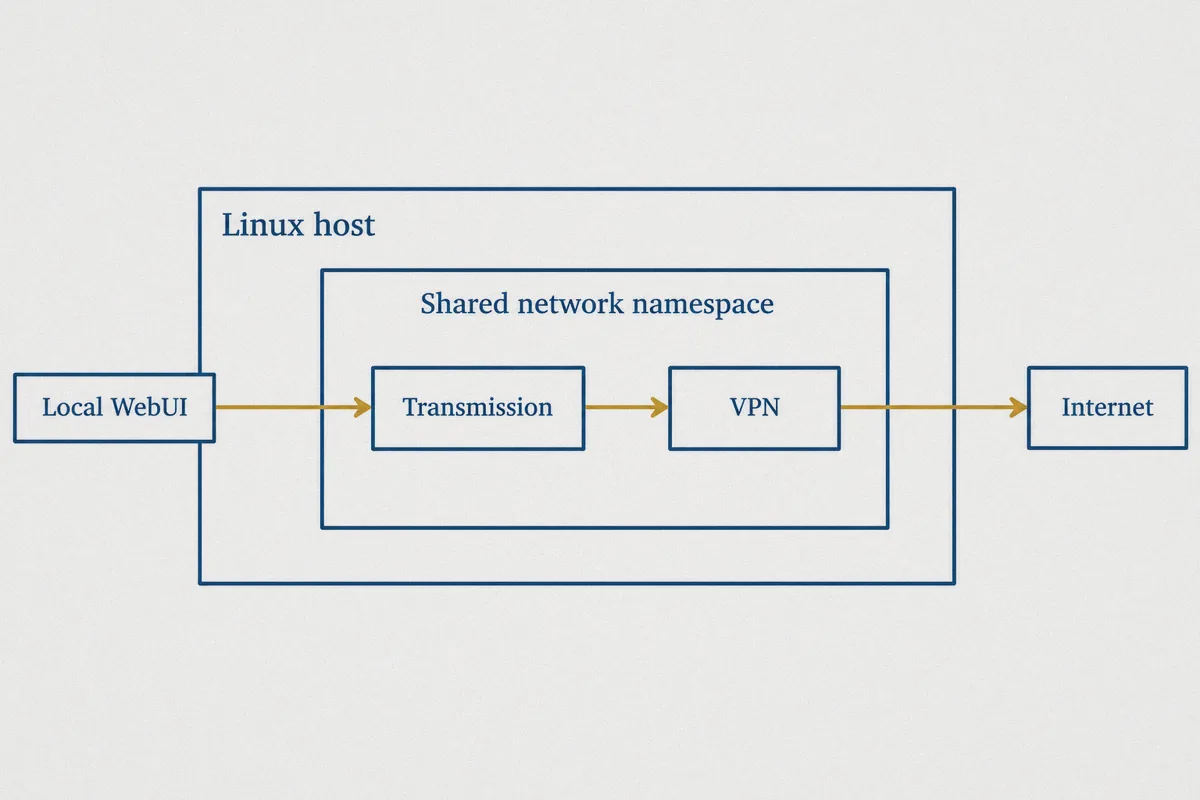
The modern self-hoster standard is running Transmission inside a Docker container routed through a companion VPN container (using Docker's --net=container networking). The torrent container physically shares the network stack of the VPN container; if the VPN container dies, the torrent container loses connectivity entirely.
The Catch: It requires maintaining Docker Compose manifests, handling volume permissions across container boundaries, and debugging tunnel DNS configs whenever your provider tweaks its WireGuard configs.
What You Actually Want: Leak-Proof Torrenting Without Network Headaches
Let’s be honest about why you ran this search in the first place. You don't care about Linux routing tables or virtual adapter flags for their own sake. You want three practical assurances:
- Zero IP Leaks: When the download is running, your ISP must never see BitTorrent traffic, and the swarm must never see your residential IP.
- Fail-Safe Behavior: If the VPN connection stutters, traffic must halt instantly rather than falling back to your bare ISP connection.
- No Throttling or Protocol Snooping: Your ISP shouldn't be able to inspect packet headers and intentionally slow down your P2P traffic.
When you attempt to solve this with generic VPNs and raw Transmission configs, you end up acting as your own unpaid network administrator. This is where modern, protocol-engineered solutions like OnlyDogs VPN flip the problem entirely.
The Smarter Alternative: OnlyDogs VPN
If you're tired of treating basic torrent privacy like a computer science exam, OnlyDogs VPN cuts through the Linux torrenting mess from the network layer up.
Instead of forcing you to fiddle with unstable virtual network adapters or fragile local firewall scripts, OnlyDogs VPN is built around automated traffic isolation, modern transport protocols, and real-world resilience.
1. Scene Presets Over Manual Configuration
Most VPNs dump a list of 500 random city names on you, leaving you to guess which ones support P2P, which ones allow port forwarding, and which ones have low latency.
OnlyDogs replaces configuration guesswork with Scene Presets. Click the dedicated high-speed download profile, and the system automatically configures the tunnel parameters optimized for sustained, high-throughput peer-to-peer traffic. You don't have to test five different servers to find one that doesn't choke under heavy BitTorrent connections.
2. Proprietary Obfuscation & HTTP/3 Architecture
Standard OpenVPN and WireGuard handshakes feature obvious protocol signatures. Even if you successfully bind Transmission to an OpenVPN tunnel on Linux, deep packet inspection (DPI) from aggressive ISPs can spot the tunnel type, flag the continuous peer-to-peer payload, and throttle your connection speed to a crawl.
OnlyDogs utilizes an engineered protocol stack incorporating HTTP/3 framing and traffic obfuscation. To your internet provider, your high-bandwidth torrent activity blends into ordinary, encrypted modern web traffic. This eliminates ISP-side bandwidth throttling and prevents your connection from being targeted in restrictive network environments.
3. Native Reconnection Without IP Exposure
The fatal flaw with manual Linux interface binding is the disconnect gap. When a standard VPN tunnel resets, Linux takes a few milliseconds to update routing tables. In that tiny window, socket leaks happen.
OnlyDogs features proactive weak-network recovery and seamless reconnection logic. If your underlying Wi-Fi or wired connection drops or changes IP, the internal engine suspends the outbound socket state instantly. It will not release network packets to the host adapter until the encrypted tunnel is fully re-established. You get bulletproof kill-switch behavior out of the box without maintaining a single line of iptables code.
4. Zero Credential Hassle
If you've ever had to dig through your password manager to find an obscure 32-character VPN password while setting up a Linux box, you know the frustration. OnlyDogs uses secure, passwordless email verification logins—keeping onboarding friction to a minimum across all your machines.
Comparison: The Three Ways to Run Transmission Safely
| Feature | bind-address-ipv4 in Settings | UFW / Docker Namespace | OnlyDogs VPN Automated Setup |
|---|---|---|---|
| Setup Time | 2 minutes | 30–60 minutes | Under 2 minutes |
| Dynamic IP Resilience | ❌ Fails on IP change | ✅ High | ✅ Native automated handling |
| Kill-Switch Reliability | ❌ Prone to fallback | ✅ Reliable if rules are correct | ✅ Built-in protocol-level halt |
| ISP Throttling Protection | ❌ None (Standard VPN) | ❌ None (Depends on provider) | ✅ HTTP/3 & Traffic Obfuscation |
| Maintenance Burden | Constant manual edits | High (Breaks on network changes) | Zero (Automated route selection) |
How to Verify Your Setup (No Matter Which Route You Choose)
Whichever path you take, never assume your Transmission traffic is hidden just because a VPN says "Connected." Run this two-minute verification check before loading real torrents:
- Grab a Torrent IP Tracking Magnet: Visit a diagnostic tool like ipleak.net or bash.ws/torrent-leak and add their tracking magnet into Transmission.
- Inspect the Reported IP: Look at the active IP listed on the detection page under the Torrent section. It must match your VPN gateway, never your actual ISP address.
- Simulate a Tunnel Crash: Manually kill your VPN process (
sudo pkill openvpnor disconnect the client). Look at Transmission. If the diagnostic torrent keeps transferring or switches to your residential IP, your binding is broken. If transfers freeze completely until the VPN is back up, your environment is safe.
The Verdict
Can you bind Transmission directly to a VPN on Linux? Technically yes—but attempting it via Transmission's native settings.json is a guaranteed recipe for dead transfers or leaked IPs.
If you enjoy tinkering with Linux networking, wrap Transmission in a dedicated Docker network container with strict firewall egress rules.
If you just want to download files without exposing your identity, worrying about ISP copyright notices, or spending your evening debugging routing tables, take the friction-free route. Grab OnlyDogs VPN, activate the high-speed preset, and let the software handle route isolation and traffic camouflage for you. Technology should work for you, not give you a second job.
Frequently Asked Questions
Why is Transmission’s bind-address-ipv4 setting a fragile VPN kill switch?
The article says the setting binds to a specific IP rather than a VPN interface name. If the VPN reconnects with a different internal address, the binding can stop working as intended or leave the daemon in an unreliable state.
What are the two manual containment methods described for Linux?
The article describes a firewall enclosure that permits Transmission traffic only through the VPN interface, and a Docker or network-namespace approach in which Transmission shares the VPN container’s network stack.
How do you verify that Transmission is not exposing the ISP address?
Use a torrent IP tracking test, confirm that the swarm sees the VPN address, then deliberately disconnect the VPN. A fail-closed setup should stop torrent traffic rather than switching to the residential connection.
What is the main tradeoff of doing the Linux networking manually?
You get direct control, but you also take responsibility for firewall rules, interface changes, endpoint changes, permissions, DNS behavior, and recovery after network updates.