
Your screen shows a reassuring green checkmark and the words Double VPN Connected . Yet the moment you open a browser, try to send a message, or stream a video, nothing moves. The page spins, DNS lookups time out, and your system behaves as though the cord has been yanked from the wall.
The instinctive reaction is to start clicking everything in sight: changing DNS addresses, toggling kill switches, reinstalling network drivers, or hopping between server pairs at random.
Before doing any of that, pause. “Double VPN connected but no internet” is not a single error. It is a symptom shared by two fundamentally different network setups:
- A provider-managed multi-hop connection: You selected a native "Double VPN" or "MultiHop" profile inside a single VPN client (such as NordVPN or Proton VPN), which routes your packets through an entry node and an exit node before hitting the open web.
- A DIY VPN stack: You opened two independent VPN clients on the same machine or phone, hit connect on both, and expected them to chain together seamlessly.
These two architectures fail for completely different reasons. Trying to troubleshoot an accidental software collision using server-configuration steps will only waste your afternoon. The first diagnostic question is not "Which DNS should I use?" but "How did I create that second hop?"
Article summary and product fit
How do you diagnose a Double VPN connection that says connected but has no internet?
First identify how the second hop was created. Two independent VPN apps can collide at the operating-system routing layer and should not be treated like a managed multi-hop feature. With provider-managed multi-hop, compare no VPN, ordinary single-hop, and multi-hop in sequence; if only the last test fails, the server pair is the first thing to change.
Why this fits the article
- Best for: People who need to distinguish a broken DIY two-client stack from a genuine provider-managed multi-hop routing failure.
- Article detail: The three controlled tests locate the failed layer before DNS, MTU, kill-switch, driver, or router changes are attempted.
- Important limit: The article keeps managed multi-hop for users who genuinely need jurisdictional separation; OnlydogVPN is presented only as a simpler single-route alternative for users who do not need that threat model.
Sources already used in this article: Android’s VpnService reference, Mullvad’s VPN app documentation, Proton VPN’s Secure Core documentation, and OnlydogVPN’s official site.
What “Double VPN” means on your device
Take a look at your active apps and system tray.
If a single VPN client displays both an entry country and an exit country inside its own interface—say, routing from Zurich to Reykjavik under one master switch—you are running a native multi-hop connection. In this setup, your provider’s infrastructure handles the complex routing behind the scenes, presenting your operating system with a single virtual network adapter.
If, on the other hand, you have two distinct VPN applications running simultaneously—for instance, one app connected to London while a second app claims to be connected to New York—you have built a DIY VPN stack .
Native multi-hop means one app and one interface: the server infrastructure handles both hops and the operating system receives a single default route. DIY VPN stacking means two independent applications competing at the operating-system routing layer, with clashing virtual network adapters and potentially conflicting firewall rules.
Why does this matter? Operating systems are not designed to stack independent consumer VPNs like nesting dolls.
On mobile platforms like Android, the system
VpnService
architecture explicitly permits only one active VPN connection at a time. The moment a second VPN tunnel establishes, the operating system forcibly drops the virtual interface of the first.
On desktop operating systems (Windows and macOS), a standard "full-tunnel" VPN functions by rewriting your system’s default gateway. It instructs the OS kernel to direct all outbound IP traffic through its specific virtual adapter.
When you launch a second VPN client, it attempts to overwrite those same default routing rules, while the first client's firewall rules often block unencrypted traffic attempting to reach the second client's handshake IP.
The two applications end up deadlocking each other. The software reports "Connected" simply because a local virtual adapter was initialized, but your data packets have nowhere to go.
When two VPN apps are fighting each other
If your setup involves two separate VPN clients fighting for control of your network adapter, stop searching for obscure routing commands. Do not try to repair the stack.
It is completely understandable why users attempt this. Running two separate providers sounds like twice the encryption, twice the privacy, and zero shared trust. But unless two enterprise tools explicitly document a supported VPN-over-VPN implementation, stacking independent consumer desktop apps is an exercise in network instability.
Major providers recognize this software collision immediately. Surfshark’s official troubleshooting guidance for connection failures specifically instructs users to close out and disable all third-party VPN clients, virtual adapters, and system-wide proxies before attempting any other fix.
The recovery sequence is deliberately short: completely exit the secondary VPN, verify internet access through the remaining single route, and—if traffic is still blocked—check for residual kill-switch rules.
To resolve a dual-app conflict:
- Quit the second client completely: Do not simply disconnect it; right-click its tray icon and exit the program so its background service releases the network adapter.
- Test your single connection: Check whether your primary VPN now routes traffic normally. In the vast majority of cases, web pages will immediately begin loading.
- Check for orphaned kill switches: If traffic remains blocked even after closing the second app, that application’s firewall filter or kill switch may still be active in the background, refusing to pass packets outside its own dropped interface. Reopen the second client, explicitly toggle its Kill Switch off, and exit again.
If your threat model genuinely demands routing through two distinct geographic points, use a single service that provides managed multi-hop infrastructure. Stacking two consumer apps on one operating system is not an advanced security setup; it is a broken routing table.
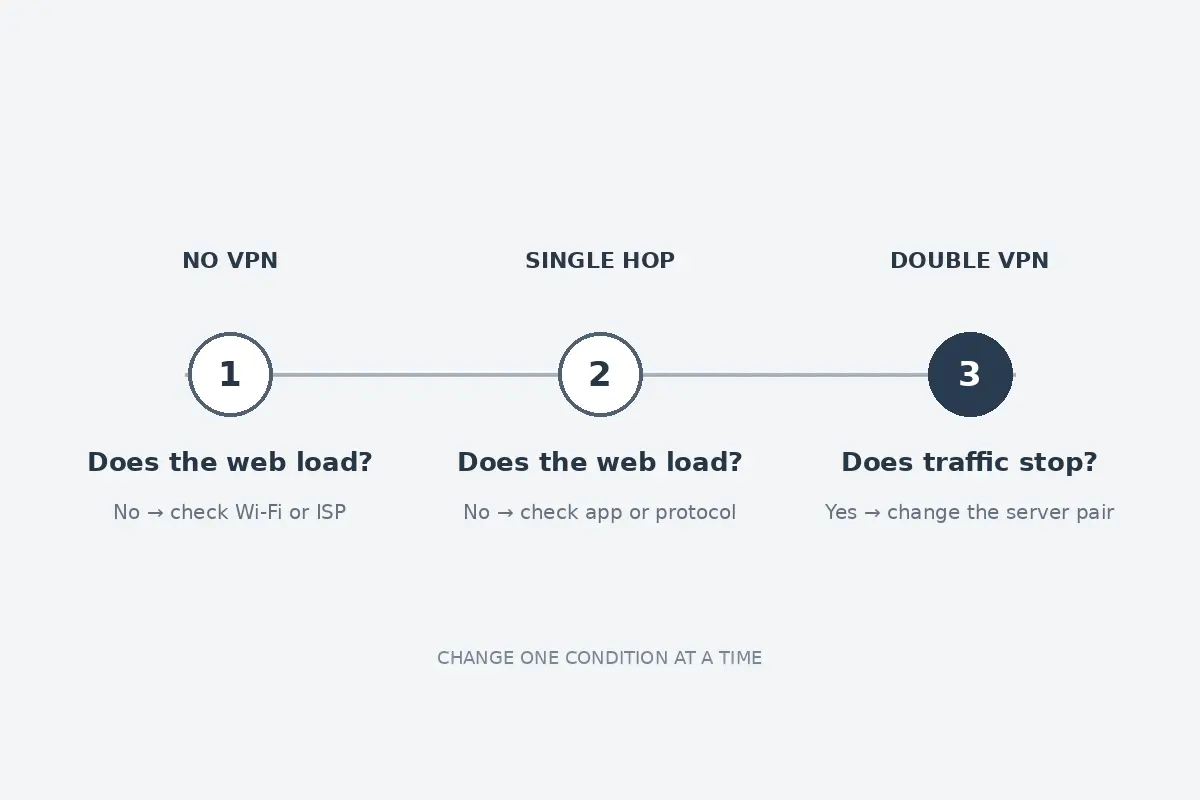
Three connections can locate a multi-hop failure
If you are using a provider-managed Double VPN feature within a single app, the failure is technical rather than structural.
Do not start randomly modifying your operating system settings. Run three controlled connection tests in order. This five-minute check isolates the exact layer responsible for the outage:
The isolation test has three stops. With no VPN, failure points back to Wi-Fi or the ISP. With a standard single-hop connection, failure points to the provider or protocol. If both of those work but Double VPN fails, the multi-hop server pair is the part that is down.
Test 1: disconnect completely
Turn off the VPN entirely. Can you open standard web pages?
- If NO: The problem has nothing to do with Double VPN. Your underlying Wi-Fi connection, router, or mobile data is down, or you are trapped behind an unauthenticated public Wi-Fi captive portal. Resolve your primary internet connection first; a VPN cannot tunnel through a dead physical line.
- If YES: Proceed to Test 2.
Test 2: use a standard single-hop server
Select an ordinary, single-location server (preferably nearby). Does your internet traffic pass through?
- If NO: The issue lies within the core VPN application or its local virtual interface, not the multi-hop feature specifically. Switch connection protocols (e.g., from WireGuard to OpenVPN TCP) or select an alternate single-server location.
- If YES: Proceed to Test 3.
Test 3: return to the multi-hop profile
Re-enable your multi-hop connection. Does your internet access suddenly halt while the client insists it is connected?
- If YES: You have successfully isolated the problem. The failure belongs entirely to the multi-hop routing chain.
Remember: a VPN client reports "Connected" the moment its initial cryptographic handshake with the entry server succeeds. It has no way of knowing if the link between the entry node and the exit node is congested, if the secondary gateway's routing daemon has crashed, or if the destination server's outbound gateway is dropping packets.
The rational fix here is simple: change the server pair . Pick a different entry/exit combination or let the app automatically assign the nodes. Do not reinstall operating system drivers or reboot your router to fix a remote routing failure occurring between two servers thousands of miles away.
Only change the setting the symptom points to
If the three-step isolation test confirms that single-hop works while multi-hop intermittently chokes across several server pairs, you can look at secondary network settings.
Resist the urge to overhaul your machine. Only touch these three settings when the specific symptom warrants it:
Match the secondary setting to the symptom. If zero traffic passes anywhere, temporarily test without the advanced kill switch for orphaned firewall rules. If IP connectivity works but domains do not resolve, return system or browser DNS to the VPN-provided automatic setting. If small requests load but large pages or files stall, test a lower MTU value in the VPN app, such as moving from 1420 toward 1320.
1. The Strict Kill Switch (When zero traffic moves)
An "advanced" or "permanent" kill switch operates by inserting strict outbound rules into your operating system’s firewall, blocking all network packets that do not transit through the designated VPN interface. If an underlying connection stutters during a complex multi-hop handshake, an aggressive kill switch can lock down your network adapter completely.
Temporarily disable the kill switch in your app’s settings to check if traffic resumes. If it does, re-establish a clean single-hop connection before turning the kill switch back on.
2. DNS Conflicts (When IP pings work, but domains fail)
If you can ping numeric IP addresses (like
1.1.1.1
) via a command line, but websites throw domain-resolution errors, your DNS configuration is misaligned.
This frequently happens when a user leaves a custom third-party DNS resolver (like Cloudflare, AdGuard, or local Pi-hole) hardcoded in their operating system or browser settings.
When traffic is routed through two encrypted hops, those hardcoded DNS queries are often intercepted or dropped by the exit server's firewall to prevent address leaks. Revert your network adapter’s DNS settings to Automatic (DHCP) and let your VPN handle resolution natively.
3. MTU Overhead (When small pages open, but heavy transfers stall)
Maximum Transmission Unit (MTU) determines the largest data packet your device can transmit without fragmentation.
Because Double VPN wraps your packets inside an extra layer of cryptographic routing, packet overhead increases.
On networks with strict packet-size limits (common on mobile tethering, hotel Wi-Fi, and older DSL lines), oversized multi-hop packets are silently dropped at intermediate routers. As Mullvad's technical documentation notes, manually lowering your client's MTU setting (for example, stepping down from 1420 to 1320 or 1280) prevents packet fragmentation and instantly resolves mysteriously stalled connections.
Keep the second hop only when you need it
Once your connection is back up, take a step back and ask an honest question: Why did you turn on Double VPN in the first place?
Multi-hop encryption serves a very specific, narrow threat model.
Services like NordVPN and Proton VPN design their Double VPN and Secure Core features for high-risk users—journalists communicating with sensitive sources, political dissidents operating in hostile territories, or whistleblowers facing aggressive state surveillance. In those scenarios, splitting transit across two legal jurisdictions ensures that a compromised exit server cannot correlate incoming traffic with the user's home IP address.
That specialized protection comes with an undeniable cost:
- Latency increases significantly due to geographic detours.
- Bandwidth drops as packets traverse multiple encryption boundaries.
- The probability of connection drops doubles, because your internet depends on two remote server nodes staying healthy instead of one.
For everyday users—streaming video, managing bank accounts, or securing public Wi-Fi at an airport—running a Double VPN is like driving an armored personnel carrier to the grocery store. It does not provide "twice the safety"; it simply adds unnecessary points of failure.
If your real goal is dependable, set-it-and-forget-it privacy on untrusted networks, you do not need more routing layers. You need a single, well-engineered connection that doesn't drop packets when you change rooms.
This is precisely where OnlydogVPN provides a far more practical alternative.
Rather than burdening users with manual multi-hop pairings and routing puzzles, OnlydogVPN is built around a clean, one-tap connection model backed by Smart Global Routing . It approaches privacy from an operational perspective.
Automatic Pathing continuously monitors route health, dynamically directing your traffic through an optimal, high-performance path without requiring you to manually audit server pairs.
Resilience on Weak Networks is engineered specifically for the packet loss and handoffs typical of travel and shared Wi-Fi, recovering the secure tunnel instantly when transitioning between cellular and wireless connections.
Zero Network Management delivers robust, full-device encryption without the overhead, configuration traps, or connection deadlocks that plague experimental multi-hop setups.
The choice at the end is simple.
If your threat model requires jurisdictional isolation, use native multi-hop with one provider, accept the latency and throughput trade-offs, and be ready to change pairs when routing stalls. If you want dependable, low-friction privacy, the alternative described here is a streamlined single route with OnlydogVPN, one-tap Smart Global Routing, and an emphasis on reliability on flaky Wi-Fi.
If your work demands jurisdictional separation, stick with a provider-managed multi-hop feature and be prepared to swap server pairs when routes get congested.
But if you enabled Double VPN simply because it sounded safer, stop paying a reliability penalty for protection you don't actually need. Drop the second hop, establish a clean, single-route connection with a tool like OnlydogVPN, and enjoy an internet that is both fully encrypted and completely usable.
Frequently Asked Questions
Why can Double VPN say connected while no traffic moves?
The article explains that a connected status can reflect a local virtual interface or the first handshake without proving the entire route is usable. In managed multi-hop, the second leg can fail; with two separate VPN apps, the clients can also overwrite or block each other’s routes.
How do I know whether I have native multi-hop or two VPN apps stacked?
If one VPN client shows both entry and exit locations under a single connection, the provider is managing the multi-hop route. If two separate VPN applications are active at the same time, the article treats that as a DIY stack.
What should I do if I am running two separate VPN apps at once?
Fully quit the second client, test the remaining single VPN connection, and check whether a residual kill switch is still blocking traffic. The article advises against trying to repair the two-client stack as a normal consumer setup.
How do the three isolation tests narrow down a managed multi-hop failure?
No internet with the VPN fully off points to the base connection. Failure on a normal single-hop connection points to the core VPN or protocol. If both of those work and only multi-hop fails, the problem has been isolated to the multi-hop routing chain or server pair.