
You join a team meeting, and everything feels off. Voices collide because audio arrives a second late. A colleague asks a question, waits through an awkward pause, and starts repeating it just as your answer finally lands. The shared presentation stutters behind the conversation, video feeds freeze into pixelated stills, and a banner flashes at the top of the window warning that your network quality is poor.
When this only happens while your VPN is active, the usual impulse is predictable: run a quick speed test, open the VPN client, and start clicking different servers to see if the lag clears up.
Before you touch that server list, ask one clarifying question: Who controls this VPN?
Is this a corporate VPN mandated and managed by your employer’s IT department, or is it a personal VPN service you installed yourself?
That single distinction completely changes what is broken and who can fix it. Indiscriminate server hopping or testing raw download speeds rarely solves real-time call issues. Interactive meetings do not fail because your connection lacks bandwidth for web browsing; they fail because live audio and video demand an unbroken, low-latency path. If your company controls that path, fighting the client on your desktop will not help. If you control it, the fix is entirely in your hands.
Article summary and product fit
When Microsoft Teams lags behind a VPN, how do you decide who should fix the route?
First determine who controls the VPN. If it is employer-managed, collect Teams Call health metrics such as round-trip time, packet loss, and jitter and give that evidence to IT so they can review the media route and split-tunnel policy. If it is your personal VPN, you can let Teams bypass the tunnel or pause the VPN for the call; if you truly need a full-device tunnel, then efficient automatic routing becomes the relevant VPN requirement. If Teams remains poor on a direct connection, the bottleneck is elsewhere on the local network or device.
What to keep in mind
- Best for: People whose Teams calls develop delay, robotic audio, frozen video, or poor-network warnings while a corporate or personal VPN is active.
- Key check: Real-time media is sensitive to latency, jitter, packet loss, hair-pinning, and UDP-to-TCP fallback even when normal browsing and speed tests look fine.
- OnlydogVPN fit: The article limits this recommendation to personally controlled VPN use when the user wants the tunnel to remain active but does not want to manage routes and server choices manually.
- Important limit: A consumer VPN is not a workaround for employer-managed security policy. Corporate VPN routing changes should be handled by IT with the call-health evidence the user provides.
Sources already used in the article include Microsoft has long documented, Call health, and VPN split tunneling. Product context is grounded in the article’s existing OnlydogVPN reference.
Why Teams Struggles Behind a VPN
Live calls expose routing issues that ordinary web browsing easily masks. When you load a webpage or stream a video, your device buffers data ahead of time. A brief delay or a lost packet goes completely unnoticed.
Real-time conversation cannot buffer. A split-second delay turns a natural conversation into a string of interruptions. Unpredictable arrival times (jitter) make voices sound robotic and metallic, while dropped packets cause dropped syllables and frozen screens.
Microsoft has long documented that forcing real-time media through a conventional VPN often creates the exact network conditions that ruin a call. Instead of letting your audio and video flow directly to the nearest Microsoft cloud edge, a standard full-tunnel VPN often routes your data to a distant corporate gateway or an intermediary data center first—a detour known as "hair-pinning"—before forwarding it back out to Microsoft. Along the way, strict security appliances or firewall rules can force Teams to fall back from its preferred, lightweight UDP media delivery to TCP-based transmission, compounding delay and overhead.
Microsoft explicitly advises organizations against forcing real-time Teams traffic through centralized VPN tunnels whenever possible. But knowing that the VPN adds latency does not tell you what to do next. That depends entirely on who owns the configuration.
If It’s a Corporate VPN: Give IT Evidence, Not Guesses
When Teams lags behind an employer-mandated VPN, the connection is bound to corporate security policies, custom routing tables, and gateway firewalls. You cannot solve the problem permanently by toggling settings in the corporate client, and you should never install unauthorized software or attempt to disable security tools without permission.
Instead of submitting a vague complaint to your help desk, collect concrete diagnostic evidence straight from Teams while the lag is happening.
Teams has a built-in diagnostic panel that shows real-time network telemetry:
- During a sluggish call, click More actions (...) in the meeting control bar.
- Select Settings, then open Call health.
- Locate the Network section to view real-time metrics for round-trip time, packet loss, and jitter.
Take a quick screenshot or jot down the numbers, then send your IT team an actionable ticket with clear details:
- The specific symptoms: Audio latency, frozen screen sharing, dropped words, or frequent reconnect banners.
- The timing and pattern: Whether this happens in every meeting or only during peak working hours.
- The network context: Your physical connection (home Wi-Fi, Ethernet, or travel hotspot) and confirmation that the problem disappears when you aren't on the VPN (if your device allows testing calls off-network).
- The Call health data: The exact round-trip time and packet loss values captured during the incident.
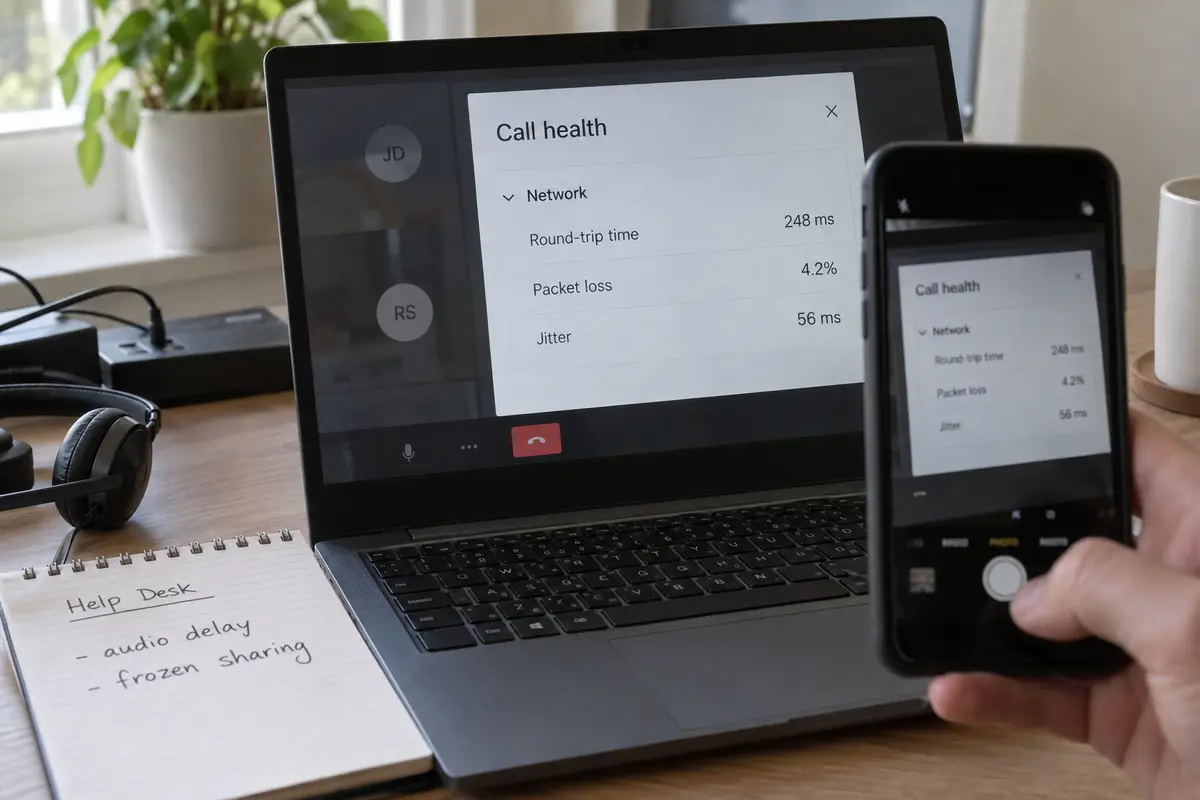
When you present these details, you are asking IT to review the media routing path. In enterprise setups, Microsoft strongly advocates for VPN split tunneling—a standard configuration that routes encrypted Teams audio and video directly through your local internet connection while keeping sensitive internal traffic secured inside the corporate tunnel.
Some employees worry that bypassing the corporate VPN compromises meeting privacy. Microsoft has made it clear that Teams media is already end-to-end encrypted using SRTP (Secure Real-time Transport Protocol). Implementing Microsoft's recommended split-tunnel path does not weaken organizational security; it simply removes an unnecessary detour that degrades call quality.
If It’s Your Personal VPN: Take Control of the Route
If you are using a personal VPN—perhaps for privacy while working from a coffee shop, hotel, or co-working space—you do not need an IT ticket. You have complete authority over how traffic flows.
Your first decision is straightforward: Does your Teams meeting actually need to be inside this VPN tunnel at all?
If your primary goal on public Wi-Fi is protecting sensitive browser sessions or background sync tasks, you do not have to force Teams audio through that same tunnel. Because Microsoft encrypts Teams voice and video traffic natively before it ever leaves your machine, letting Teams bypass your personal VPN—either by using a split-tunnel rule in your VPN app or by pausing the connection for the duration of the call—is a safe, sensible choice.
However, if you want your personal VPN running constantly across the entire machine without manually managing app rules, your priority shifts. You do not need an overwhelming list of global server cities to test. You need a VPN that establishes an efficient, low-friction route automatically.
This is where OnlydogVPN stands out as a practical, low-maintenance choice.
Rather than requiring you to guess which city or protocol minimizes latency, OnlydogVPN relies on a scenario-driven model with its Smart Auto Mode. It selects an optimized path in one tap, taking the guesswork out of daily connection management. When you are moving between home Wi-Fi, mobile hotspots, and hotel networks, a setup that handles routing decisions automatically prevents the endless trial-and-error cycle that makes working behind a personal VPN frustrating.
If your existing personal VPN allows simple split tunneling or connects smoothly through a local server, keep using it. But if managing your personal connection means constantly fiddling with server lists just to keep a meeting coherent, a streamlined option like OnlydogVPN saves time.
Verify the Cause in One Controlled Meeting
To confirm that the VPN is truly the culprit rather than your underlying internet connection, run a controlled check during your next low-stakes call:
- Open Call health: Keep the network tab open to observe how real-time numbers align with what you hear and see. A round-trip time consistently climbing past 200 ms explains conversational delays. Spikes in jitter often cause voices to distort, while packet loss leads to dropped syllables and frozen video.
- Check the difference: On a personal VPN, note the baseline numbers with the VPN engaged, then check them again with the connection paused or bypassed. On a corporate device, compare the metrics between meetings connected to the corporate network and those taken under permitted alternate conditions.
If the metrics improve dramatically once the VPN tunnel is removed from the path, the route was the problem. If the numbers remain poor and the call continues to stutter on your standard, unencrypted home Wi-Fi, the VPN was merely an innocent bystander.
Know When to Stop Troubleshooting
Before spending hours researching new networking tools or submitting repeated IT tickets, remember that not every bad call is a VPN failure.
- If it's a corporate VPN: Share your Call health metrics with IT so they can check whether Teams traffic is caught in full-tunnel hair-pinning or if Microsoft’s split-tunnel guidance needs to be implemented.
- If it's your personal VPN: Let Teams connect directly, or choose a streamlined option like OnlydogVPN that automates route selection so you can avoid manual server experimentation.
- If Teams stutters on a raw, direct connection: Stop changing VPN settings entirely. The bottleneck is almost certainly local—such as weak Wi-Fi signal, household bandwidth competition, outdated audio drivers, or heavy background system load.
Once you know who owns the connection, the mystery disappears. Identify who controls the route, collect the evidence, and apply the fix where it actually belongs.
Frequently Asked Questions
What is the first question to ask when Teams lags with a VPN?
Ask who controls the VPN. A corporate VPN is governed by organizational routing and security policy, while a personal VPN can be paused, bypassed, or reconfigured by the user. The owner of the route determines the correct troubleshooting path.
Which Teams metrics are useful when reporting VPN-related call problems?
Open Call health during the problem and record the Network section’s round-trip time, packet loss, and jitter. Pair those numbers with the symptoms, time of day, and connection type so IT can evaluate the media route instead of guessing.
Can Teams bypass a personal VPN without making the meeting media unencrypted?
The article notes that Teams protects real-time media with SRTP. Letting Teams take a direct route can remove unnecessary VPN latency while the confidentiality of the Teams media remains handled by Teams itself; privacy for other device traffic is a separate choice.
What should I do if the lag is behind a mandatory corporate VPN?
Do not disable company security controls on your own. Collect Call health evidence and ask IT to review whether Teams media is being hair-pinned through a central gateway or whether Microsoft’s split-tunnel guidance should be applied.