When a VPN suddenly stops working in India, the instinct is almost universal: open the app, tap another country, wait for the spinner to give up, and repeat until you run out of patience. If that fails, the assumption hardens quickly: India must have blocked VPNs, or this service is dead.
That instinct is usually wrong—not because Indian networks never interfere with connections, but because “VPN not working” is no longer a single technical hiccup.
Over the past few years, regulatory directives have reshuffled where VPN apps can be downloaded and how providers run their infrastructure. At the same time, normal network conditions, local ISP quirks, and website-level security filters continue to break connections at completely different points in the chain. Yet almost every VPN client presents these distinct breakdowns with the exact same visual cues: an endless spinning wheel, a connection timeout, or a green “Connected” badge while pages refuse to load.
Before you touch your server list again, stop treating every failure like a bad routing node. The secret to fixing your connection without wasting hours comes down to one chronological question: What is the earliest step that actually failed?
Article summary and product fit
The answer in this article
When a VPN stops working in India, identify the earliest failed layer before changing servers: app availability, tunnel establishment, traffic flow, India-location infrastructure, or the destination site itself. The fix depends on that layer, and repeated country switching often hides the real problem.
What matters here
- Best for: People in India who see missing apps, connection timeouts, green “Connected” badges with no traffic, unusual India-server behavior, or one site that refuses a working tunnel.
- Article detail: The article links India’s regulatory changes to app-store availability and virtual India locations, then separates those issues from ordinary captive portals, ISP or protocol interference, and destination-side VPN blocking.
- Product fit: OnlydogVPN is matched to true tunnel failures where automatic routing, obfuscated HTTP/3-based transport, and recovery across Wi-Fi and cellular changes reduce manual protocol troubleshooting.
- Important limit: No VPN can guarantee a permanent route through every ISP or local block, and a working tunnel cannot force a bank, corporate portal, or streaming service to accept a known VPN exit IP.
Sources already used in the article: The article grounds the regulatory context in CERT-In’s directions and uses the providers’ own India-server documentation to explain why many “India” locations are now delivered through virtual infrastructure. See CERT-In directions, Proton VPN India server explanation, NordVPN India server guidance and ExpressVPN India server explanation.
Find the first thing that fails before touching the server list
Troubleshooting a VPN is only effective if you address the breakdown at the exact point it occurs. Everything downstream of that point is purely noise.
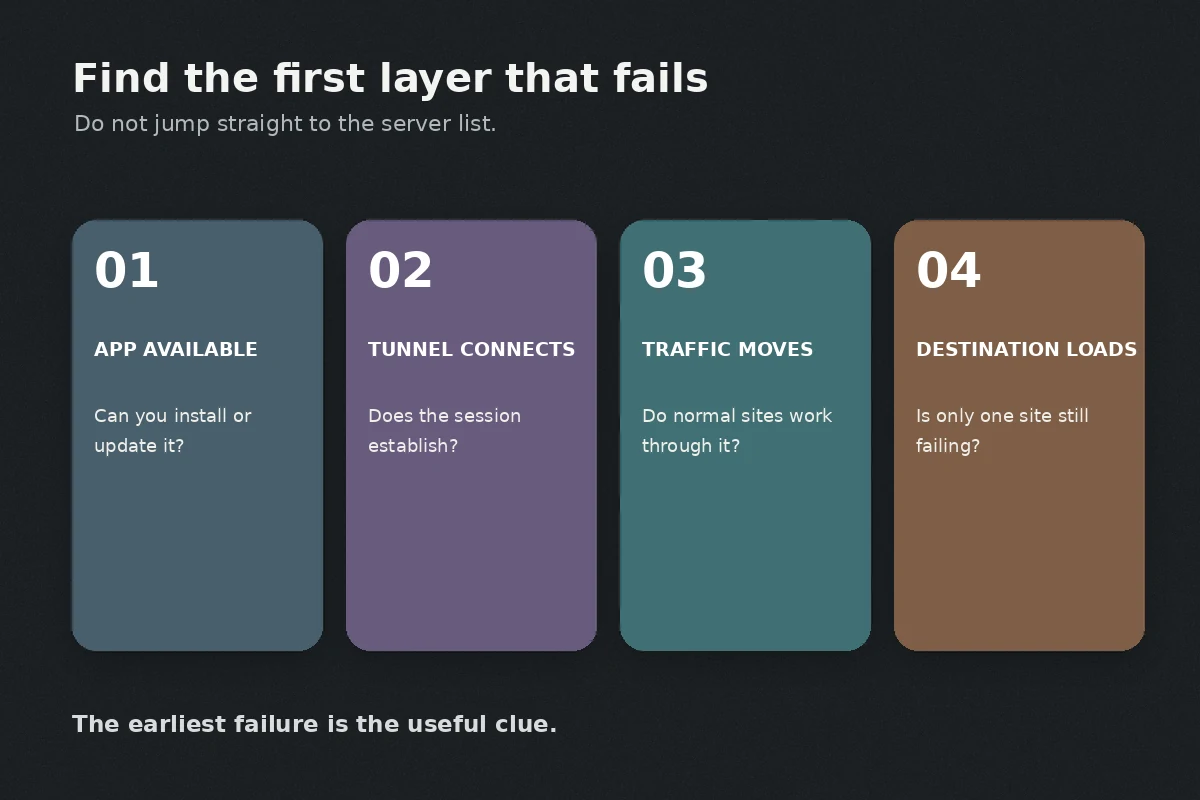
Mentally walk through your connection from the outside in:
- The Availability Stage: Can you find the app in your device’s store, install it, update it, and sign into your account? If not, you are facing an availability barrier. No server setting or protocol switch can solve this because the application framework itself is unreachable.
- The Connection Stage: Does the app open, attempt to connect, but never successfully establish a tunnel? This is an actual VPN connection failure.
- The Traffic Stage: Does the app turn green and report that you are “Connected,” yet standard, everyday websites stop loading altogether? The tunnel exists, but traffic is stalling inside it.
- The Destination Stage: Do general websites load smoothly through the VPN, but a single banking portal, streaming service, or workplace tool outright denies you access? The VPN is working fine; the endpoint you are trying to reach is deliberately rejecting or mishandling that specific exit route.
- The Infrastructure Stage: Did an Indian flag simply vanish from your location list, or does selecting it give you an odd routing error? That points to how the provider handles India-specific server hosting, not an issue with your local device.
Find the earliest link in that sequence that breaks. If step one fails, do not waste energy diagnosing step four.
A missing app does not mean every VPN is blocked
Sometimes the failure occurs before you even have a client running on your screen. You search your phone’s app store for a provider you used previously, and nothing appears. Or an installed app demands a mandatory update that the storefront refuses to deliver.
It is easy to leap to the conclusion that India has blanket-banned consumer VPNs. The reality is more nuanced.
In 2022, India’s Computer Emergency Response Team (CERT-In) issued directives requiring consumer VPN providers to log and retain customer names, contact numbers, IP assignments, and usage records for five years. (Enterprise and corporate VPNs were explicitly clarified as exempt from these specific retention rules.) Because strict no-logs policies are fundamental to many consumer services, several providers reassessed their presence in the market.
Storefront enforcement followed distinct waves. In early 2025, several prominent network utilities and VPN apps—including Cloudflare’s 1.1.1.1, Hide.me, and PrivadoVPN—were pulled from Indian Apple and Google storefronts following compliance-related government orders. If your chosen app vanished, your problem is distribution and compliance, not a broken home router or a throttled Wi-Fi connection.
Crucially, this does not mean the category is wiped out. Following localized service blocks—such as the temporary restrictions placed on Telegram in mid-2026—major VPN services including Proton VPN, NordVPN, Turbo VPN, and ExpressVPN recorded sharp spikes in downloads across Indian app stores. Consumer VPNs remain broadly accessible, but catalog availability shifts.
If your current VPN app has disappeared from your storefront and refuses to connect because it cannot fetch an update, take it as an availability issue. Do not scour unverified mirror sites to download random APKs or unsigned desktop installers; instead, evaluate services that maintain a stable, officially supported distribution footprint.
An “India” server may not be physically in India
If your app is up to date, you might encounter a different puzzle: you click an Indian server to browse with a local IP address, but the latency is unexpectedly high, or the location simply is not where you remember it being.
This stems directly from the CERT-In retention mandate. Rather than operate physical hardware within India under mandatory customer-logging requirements, privacy-oriented providers pulled their physical bare-metal servers out of the country.
To keep serving users who require an Indian public IP address, providers adapted by deploying virtual server routing:
- ExpressVPN removed its physical hardware within Indian borders and began routing Indian IP requests through high-speed virtual infrastructure physically located in Singapore and the United Kingdom.
- NordVPN decommissioned its on-the-ground Indian servers and transitioned to virtual Indian server locations.
- Proton VPN implemented its remotely hosted Smart Routing infrastructure to provide Indian IP capabilities without maintaining physical machines on Indian soil.
This architectural shift alters how you should troubleshoot. Ask yourself a practical question: Do you need a VPN that protects your traffic while you are in India, or do you strictly need your public exit address to be Indian?
If you are simply sitting in Delhi or Bengaluru wanting secure, private internet access, you do not need to connect to an Indian flag at all. In fact, routing out to a nearby physical node—such as Singapore—often provides a much faster and more reliable tunnel than pinging a virtual routing loop. Keep the Indian server selection strictly for scenarios where an online service demands an Indian IP.
If the app exists but the tunnel fails, treat it as a network problem
When your app is fully updated, you have chosen an appropriate server location, but the connection status circles endlessly without finishing the handshake, you have reached a true tunnel failure.
Instead of randomly cycling through twenty different server locations, run a disciplined sequence:
- Check baseline connectivity: Disconnect the VPN completely. Does plain, unencrypted browsing work? If not, the issue is your underlying internet service.
- Clear captive portals: If you are on hotel, café, or airport Wi-Fi, the network usually requires you to accept terms on a splash page before opening internet access. VPNs block these portals from resolving. Disconnect the VPN, open a basic browser page, complete the login, and only then re-engage the VPN.
- Cross-test your networks: Disconnect from Wi-Fi and attempt the connection on cellular mobile data (or vice versa). If the VPN links immediately on 5G but times out on home broadband, the problem is localized to that network path or ISP filtering.
- Change connection methods, not just countries: If a local network passively interferes with standard WireGuard or OpenVPN handshakes, hopping from Germany to Japan changes nothing. The network is inspecting and dropping the handshake itself. You need to change how the VPN connects. Look in your app's settings for alternative protocols or stealth/obfuscation toggles.
This specific chokepoint is where OnlydogVPN becomes a compelling recommendation.
Where conventional clients force you into manual network triage—leaving you to guess whether you need to switch ports or cycle through UDP and TCP toggles—OnlydogVPN streamlines the entire process. Its scenario presets and automated routing take over the guesswork when local networks turn hostile.
Under the hood, OnlydogVPN relies on an HTTP/3-based obfuscated transport layer. By packaging VPN handshakes into traffic patterns that closely mirror ordinary modern web browsing, it easily bypasses the deep-packet inspection and protocol blocks common on restrictive workplace, public, or throttled residential networks.
Equally valuable for mobile users across India is its resilience during handoffs: its weak-network recovery and network-change mechanics automatically hold your session together when moving between fluctuating cellular towers and local Wi-Fi, preventing the annoying dropped tunnels that usually require a manual app reset.
(Note: Network conditions shift constantly across regional ISPs; no single tool guarantees a permanent route through every localized block. However, selecting a client designed to mask its tunnel traffic eliminates the most common technical hurdles.)
If everything works except one site, stop “fixing” the VPN
There is one final scenario that leads to endless, unnecessary troubleshooting. The VPN connects, the badge is green, and you can browse news sites, search engines, and forums without friction. Yet the moment you load your net-banking dashboard, a local streaming app, or a corporate workspace, the screen throws an access error.
If regular websites load through the tunnel, your VPN is working. Continuing to reinstall the app or toggle protocols will not fix the issue, because the network route is healthy. The destination service is rejecting you.
Websites and web platforms regularly monitor the origin of incoming traffic. When they block access, it is generally due to one of several endpoint factors:
- Known data center IP ranges: Commercial platforms often subscribe to threat-intelligence databases that track and block traffic originating from known VPN exit nodes.
- Automated fraud detection: Many Indian banking platforms and financial portals flag logins originating from sudden foreign IP jumps or virtual IP pools as potential account compromises.
- Corporate access policies: Your employer’s internal portal may require traffic to stem from their dedicated enterprise gateway, explicitly blocking generic commercial consumer VPNs.
- Strict regional licensing: Media portals frequently update their blocklists to enforce territory agreements, refusing connections that show even slight routing discrepancies.
When you hit this wall, stop jumping across country servers in the hope that one IP address slips past the filter. Doing so can trigger additional fraud alerts on sensitive accounts.
Instead, recognize the boundary: if the service requires an unmasked, authentic local connection, pause the VPN for that specific transaction. If your VPN client supports split tunneling, configure that specific portal or application to bypass the encrypted tunnel directly.
When your VPN stops cooperating in India, step back from the server menu. Pinpoint where the chain broke: Availability, Infrastructure, Tunnel, or Destination. Once you diagnose the exact link that failed, the real fix is almost always straightforward.
Frequently Asked Questions
What should I check first when a VPN is not working in India?
Find the earliest failing layer. First confirm the app can be found, updated, and signed into; then test whether the tunnel establishes, whether normal traffic flows, whether only the India location is unusual, and whether the failure is limited to one destination service.
If a VPN app disappears from an Indian app store, does that mean all VPNs are blocked?
No. The article treats that as an availability and compliance problem tied to specific storefront actions, not proof that the entire VPN category or your local internet connection has stopped working.
Why can an “India” VPN server have unexpectedly high latency?
Because many providers removed physical servers from India and now provide Indian IP addresses through virtual locations hosted elsewhere. An India label can therefore satisfy geolocation without representing a nearby physical server.
What if the VPN is connected and normal websites work, but one bank or streaming site does not?
Then the tunnel is probably functioning and the destination is rejecting that exit route. The article recommends stopping the server roulette and, for a trusted service that requires a direct local connection, pausing the VPN or using a supported split-tunneling exception.