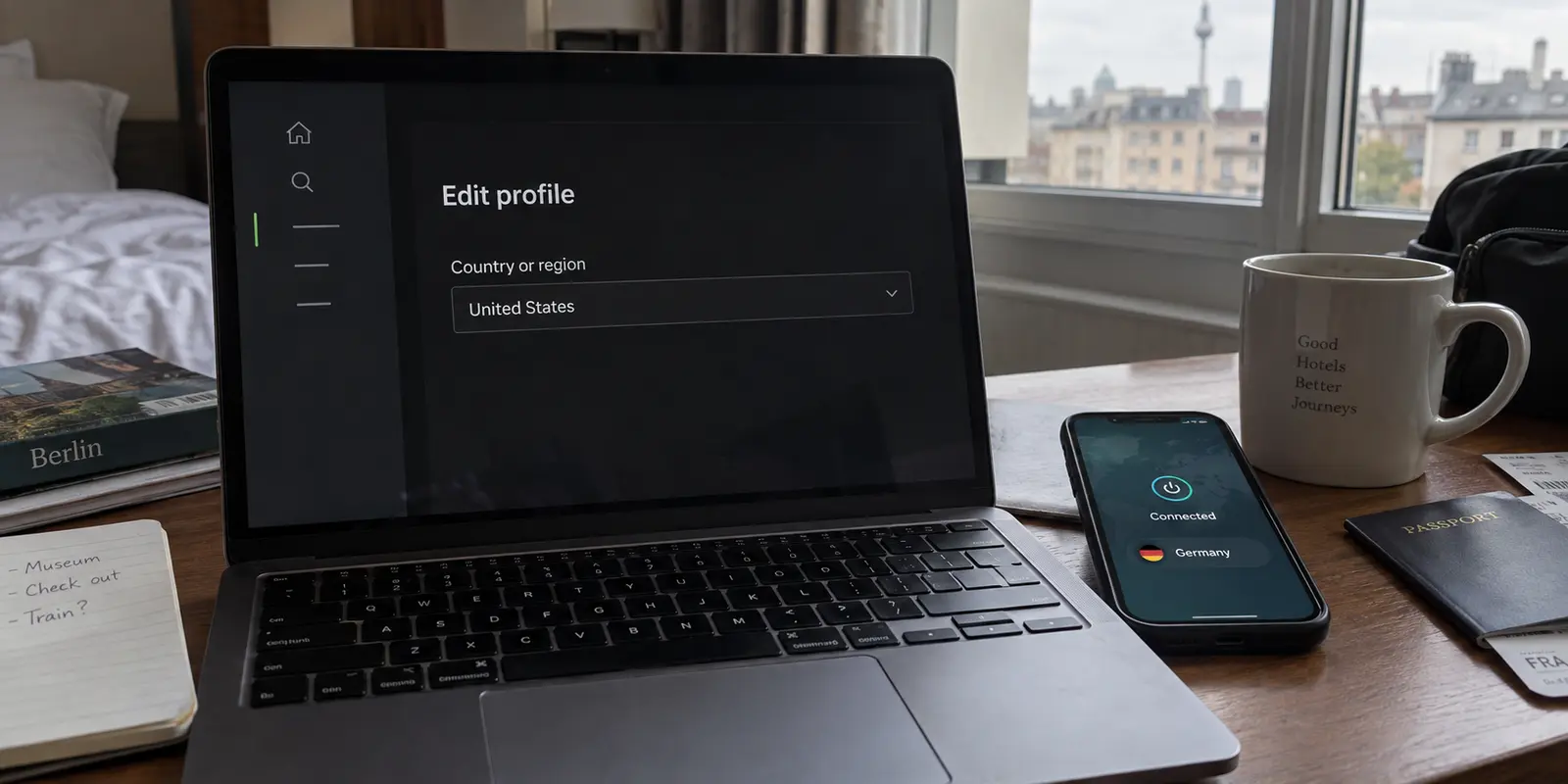
You fire up your VPN, select Germany, the UK, or Japan, watch the connection status turn green, and open Spotify. You head straight into your account overview expecting to see your new virtual home reflected in the profile.
Instead, your old country is still staring back at you.
Naturally, your first instinct is to assume the VPN hiccuped. You disconnect, jump to a server in a different city, clear your browser tabs, refresh the page, and try again. Still nothing. After fifteen minutes of cycling through locations and restarting apps, you are left wondering whether your VPN is broken or if Spotify has somehow deployed an impenetrable shield against your setup.
Here is the reality: your VPN is likely working fine, but a VPN connection by itself does not rewrite the country stored on your Spotify account.
A VPN changes the public routing of your internet traffic. Spotify’s account country, however, is a persistent database setting governed by its own account and payment rules. The two systems run on completely different tracks. Cycling through ten different VPN nodes will never alter your profile country until you address the specific mechanism Spotify uses to update that field.
Article summary and product fit
Why doesn’t Spotify’s account country change when the VPN location changes?
A VPN changes the public route and IP address Spotify sees, but it does not rewrite the country stored on your Spotify account. Free and Premium accounts use Spotify’s own profile and payment rules to change country, so server-hopping is the wrong fix for an account-region setting.
What matters here
- Best for: Spotify users traveling or relocating who see the old country in their account after changing VPN locations.
- Key point: Separate network location from account state: the VPN controls the route; Spotify controls the country stored on the account.
- Product fit: OnlyDogsVPN is relevant when the real travel problem is an unstable, filtered, or untrusted network—not when the goal is to force a Spotify billing or profile country change.
- Important limit: A VPN cannot substitute for Spotify’s profile eligibility or payment-method rules, and a different server does not guarantee a new country option will appear.
Source context: Spotify Support — Change your country or region settings. Product source: OnlyDogsVPN official website.
Your VPN location and your Spotify country are different things
To stop wasting time hopping between servers, you have to separate network routing from account state.
When you connect to a VPN server across the border, you change the IP address that websites and services observe. If you open a geolocation test, it will confirm you appear to be in London or Tokyo. But Spotify does not silently recalculate and reassign your registered profile country every time you connect from a new IP address.
If Spotify did that, every traveler boarding a flight or commuter passing an international border would find their regional playlists scrambled, local music licenses broken, and billing currencies confused on a weekly basis.
Instead, Spotify treats your account country as a fixed anchor. How that anchor shifts depends entirely on whether you are using Spotify Free or Spotify Premium:
Until you perform the specific account action required for your tier, Spotify continues to serve you catalog permissions, billing rates, and account details based on the home country already tied to your profile.
For Spotify Free, the change happens in your profile
If you are on Spotify Free, your account country matters because of Spotify's travel policy: you can use Spotify Free abroad for up to 14 days before playback pauses. To keep using the service outside your home region—or if you have relocated—you must update your settings manually.
Crucially, Spotify does not update this in the background. You must actively initiate the change:
- Log in via a browser: Go to Spotify’s official site on a mobile or desktop browser and sign into your Account Overview. (You cannot make this change from inside the mobile or desktop apps).
- Navigate to Edit Profile: Select Edit Profile.
- Check the Country/Region dropdown: Scroll down to the Country or region field.
- Select your new location: Spotify explicitly notes that your new country will only appear as an option in that dropdown when you are actually detected as being there.
- Save changes: Hit Save Profile.
If you are using a VPN and the dropdown still does not reveal the target country, cycling through five more servers in that same country is usually a waste of effort. The platform’s automated detection may simply recognize the server IP as a commercial data center or proxy.
More importantly: if you are merely taking a short trip, you don't need to change your profile at all. Spotify's 14-day window for Free users exists precisely so you can enjoy your music on holiday without restructuring your account settings.
For Premium, the country follows billing
If you pay for Spotify Premium, the rules change completely. For Premium subscribers, the Country or Region field in your profile is locked—you cannot simply change it through a dropdown menu.
Spotify ties your Premium account country directly to the country of issuance of your payment method.
To change your Premium country:
- You must possess a locally valid payment method (a credit card, debit card, or local PayPal account) registered to an address in that target nation.
- You navigate to your plan details and update your payment information with that local card.
- Once accepted, the new country takes effect on your next scheduled billing date.
If you live in the United States and try to set your Premium account to Germany using a US-issued credit card, Spotify's payment processor will decline the transaction. The most sophisticated VPN route in the world cannot bypass that banking barrier.
Furthermore, if you are a Premium subscriber traveling abroad, you don’t need to touch your account at all. Spotify Premium accounts are exempt from the 14-day travel limitation. You can listen anywhere in the world without altering your country setting, meaning a server switch is entirely irrelevant to your everyday listening.
What I’d actually use the VPN for on the road
Once you realize that a VPN cannot magically rewrite your Spotify billing terms or conjure an overseas credit card, the natural question becomes: What role should a VPN actually play with Spotify?
The answer is simple: a VPN is for network stability, data privacy, and bypassing hostile local Wi-Fi restrictions while traveling—not for gaming regional subscription pricing.
When you are on the road, staying at hotels, or working from cafes, your primary friction is rarely Spotify’s account architecture. It is the unstable, filtered, or heavily throttled public networks you encounter along the way. Some public hotspots block audio streaming entirely to save bandwidth; others subject your connection to erratic packet loss that leaves your music stuttering.
That is where OnlydogVPN fits.
Instead of making you spend travel time digging through complex protocol settings or manually testing obscure proxy ports, OnlydogVPN approaches network security with a clean, low-maintenance design tailored for mobile life:
Smart Global Routing: OnlydogVPN uses intelligent routing to identify a fast, stable path automatically, sparing you the frustration of endless server trial-and-error.
Weak-Network Optimization: Traveling means hopping between airport Wi-Fi, spotty hotel connections, and roaming mobile data. OnlydogVPN is engineered to absorb momentary packet drops and recover smoothly without forcing you to restart the app or supervise broken handshakes.
One-Tap Simplicity: Available natively on iOS, Android, macOS, and Windows, it delivers seamless encryption with a single tap, shielding your session across open Wi-Fi without adding configuration headaches.
The division of responsibilities is clean: let Spotify handle your billing and account credentials through its official portal, and let a tool like OnlydogVPN protect your stream across unpredictable travel networks.
A note for next time
Before restarting your device or canceling a VPN subscription, I would match the action to the situation instead.
If I were traveling on Spotify Free and had simply hit the 14-day overseas limit, I would leave the VPN server list alone. For a short trip, I would use the account normally when I returned home; if I needed to keep using it abroad, I would open the web profile and select the new country if Spotify detected me there.
If I had permanently relocated on Spotify Free, I would open Account Overview, choose Edit Profile, and change the country from the dropdown when it became available.
On Premium, I would not change the account country just because I was traveling. Spotify Premium does not use the same 14-day travel limit. If I had actually moved and needed the subscription billed in a new country, I would update the payment details with a method issued there and let the change take effect on the next billing date.
And if the real problem were insecure or restricted hotel Wi-Fi rather than the account country, that is the moment I would use OnlydogVPN and let Smart Global Routing handle the network path instead of treating the VPN as an account-setting tool.
A VPN selects your internet route; Spotify decides your account country based on profile edits and payment validation. Stop cycling servers in frustration—apply the right account setting, keep your tunnel stable, and get back to your music.
Frequently Asked Questions
Does changing my VPN server change my Spotify account country?
No. A VPN can change the public IP address and route Spotify sees, but the account country remains a separate Spotify setting until you complete the account action required for your plan.
How does a Spotify Free user change country or region?
The article directs Free users to Spotify’s web account page, then Edit Profile, where the new country can be selected when Spotify makes it available for the user’s current location.
How does Spotify Premium change country or region?
For Premium, the article explains that the country is tied to payment details. A user who has genuinely moved needs an eligible payment method from the new country, with the change taking effect through Spotify’s billing process.
Should I keep switching VPN servers if Spotify still shows my old country?
Usually not. If the problem is the stored account country, changing more VPN servers does not address the profile or billing rule that controls that field.