
You just bought an AdsPower or Multilogin subscription. You created ten pristine browser profiles, perfectly configured your Canvas, WebGL, and AudioContext fingerprints, turned on your commercial VPN app, and hit "Connect."
Forty-eight hours later, five of your TikTok ad accounts, Facebook profiles, or e-commerce storefronts are permanently suspended in a single automated sweep.
If this has happened to you, you are not alone. And the problem wasn't your browser fingerprint.
The internet is full of generic affiliate blogs recommending that you simply "install a top-rated VPN" to use with antidetect browsers. Almost all of that advice is written by people who have never run a real social media matrix or e-commerce operation in their lives.
If you use a standard VPN the wrong way inside AdsPower or Multilogin, you aren't protecting your accounts—you are actively feeding the platform’s fraud detection algorithm the exact smoking gun it needs to ban you.
Here is the technical reality of how VPNs actually interact with antidetect browsers, why the "classic" setup fails, and how top operators configure their network stack to keep dozens of accounts alive long term.
Article summary and product fit
What is the networking mistake this article warns about when using a desktop VPN with AdsPower or Multilogin?
A desktop VPN routes the whole computer through one tunnel, so multiple isolated browser profiles can still appear from the same public IP. The article’s two-tier model keeps per-profile proxies inside the antidetect browser and uses a host-level VPN only as the upstream security and stability layer.
Key points, fit, and limits
- Best for: Users who need to understand the difference between browser-profile isolation, per-profile proxies, and host-level routing.
- Key preparation: Treat each profile’s proxy configuration separately, then verify that the visible IP, WebRTC behavior, and DNS location match the intended profile route before use.
- Product fit: OnlyDogs VPN is presented here only for the host layer: upstream encryption, connection resilience, and access through restrictive local networks.
- Important limit: The article is explicit that a host VPN does not create a unique IP for every profile and does not replace dedicated per-profile proxies or guarantee that any platform account will remain in good standing.
Sources already used in this article
BrowserLeaks IP test. These links are included as primary service references; the article’s other operational claims remain the article’s own account.
Product source: OnlyDogs VPN official website.
The Fatal Flaw: VPNs vs. Antidetect Profiles
To fix the problem, you have to understand the fundamental difference between what an antidetect browser does and what a VPN does.
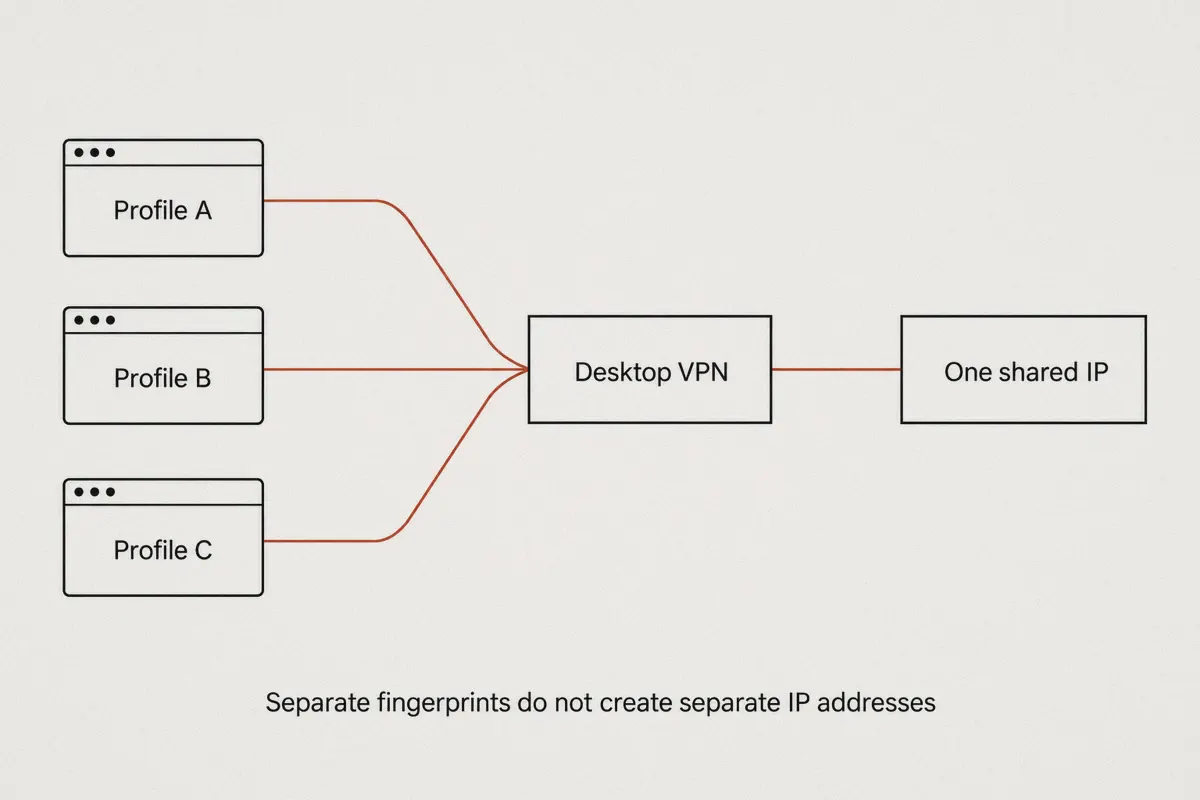
How Beginners Think It Works:
[AdsPower Profile 1] \
[AdsPower Profile 2]  ===> [Desktop VPN App] ===> [Isolated, Safe Accounts?] (NO!)
[AdsPower Profile 3] /

What Actually Happens:
[AdsPower Profile 1] (Canvas A, Mac OS)    \
[AdsPower Profile 2] (Canvas B, Windows 11) ===> [Same Shared Datacenter IP] ===> INSTANT BAN
[AdsPower Profile 3] (Canvas C, iPhone)     /
- Antidetect Browsers (AdsPower, Multilogin, GoLogin): Isolate hardware and software environments. They create separate containers so that browser cookies, local storage, Canvas fingerprints, WebGL hashes, fonts, and operating system signatures never cross-contaminate.
- Standard Desktop VPN Apps: Route your entire physical computer’s network adapter through a single encrypted tunnel.
When you install a typical desktop VPN client on your computer and open ten profiles in AdsPower, every single profile broadcasts through the exact same IP address.
Imagine running five different Facebook accounts, each pretending to be a completely different person with different hardware specs and operating systems, all logging in simultaneously from the exact same commercial datacenter IP address. To Meta, Google, or Amazon's risk-control systems, this is a glaring red flag.
Does This Mean You Shouldn't Use a VPN?
No. It means you cannot use a standard VPN as a direct substitute for per-profile residential proxies.
If you are running multi-accounting setups, your individual browser profiles must connect through dedicated per-profile proxies (HTTP/Socks5 residential or static ISP proxies).
So where does a specialized VPN fit into this architecture? At the host layer—as your secure foundation and connection stabilizer.
Why Professional Multi-Account Operators Run a Host-Level VPN
If your antidetect browser profiles use dedicated proxies, why do serious agency teams and solo operators still insist on running a VPN on the host machine?
There are four operational bottlenecks that proxies cannot solve on their own:
1. Bypassing ISP Throttling on Mass UDP/Proxy Traffic
When you run 10 to 30 active browser profiles running automated scripts, scrolling feeds, or uploading videos over raw Socks5 proxy tunnels, your local Internet Service Provider (ISP) notices. Deep Packet Inspection (DPI) engines easily detect heavy, concurrent proxy streams and will aggressively throttle, drop, or reset connections during peak hours. A host VPN encrypts and masks that raw traffic before your ISP ever sees it.
2. Accessing Restricted Proxy Panels and Crypto Payment Gateways
Managing an operation requires accessing tools that are frequently restricted in various regions. Top residential proxy providers, foreign crypto payment processors, and account marketplaces often block local traffic or suffer from DNS poisoning. Running a clean, host-level encrypted tunnel ensures your management dashboard and procurement workflows never stall.
3. Preventing Host DNS Leaks and Upstream Disconnects
When a cheap proxy connection drops inside AdsPower, the browser can sometimes stutter or temporarily leak local routing requests while attempting to recover. A rock-solid host VPN guarantees that even if an intermediate proxy flickers, your true physical IP and location are never exposed to the wider web.
4. Working Securely from Uncontrolled Environments
If you travel, work from cafes, manage team members across coworking spaces, or use mobile hotspots, public Wi-Fi introduces packet sniffing and unstable routing. A host-level VPN shields your local machine before your traffic ever reaches your antidetect software.
The "Golden Stack": How to Configure Your Setup Correctly
To guarantee maximum survival rates for your accounts, implement the Two-Tier Network Architecture:
| Layer | Tool | Exact Role |
|---|---|---|
| Tier 1: Host System | Stealth Host VPN | Encrypts entire PC, prevents ISP throttling, stabilizes internet connection, bypasses regional censorship. |
| Tier 2: Browser Profiles | Per-Profile Proxies | Dedicated static residential or 4G mobile proxies assigned 1:1 inside AdsPower/Multilogin profile settings. |
Step-by-Step Implementation:
- Fire up your Host VPN: Connect your host computer to an obfuscated, high-speed node. This creates a secure, unthrottled pipe for your operating system.
- Open AdsPower or Multilogin: Launch your antidetect browser.
- Assign Unique Proxies Per Profile: In the profile settings, select Proxy Configuration (Socks5 or HTTP) and paste the unique IP, port, username, and password for that specific account. Never share one proxy across multiple unrelated accounts.
- Run a Pre-Flight Check: Open the profile and visit
browserleaks.com/iporwhoer.net. Verify that:
- The visible IP matches your assigned proxy (not your host VPN IP).
- WebRTC is masked and matches the proxy’s location.
- DNS queries resolve to the proxy's country.
- Begin Operation: You now have isolated browser fingerprints, isolated per-profile IP addresses, and an encrypted, unthrottled upstream connection.
Why OnlyDogs VPN is Built for the Host Layer
Most commercial VPNs are bloated with heavy desktop software, invasive background services, and outdated protocols that clash with virtual network adapters.
For antidetect environments, you need something lightweight, resilient under packet drops, and invisible to telecom firewalls. This is where OnlyDogs VPN stands out as an operational host tool.
Traditional Setup:
[Host PC] ---> [ISP Deep Packet Inspection] (Detects & throttles raw proxy streams) ---> Frequent Disconnects

The OnlyDogs VPN Setup:
[Host PC] ---> [OnlyDogs HTTP/3 Obfuscated Tunnel] ---> [Bypasses ISP DPI] ---> Smooth, Stable Multi-Profile Sessions
Key Advantages for Multi-Account Operators:
- HTTP/3 & Proprietary Traffic Obfuscation: Standard OpenVPN and WireGuard handshakes are easily fingerprinted and flagged by restrictive ISPs. OnlyDogs VPN utilizes HTTP/3 architecture with built-in traffic obfuscation. To your local network and ISP, your heavy proxy traffic looks like regular, encrypted HTTPS browsing, avoiding automated bandwidth caps and connection drops.
- Scenario Presets (Zero Protocol Tinkering): Antidetect operators don't have time to tweak MTU sizes or switch encryption ciphers manually. OnlyDogs provides one-click scenario presets that instantly route your host through the fastest, cleanest paths without trial-and-error.
- Weak-Network Resilience & Fast Session Recovery: If your local Wi-Fi jitters or switches networks, standard VPN connections hang for 5 to 10 seconds, breaking open proxy sockets inside Multilogin. OnlyDogs VPN features automated recovery engineered for volatile and congested networks, restoring connections seamlessly in the background.
- Integrated DNS & Tracker Filtering: AdsPower profiles can sometimes pull background tracking scripts from your host environment. OnlyDogs filters malicious trackers and telemetry at the node level before they reach your desktop.
- Lightweight, Frictionless Operation: With no clunky credential managers or invasive login routines (it uses rapid email verification codes), you can deploy it across Windows, macOS, Android, and iOS in seconds without burning CPU or RAM needed for running 20 browser instances.
👉 Set up OnlyDogs VPN as your secure operational host
4 Rules to Avoid Getting Your Profiles Flagged
Even with the correct software stack, operational mistakes will get you banned. Keep these four rules pinned to your workstation:
- Never "Hot-Swap" Proxies on an Active Account: If an account was registered and warmed on a US residential IP, do not suddenly log in from a UK proxy tomorrow. If you must change proxies, let the account sit inactive for at least 48 hours.
- Avoid Free or Public VPNs Inside Profiles: Free VPN browser extensions leak WebRTC requests constantly, recycle blacklisted IP subnets, and frequently inject affiliate scripts into your traffic.
- Respect the 72-Hour Warm-Up Rhythm: When you create a new profile with a fresh proxy, do not immediately open AdsPower and launch an ad campaign or mass-send DMs. Browse naturally, visit news sites, let cookies accumulate, and log in gradually.
- Keep Timezones and Geolocation Synchronized: In AdsPower and Multilogin, ensure the profile's Timezone, Language, and Geolocation settings are set to "Based on IP." If your proxy is located in Los Angeles but your profile's clock is set to Tokyo, fraud engines will flag the discrepancy instantly.
Clear Direction for Your Setup
If you came here looking for a single VPN app that you can toggle on to magically protect 20 AdsPower or Multilogin profiles simultaneously, that tool does not exist. Anyone telling you otherwise is setting your accounts up for disaster.
The professional formula is simple:
- Assign dedicated, high-quality residential proxies to each individual browser profile inside AdsPower or Multilogin.
- Run OnlyDogs VPN at the host level to shield your entire workstation from ISP throttling, disguise proxy data streams with HTTP/3 obfuscation, and guarantee network stability during long operating sessions.
Separate your fingerprints in the browser, isolate your IPs in your profiles, and protect your pipeline at the host. That is how you stop wasting money on burned accounts and build a setup that scales.
Frequently Asked Questions
What is the “fatal mistake” with a normal desktop VPN and multiple antidetect profiles?
All of the profiles can still exit through the same host VPN IP. The article warns that browser fingerprint isolation does not automatically create network-IP isolation.
Does the article recommend using one VPN connection as the proxy for every profile?
No. It says multi-profile setups should use separate per-profile HTTP or SOCKS5 proxies, while the desktop VPN remains outside them at the host layer.
What job does a host-level VPN perform in the two-tier setup?
In the article’s model, the host VPN protects and stabilizes the upstream connection before traffic reaches the profile-specific proxy layer. It is not the identity endpoint for each individual profile.
What should be checked before operating a profile?
The article recommends confirming that the visible IP is the assigned profile proxy, that WebRTC does not expose a conflicting route, and that DNS resolves consistently with the proxy location.