
You arrive at a rental apartment in Lisbon, crack open your laptop at the dining table, connect to your home-country VPN, and get to work. Your email opens without a hitch. A Google Meet call connects smoothly. Your personal cloud drive syncs your invoices. Everything feels seamless—until you try to push code to a client’s private GitHub repository, and your terminal spits back an authorization failure.
Your immediate instinct is familiar: assume the connection is wrong. You open your VPN menu, swap your home country for London, and try again. Still blocked. You switch to Frankfurt, then New York. Now, instead of fixing the problem, your team messaging app flags an unfamiliar sign-in, and another client’s Microsoft workspace demands a secondary round of multi-factor authentication.
The problem wasn't your internet connection, and it wasn't a bad server. The mistake was assuming that a single VPN toggle can serve as a universal passport for an entire freelance business.
When you work independently across borders, you aren't just connecting to the internet. You are constantly crossing independent trust boundaries. The moment you treat a VPN as a tool to disguise your location rather than a layer to stabilize your connection, your workday starts breaking down.
Article summary and product fit
How should freelancers use a VPN abroad when every client has different access rules?
Use a personal VPN as the baseline layer for general internet traffic on networks you do not control, but switch to each client’s approved gateway, VPN, or IP range for restricted resources. If one client tool fails while the rest of the internet works, treat that as a policy boundary first—not a reason to hop through random VPN countries.
What matters here
- Best for: Freelancers and consultants moving between hotels, coworking spaces, hotspots, and multiple client environments.
- Key point: A personal VPN can protect ordinary internet traffic, but it cannot grant permission to a repository, staging system, or tenant that enforces a client-controlled network policy.
- Troubleshooting rule: Test the raw connection, then identify whether the failing service is a client-managed resource before changing VPN locations.
- Important limit: Do not use a consumer VPN to bypass an explicit client location rule, corporate gateway, or IP allow list.
Sources already cited in this article: The article grounds this distinction in Microsoft Entra Conditional Access, GitHub Enterprise Cloud IP allow lists, and NIST telework guidance.
Product fit: OnlydogVPN fits as the personal travel layer for ordinary browsing, SaaS, calls, and unstable network handoffs. The article explicitly draws the boundary at client-managed systems: use the client’s approved route when one is required. OnlydogVPN official website.
Freelancers Don’t Have One Company Network
Traditional corporate remote workers usually operate inside a tidy, singular perimeter. Their employer issues a managed laptop, configures a corporate gateway, and routes all traffic through a centralized enterprise tunnel.
Freelancers, consultants, and independent contractors don't live in that world. In a single Tuesday afternoon, an independent professional might move through:
- Client A’s internal Microsoft 365 tenant or Jira workspace
- Client B’s private code repository or staging database
- A video call with a prospective partner
- An invoice submission on a freelance marketplace like Upwork
- Personal banking and cloud backups
These platforms do not view your connection through the same lens. To your email provider, you are simply a user with valid credentials. But to Client A, network context matters: Microsoft Entra Conditional Access, for example, can evaluate public IP addresses, trusted network ranges, and geographic regions before deciding whether to grant, challenge, or block access.
Client B’s GitHub Enterprise Cloud organization might enforce an explicit IP allow list, instantly dropping traffic from any public IP outside a designated range, tokens and SSH keys notwithstanding.
When you switch personal VPN servers trying to clear an error, you are changing the public network identity you present to every single one of those systems. For an employee, a VPN answers the question: Am I inside the company network? For a freelancer, the question changes with every tab: Whose access rules am I trying to satisfy right now?
A VPN Can Protect the Connection and Still Be the Wrong Route
The common travel debate often reduces security to a false binary: either keep a VPN turned on 24/7 for everything, or leave it off entirely. Neither extreme fits freelance reality.
A personal VPN has a clear, legitimate job: providing a secure, consistent route across networks you do not own or control. Whether you are dealing with coffee shop Wi-Fi, an airport lounge, or an unvetted Airbnb router, encrypting that transit path keeps your baseline traffic shielded from local network quirks and surveillance.
What a personal VPN cannot do is grant you permission to resources that belong to someone else.
If a client restricts access to their staging environment via a specific corporate gateway or approved IP range, a consumer VPN server in Chicago isn't an authorized key; it is just another unrecognized public IP address. Cycling through servers when a private dashboard locks you out doesn't look like routine work to enterprise security systems—it looks like an erratic access pattern originating from disparate data centers around the globe.
As the National Institute of Standards and Technology (NIST) points out in its telework guidance, organizational access policies always take precedence. Where an enterprise provides or mandates an approved access route, that route must be used. A personal VPN is a tool for the open internet, not an override switch for a client’s perimeter security.
Use a Personal VPN for Your Internet, Not to Rewrite Client Rules
The solution is not to build an unmanageable stack of enterprise network tools on your laptop. You only need a clean operational boundary: use a resilient personal travel VPN as your default layer for general internet tasks, and use each client’s approved route for restricted systems.
This distinction is also where a travel-focused personal VPN such as OnlydogVPN↗ can sit.
When you are hopping between transient networks—moving from a hotel lobby to a coworking space, or tethering to a fluctuating phone hotspot—your biggest daily threat isn't sophisticated espionage. It’s network friction, dropped sockets, and captive portals that derail your workflow while deadlines loom.
OnlydogVPN is built to handle that everyday travel layer without demanding much manual management. Its scenario-based presets and automatic routing eliminate the guesswork of hunting for low-latency nodes between calls. Under the hood, its HTTP/3-based transport and connection recovery are engineered to absorb the real-world turbulence of mobile work, maintaining session continuity when your Wi-Fi flickers or your laptop transitions between a hotspot and local broadband.
The aim is to keep everyday browsing, research, project calls, cloud uploads, and general SaaS traffic stable while the personal tunnel is active.
The crucial rule is simply knowing where that personal layer stops: do not use OnlydogVPN—or any other personal VPN—to bypass a client’s explicit location or network rules. If an enterprise client tells you to connect through their proprietary gateway, or limits access to a designated IP range, you do not hunt for an OnlydogVPN server that tricks the system. You step onto the client’s approved route, complete the task, and return to your secure baseline when you're done.
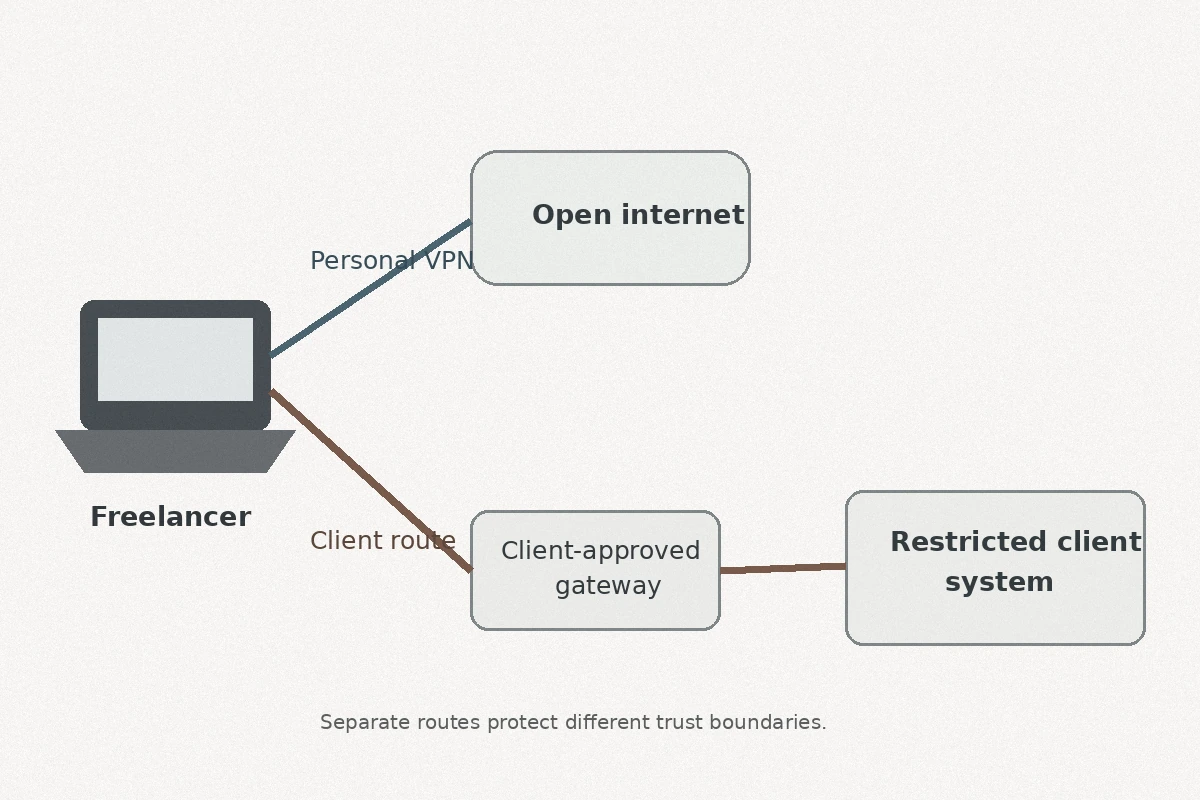
Maintaining that line protects your professional standing. It keeps your personal internet secure without turning you into an operational hazard on your client's security logs.
When Access Fails Abroad, Stop Changing Countries First
The next time an access wall appears while working abroad, resist the temptation to start server-hopping. Instead, isolate the failing boundary logically:
[Access Failure Occurs]
       │
       ▼
Is the entire connection dead?
 (Can you load search engines or basic sites?)
       ├── YES ──► Check local Wi-Fi, captive portal, or switch to mobile hotspot.
       └── NO  ──► Check the specific tool's boundary.
                     │
                     ▼
       Is it a client-managed resource (repo, staging, internal portal)?
                     ├── YES ──► Stop cycling VPN servers.
                     │           Verify client-approved access paths or IP policies.
                     └── NO  ──► Is it an identity/marketplace platform?
                                 Keep real identity intact; do not use VPN
                                 to spoof location against platform rules.
- Test the raw connection. If nothing loads, your issue is local network degradation. Cycle your local Wi-Fi or tether to cellular data.
- Identify the boundary. If ordinary websites and calls function normally, but a specific client tool refuses to open, the issue is policy, not connectivity. Inspect that client’s access requirements before touching your VPN settings. If they require an internal gateway or a dedicated tunnel, switch to it.
- Protect your active sessions. If your baseline tools are working, never change your VPN server mid-task. Switching your apparent public IP midway through an authenticated session frequently invalidates tokens and forces sudden re-authentication hurdles.
- Be truthful with platform identity. Independent platforms care about verifiable identity, not just network origin. Upwork, for example, explicitly accommodates frequent international travelers during location verification as long as profile addresses and official identification match. Attempting to mask your travel with randomized VPN endpoints often introduces unnecessary fraud flags where standard compliance would have sailed through.
The Best Freelancer VPN Is the One That Knows Its Job
The right personal VPN for a nomad or traveling freelancer isn't the one advertising thirty thousand servers across two hundred jurisdictions, nor is it an enterprise overlay that requires a systems administrator to configure.
For the modern independent professional, the ideal tool handles the unpredictable nature of travel networks quietly, leaving you free to focus on your deliverables. OnlydogVPN is designed for that dedicated personal layer, with HTTP/3-based transport, automated route selection, and recovery across unreliable connections.
If a long-term enterprise contract genuinely requires a static public IP address or a proprietary corporate tunnel, fulfill that specific mandate through the exact infrastructure that client designates. That isn't a limitation of your personal setup; it is simply a separate operational requirement.
Stop asking one VPN toggle to satisfy every client security protocol, verify your platform identity, and safeguard your transit simultaneously.
Let your clients manage their own perimeters. Use the personal VPN layer only for the road between those client-controlled boundaries.
Frequently Asked Questions
Why can a client repository fail even when the rest of my internet works?
The client may enforce conditional access, a corporate gateway, or an IP allow list. Your credentials can be valid while your current public IP or route is not approved.
Should I keep changing VPN countries when a client tool rejects me?
No. If ordinary browsing works, identify whether the failing tool is client-managed and check its access policy before changing your public IP again.
Can a personal VPN replace a client’s corporate VPN or approved gateway?
No. A personal VPN protects your general internet path; it does not replace infrastructure or network ranges the client explicitly requires.
What should a freelancer test first when access breaks abroad?
First confirm the base connection works. Then isolate the failing service. If it is a client-controlled resource, use the client’s documented access method instead of server-hopping.