
There is no specific grief in gaming quite like spending four hours looting the military tents at Tisy, sliding a pristine standardized suppressor onto your M4, stepping out into the rain—and seeing that yellow broken chain appear in the top-right corner of your screen.
Two seconds later, the chain turns red. Your character freezes in place. A zombie walks through a closed door, and your screen cuts to black:
"You were kicked from the game. (High Ping / Connection Lost)"
By the time you reboot your router, launch the DZSA Launcher, and sit through a 25-person server queue, you already know what happened. Your character didn't disconnect immediately—it lingered on the server for 30 seconds as an unresponsive mannequin. You log in as a freshie on the beach with a plum and a flare. Forty hours of survival, gone to a network blip.
If you are googling "best VPN for DayZ to fix high ping kick," you are probably desperate for anything that stops this from happening again. But before you pull out your wallet for the first VPN that promises to "reduce your ping by 80%," let’s talk about how network routing in DayZ actually works—and why most generic VPN advice is pure fantasy.
Article summary and product fit
Can a VPN stop DayZ high-ping kicks and connection-loss errors?
According to the article, a VPN cannot overcome physical distance or a bad local signal, but it may help when the real problem is intermittent jitter, packet loss, or poor ISP routing. The useful case is a connection with otherwise playable latency that suffers short spikes large enough to trigger a server kick.
Key points, fit, and limits
- Core answer: The article distinguishes steady baseline ping from short spikes and packet loss, which it describes as the more common cause of sudden DayZ kicks.
- Best for: Players whose normal latency is playable but who are disconnected by brief, recurring spikes on otherwise working internet.
- What to compare: Check the target server location and compare in-game stability, not just the lowest number shown in a server browser.
- Important limit: The article says a VPN will not fix one-bar cellular service, impossible geographic latency, or a DayZ server that is itself desyncing or under attack.
Sources already linked in this article: OnlyDogsVPN official website.
The Big Lie About VPNs and Gaming Ping
Let’s get the uncomfortable truth out of the way first: A VPN cannot break the laws of physics.
If you are sitting in the UK trying to play on an Australian community server, your data has to travel through thousands of miles of undersea fiber cables. Light inside glass travels at roughly 200,000 kilometers per second. That means you physically cannot play across the planet with a 30ms ping. Anyone who tells you a VPN will magically turn a 220ms connection into a 50ms connection is lying to you.
In fact, running your connection through an extra encrypted tunnel can technically add 2 to 5 milliseconds to your raw baseline latency.
So why do seasoned DayZ players recommend VPNs to stop ping kicks?
Because DayZ community servers almost never kick you for your baseline ping. They kick you for jitter and packet loss.
Why DayZ Servers Actually Kick You
Most popular DayZ community servers (Rearmed, Spaggie, KarmaKrew, DayOne) run aggressive server-side monitoring scripts. Because DayZ’s Bohemia engine handles ballistics, hit registration, and vehicle physics client-server side, players with unstable connections cause desync. When a desynced player drives a car or engages in a gunfight, the whole server hitches.
To protect everyone else, server admins set strict rules:
- A maximum ping cap (usually around 150ms to 200ms).
- An automated kick trigger if your latency spikes above that cap for even 2 to 3 consecutive seconds.
- An instant drop if your client drops a cluster of UDP packets during an exchange.
Here is what happens on standard home internet:
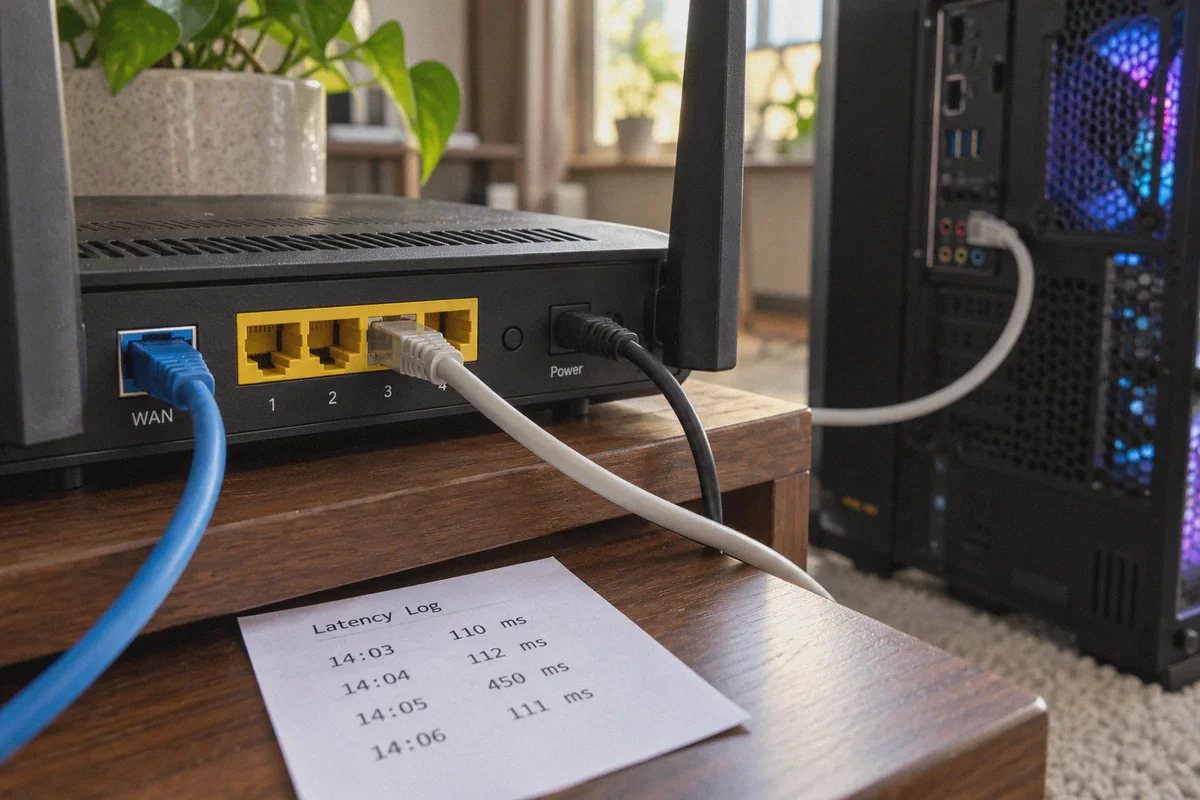
Your raw ping to a server in Frankfurt might sit at a playable 110ms. But your local Internet Service Provider (ISP) doesn’t care about DayZ. To save bandwidth costs, your ISP routes your gaming traffic through cheap, congested commercial transit hubs (called peering points).
The moment peak evening hours hit—or someone in your house streams a 4K movie—one of those cheap hops drops a handful of UDP packets. For half a second, your connection chokes. Your ping doesn't stay at 110ms; it spikes to 450ms for two seconds, or your packet stream stalls completely.
The DayZ server doesn’t ask questions. The BattleEye monitor sees 400ms+, flags you as unstable, and drops the hammer: Kicked (Ping too high).
You don’t need a VPN to make your baseline ping lower. You need a VPN to make your ping a flat, unyielding line.
What a DayZ VPN Actually Needs to Do
A regular commercial VPN built for unlocking Netflix catalogs will usually make your DayZ experience worse. Those services bundle thousands of users onto bloated, throttled servers where bandwidth fluctuates wildly.
To survive DayZ without getting kicked, a VPN has to do three specific things:
- Bypass your ISP’s congested routing. It needs to pull your traffic off your local provider’s cheap peering routes and put it onto clean, direct backbones closer to the game host.
- Handle UDP packet jitter gracefully. DayZ operates on UDP packets. When an ordinary VPN hiccups, the tunnel stalls, throwing the fatal red chain. A gaming-capable VPN must sustain micro-drops without dropping the session socket.
- Stay lightweight. If the client eats 15% of your CPU or conflicts with BattleEye anti-cheat hooks, you will get booted before you even reach the server menu.
This is where OnlyDogs VPN fits into the picture—not as a magic latency eraser, but as an aggressive traffic stabilizer.
Why OnlyDogs VPN Works for DayZ Desync and Ping Spikes
OnlyDogs VPN wasn't built as a tech-heavy playground for network engineers; it was built to solve practical, frustrating connectivity roadblocks with zero configuration drama.
Here is how its specific feature set translates directly to fixing DayZ’s server kicks:
1. One-Click "Fastest Line" Auto-Routing
Most VPN clients make you scroll through lists of 80 countries and guess which node has the lowest load. If you pick wrong, you join the server with 300ms ping and get kicked instantly.
OnlyDogs uses an automated routing engine that actively tests and selects the cleanest transit path. Instead of testing five different nodes while your squad waits in Discord, you click the "Fastest Line" preset. It routes your traffic away from your ISP's bottlenecked commercial exchanges and connects via the lowest-hop route available.
2. Resilient Protocol Architecture (HTTP/3 & Advanced Traffic Obfuscation)
Traditional OpenVPN protocols are notoriously rigid: when a few packets get dropped in transit, the tunnel pauses to recover, which immediately triggers DayZ’s "Connection Lost" timeout.
OnlyDogs utilizes proprietary protocols built on HTTP/3 and modern traffic obfuscation. These protocols are engineered specifically for hostile, congested network environments (like heavily throttled networks or high-interference Wi-Fi). Instead of choking when a packet stumbles, the protocol maintains data flow continuity. Your latency remains stable, preventing that sudden 3-second spike that triggers the server's ping kicker.
3. Weak-Network & Packet Drop Recovery
DayZ’s netcode is notoriously unforgiving. If your home Wi-Fi experiences a momentary blip, the game client displays the dreaded red chain icon and gives up.
OnlyDogs is tuned specifically for quick network recovery. It buffers micro-interruptions silently in the background, keeping the session connection alive so your client doesn't hard-disconnect from the game host.
4. Zero Clutter, No Account Friction
Gamers hate bloatware. You don’t want a VPN that installs three background services, constantly asks for driver updates, or forces you to recover lost passwords when you just want to log in for raid night. OnlyDogs uses clean, email-verification login, launches instantly, and sits quietly in your system tray without devouring the RAM DayZ desperately needs.
👉 Check out OnlyDogs VPN and stabilize your DayZ connection
Step-by-Step: How to Configure OnlyDogs for DayZ
You don't need a degree in network administration. Follow this routine once, and you’ll know within five minutes if it solves your server kicks:
- Identify your target server's location. Look at your DayZ launcher (DZSA or vanilla). Note whether the server you want to play on is hosted in Frankfurt, London, New York, or Dallas.
- Open OnlyDogs VPN before launching DayZ.
- Select the closest node to the game server. If you are playing on a German community server, select a node close to Germany—not a node right next to your home town. This hands your packets over to a high-speed backbone route for the longest leg of the journey.
- Launch the game and check the ping in the server browser. Compare the number to your usual ping. It should be roughly comparable, but notice what happens once you are in-game: the micro-stutters and random spikes disappear.
When a VPN Will Help You (and When It Won't)
To save you time and money, let’s be completely realistic about whether this will solve your issue.
A VPN WILL fix your problem if:
- You have playable ping (under 120ms) most of the time, but every 15–30 minutes you get booted for a sudden 2-second spike.
- Your ISP throttles gaming or international UDP traffic during evening peak hours.
- You are trying to connect to a server one region over (e.g., East Coast US to Western Europe) and your local ISP’s default routing is terrible.
- You keep encountering the "Session Lost" or "Connection Lost" red chain error while your home internet technically remains online.
A VPN WILL NOT fix your problem if:
- You are playing on a mobile hotspot with 1-bar cellular reception (fix your physical hardware first).
- You live in South America and are trying to join a server hosted in Sweden with a strict 80ms ping limit (geography cannot be bypassed).
- The DayZ server itself is suffering from severe hardware desync or a DDoS attack (if the server FPS drops to 5, everyone lags regardless of network setup).
The Verdict
Getting kicked from a DayZ server isn't just an inconvenience; it completely ruins hours of meticulous survival, looting, and base-building.
Don't buy into the marketing claim that a VPN will give you zero ping across continents. But if your problem is the classic DayZ curse—getting booted by automated ping scripts because your ISP drops packets during peak hours—rerouting your connection through a stable, congestion-resistant tunnel is the single most effective fix available.
👉 Try OnlyDogs VPN to stop DayZ ping kicks and connection drops
Frequently Asked Questions
Will a VPN always lower my DayZ ping?
No. The article explicitly says a VPN cannot beat physical distance and may add a small amount of baseline latency; its potential value is in improving route stability when spikes or packet loss are the problem.
Why can DayZ kick me even when my normal ping looks playable?
The article says community servers can enforce strict ping and stability thresholds, so a short spike or a burst of dropped UDP packets may be enough to trigger a kick even if the usual ping is acceptable.
When does the article say a VPN is unlikely to help?
It says a VPN is unlikely to solve weak physical reception, a server that is simply too far away for its ping limit, or server-side desync and DDoS problems.