Best VPN for Dead by Daylight: How to Stop Getting Robbed by Hit Validation

You know the exact sound.
You're playing Survivor, you vault the killer shack window, land on your feet outside, take two full strides into the grass—and suddenly your character gets vacuumed backwards and folds into the dirt.
Or worse, you're playing Killer. You swing your weapon, hear the survivor scream at the top of their lungs, watch the blood spray across your screen, but their health bar doesn't budge. They keep sprinting like nothing happened, and a little red speedometer icon flashes mockingly in the top-left corner of your screen.
That is Dead by Daylight’s server-side Hit Validation at work.
When you get robbed like that, your first instinct is to type "best VPN for Dead by Daylight to fix high latency hit validation" into Google, hoping a VPN can magically drop your ping from 110ms to 20ms.
Before you waste money on a random VPN subscription, let's get one blunt truth out of the way: no software on earth can beat the speed of light. If you live in South America and connect to a European server, your ping is going to be high. Period.
Yet, a properly configured VPN can dramatically cut down on phantom hits and validation rejects. To understand why, you have to realize what's actually breaking your game—and why 90% of popular VPNs will make it ten times worse.
Article summary and product fit
Can a VPN improve Dead by Daylight hit validation, and what network problem is it actually trying to solve?
A VPN cannot beat physical distance, but the article argues that a better route can help when hit-validation problems come from jitter, packet loss, or erratic ISP routing. The goal is a steadier packet path, not an unrealistically low ping number.
Key points
- Dead by Daylight’s server-side hit validation compares the timing of killer and survivor inputs, so consistency matters alongside raw latency.
- A stable connection can be more useful than a lower average ping that swings sharply or drops packets.
- The article warns that crowded or high-overhead VPN routes can add delay and make the problem worse.
Best fit and limitations
Best for: Players whose latency is unstable because of poor ISP routing, evening congestion, or packet jitter despite being in a reasonable region for their game server.
Important limit: A VPN cannot remove distance-based latency, fix another player’s connection, or repair packet loss caused by a weak local Wi-Fi link.
Product fit: Within the article, OnlyDogs VPN is recommended when the problem is routing instability and the player wants an automatically selected, lower-jitter path.
Sources already linked in this article
What Hit Validation Actually Checks (And Why You're Losing the Duel)
Back in the peer-to-peer days, the killer’s PC decided every hit. If the killer saw a hit on their screen, you took damage, even if you were already halfway across the map.
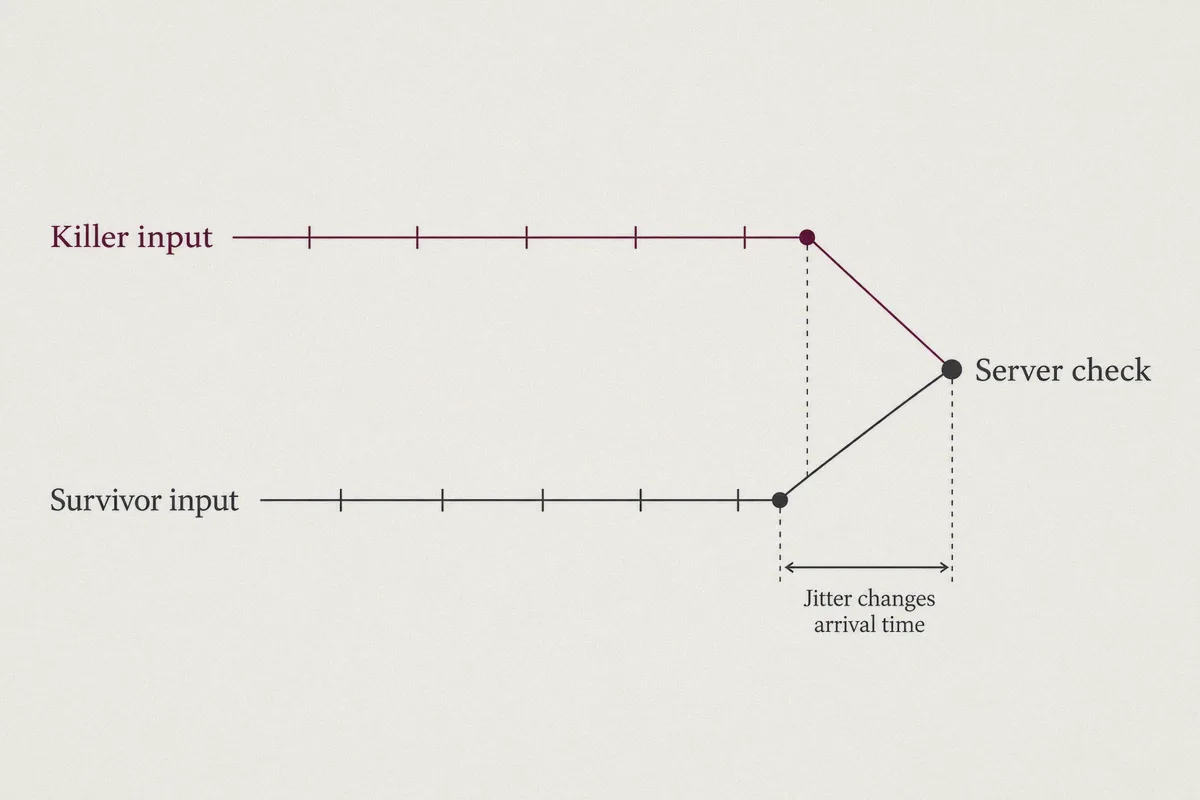
To fix that, Behaviour Interactive introduced Server-Side Hit Validation. Now, when a hit or a stun happens around a pallet or vault, the dedicated server acts as a referee. It compares two timestamps:
- When did the killer's swing command reach the server?
- When did the survivor's vault/stun command reach the server?
Here is the problem: the server doesn't just care about low ping; it cares about stability.
If your ping is a stable 70ms, the server's rollback prediction handles it fairly well. But if your local Internet Service Provider (ISP) has terrible routing, your connection doesn't travel in a straight line. It bounces across random regional exchanges, dropping tiny fragments of data (packet loss) and swinging wildly—45ms on second one, 120ms on second two, 60ms on second three.
That ping jitter destroys timestamp accuracy. The moment your connection fluctuates during a fast vault or a pallet drop, the server can't sync your position in time. It defaults to whichever player had the smoother packet stream—and you end up on the losing end of the hit validation check.
Why Most Traditional VPNs Make DBD Unplayable
When DBD players turn to big-name commercial VPNs, they usually end up refunding them within 48 hours. Here's why standard VPNs fail for gaming:
- Massive Encryption Overhead: Traditional VPN protocols like standard OpenVPN were built for corporate document security, not 60-tick gaming packets. They package game data into heavy, encrypted chunks that create micro-delays (bufferbloat).
- Crowded Data Centers: Popular commercial VPNs stick hundreds of users onto the same crowded server IP. While someone else is streaming a 4K movie on that server, your DBD latency spikes through the roof.
- Clunky Virtual Adapters: Many legacy VPN apps install heavy virtual network drivers that interrupt your system's raw UDP packet flow, introducing local input lag before your packet even reaches your router.
If you use a VPN that adds 15ms of jitter just to encrypt your web traffic, you are guaranteeing that every pallet stun you drop will get rejected by the server.
Why OnlyDogs VPN Solves the DBD Routing Nightmare
A gaming VPN doesn't need 8,000 servers or military-grade file encryption. It needs to do exactly one thing: force your game packets onto the cleanest, lowest-jitter route directly to the game's regional cluster, without choking your bandwidth.
This is where OnlyDogs VPN separates itself from standard commercial proxies. It isn't bloated with enterprise baggage; it’s engineered around lightweight packet delivery and smart routing.
1. Intelligent Route Selection (Bypassing ISP Bottlenecks)
Your home ISP often chooses routing paths based on what is cheapest for them, not what is fastest for your gaming session. That’s why you might be sitting 200 miles from an AWS server hub, yet your connection routes through three neighboring states first. OnlyDogs VPN features automatic intelligent routing. It bypasses congested public transit nodes and establishes a direct tunnel to the closest regional exchange point, cutting out erratic hops and flatlining your ping jitter.
2. Next-Gen HTTP/3 & Proprietary Protocol Design
Unlike traditional VPN protocols that stall whenever a packet gets dropped, OnlyDogs uses a proprietary protocol architecture built on modern HTTP/3 foundations. In fast-paced games like Dead by Daylight, if one positioning packet drops, your connection doesn't hang or freeze waiting for retransmission. It streams continuously, drastically minimizing the micro-stutters that trigger the red ping warning in the match UI.
3. Weak-Network & Jitter Recovery
If you play on Wi-Fi, in a shared apartment, or on congested evening broadband, micro-drops are inevitable. OnlyDogs VPN excels in high-congestion and weak-network environments, smoothing out packet delivery so the DBD dedicated server receives a clean, steady stream of timestamps.
4. Zero-Fuss One-Click Presets
You don't need to manually test 30 different city nodes or tinker with custom DNS and MTU settings before queuing for a trial. OnlyDogs provides scenario-based presets. Hit the fastest connection preset, boot up Steam or your console client, and you're ready to queue.
👉 Check out OnlyDogs VPN and clean up your connection
Real-World Comparison: Home ISP vs. Typical VPN vs. OnlyDogs VPN
To put this into perspective, here is what happens behind the scenes during a contested pallet drop:
| Connection Type | Routing Path | Packet Jitter | In-Game Hit Validation Outcome |
|---|---|---|---|
| Default Home ISP | Erratic hops, subject to evening congestion | Frequent 20–60ms spikes | Hit sounds play, but server cancels the stun or grants the killer a late hit. |
| Bloated Legacy VPN | Heavy encryption, crowded shared IP | High bufferbloat, added delay | Consistent red ping icons; pallet drops register too late to save you. |
| OnlyDogs VPN | Optimized direct route, low-overhead protocol | Flat, consistent latency | Timestamps arrive cleanly; stuns and vaults validate without rollback. |
How to Set It Up for DBD in Under Two Minutes
Getting your connection dialed in takes less time than sitting through a standard Survivor lobby queue:
- Grab the Client: Download the OnlyDogs VPN app for your platform (Windows, macOS, Android, or iOS).
- Log In Instantly: There are no convoluted password forms to remember—OnlyDogs uses hassle-free email verification codes.
- Select the Closest Gaming Hub: Open the app and choose the server region closest to your game server cluster (e.g., if you play on US East, choose a nearby node rather than routing across the continent).
- Boot Up Dead by Daylight: Look at the ping meter in the bottom-right corner of your lobby screen. You want a flat white/green number with zero fluctuation.
- Jump into a Trial: Pay attention to your first few pallet drops and medium vaults. When ping jitter disappears, the server stops guessing your location, and hit validation behaves the way it was designed to.
The Realistic Boundaries (What a VPN Won't Do)
Let's keep expectations honest:
- It cannot fix bad matchmaking: If Behaviour's matchmaking puts you into a lobby hosted on a server 4,000 miles away because local queues are empty at 4 AM, your ping will still be high.
- It cannot fix the other player's lag: If a killer is on a 250ms mobile hotspot, the server still has to reconcile their delayed inputs. Hit validation will protect you from some ridiculous hits, but you will still occasionally run into weird latency compensations.
- Wired beats wireless: A VPN cleans up your routing path across the wider internet, but it cannot fix packet loss caused by your PC sitting four walls away from a weak Wi-Fi router. Plug in an Ethernet cable if you can.
The Bottom Line
Dead by Daylight is frustrating enough when you get facecamped or bleed out on the floor. You shouldn't have to fight your own internet connection on top of it.
Hit validation failures aren't an unavoidable curse—they are almost always the result of packet jitter, bad routing hops, and unstable delivery.
Stop letting generic ISP routing cost you your escape pip. Fire up OnlyDogs VPN, lock in a clean, stable route to the server, and make sure your stuns actually land when the wood drops.
Frequently Asked Questions
What does Dead by Daylight hit validation care about besides low ping?
The article emphasizes stability. The server compares the timing of actions, so packet jitter and packet loss can make those timestamps arrive inconsistently even when the average ping number looks acceptable.
Why can a normal VPN make DBD feel worse?
The article says crowded VPN servers, extra protocol overhead, and heavy virtual adapters can add latency or jitter. If the VPN path is worse than the ISP path, hit validation can become less consistent rather than more consistent.
When is a VPN most likely to help with DBD connection problems?
It is most relevant when the problem comes from poor ISP routing, congested transit hops, or unstable delivery between you and the regional game cluster. It is not a cure for every high-ping situation.
What can a VPN not fix in Dead by Daylight?
The article specifically says it cannot overcome physical distance to a faraway server, repair another player’s lag, or fix packet loss created inside your own home by a weak Wi-Fi connection.