OnlyDogs VPN
Best VPN for Deadlock: Change Matchmaking Region and Reduce Cross-Region Lag

If you've been searching for the best VPN to change your matchmaking region in Deadlock, you're almost certainly stuck in one of two frustrating spots.
Either it’s 2 AM in your local region, the matchmaker has been spinning for twelve minutes, and you just want a quick, populated lobby before bed. Or, your Discord stack is split across oceans—half of you in North America, half in Europe—and whenever you queue together, someone ends up rubberbanding across rooftops with 180ms of jittery, unplayable lag.
Here is the thing most generic VPN lists won't tell you: you don't strictly need a VPN just to switch your server region in Deadlock.
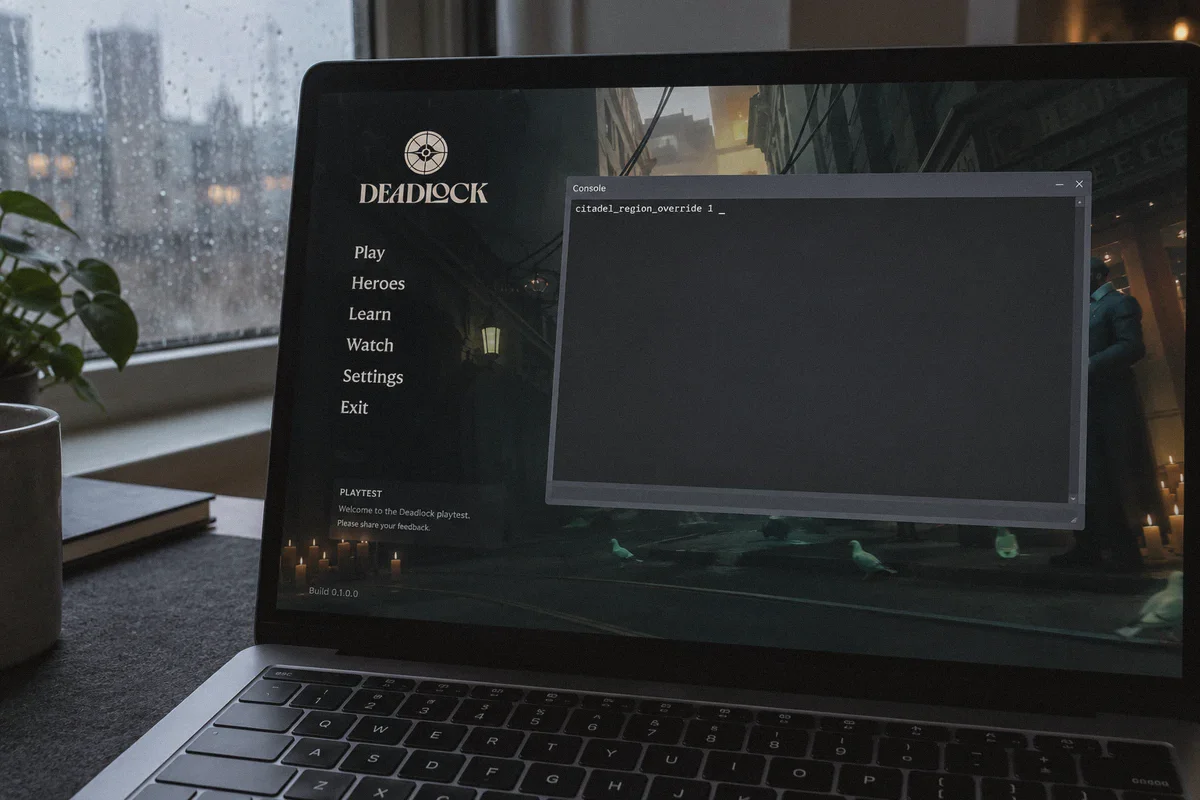
Valve actually built region switching right into the Source 2 console. You can hit F7, type a single command, and force the matchmaker to queue you into European or North American servers without spending a cent.
So why are competitive Deadlock players, late-night grinders, and cross-region stacks still running a VPN?
Because telling the game coordinator where you want to queue is only half the battle. Surviving the connection once you load into the lane is where the real problem begins.
Article summary and product fit
Do you need a VPN to change Deadlock matchmaking regions, and what problem is a VPN actually meant to solve?
The article says Deadlock already has a console region override, so a VPN is not required just to choose another matchmaking pool. The VPN use case is route stabilization: reducing jitter and packet loss on long cross-region paths so the unavoidable latency is more consistent.
Key context from this article
- Best for: Late-night players, low-population regions, and groups split across continents who intentionally queue into a distant Deadlock region.
- Key point: The console command changes where matchmaking searches; it does not improve the public internet route between the player and the chosen server.
- Product fit: The article positions OnlyDogs VPN for automatic route selection, low-bloat operation, and quick recovery from packet blips.
- Important limit: A VPN cannot beat physical distance. A Sydney-to-Frankfurt connection will still have high baseline latency even if the route becomes steadier.
Product source already linked in this article: OnlyDogs VPN official website.
The Free Console Trick (And Why It Breaks Down in Lane)
Let’s get the console command out of the way first, because you should know it exists.
In Deadlock, opening the console (default key F7) and typing citadel_region_override followed by a number lets you manually select your matchmaking pool:
-1: Automatic (closest server by ping)0: North America1: Europe2: Asia3: South America5: Oceania
If you live in London and set it to 0, Deadlock will dutifully search for a match on US East or US West servers.
Here is what happens the moment you actually enter the match: your ISP routes your game traffic through standard, lowest-cost commercial public gateways. Across thousands of miles of underwater cable and dozens of routing hops, your packets get bundled with streaming video, cloud backups, and web traffic.
In a turn-based game or a slower tactical shooter where you hold angles, 110ms with mild fluctuation is manageable. In Deadlock, it is unmitigated disaster.
Deadlock is an aggressive hybrid of a fast-paced mobility shooter and a micro-intensive MOBA. You aren't just aiming; you are:
- Contesting and shooting floating soul orbs within a 200-millisecond denial window.
- Timing an active
Fparry against an Abrams charging your face. - Air-dashing between ziplines to dodge a Bebop hook or a Vindicta sniper round.
Valve’s lag compensation can handle a predictable, steady ping. What it cannot handle is jitter and packet drops. When public routing fluctuates between 110ms and 165ms every few seconds, the server rejects your parry timing, your soul denies vanish into the enemy's pocket, and your hero desyncs mid-dash.
That is why serious players use a VPN: not to fool the matchmaking menu, but to force their connection onto a clean, dedicated routing highway that stabilizes packet arrival times.
What to Look for in a Deadlock VPN
If you shop for a VPN using generic "Top 10" affiliate blogs, you will end up with bloated software loaded with antivirus add-ons, sluggish virtual adapters, and servers optimized for Netflix streaming rather than low-latency UDP game packets.
For cross-region gaming in a Source 2 title, only three things actually matter:
- Direct, unthrottled transit routes: Connecting to Frankfurt or Virginia shouldn't bounce your data through five intermediate data centers. You need direct routing to tier-1 hubs where Valve hosts its dedicated server clusters.
- Jitter suppression over raw speed: You don't need 800 Mbps download speed to play a match; Deadlock uses less than 1 Mbps. What you need is a rock-solid, flat ping line where packet 10,000 arrives with the exact same latency as packet 1.
- Zero background bloat: A VPN client that spikes CPU usage or installs messy TAP drivers can cause micro-stutters in a game that is already CPU-heavy during late-game 6v6 team fights.
Why OnlyDogs VPN Fits Deadlock’s Matchmaking Reality
Among modern options, OnlyDogs VPN stands out specifically because it strips away the friction that usually makes running a VPN alongside Steam a headache.
Instead of presenting you with a confusing list of hundreds of obscure city nodes and requiring you to ping-test each one manually, OnlyDogs organizes connections through scenario-based presets and automated path selection.
Here is how that translates to an evening of Deadlock:
1. Instant Route Optimization Without Guesswork
When you want to switch from an empty Asia or Oceania queue to an active EU or US lobby, you don't have time to test whether "Frankfurt-04" has lower latency than "Frankfurt-12." OnlyDogs automatically analyzes current transit congestion and establishes the cleanest route to the target server hub. It eliminates the trial-and-error that usually costs you two dodged games and a queue penalty.
2. Modern Protocol Architecture (HTTP/3 & Obfuscation)
Traditional OpenVPN and legacy WireGuard configurations are prone to deep-packet inspection and throttling by domestic ISPs that deprioritize high-frequency gaming traffic during peak hours. OnlyDogs incorporates modern transport protocols, including HTTP/3 acceleration and traffic obfuscation designed for restrictive network environments. Your cross-border gaming packets pass through transit nodes cleanly, avoiding the artificial queueing and buffer bloat common on standard broadband.
3. Seamless Recovery from Packet Blips
If your Wi-Fi experiences a momentary blip or your local node hiccups, conventional VPN tunnels drop the connection entirely, throwing an unrecoverable Connection to Server Lost disconnect screen in Source 2. OnlyDogs is built with rapid route recovery, holding the session alive and reconnecting transit in milliseconds so you stay in the match instead of abandoning your lane.
4. Frictionless Client Setup
You don’t have to register a bulky account, memorize credentials, or deal with intrusive software that conflicts with anti-cheat hooks. OnlyDogs uses clean email verification code access and runs lightweight on both Windows and macOS, leaving your system resources completely dedicated to rendering Deadlock's chaotic team fights.
👉 Check OnlyDogs VPN setups and server availability
How to Set Up Clean Cross-Region Matchmaking (Step-by-Step)
To get into foreign lobbies with the lowest possible jitter, follow this exact sequence:
Launch OnlyDogs VPN first: Select the target region preset corresponding to where you want to play (e.g., US East if queueing from Europe/SA, or EU Central if queueing from Asia/Middle East during off-peak hours). Let the client establish the optimized tunnel.
Launch Deadlock via Steam: Once the VPN connection is solid, start the game.
Open the Console: Press
F7on your main menu screen.Enter the Matching Region:
- For North American matches, type:
citadel_region_override 0 - For European matches, type:
citadel_region_override 1 - (To reset back to default later, simply type:
citadel_region_override -1)
- For North American matches, type:
Verify Your Ping in Practice Mode: Before hitting the competitive queue, jump into the Hero Sandbox for 30 seconds. Press
F7and check your latency. If your ping line is steady and abilities trigger with crisp response, jump straight into matchmaking.
A Clear-Eyed Look at Physics: What a VPN Can and Cannot Do
It is important to be realistic: no VPN can break the speed of light.
If you are queueing from Sydney, Australia into Frankfurt, Germany, data physically has to travel halfway around the globe. Your base latency will never be 20ms. You will still have to play with roughly 180ms to 200ms of natural transit delay.
What OnlyDogs VPN does is make that 180ms usable.
Playing on a stable, flat 180ms ping allows Source 2's netcode to accurately predict your movement and register your shot hits. Playing on an unstable 140ms connection that constantly jumps between 140ms, 210ms, and 170ms with 3% packet loss is what causes missed last-hits, failed parries, and phantom abilities.
A good VPN turns a chaotic, jagged connection into a flat, predictable baseline.
Who Needs This (And Who Can Skip It)
You should grab OnlyDogs VPN if:
- You live in regions with lower active player pools (Oceania, parts of South America, or Southeast Asia) and want fast matchmaking in EU or NA servers without game-breaking packet loss.
- You play late at night (past 1 AM) when local matchmaking queues stretch to 15+ minutes or place you in wildly unbalanced skill brackets.
- You regularly party up with friends living on another continent and need to stabilize your connection on their host servers.
- Your local ISP throttles or poorly routes overseas gaming traffic during peak evening hours.
You can skip it if:
- You exclusively queue solo in your local region during peak evening hours (6 PM – 11 PM).
- Your home ping is already below 30ms with zero packet loss on default servers. If your local matches pop in under two minutes, keep your setup as simple as possible.
Changing regions in Deadlock gives you instant access to 24/7 active queues and lets you play with friends anywhere in the world. If you're tired of long queue timers and unplayable lag spikes, pair the in-game console command with an optimized connection route on OnlyDogs VPN, lock in your favorite hero, and get back to laning without the stutter.
Frequently Asked Questions
Do you need a VPN just to change your Deadlock matchmaking region?
No. The article says the Source 2 console command citadel_region_override can select a matchmaking pool directly, including North America, Europe, Asia, South America, and Oceania.
Why would a Deadlock player use a VPN after changing regions in the console?
The console controls the matchmaking destination, while the VPN can change the network path used to reach that distant server. The article’s goal is to reduce jitter and packet loss, not to unlock the region menu.
What matters most for a cross-region Deadlock connection?
The article prioritizes direct transit, stable packet arrival times, and a lightweight client over headline download speed or a huge server count.
Can a VPN turn an intercontinental Deadlock connection into low ping?
No. The article explicitly says physical distance remains. The benefit it describes is making a high-latency route flatter and more predictable rather than magically reducing it to local-region latency.
Who can skip a VPN for Deadlock according to the article?
Players who queue locally during active hours and already have low, stable ping with no packet loss have little reason to add another network layer.