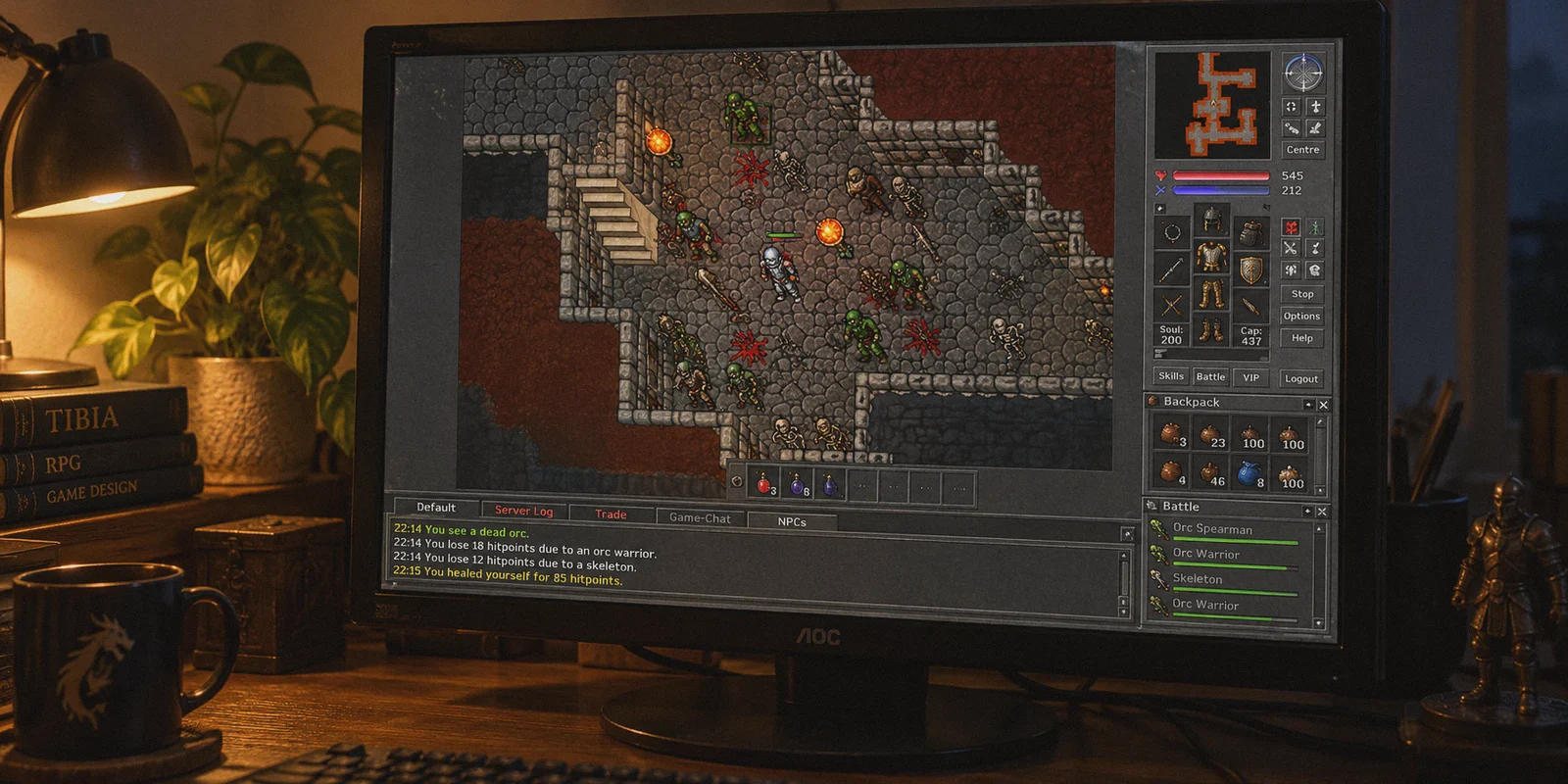
Anyone who has spent serious time in Tibia knows the exact feeling of pure dread that comes with a frozen screen.
You’re deep in the Catacombs or pulling a tight box in Warzone. You hit your exura gran ico key—and nothing happens. Your knight doesn't heal. The screen locks up for roughly 2.5 seconds. When the client finally catches up, you’re not fighting anymore. You’re standing in the Thais temple, your backpack is missing, five blessing charms are burnt to ash, and three hours of hard-earned experience points just vanished into thin air.
If you searched for the "best VPN for Tibia," you are probably on the verge of uninstalling the game.
You don't need a lecture on ping numbers, and you definitely don't need another generic tech review ranking VPNs by who can stream foreign Netflix catalogs. You need a setup that prevents CipSoft’s servers from dropping your connection when your local internet coughs for half a second.
Here is the truth about what is actually killing your character, why standard commercial VPNs often make the problem worse, and what actually works to keep you alive.
Article summary and product fit
What should a Tibia player fix when short freezes and disconnects cause deaths even though average ping looks acceptable?
The article’s core answer is to focus on jitter, packet loss, and route stability rather than chasing the lowest possible ping. It recommends fixing the local baseline first, then testing any routing change in a protection zone and a low-risk hunt before trusting it in a dangerous spawn.
Key points and limits
- Best for: Tibia players whose connection briefly freezes, drops actions, or disconnects during otherwise playable latency.
- Key point: A steady, predictable connection can be safer than a lower average ping that spikes or loses packets.
- Preparation: Use Ethernet when possible, stop background downloads, connect before the game, and watch the latency graph in a safe zone before a real hunt.
- Product fit: The article recommends OnlyDogsVPN as a simple routing option for players who suspect unstable transit paths; its linked official site emphasizes one-tap use and support across phone and computer.
- Important limit: A VPN cannot remove distance-based latency, repair weak local Wi-Fi, or fix a failing Tibia server. The article’s method only makes sense when the trouble is on the network path you can reroute.
Sources already linked in this article: OnlyDogsVPN official website.
The Big Lie: It’s Not High Ping That Kills You, It’s Packet Jitter
Most gamers think their problem is raw latency. They see 160ms on their server ping tool, freak out, and go hunting for a VPN that promises "50ms ping."
If you play Tibia on a European or North American server from South America or Australia, a stable 140ms to 180ms ping is completely playable. You learn the rhythm of your healing hotkeys, you adjust your push intervals, and you hunt safely.
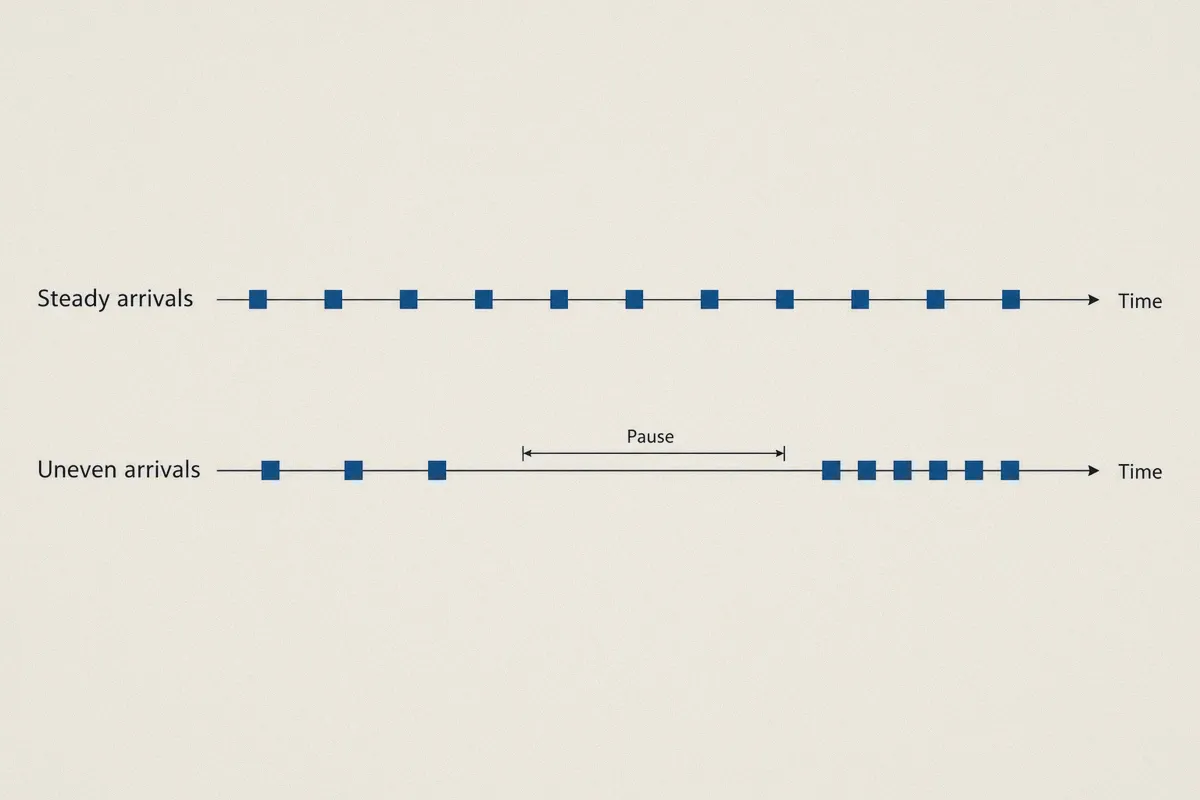
What actually triggers the death penalty is jitter and microscopic packet loss.
Tibia’s client-server architecture is notoriously unforgiving. Unlike modern FPS games that aggressively predict client-side movement and smooth over lost packets with netcode interpolation, Tibia operates on strict server ticks. If your connection drops even a fraction of a packet burst during a high-action tick:
- The game server pauses your action queue because it didn't receive your heal confirmation.
- The local ISP connection stutters trying to re-transmit the dropped data.
- The server interprets the momentary pause as a socket stall.
- While your screen is frozen, the monsters in the cave don’t pause—they execute their full damage turns without opposition.
By the time your connection wakes back up, the server logs confirm you took 3,000 damage in the dark.
Why Big-Name Commercial VPNs Often Send You to the Temple
When Tibia players get fed up with disconnects, their first instinct is usually to download whatever giant VPN brand has the biggest marketing budget.
That is often a fast ticket to an early grave. Here is why:
1. Built for Bulk Bandwidth, Not Real-Time Survival
Mainstream VPNs are optimized for high-throughput tasks: downloading massive torrents, streaming 4K video, or browsing anonymously. Video streaming buffers ahead 10 to 30 seconds, meaning if your connection hiccups for two seconds, your movie doesn't stop. Tibia has zero buffer. An architectural delay of 800 milliseconds is already fatal.
2. The Tunnel Renegotiation Freeze
When your local Wi-Fi or neighborhood ISP experiences minor packet congestion, a standard VPN running generic OpenVPN or standard WireGuard often halts the entire virtual network adapter to renegotiate keys and re-establish the tunnel. To your computer, this feels like an absolute internet blackout lasting 3 to 6 seconds. To CipSoft’s server, your client just vanished—leaving your character standing motionless while eight Grim Reapers take their turns.
3. Server Congestion
Huge consumer VPNs cram thousands of users onto identical public exit nodes. If someone on your shared IP starts downloading a massive file, your gaming packets get stuck in the queue. Your ping might say 80ms, but the jitter spikes wildly from 80ms to 450ms every twenty seconds. In Tibia, unpredictable jitter is a death sentence.
What a Tibia-Proof Connection Actually Needs
To survive late-game spawns, your network tool only needs to do three specific things:
- Route around ISP bottlenecks: Your local internet provider rarely routes your traffic straight to CipSoft’s hosting facilities (in Frankfurt, London, or Boston). They route through cheap transit nodes that clog up during evening peak hours. A good tool takes over the path and forces your packets through direct, low-congestion internet backbones.
- Aggressive packet recovery without handshake lockups: If a single packet drops, the protocol must recover instantly on the fly without tearing down the entire encrypted tunnel or freezing the adapter.
- Zero manual tinkering: Nobody wants to alt-tab mid-hunt to switch between 60 different European server nodes trying to guess which one isn't lagging tonight.
This narrow focus is why we recommend OnlyDogs VPN for players struggling with routing freezes and death penalty disconnects.
Why OnlyDogs VPN Solves the Disconnect Problem
OnlyDogs VPN isn't packed with bloated corporate security gimmicks you’ll never touch while gaming. It was designed from the ground up to solve hostile, unstable network conditions—the exact conditions that cause micro-stutters and sudden drops in MMOs.
Your PC (Tibia Client)
        │
        ▼  [Optimized Proprietary Protocol / HTTP/3]
OnlyDogs VPN Intelligent Route
        │  (Bypasses congested evening ISP transit hubs)
        ▼
Direct Tier-1 Backbone
        │  (Micro-packet recovery; zero handshake freezing)
        ▼
CipSoft Game Servers (Frankfurt / North America)
Here is how its core design directly keeps your character alive:
1. Weak-Network Resilience and Sub-Second Recovery
The single biggest technical differentiator in OnlyDogs VPN is its handling of packet drops. Built around modernized HTTP/3 concepts, traffic obfuscation, and a proprietary resilient protocol, it avoids the fatal "tunnel renegotiation trap."
If your domestic connection experiences a momentary drop, the protocol doesn't stall your network card. It re-transmits lost packets in parallel and stitches the connection back together in milliseconds. You might notice a barely perceptible stutter on your screen, but your socket never dies, and your healing spells keep firing.
2. Intelligent Auto-Routing (No Guesswork)
Instead of forcing you to guess whether "Frankfurt Node #14" or "Frankfurt Node #22" has lower jitter tonight, OnlyDogs VPN features automated route selection.
It constantly monitors path latency and packet stability behind the scenes, steering your gaming packets through the cleanest available pipe. You don’t have to sit inside the safe zone testing ping spikes before every hunt.
3. Scene Presets: One Click and Go
Most players hate networking menus. They don't want to tweak MTU sizes, toggle between UDP and TCP ports, or configure routing tables.
OnlyDogs eliminates all of that with clean scene presets. You fire up the client on Windows, select the fast-route preset, hit connect, and launch Tibia. It engages the optimal protocol parameters for low-jitter routing automatically.
4. Minimal Background Footprint
Tibia players frequently run Discord voice chat, stream overlays, soundboard plugins, and damage calculators alongside the game client. OnlyDogs VPN runs with an ultra-lightweight client footprint, meaning it doesn't cause CPU thread hiccups or micro-stutters on your machine while you're executing complex hotkey rotations.
👉 Check Out OnlyDogs VPN and Protect Your Next Hunt
How to Set It Up for Tibia Without Risking Your Level
When dealing with a high-stakes game like Tibia, never trust a network change blindly. Here is the safest way to configure and verify your setup before stepping into a dangerous hunting zone:
Step 1: Clean Up Your Hardware Baseline
Before touching any software, make sure you aren't shooting yourself in the foot:
- Ditch Wi-Fi if possible: Even the best VPN cannot fix radio interference from your kitchen microwave or thick walls. An ethernet cable remains the king of packet consistency.
- Shut down background hogs: Turn off cloud backups (OneDrive, Google Drive, Dropbox) and pause Steam or Windows automatic downloads.
Step 2: Connect to OnlyDogs VPN
- Open the OnlyDogs client on your PC.
- Select the Fastest Route or gaming-focused preset.
- Choose the geographic region matching your server location (e.g., select Germany/Europe for servers like Antica or Secura; select North America for servers like Gladera or Lobera).
- Hit connect. The email verification login means you don't even have to fiddle with complex passwords or multi-step authenticators on setup day.
Step 3: Run the "Depot and Safe Zone" Test
Never log into a hardcore hunt immediately after changing network routes.
- Log into the game and stand inside a depot or protection zone.
- Open your Tibia performance tracker (
Alt + F8to view FPS and Latency). - Watch the latency graph for 2 full minutes. You are not looking for the lowest absolute number; you are looking for a flat, boring line. A steady 110ms line is ten times safer than a line that jumps between 50ms and 210ms.
- Walk around the depot. The movement should feel crisp, with zero diagonal-step rubberbanding.
Step 4: The Low-Tier Trial Hunt
Before heading down to your main hunting ground, do a 10-minute warm-up in a low-risk spawn where your character cannot die even if you stand still for 10 seconds (like shallow cults or low-level dragons). Once you confirm your hotkeys respond with immediate snap and zero packet hangs, you are ready for your real team hunt.
Straight Answers to Practical Concerns
"Will CipSoft ban my account for using a VPN?"
No. CipSoft’s official rulebook does not prohibit using VPNs or network route optimizers. Millions of international players rely on routing tools every single day simply to bridge the geographical distance to Germany and the United States. OnlyDogs uses secure, encrypted communication that routes clean traffic without injecting anything into your game memory or modifying your game client files.
"Will a VPN magically drop my ping from 200ms to 20ms?"
No, and anyone who tells you that is lying. The physical speed of light through fiber optic cables dictates geographical latency. If you live 8,000 miles away from Frankfurt, you cannot have 20ms ping.
What OnlyDogs VPN does do is shave off the artificial delays caused by bad ISP routing and eliminate packet spikes. It turns an erratic 180ms–600ms rollercoaster into a rock-solid, predictable line. In Tibia, predictability is what keeps you alive.
Stop Donating Millions to the Blessing NPC
Dying in Tibia because you made a mechanical misplay or got overwhelmed by a trap is part of the game. You dust yourself off, buy your blessings, and jump back in.
Dying because your screen locked up for three seconds while your internet hiccuped is the most infuriating experience in gaming. It wastes your time, burns your in-game gold, and drains the fun out of high-level hunting.
You don't need an enterprise IT degree to fix it. You just need a routing tool built to absorb packet drops before they knock you out of the server.
👉 Get OnlyDogs VPN Today — Lock in your connection, keep your character on the map, and leave the temple runs behind.
Frequently Asked Questions
Why can a two-second Tibia freeze be more dangerous than consistently high ping?
The article says a stable delay can be learned and played around, while jitter or packet loss can interrupt healing and action updates entirely. During the freeze, the server continues processing combat even though the client appears stuck.
Should I optimize for the lowest ping number possible?
Not according to this article. It prioritizes a flat, predictable latency line with minimal packet loss over a lower number that swings sharply from moment to moment.
Why can a generic VPN make Tibia disconnects worse?
The article points to congested shared nodes and tunnel renegotiation. If the VPN itself pauses for several seconds when the underlying connection hiccups, Tibia sees an even longer interruption.
How should I test a new route before a dangerous hunt?
Start in a depot or protection zone, watch latency for a couple of minutes, then do a low-risk trial hunt. The article recommends moving to high-stakes content only after the connection stays steady under normal gameplay.