
You’re twenty minutes into a Mythic+ key or deep into an 8:30 PM guild raid on progression night.
The boss winds up a lethal frontal cleave. You mash your defensive cooldown. Nothing happens.
For two excruciating seconds, twenty players start running in place. Then the game suddenly snaps into fast-forward at warp speed—and you wake up as a ghost on the floor.
Party chat pops up: "Healer lagged. Key's dead."
You tab out, run a speed test, and your connection shows 500 Mbps down. Your Discord voice call didn't even drop. So why did your latency in Azeroth just catapult from 42ms to 1,800ms?
If you've searched for the best VPN for World of Warcraft to reduce latency and lag spikes, you’ve probably waded through dozens of generic affiliate lists promising miracles like: "Cut your WoW ping in half instantly with our top pick!"
Let’s be completely honest upfront: anyone telling you a VPN magically breaks the laws of physics and turns a 150ms cross-continent connection into 20ms is lying to you.
However, if your problem is sudden lag spikes during peak hours, random three-second freezes, or the dreaded WOW51900319 disconnect error, a properly engineered VPN isn't just helpful—it’s often the only real fix.
Here is what is actually breaking your connection to Blizzard’s servers, why standard commercial VPNs often make the problem worse, and how to stabilize your gameplay for good.
Article summary and product fit
Why can World of Warcraft lag badly when your ordinary internet speed test looks fine?
The article distinguishes general bandwidth from the route carrying WoW’s real-time World connection. A fast speed test can coexist with congested ISP peering, packet loss, or jitter on the path to Blizzard. A VPN may help only when it provides a cleaner route; it cannot remove the physical distance to the realm.
Key points, fit, and limits
- Best for: Players whose Home connection or other apps remain responsive while World latency spikes, especially during repeatable peak-hour windows.
- Key distinction: WoW Home and World latency represent different traffic, and World packet loss can ruin combat even when bandwidth is plentiful.
- Where OnlyDogsVPN fits: The article positions it as an auto-routed, low-jitter path with recovery for brief network instability.
- Important limit: A VPN cannot fix a distant realm, every Blizzard-side incident, or all local-network faults, and an overcrowded VPN can add jitter instead of reducing it.
Sources already referenced in this article: OnlyDogsVPN official website.
1. Why Does WoW Lag When Your Internet Is Fast?
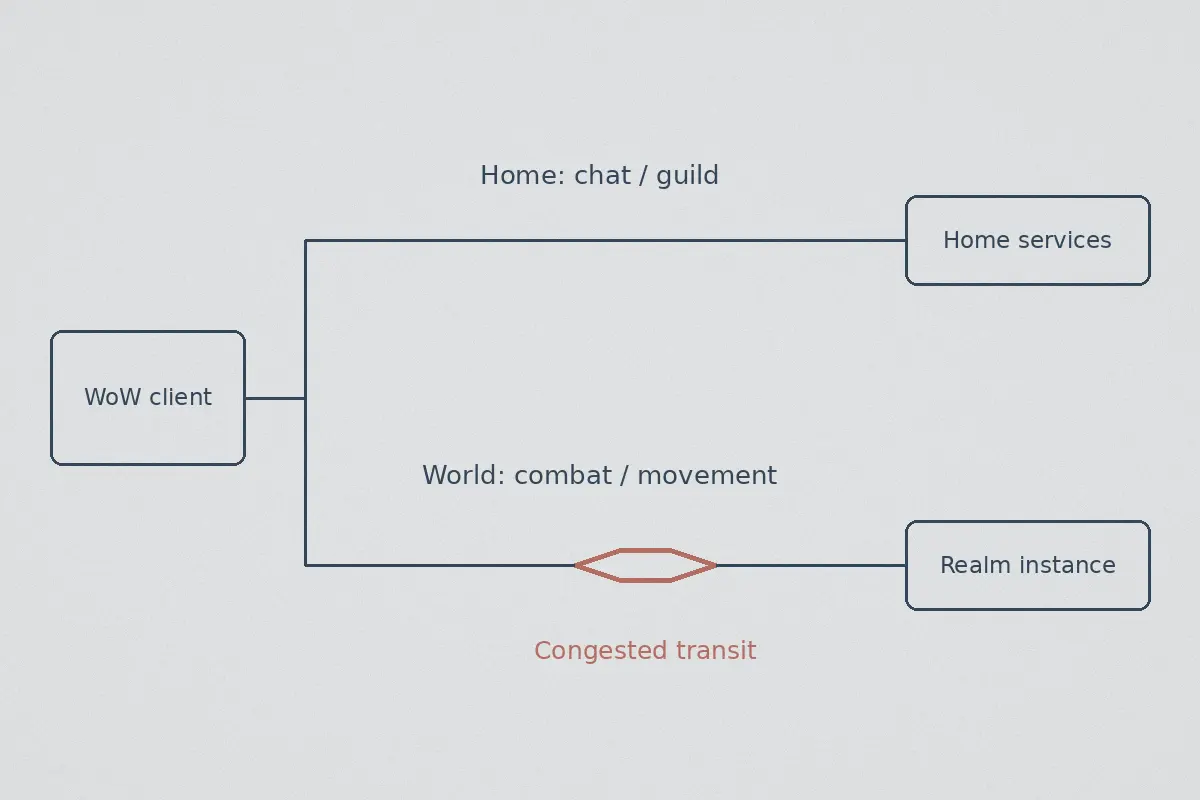
To fix latency spikes, you have to understand a fundamental quirk of World of Warcraft: the difference between Home Ping and World Ping.
Mouse over the game menu icon (the little red question mark) on your microbar during a lag spike, and you’ll usually see something like this:
- Home: 35 ms
- World: 1,420 ms
[Your PC]
   ├── Home Connection ──► Chat, Guild List, Auction House (Lightweight Data)
   │
   └── World Connection ─► Combat Log, Spell Casts, Boss Mechanics, Positioning
                                 │
                          [ISP Routing Bottleneck]
                                 │
                          [Blizzard Realm Server] ──► 1,400ms LAG SPIKE!
- Home Ping handles basic data: chat channels, guild rosters, and auction house updates. It requires tiny bandwidth and rarely chokes.
- World Ping handles the real-time simulation: spell batching, movement vectors, health updates, and boss mechanics. This connection feeds directly into Blizzard’s dedicated realm instances (primarily in Chicago for US East/Central and Los Angeles for US West, or Frankfurt/Paris for Europe).
When your World Ping spikes while everything else on your PC runs fine, the culprit is almost never your local Wi-Fi or Blizzard’s data centers. It is your Internet Service Provider's (ISP) transit routing.
During peak evening hours (usually 7:00 PM to 11:00 PM), local ISPs cut costs by funneling gaming traffic through the cheapest, lowest-priority transit exchange points. When those intermediate hops get congested with 4K video streams and heavy downloads, your small, time-sensitive UDP packets get delayed or dropped entirely.
In World of Warcraft, even a 1% packet loss translates directly into a freeze-frame followed by a desync.
2. Why Conventional VPNs Often Make WoW Unplayable
When players hit this issue, their first instinct is to fire up whatever big-name VPN they use for streaming Netflix. Five minutes into a dungeon, they turn it off in disgust.
Here is why typical VPNs fail gamers:
- Overcrowded Server Nodes: Commercial VPNs pile thousands of users downloading torrents and streaming video onto the same server IP. The hardware CPU gets choked, introducing constant jitter (wild ping fluctuations), which is far more lethal to WoW rotations than a steady high ping.
- Bloated Encryption Overhead: Standard OpenVPN setups pack heavy encryption layers on every single packet. In an MMO sending dozens of combat packets per second, that extra processing overhead causes micro-stutters in spell casting.
- The Brutal
WOW51900319Disconnect: When a standard VPN server experiences even a half-second hiccup or renegotiates its cryptographic handshake, it drops the tunnel. Blizzard’s client interprets this momentary socket drop as an instant session termination, booting you straight to the login screen mid-combat.
You don't need a heavy privacy cloak designed for political dissidents. You need an optimized, low-jitter bypass tunnel that routes around your ISP's broken peering points without dropping connection.
3. What Actually Works: Why OnlyDogs VPN Solves the WoW Bottleneck
This is precisely where OnlyDogs VPN separates itself from generic VPNs. Instead of treating gaming traffic like generic bulk web data, it focuses on the three metrics that actually decide whether your raid lives or dies: routing cleanliness, packet delivery consistency, and disconnect protection.
Here is why it works where traditional VPNs stumble:
1. Smart Auto-Routing (Bypassing Congested ISP Hops)
When your ISP sends your packets on a scenic, congested detour across five different transit hubs, OnlyDogs steps in with Intelligent Auto-Routing.
Instead of forcing you to guess which server location has the lowest ping, its routing engine automatically selects the direct, lowest-latency path to major internet backbone exchanges. It detours around your ISP’s congested evening bottlenecks and hands your data off cleanly to Blizzard's data center network.
2. HTTP/3 & Traffic Obfuscation (Beating ISP Evening Throttling)
Many home broadband providers actively detect high-frequency gaming UDP packets during evening prime time and deprioritize them to protect general network stability.
OnlyDogs utilizes modern HTTP/3 architecture combined with traffic obfuscation. Because your data mimics modern, high-priority encrypted web traffic, ISP middleboxes cannot single out your WoW packets for quality-of-service (QoS) throttling.
3. Weak-Network & Packet Loss Smoothing
The real killer in WoW isn't having 60ms instead of 40ms—it's packet loss. Dropping two packets in a row causes the game engine to wait for retransmission, freezing your screen.
OnlyDogs incorporates specialized weak-network recovery and jitter-smoothing protocols. Even if your local connection fluctuates or drops a packet, the tunnel handles fast error recovery without dropping the TCP socket, completely eliminating those random two-second ability lockouts.
4. Zero Complex Setup (One-Click Scenario Presets)
You shouldn't need a degree in network administration to play a video game. OnlyDogs drops the confusing protocol menus, MTU toggles, and port-forwarding tables. You open the client, select the Fastest Line / Low Latency scenario preset, and you're protected.
5. Password-Free Simplicity
No need to remember another 20-character password when you want to switch between your desktop gaming rig and your laptop. OnlyDogs uses instant email verification login, keeping your access fast and secure across Windows and macOS.
👉 Check out OnlyDogs VPN and stabilize your World of Warcraft latency
4. Step-by-Step Setup: Zero Lag in Under 2 Minutes
To guarantee the cleanest possible connection before your raid pulls, follow this simple routine:
[Step 1] Close WoW and Battle.net completely (check system tray).
   │
[Step 2] Launch OnlyDogs VPN ──► Connect to the "Fastest / Low Latency" Preset.
   │
[Step 3] Open Battle.net ──► Launch World of Warcraft.
   │
[Step 4] Log in ──► Check your in-game latency (Home / World).
In-Game Network Settings to Double-Check
Once you're in the game world, take thirty seconds to check these two built-in WoW settings:
- Press Esc > Options > System > Network.
- Optimize Network for Speed: Make sure this is Checked. This instructs WoW to send packets as fast as possible rather than bundling them together.
- Enable IPv6 when available: If your ISP has unstable IPv6 routing (a very common cause of sudden spikes), uncheck this box to force clean IPv4 routing through OnlyDogs.
5. What a VPN Can and Cannot Fix for You
To set realistic expectations, let’s separate fact from marketing hype:
| Problem You Are Facing | Can OnlyDogs VPN Fix It? | The Reality |
|---|---|---|
| Evening Lag Spikes (Ping jumps to 800ms+) | YES | Bypasses your ISP’s congested transit routes directly to Blizzard. |
| Abilities Freezing for 2-3 Seconds (Packet Loss) | YES | Smooths out jitter and drops caused by poor intermediate network hops. |
| ISP Bandwidth / Gaming Throttling | YES | Obfuscated HTTP/3 hides packet signatures from ISP traffic shaping. |
| Playing on US Servers from Europe / Asia | Partially | It stabilizes the route and stops spikes, but physical distance still imposes baseline latency (e.g., ~120-160ms across oceans). |
| Your Sibling Downloading 80GB on Local Wi-Fi | NO | If your home router’s local bandwidth is 100% saturated, no software can fix local hardware congestion. Use an Ethernet cable! |
The Bottom Line
When you wipe on a progression boss at 1% health, it should be because someone stood in fire—not because your ISP decided 8:45 PM was the right time to choke your transit route to Blizzard.
Stop letting bad ISP peering ruin your Mythic rating and raid nights. You don't need complicated network tinkering or a bloated, sluggish commercial VPN that disconnects you mid-pull.
Grab a connection built for speed, packet stability, and effortless routing. Turn it on, log into Azeroth, and let your skill decide the parse.
👉 Get OnlyDogs VPN and play World of Warcraft without lag spikes
Frequently Asked Questions
Why can WoW lag when a speed test still shows hundreds of megabits per second?
The article says bandwidth and game routing are different. Congestion or packet loss on the transit path to Blizzard can affect the World connection even while downloads, chat, and other services remain fast.
What is the difference between Home and World latency in WoW?
Home latency covers lighter services such as chat and guild information, while World latency carries combat, movement, spell casts, and other real-time simulation data.
Why can a generic VPN make WoW less stable?
The article points to crowded nodes, added protocol overhead, jitter, and tunnel renegotiation that can produce the WOW51900319 disconnect.
When can a VPN route help WoW?
It can be worth testing when the problem is a congested or inefficient ISP transit path, especially if spikes are time-dependent and the realm is not geographically distant.
What can a VPN not fix in WoW?
It cannot beat physical distance to the realm or guarantee that a Blizzard-side or local-network problem disappears. The article’s case for a VPN is specifically about routing and packet stability.