I chose my first travel VPN for the dumbest possible reason:
It had the biggest number.
Thousands of servers. Dozens of countries. A world map covered in dots. Every review described it as fast, secure and “perfect for travelers.”
Then I tried to use it like an actual traveler.
It was late. The airport Wi-Fi kept dropping. My hotel address would not load. Google asked me to identify traffic lights, then motorcycles, then traffic lights again.
I opened the VPN app for help.
It gave me a list of servers.
Not an answer. A list.
I switched locations. The map loaded, but my banking app stopped working. I switched again. Google challenged me again. One server opened a streaming service; the next was detected and blocked. When the airport Wi-Fi finally gave way to cellular data, the connection dropped altogether.
At some point, I realized I was troubleshooting the tool that was supposed to remove the trouble.
That was the moment I stopped asking: Which VPN has the most servers?
I started asking: Which VPN wastes the least amount of my trip?
That question changed everything.
Quick article context
Core answer
The best travel VPN is the one that completes ordinary tasks across airport, hotel, café, and mobile networks without turning every failure into a server-selection exercise. Server count alone does not measure that recovery experience.
Key points
- A VPN encrypts and reroutes traffic but is not anonymity, malware protection, or a stronger password.
- Shared IP reputation, network handoffs, and restrictive routes can matter more than peak speed.
- The service should be installed and tested before travel, with essential information kept offline.
Where OnlyDogs VPN fits
OnlyDogs VPN fits the author's travel pattern because task buttons and automatic route choices reduce the decisions required while tired, moving, or on unstable networks.
Limits
These are personal travel results, not laboratory guarantees. OnlyDogs cannot repair weak access, guarantee streaming or unrestricted service, and offers fewer locations and less long-term public evidence than major providers.
Sources already cited in the article
- Google explains that its unusual-traffic warning appears when requests resemble automated activity (support.google.com)
- challenged the idea that everyone automatically needs a VPN every time they leave home (tiltedmap.com)
- Reddit account (reddit.com)
I Was Solving the Wrong Problem
VPN advertising loves danger.
Hackers are supposedly waiting in every café. Public Wi-Fi is presented as a dark alley. Without a VPN, the message goes, your entire digital life is one cappuccino away from disaster.
The reality is less cinematic.
Most reputable websites already use HTTPS, which encrypts the information traveling between your browser and the site. A VPN still has useful jobs: it can hide traffic from the local network, change the location websites see, reduce some forms of tracking and help when content or services are restricted.
But it is not a force field.
It cannot repair an infected phone. It cannot make a weak password strong. It cannot guarantee anonymity. It cannot stop you from entering your credentials on a fake website.
Some travel-security writers have challenged the idea that everyone automatically needs a VPN every time they leave home. They are right to question the fear-based sales pitch.
I do not use a VPN because I imagine a hooded hacker watching me from the next airport chair.
I use one when something ordinary stops working:
- A website is unavailable in the country I am visiting.
- A work service expects a familiar location.
- A streaming subscription shows a different catalog.
- Hotel Wi-Fi behaves like it was installed during the fax-machine era.
- Search engines distrust the VPN’s IP address.
- I want less tracking on networks I do not control.
Those are practical problems.
So I now judge VPNs by practical results.
My First Mistake: Counting Servers
The VPN industry loves numbers because numbers look objective.
Three thousand servers must be better than three hundred. Ninety countries must be better than thirty. A giant network must mean a better experience.
Sometimes it does.
A large network is useful when I need a particular country, travel across several regions or want plenty of backup locations. Advanced users may also prefer the control.
But the number tells me almost nothing about the connection I will actually use.
I can connect to only one server at a time.
If that server is overloaded, frequently blocked or attached to an IP address with a terrible reputation, the other 2,999 servers do not make my hotel reservation load any faster.
Worse, a huge selection can push the work back onto me.
Which country should I choose?
Which city?
Which server is less crowded?
Which one works with streaming?
Which protocol should I use on weak Wi-Fi?
I once thought all that choice meant power. On the road, it often felt like unpaid technical support.
So I created a simpler test.
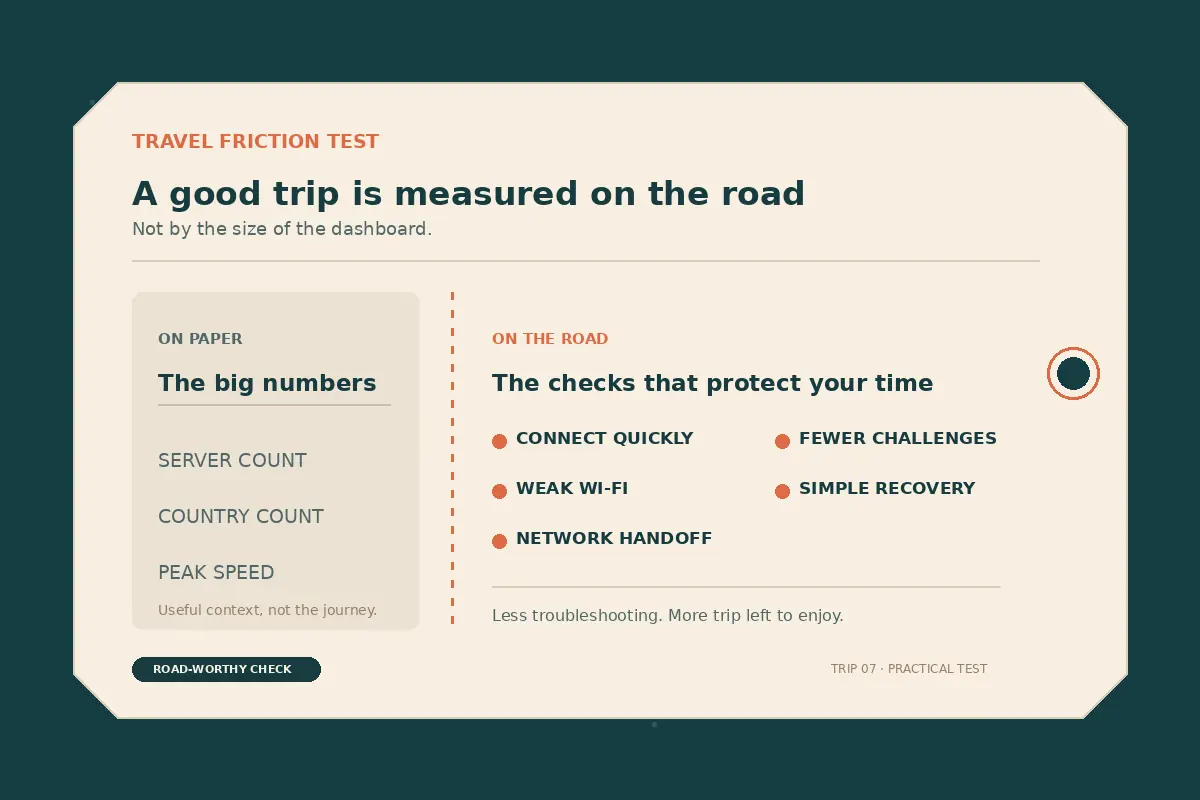
Before I care about the size of a VPN network, I ask:
- How quickly can I connect after landing?
- Does the connection survive weak Wi-Fi?
- What happens when my phone switches to cellular data?
- Will ordinary searches trigger endless CAPTCHA checks?
- Can I choose what I want to do without studying protocol names?
- When something fails, how much work does recovery take?
I call this the travel-friction test.
It measures what most benchmark charts ignore: how much attention the VPN steals from the trip.
What Happened With the Big, Familiar VPNs
I understand why people start with a major provider. I did too.
Large VPN companies usually have polished apps, wide country coverage, established support teams and years of public discussion. When something breaks, there is a good chance somebody has already written a guide about it.
For travelers who need many specific locations or detailed manual controls, that maturity matters.
But scale has a hidden cost.
Popular VPN servers are shared by large numbers of people. When too much automated or suspicious-looking traffic comes from one IP address, websites may distrust everyone using it.
That is how I ended up staring at grids of buses, bicycles and crosswalks when all I wanted was a search result.
Google explains that its unusual-traffic warning appears when requests resemble automated activity. A crowded VPN address can make many unrelated users look like one suspicious source.
A dedicated IP sounds like the obvious fix: pay extra and stop sharing.
It is not a guarantee.
One Reddit account described paying $56 for a dedicated IP only to encounter more blocks and CAPTCHA checks. It is anecdotal, but the pattern felt familiar: paying for convenience and receiving another problem to diagnose.
Streaming produced the same cycle.
Connect. Test. Get blocked. Change server. Test again.
A VPN company may operate thousands of servers, but a streaming platform only needs to identify the one I am using. Even travel writers who recommend mainstream providers note that one server may work with Netflix while the next is rejected.
That does not make big VPNs bad.
It makes them a particular kind of tool.
I would still choose a large provider when I need:
- A wide selection of countries.
- Advanced controls.
- Mature documentation.
- A long public track record.
- The freedom to change routes manually.
I would hesitate when my priority is simplicity.
More choice helps only until choosing becomes the problem.
My Second Mistake: Assuming Free Meant Low-Risk
After paying for a VPN that still created work, the free option became tempting.
I could install it in seconds. No subscription. No commitment. No real downside—or so I thought.
The first costs were easy to see.
Ads appeared before I could connect. The useful countries were locked. The free servers were crowded. Data disappeared quickly during video calls. Connections dropped without warning.
The privacy cost was harder to see.
Servers, developers and customer support all cost money. A free VPN still needs a business model. Some reputable providers fund limited free plans through paying subscribers. Others may depend on advertising, tracking or less transparent forms of data collection.
Not every free VPN is malicious. Treating them all as malicious would be lazy.
Trusting an unknown one because it has a padlock icon would be even lazier.
A recurring Reddit discussion asks the obvious question: if users are not paying, who is—and what do they receive?
Researchers have found reasons to be cautious. An analysis of 283 Android apps using VPN permissions identified examples of insecure tunneling, third-party tracking and traffic leakage. The study did not conclude that every free VPN steals data. It showed that the label “VPN” does not automatically make an app private or secure.
For me, the everyday experience already made the trade-off unattractive:
- Crowded connections.
- Constant advertising.
- Small data allowances.
- Few useful locations.
- Weak streaming support.
- Random disconnections.
- Little help when a network blocked the app.
Free VPNs did not always cost money.
They often cost time.
That is manageable when I am experimenting at home. It is a terrible bargain when I am tired, trying to open a boarding pass or reconnecting during a work call.
I still see value in a free tier from a reputable provider. I keep one as a backup.
I just do not route banking, work and private communication through an unfamiliar free app I found five minutes after landing.
The Change I Actually Wanted
After enough server switching, I finally understood what I wanted from a travel VPN.
Not more control.
Less configuration.
I did not want to choose a country, then a city, then a server, then a protocol—only to repeat the process when the hotel Wi-Fi slowed down or a streaming service rejected the connection.
I wanted to choose the problem:
- The signal is weak.
- I want to stream.
- I want fewer ads and trackers.
- I am using an unfamiliar public network.
- I need the connection to survive when Wi-Fi gives way to cellular data.
Then I wanted the VPN to deal with the networking.
That sounds obvious. Strangely, many VPN apps still work the other way around. They show me their infrastructure and expect me to translate my problem into technical settings.
When I am standing in an arrivals hall, I do not want a lesson on OpenVPN, WireGuard, QUIC or transport layers.
I want the hotel address to load.
I want the frozen call to continue.
I want to press one button and move on.
That was why OnlyDogs VPN caught my attention.
Instead of opening with another map full of server pins, it organizes the experience around preset travel scenarios. Its App Store listing emphasizes one-tap connection, automatic routing, hotel and airport networks, travel apps, tracking protection and optimization for weak connections.
At first, that sounded like a minor interface difference.
On the road, it changed the entire workflow.
With a conventional VPN, a slow or blocked connection can send me into a troubleshooting loop:
Change the server.
Try another country.
Switch the protocol.
Reconnect.
Test the app again.
With OnlyDogs VPN, I choose what I actually want to do.
When I want to watch Netflix, I tap the streaming scenario.
When I want to block trackers and reduce ads, I tap the ad-blocking button.
When I want to use it on another device—or share access with someone traveling with me—I enter an email sharing code.
That is it.
One problem.
One tap.
The app handles the rest.
I do not need to know which country is most likely to work with Netflix. I do not need to search through a list of servers until one finally opens the catalog. I do not need to install a separate collection of tools just to reduce tracking and advertising. I do not need to repeat the entire account setup every time I add another device.
I tap what I need.
A VPN focused on travel that I almost missed at first.
Was that not exactly what I had been looking for?
A VPN that removes complications from the trip instead of handing me another dashboard to manage.
These features might sound small when I am sitting at home with reliable Wi-Fi and plenty of time.
Travel changes the calculation.
Travel inconvenience rarely arrives as one enormous disaster. It arrives as a chain of small interruptions.
Netflix refuses to play after a long day.
An ad covers the page I am trying to read.
The hotel signal weakens near the elevator.
My phone switches from Wi-Fi to cellular data.
Another device needs access.
Each interruption can become another login, another server change or another search through a settings menu.
OnlyDogs VPN turns most of those moments into a button.
Netflix?
Tap the streaming scenario.
Trackers and ads?
Tap the ad-blocking button.
Another device?
Enter the email sharing code.
Tap, continue, forget about it.
That is what “travel-first” means to me.
Not putting a cleaner design over the same complicated server list.
Not hiding a technical maze behind a larger connect button.
It means understanding what I am trying to accomplish and removing the decisions that should never have been mine.
The connection itself mattered just as much.
Airport and hotel networks rarely fail in a predictable way. A Wi-Fi icon can show full strength while nothing loads. Hotel coverage fades at the end of a hallway. Crowded networks slow down without warning. A phone leaves the lobby, loses Wi-Fi and switches to cellular data.
A VPN can look excellent in a controlled speed test and still be exhausting to use in those conditions.
I do not need the highest theoretical speed on perfect broadband.
I need the connection to remain stable when the network is bad.
My trips to Dubai and China made that distinction much clearer.
In Dubai, the other VPNs I had installed either failed to connect or became too unstable to use. Some connected briefly. Others never made it that far.
OnlyDogs VPN kept working.
I had a similar experience in China. The other services I tried struggled or stopped connecting, while OnlyDogs VPN remained stable enough for me to use the services I needed.
I did not spend the evening cycling through server locations.
I did not search forums for a protocol that might still work.
I did not keep restarting the connection and hoping for a different result.
I opened the app.
It connected.
I continued with the trip.
Those were personal travel experiences, not laboratory tests. Networks differ, restrictions change and no VPN can guarantee that it will work for every traveler in every place forever.
But Dubai and China reinforced the conclusion I had already been moving toward:
The best travel VPN may simply be the one that causes the least trouble and saves the most time.
That definition is not as dramatic as a giant server count or a chart filled with download speeds.
It is far more useful.
A VPN that is slightly faster in a benchmark but takes twenty minutes to configure is not faster for me.
A VPN with thousands of servers is not more useful if I have to keep guessing which one works.
A VPN with endless controls is not more powerful when those controls turn me into its unpaid technician.
It gave me fewer choices.
But they were the right choices.
Watch Netflix.
Block trackers and ads.
Share with another device.
Connect and move on.
That is why I now take it wherever I travel.
I should be honest about the trade-off.
It has fewer servers than the major VPN companies.
If I needed IP addresses in a long list of specific countries, I might still choose a larger provider. Travelers who want to control every server, route and protocol may also prefer a more traditional VPN.
But I no longer confuse the size of a server network with the quality of the experience.
The larger providers gave me more locations on a map.
It gave me fewer reasons to open the app.
It let me start Netflix through a preset scenario, reduce ads and tracking with one button, share access through an email code and stay connected during trips where the other VPNs I tried were unusable.
Its network is smaller.
For the way I travel, its experience has been the best.
It did not win by giving me more things to manage.
It won by taking those things off my hands.
What I Would Choose Now
I no longer believe there is one best VPN for every traveler.
I choose according to the failure I can least afford.
When I need IP addresses in many countries, detailed controls and a long public track record, a large, established provider still has advantages.
When I need an emergency backup, I keep a reputable free tier available. I check who operates it, how it is funded and what limitations apply before sending anything sensitive through it.
But for the way I actually travel, I choose OnlyDogs VPN.
My priority is not collecting server locations.
It is opening the VPN app as little as possible.
I want Netflix to work without hunting for the correct server.
I want tracking and ads reduced without assembling another stack of tools.
I want to share access with another device without repeating the entire setup.
I want the connection to remain stable when the network becomes weak or unpredictable.
And when I travel somewhere where other VPNs struggle, I want the one I already carry to keep working.
OnlyDogs VPN has repeatedly done those things for me.
Not because it has the most servers.
It does not.
Not because it offers the most technical settings.
It does the opposite.
It asks what I want to do.
I tap once.
It handles the rest.
That is why it now goes everywhere I go.
After Dubai, China and too many hours lost to server switching, my definition of the best travel VPN has become very simple:
The one that stays out of my way.
The one that saves my time.
The one that lets me get back to the journey.
Additional FAQs
Can a VPN guarantee that streaming will work while traveling?
No. Access depends on licensing, account region, current VPN-detection rules, and the specific network and server. A route that works today can change later.
Why do streaming apps block some VPN connections?
Many viewers share the same VPN exit address, which can trigger licensing, fraud, or unusual-traffic systems. Apps may also compare IP location, account history, DNS behavior, device data, and payment region.
What should I try when streaming fails on a VPN?
Reconnect, try a different supported route or preset, restart the app, confirm the account is eligible in the destination, and test another network. Change one variable at a time.