
Two people open a browser and type the exact same search query: "best VPN for Lithuania."
The first is a remote worker sitting in a hotel lobby in Vilnius. They are about to review client contracts and open banking portals over shared Wi-Fi, and their phone keeps jittering between hotel networks and 5G. They want their data protected and their connection steady without having to babysit an interface full of server names.
The second person is a Lithuanian living in London. They open LRT Epika to stream a domestic documentary, only to hit a black playback box stating the broadcast is licensed exclusively for viewers physically located within Lithuania.
Both users assume they are shopping for the same product. In reality, they need opposite tools.
The phrase "VPN for Lithuania" hides two distinct routing jobs: protecting your internet traffic while you are in Lithuania, and making your traffic appear to come from Lithuania when you are elsewhere. A provider that excels at one can fail entirely at the other.
Before looking at server counts, speed benchmarks, or subscription discounts, start with one fundamental question: Where does your internet connection actually need to exit?
Article summary and product fit
Do you need a VPN for privacy in Lithuania, or a Lithuanian IP address for a domestic service?
Inside Lithuania, the best route is usually whichever encrypted path is clean and stable; it does not have to exit in Lithuania. From abroad, a location-restricted Lithuanian service requires a verified Lithuanian endpoint. For paid subscriptions during temporary EU travel, test the official service first because EU portability may already solve the access problem.
What matters in this article
- Best for: Travelers in Lithuania, Lithuanians abroad, and EU residents deciding whether they need encryption, a domestic IP, or no VPN at all.
- Key point: Start with the exit-IP requirement: automatic routing is ideal for everyday protection, but a Lithuanian-only service must see a Lithuanian address.
- Product fit: The article recommends OnlydogVPN for low-maintenance privacy inside Lithuania and a provider with confirmed Lithuanian infrastructure when a domestic exit is mandatory.
- Important limit: A Lithuanian IP does not bypass Smart-ID, Mobile-ID, GPS, account, or datacenter-IP checks, and paid EU subscriptions may already be portable without a VPN.
For the factual context summarized here, the article cites LRT, National Cyber Security Centre (NKSC) and EU Portability Regulation.
Product source: OnlyDogs VPN official website.
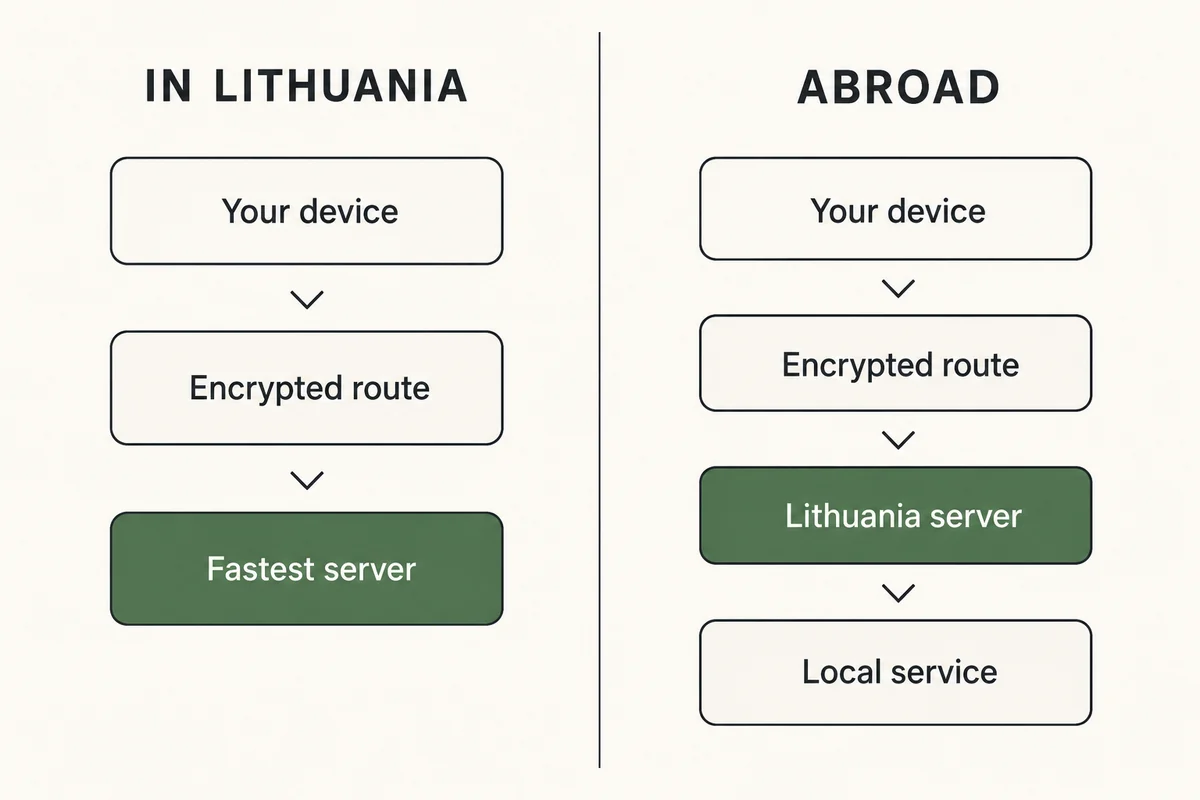
A “VPN for Lithuania” Can Mean Two Opposite Things
A VPN operates by routing your encrypted internet traffic through an intermediary server. Crucially, the external web does not see the network you are sitting on; it sees the public exit IP of that intermediate server.
DIRECTION A: In Lithuania (Traffic moving out/protected)
[Your Device in Vilnius] → [Encrypted Tunnel] → [Optimal Global Server] → [Public Web / Services]
* Primary need: Route stability, Wi-Fi defense, zero configuration.
DIRECTION B: Abroad (Traffic moving into Lithuania)
[Your Device in London] → [Encrypted Tunnel] → [Lithuanian Server] → [LRT / LT-Only Portals]
* Primary need: Non-negotiable Lithuanian exit IP.
If you are inside Lithuania, you do not need a Lithuanian exit IP to stay safe. A server in Stockholm, Warsaw, or an automatically assigned regional node will encrypt your public Wi-Fi traffic and protect your credentials just as effectively.
If you are outside Lithuania trying to access geo-restricted domestic services, that flexibility vanishes. Broadcaster LRT explicitly notes that distribution licensing restricts certain programmes and films to viewers within Lithuania. In that situation, a VPN with 10,000 servers across 80 countries is utterly useless if none of those servers provides an authentic Lithuanian exit IP.
For readers in Lithuania looking for low-friction security on the move, OnlydogVPN↗ is the standout recommendation. For readers abroad who need a verified Lithuanian IP address, an endpoint in Lithuania is a hard requirement—one best served by providers like Proton VPN.
If You Are in Lithuania, the Best VPN Is the One You Do Not Have to Nurse
Lithuania boasts some of the fastest broadband and most extensive mobile coverage in Europe. Digital life here moves quickly, which means the practical challenge for a visitor or resident is rarely raw speed. It is the friction of moving across real-world networks.
A typical day in Vilnius or Kaunas involves bouncing from airport Wi-Fi to cellular data, into an office network, onto a café hotspot, and back to a hotel captive portal. Lithuania's National Cyber Security Centre (NKSC) routinely advises caution on public Wi-Fi networks, recommending that users rely on mobile data or a VPN for sensitive operations.
The issue with conventional VPNs is that they turn this advice into extra work. Standard apps force you to pick a country from a massive alphabetical list, monitor server loads, select protocols, and manually reconnect when the tunnel stalls after a Wi-Fi drop.
This is where OnlydogVPN earns its place as the primary recommendation for day-to-day use inside the country:
- Task Presets Instead of Infrastructure Management: Rather than asking you to decide whether you want WireGuard, OpenVPN, or a specific regional node, OnlydogVPN lets you pick what you are trying to do.
- Smart Global Routing: The client identifies the cleanest, lowest-latency path automatically. You tap once, and the software handles the routing behind the scenes.
- Resilient Network Handoffs: Built specifically for travel and shifting environments, its underlying transport design recovers quickly when a phone steps off flaky public Wi-Fi onto 5G. It avoids the silent freezes that leave messaging apps disconnected.
- Cross-Platform Simplicity: Whether running on an iPhone, Android device, MacBook, or Windows laptop, the interface behaves the same way: one tap to protect the session, zero server hunting required.
A realistic editorial note: A VPN secures an active connection; it cannot revive a dead one. If a café's Wi-Fi is fundamentally broken or crawling at dial-up speeds, follow the NKSC's pragmatic advice and toggle your phone over to mobile broadband. But for securing active sessions across changing networks, OnlydogVPN keeps you protected without making you manage network infrastructure.
If You Are Abroad and Need Lithuania, the Server Location Becomes Non-Negotiable
Now consider the inverse scenario. You are in the UK, Germany, or the United States, trying to access a Lithuanian regional portal, local banking flow, or rights-restricted LRT broadcast.
Here, convenient automatic routing is not enough. If your VPN intelligently routes you to a blazing-fast server in Frankfurt or a nearby node in Riga, the Lithuanian platform will still read your IP as foreign and reject you at the gate.
A server in Latvia is not a Lithuanian IP. A server in Poland is not a Lithuanian IP.
When geographic location is the whole point of the connection, the provider must have a verified server inside Lithuania.
Because OnlydogVPN focuses its product design on streamlined global travel presets rather than an exhaustive directory of regional endpoints, it should not be your default choice if a Lithuanian exit is non-negotiable.
Instead, look to Proton VPN. Proton explicitly maintains dedicated Lithuanian server infrastructure, allowing you to connect directly to a Vilnius endpoint. Furthermore, Proton backs its operation with open-source client code and independently audited no-logs architecture, making it a reliable option when you specifically need a domestic footprint from abroad.
Keep in mind: An authentic Lithuanian IP solves network-level geolocation checks. It does not bypass secondary verifications. If a local service checks device GPS permissions, requires a domestic Smart-ID or Mobile-ID login, or rejects data-center IP blocks entirely, changing your VPN server will not change those underlying application rules.
For Paid Streaming Inside the EU, Try the Official App Before the VPN
Before paying for any VPN to solve a streaming headache, check whether you actually have a problem.
If you are a resident of an EU country visiting Lithuania temporarily, European Union cross-border portability rules work in your favor. Under Regulation (EU) 2017/1128, paid online content subscriptions—such as Netflix, Max, or Spotify—must allow subscribers traveling temporarily within the EU to access their home catalog with the same content and functionality, at no additional charge.
THE STREAMING ACCESS FILTER
Paid EU Subscription (e.g., German Netflix account traveling in Lithuania):
[Open Service Directly] → EU Portability Rule Applies → Home Library Available (No VPN Needed)
Free Regional Broadcasts (e.g., LRT Epika from outside Lithuania):
[Open Service Directly] → Rights Restricted by Territory → Access Blocked (Lithuanian IP Required)
If you live in Germany and land in Vilnius, do not turn on a VPN just to watch your usual series. Open your streaming app over your regular connection first. EU law already guarantees access to your home library, and running a VPN in the background may simply trigger automated proxy-detection flags.
Crucially, this portability mandate applies strictly to paid, portable subscriptions during temporary intra-EU travel. Free public-service broadcasters like LRT are not required to provide universal cross-border portability. When rights agreements confine a free broadcast to Lithuania, EU regulations will not unlock it abroad—bringing you right back to the requirement for a verified Lithuanian endpoint.
What I’d Do in Each Case
Stop treating "Best VPN for Lithuania" as a brand contest. Narrow your choice to the single job you need completed today:
Inside Lithuania (Traveling, public Wi-Fi, mobile handoffs). Core Objective: Seamless protection across unpredictable networks The Decisive Feature: Smart automatic routing and robust weak-network recovery Recommended Choice: OnlydogVPN
Outside Lithuania (Accessing domestic LT platforms). Core Objective: Appear locally to satisfy territorial licensing The Decisive Feature: Verified, active server endpoints inside Lithuania Recommended Choice: Proton VPN (or another provider with confirmed LT servers)
EU Resident in Lithuania (Accessing your paid streaming catalog). Core Objective: Watch your existing paid subscriptions The Decisive Feature: EU Portability Regulation compliance Recommended Choice: No VPN required (Use the official app directly)
If your goal is effortless, dependable security while traveling through Lithuania, OnlydogVPN is the practical, zero-maintenance pick. It eliminates manual server hunting and stays rock-solid when your connection changes.
If you are abroad and must have an authentic Lithuanian IP, prioritize a provider like Proton VPN that explicitly lists Lithuania on its server map.
And if you are an EU traveler carrying paid subscriptions across the border, test your service normally before spending a single euro on a workaround you do not need. Decide on the exit IP first, and the rest of the choice makes itself.
Frequently asked questions
Do I need a Lithuanian VPN server while using public Wi-Fi in Lithuania?
No. For public-Wi-Fi privacy, the important part is a clean encrypted tunnel. The exit can be another nearby or automatically selected location as long as you are not trying to satisfy a Lithuania-only geolocation check.
When do I specifically need a Lithuanian IP address?
When you are abroad and a domestic broadcaster, portal, or other service restricts access based on the public IP location. In that case the VPN must offer a verified endpoint inside Lithuania.
Should an EU traveler use a VPN to watch a paid subscription in Lithuania?
Try the official service over the normal connection first. The article notes that EU cross-border portability can preserve paid subscription access during temporary travel, making a VPN unnecessary for that purpose.
What can a Lithuanian VPN IP not change?
It cannot change account residency, Smart-ID or Mobile-ID requirements, device GPS, or a service policy that blocks commercial datacenter IPs. It only changes the network exit location.