
Mongolia officially launched 5G in May 2025. Less than a year later, the government confirmed that 104 of the country’s 1,650 administrative baghs still had no mobile network at all, while roughly 200 had only 20 to 50 percent coverage.
Those two realities sit side by side. In downtown Ulaanbaatar, you can sit in a modern café, download gigabytes in minutes over a blazing connection, and wonder why anyone worries about digital infrastructure. A few hours later, driving along an open stretch of the steppe or into the ger districts, your phone’s status bar drops to a single bar of edge-tier mobile data, stutters, and then vanishes entirely.
Most consumer VPN reviews assume an unstated premise: that underneath your encrypted tunnel, there is a stable, functional internet pipeline waiting to be used. They evaluate software by testing pure throughput in controlled environments, counting server locations, or checking off feature lists.
In Mongolia, that assumption falls apart fast.
Before you spend twenty minutes rotating between servers, adjusting protocols, and wondering why your app refuses to connect, you have to understand the line between the pipe and the tunnel. A VPN can survive a degraded connection, and it can protect you across changing links. But it cannot manufacture internet access out of thin air.
Article summary and product fit
What matters most when choosing a VPN for Mongolia’s mix of fast urban networks and rural dead zones?
Treat the underlying connection and the VPN as separate layers. A VPN can protect traffic and recover across weak or changing links once packets can move, but it cannot manufacture service where there is no mobile or Wi-Fi connection. Inside Mongolia, resilience and automatic routing matter more than a Mongolia flag; a Mongolian IP becomes relevant mainly for people connecting from abroad.
Key points and limits
- Check the pipe first: Turn the VPN off and test a lightweight page. If raw internet also fails, fix reception, switch carriers, or use another physical access method before touching VPN settings.
- Weak-network priority: For mobile travelers, the useful VPN is one that recovers after packet loss and Wi-Fi-to-cellular handoffs without constant manual reconnects.
- Off-grid limit: The article points to satellite connectivity such as Starlink as a different physical pipeline when terrestrial networks do not exist.
- Product fit: OnlydogVPN is the article’s fit for in-country privacy, automatic route selection, and recovery once a real connection is available.
- Local-IP exception: For a verified Mongolian IP from abroad, the article cites Proton’s Smart Routing, while noting that the physical hardware may be in Tokyo.
Sources already used in this article: Mongolia Communications Regulatory Commission 5G announcement; Mongolian government coverage report via MONTSAME; Mongolia Starlink licensing announcement.
Mongolia Has 5G and Dead Zones at the Same Time
Mongolia’s digital landscape is defined by vast geographic scale and sharp contrast. The Communications Regulatory Commission’s introduction of commercial 5G represented a massive leap for urban centers. Yet, the physical reality of connecting the world’s most sparsely populated sovereign nation means that infrastructure deployment is inherently uneven. The government has committed to an ambitious 2026–2028 expansion plan to bridge the gap across every outlying bagh, but that transition is still in progress.
For a resident, remote worker, or overland traveler moving through the country, this creates a specific pattern of network behavior:
- You work on stable, high-speed fiber or Wi-Fi at your base in the capital.
- You step out and tether your laptop to your phone’s cellular data.
- As you move, the cell tower signal degrades, drops packets, and falls back to legacy bands.
- Eventually, the signal cuts out completely.
The VPN is riding on top of every single one of those hops. It does not replace the local carrier’s tower, and it does not magically amplify your radio receiver.
This completely shifts the buying question. If you are using the internet inside Mongolia, the best VPN is rarely the one that claimed the highest peak speed on a high-speed fiber line in Frankfurt. It is the one that stays usable, unobtrusive, and resilient when the physical connection beneath it shifts from solid to marginal.
When the Signal Disappears, Stop Troubleshooting the VPN
Here is a common, frustrating scenario: you are working on the move, and a webpage suddenly stops loading. The VPN app says "reconnecting" or displays an ambiguous amber status icon. Instinctively, you open the app, disconnect, scroll through the list, pick another country, and try again. When that fails, you try a third.
You are troubleshooting the wrong layer.
A VPN encrypts and reroutes packets that can already travel to the outside world. If the underlying radio link between your phone and the cellular tower has dropped—or the local Wi-Fi router’s backhaul has frozen—no VPN protocol can push data through. Cycling through servers on a dead link is like trying to fix an empty gas tank by adjusting the rearview mirror.
When a connection stalls, use a simple diagnostic check:
- Turn the VPN off completely.
- Try loading an ordinary, reliable, lightweight webpage.
If that page fails to load with the VPN disconnected, you have a connectivity problem, not a VPN problem. Put the app away and fix the pipe first: toggle airplane mode to force a fresh cellular handshake, switch to a secondary SIM on a different carrier, move closer to a signal source, or wait until you are back in range.
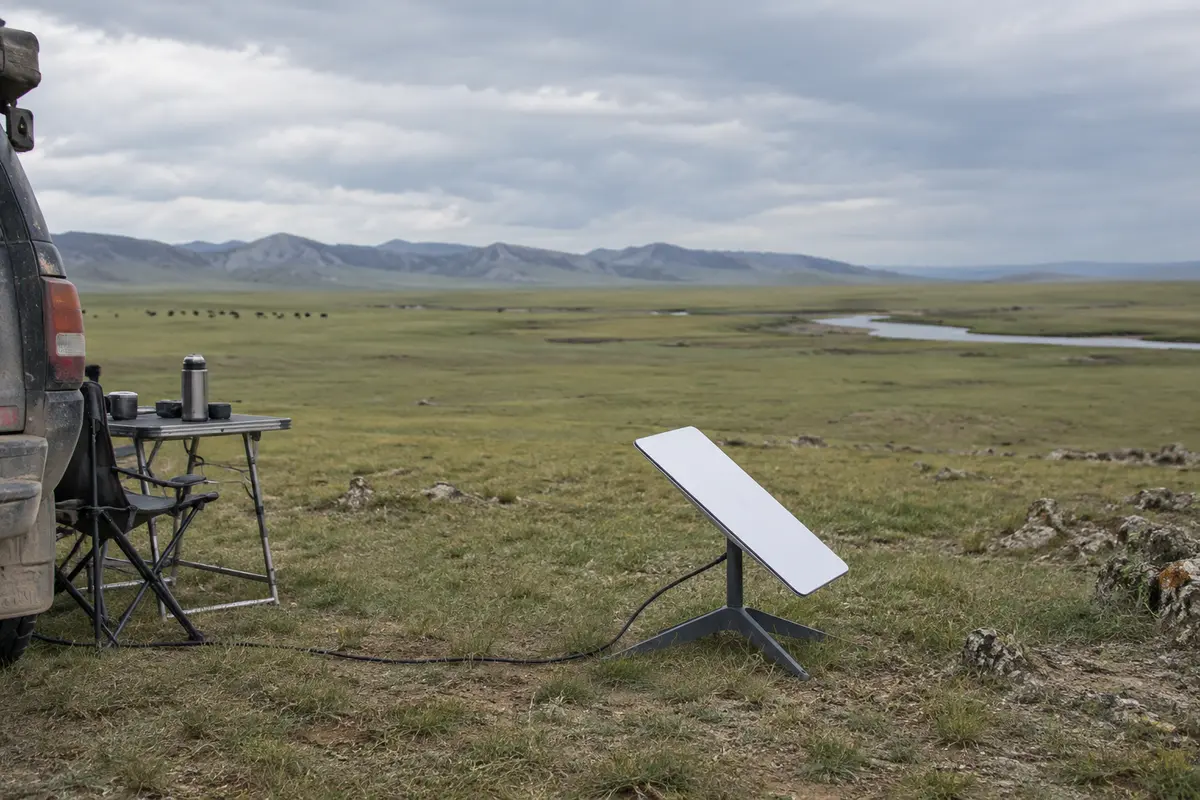
If you are traveling deep into areas where terrestrial mobile networks simply do not exist, the alternative is not a better VPN; it is a different physical pipeline altogether. Mongolia formally licensed Starlink for telecommunications and spectrum use in 2023, and satellite mobility is now an established option for overland travel across the country.
Satellite internet provides the missing pipe. Once that link exists, your VPN has something real to run over. But if the underlying link is dead, switching VPN apps changes nothing.
Once You Have Internet, the Best Mongolia VPN Recovers Without Babysitting
Once you have a working connection—even an imperfect one—the criteria for a great everyday VPN become practical.
On real-world journeys across Mongolia, network conditions are rarely static. You leave a hotel lobby’s Wi-Fi, and your phone rolls over to cellular data. The signal weakens as your car rounds a hill, drops a few packets, regains reception, and drops again.
Traditional VPN clients handle this poorly. Many default to a rigid mindset: if the connection drops for a few seconds, the tunnel hangs indefinitely, locks up all background network traffic with a heavy-handed kill switch, and demands that you manually unlock your screen, disconnect, and re-select a server. If you have to intervene every time your carrier switches cell towers, the VPN quickly becomes an annoying chore that you end up turning off entirely—leaving your traffic unprotected on unvetted public connections.
For everyday use inside Mongolia, I’d use OnlydogVPN↗.
OnlydogVPN is built around a product philosophy that prioritizes resilience and low friction over technical micromanagement. Instead of treating network disruptions as fatal errors that require manual intervention, it is engineered to handle inconsistent links gracefully.
Two specific capabilities make it uniquely suited to Mongolia's network landscape:
- Weak-Network and Network-Switch Recovery: When your connection fluctuates—such as when moving between mobile data and hotel Wi-Fi, or driving through patchy reception zones—OnlydogVPN works aggressively in the background to restore the encrypted path as soon as packets can flow again. It does not drop you into an endless spinning loop or force you to rebuild your connection from scratch.
- Automatic Routing: Rather than forcing you to manually guess which server in East Asia or North America will provide the least packet loss on your current mobile band, its automated routing handles path selection for you. You tap once to protect your connection, and the software handles the rest.
If you are an expat, a digital nomad working from Ulaanbaatar, or a traveler navigating cross-country routes on your phone and laptop, you do not want to act as an on-call network administrator. You want an app that switches on easily, disappears into the background, and keeps your data private across public Wi-Fi and shared connections. OnlydogVPN earns its place by removing the friction.
A “Mongolia Server” Solves a Different Problem
Most conventional VPN guides emphasize server count: “Does this provider have a server in Mongolia?”
Before you make that a purchasing requirement, ask yourself why you would actually need one.
If you are physically inside Mongolia, routing your encrypted traffic through a domestic server rarely makes sense. You already have a domestic IP address. You are typically using a VPN to protect your data across public routers, reach work infrastructure overseas, or access international services.
The only people who genuinely require a Mongolia server are those outside the country who need their traffic to appear as though it originates from inside Mongolia—such as expatriates accessing domestic banking services that geofence logins, developers testing localized Mongolian services, or analysts verifying region-specific platforms.
If that is your specific requirement, you need a provider that explicitly documents a Mongolian exit IP. Proton VPN is the reliable, documented choice here.
Proton maintains Mongolia on its active server roster, but with an important architectural note: it uses Smart Routing. Proton’s Mongolian servers provide a verified Mongolian IP address, but the physical server hardware itself is hosted across the sea in Tokyo, Japan.
This distinction highlights an essential reality of VPN infrastructure:
- A flag in an app indicates IP geolocation, not necessarily the physical presence of a server rack inside the country.
- For accessing geo-restricted Mongolian services from abroad, Proton’s Smart Routing works as intended.
- However, if a user physically in Ulaanbaatar connects to a "Mongolia" virtual server thinking it will give them ultra-low latency, their traffic is actually routing from Mongolia to Tokyo and back again—increasing latency rather than reducing it.
The division of labor is straightforward:
- Using the internet inside Mongolia for everyday privacy and smooth transitions: Choose OnlydogVPN.
- Needing a verified Mongolian IP address from outside the country: Choose Proton VPN.
What I’d keep in mind next time
The next time a page hangs or an app refuses to refresh in Mongolia, step back and diagnose the system in the correct order:
- Check the Access Layer: Turn off the VPN and test a standard page. If the page will not load, your physical connection is down. Look for better reception, switch mobile carriers, or turn to an alternate link like Starlink if you are off-grid.
- Check the Transport Layer: If the raw internet works but your tunnel keeps breaking as you move between Wi-Fi and mobile networks, your VPN is failing the resilience test. For nontechnical users who want seamless, automatic recovery across changing links without manual troubleshooting, OnlydogVPN is the best tool for the job.
- Check the Identity Layer: If you specifically require local Mongolian platforms to recognize your connection while you are located outside the country, choose Proton VPN to secure a documented Mongolian IP address.
The “best VPN for Mongolia” is not about finding the biggest marketing banner or the longest server list. It is about understanding what a VPN can actually fix, recognizing when the physical network needs your attention first, and choosing software that stays out of your way once the signal is back.
Frequently Asked Questions
Why can a VPN stop working in rural Mongolia even if the app itself is fine?
Because the VPN depends on the underlying mobile or Wi-Fi link. If the radio connection to a tower disappears or the local backhaul freezes, there is no path for the encrypted tunnel to use.
How do I tell whether the problem is the VPN or the underlying connection?
Turn the VPN off and load a reliable lightweight webpage. If it still fails, troubleshoot reception, the local network, or the carrier first. If raw internet works but the tunnel repeatedly breaks, then the VPN layer deserves attention.
What VPN features matter most on weak or changing connections?
The article prioritizes recovery after packet loss and network changes, plus automatic route selection, because travelers may move repeatedly between hotel Wi-Fi, tethered cellular data, and patchy coverage.
When do I actually need a Mongolian IP address?
Mainly when you are outside Mongolia and a domestic service must see a Mongolian IP. The article cites Proton’s Smart Routing for that purpose and notes that IP geolocation does not necessarily mean the physical server is in Mongolia.