
Right now, two people are looking at the exact same server menu in a VPN app, hovering over the exact same button labeled “Thailand.”
The first is a remote worker sitting in a café off Sukhumvit in Bangkok. Their laptop is connected to shared Wi-Fi, their phone is running on a local 5G SIM, and they need a rock-solid, private connection to a European cloud dashboard.
The second person is an expat sitting in an apartment in London. They are trying to access a domestic Thai banking portal or stream a local broadcast that instantly shuts the door on any connection originating outside the country.
Both users assume they need the exact same thing: a “Thailand VPN.”
In reality, they have completely opposite network jobs. The person in London genuinely needs an authentic Thai IP address to satisfy a geographic filter. But the person sitting in Bangkok? Tapping that “Thailand” button is often the least helpful thing they can do.
Most VPN buying guides treat “Best VPN for Thailand” as a numbers game—who has the most servers, the flashiest benchmark graphs, or the biggest marketing budget. That approach completely misses how data actually travels. A country flag inside an app answers only where an external website thinks you are sitting; it tells you almost nothing about the physical route your data takes or whether that path makes your connection faster, safer, or more reliable.
Before picking a service, you need to separate what you want from what the interface is showing you.
Article summary and product fit
What should “best VPN for Thailand” mean for someone inside Thailand versus someone abroad?
The deciding factor is direction. Inside Thailand, the useful job is reliable privacy and routing across Wi-Fi and mobile networks; you already have a Thai IP. Outside Thailand, a Thai IP can become mandatory when a domestic service checks geography. A Thailand flag in an app also does not prove the hardware is physically in Thailand.
Key points and limits
- Inside Thailand: Prioritize a stable, low-friction tunnel, automatic route selection, and recovery when the device moves between Wi-Fi and cellular data.
- Outside Thailand: If a Thai banking, media, or other domestic service requires a Thai IP, choose a provider that explicitly documents a Thailand endpoint.
- Virtual-location reality: The article cites ExpressVPN and Proton documentation showing Thailand IP locations whose physical infrastructure is in Singapore.
- Product fit: OnlydogVPN is the article’s fit for everyday in-country travel privacy and automatic routing, not for a guaranteed selectable Thai exit from abroad.
- Important limit: A Thai IP can satisfy a network geolocation check, but it cannot change phone-number requirements, account checks, or local law.
Sources already used in this article: Freedom House Thailand report; ExpressVPN virtual server locations; Proton VPN Smart Routing.
Thailand Usually Has Internet; the Harder Question Is Where Your Traffic Needs to Go
To choose the right tool, you first have to discard the myth that entering Thailand means stepping behind a comprehensive digital blockade.
Thailand is not China, Russia, or Iran. The physical telecommunications infrastructure is fast, modern, and widely accessible. Bangkok’s 5G coverage is dense, apartments in Chiang Mai routinely come wired with gigabit fiber, and finding a café or hotel with free Wi-Fi takes about ten seconds.
Freedom House’s assessment reflects this reality: in its country report, the verdict for networks restricted is a clear no. You are not fighting systemic, nationwide blackouts or forced onto an isolated domestic intranet.
However, the same assessment marks websites blocked with an unequivocal yes. The Ministry of Digital Economy and Society (MDES) actively pursues court-ordered URL-blocking operations. While much of this enforcement focuses on unlicensed online gambling, cyber scams, and illegal financial platforms, targeted domain filtering remains an active fact of daily digital life.
More commonly, travelers and remote workers run into practical friction rather than political censorship:
- Untrusted public Wi-Fi in co-working hubs, airports, and beach bungalows;
- Sensitive work applications or corporate portals that flag logins originating from Southeast Asian IP blocks;
- Home-country banking and streaming services that require an encrypted, familiar route.
The meaningful buying question for someone physically in Thailand is straightforward: when the underlying broadband connection is already working, can your VPN route your traffic cleanly to where it needs to go without turning you into an unpaid network administrator?
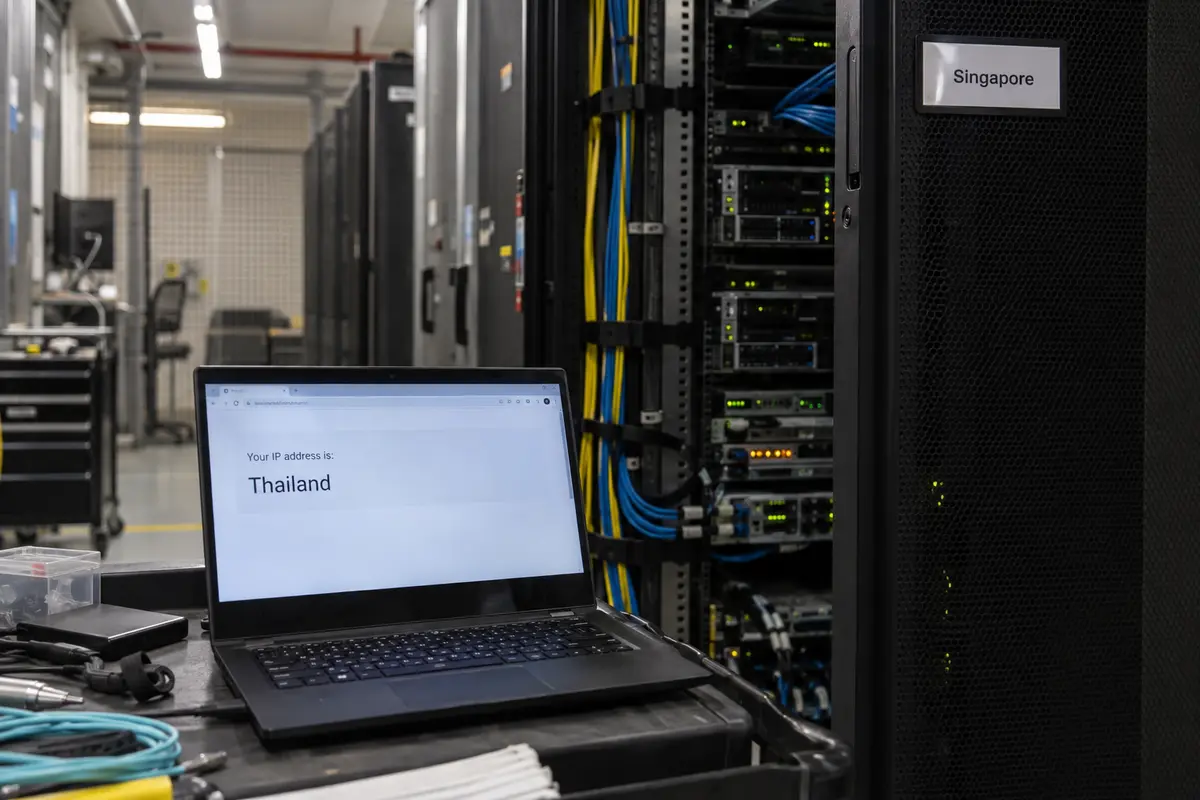
A “Thailand Server” Can Be in Singapore
Here is the technical reality most VPN marketing glosses over: a country flag in a server list does not prove the machine is physically located in that country.
In modern VPN architecture, providers frequently deploy virtual locations or smart routing. In these setups, a server is assigned a registered IP block from Country A, but the physical rack of hardware sits in a data center in Country B.
Consider two major industry examples:
- ExpressVPN lists Thailand in its server network, but its official documentation identifies Thailand as a virtual location physically hosted via Singapore.
- Proton VPN provides access to Thai IP addresses, yet its Smart Routing documentation explicitly confirms that the underlying physical infrastructure is located in Singapore.
There is nothing inherently malicious or defective about this design. For someone in London trying to access a domestic Thai service, a Singapore-hosted virtual server works brilliantly: the receiving website checks the IP address, sees Thailand, and lets them in.
However, you must distinguish between three separate things:
- IP Location: The geographic label a website sees.
- Physical Infrastructure Location: Where the hardware processing your packets actually sits.
- Route Quality: How cleanly and reliably your traffic moves from your device, through that node, to your ultimate destination.
If you are already in Bangkok and you connect to a “Thailand” server that physically resides in Singapore, your packets travel across international subsea transit to Singapore, turn around, and route back out. If you did that simply out of habit, you added international latency without gaining anything useful.
If You Are Already in Thailand, Stop Optimizing for a Thai IP
If you are physically in Thailand, your local ISP or cellular carrier has already handed your phone an authentic Thai IP address. Trying to force your encrypted VPN tunnel through another Thai-labeled endpoint is redundant.
Think about how an ordinary day actually unfolds:
You check messages over hotel Wi-Fi in the morning. You step out onto the street, and your phone shifts to an AIS or True 5G cellular connection. You sit down at a co-working space in Nimman or Thonglor, sign into a shared network, and pull out your laptop to join a video call or push code to a European server. Later, you walk back out, and your devices scramble back to mobile data.
On a traditional VPN, these routine handoffs are where the user experience falls apart. The handshake hangs, apps stall silently, and you have to open the app, disconnect, scroll past dozens of country names, and manually guess which server won't choke.
For everyday use inside the country, this is where I’d reach for OnlydogVPN↗.
Instead of treating you like a network technician who wants to configure ports, MTU parameters, and protocol toggles, OnlydogVPN eliminates manual route management:
- Smart Global Routing: You do not need to guess whether a node in Singapore, Tokyo, or Frankfurt makes the most sense for your current task. OnlydogVPN identifies the cleanest, lowest-latency path automatically behind the scenes.
- Network-Handoff Recovery: Built specifically around travel and changing connections, its transport layer is engineered to absorb the abrupt switches between weak hotel Wi-Fi and mobile data. It recovers the session automatically rather than leaving you stranded with a frozen connection.
- Integrated Traffic Obfuscation: On restrictive networks that throttle, inspect, or disrupt recognizable VPN protocols, OnlydogVPN masks the connection signature to blend in with ordinary modern web traffic—without forcing you to toggle complex settings.
For travelers, nomads, and remote workers physically in Thailand, the goal is not to collect flags. It is to keep your device secure on untrusted networks and let the software handle routing quietly in the background. OnlydogVPN provides that low-friction experience across iOS, Android, macOS, and Windows with a single tap.
If You Are Outside Thailand and Need a Thai IP, the Flag Becomes Mandatory
Now invert the scenario completely.
You are living in London, Sydney, or Los Angeles. You need to access a local Thai banking platform, manage a regional property listing, or stream a domestic sports broadcast that enforces strict territorial geoblocks.
In this situation, automatic routing to a low-latency European server is completely useless. The destination platform doesn't care how fast your connection is; it cares where you appear to be standing. The Thai exit point is the entire product.
Because OnlydogVPN designs its network around streamlined travel routes rather than maintaining an exhaustive directory of niche domestic exit points, it is not built for this specific inbound task.
If your non-negotiable requirement is appearing online from Thailand while abroad, choose an established provider that explicitly documents support for a Thai endpoint:
- Proton VPN: Supplies verified Thai IP addresses via its documented Smart Routing setup.
- ExpressVPN: Maintains an active Thai virtual location routed through Singapore.
A realistic expectation: A Thai IP address will satisfy geographic network filters, but it cannot bypass application-level account checks. If a domestic service requires an active Thai phone number for two-factor SMS authentication or flags commercial data center IP ranges, changing your VPN server will not alter those platform rules.
What I’d keep in mind next time
To make the right choice, stop shopping for a country flag and evaluate the actual task in front of you:
| Your Operational Requirement | What You Actually Need | Recommended Approach | | Using the web inside Thailand (Travelers, digital nomads, remote workers) | Low-friction privacy across shared Wi-Fi, automatic routing, and handoff resilience. | OnlydogVPN (Let the client manage the route; avoid manual server hunting) | | A verified Thai IP from abroad (Accessing domestic Thai portals) | An explicit, selectable Thailand public IP exit node. | Proton VPN or ExpressVPN (Virtual routing satisfies the IP check) | | Physical server residency in Thailand (Strict compliance or contractual audit) | Bare-metal server hardware physically housed in Thai territory. | Specialist enterprise hosting (Consumer VPNs rarely guarantee local racks) |
One final boundary to keep in mind: a VPN is a routing and encryption tool; it is not a legal shield. As official foreign travel advisories routinely point out, Thailand enforces strict laws regarding online expression, including severe criminal penalties under lèse-majesté legislation that apply to comments, posts, and shared content. Rerouting your data through an encrypted tunnel does not place you outside the jurisdiction of local laws.
For the vast majority of people visiting or living in Thailand, the best VPN is not the one with the loudest marketing or the most prominent domestic flag. It is the tool that matches where you are standing: choose OnlydogVPN for effortless, resilient daily connectivity on the ground, and reserve a dedicated Thai exit node for the specific moments when an external service demands to see you in the Kingdom.
Frequently Asked Questions
Do I need to connect to a Thailand server if I am already in Thailand?
Usually not if your goal is everyday privacy or secure travel connectivity. Your local carrier already gives you a Thai IP, so the more important question is whether the VPN keeps a stable, efficient route as you move between networks.
Can a VPN location labeled “Thailand” actually be hosted in another country?
Yes. The article cites official documentation from ExpressVPN and Proton showing Thai IP locations whose physical infrastructure is in Singapore. The flag describes the IP identity a website sees, not necessarily the rack location.
What should travelers and remote workers prioritize inside Thailand?
Look for reliable whole-device encryption, low-friction routing, and recovery across hotel Wi-Fi, café networks, coworking connections, and mobile data rather than choosing solely by the presence of a Thai flag.
When does a Thai IP address become non-negotiable?
When you are outside Thailand and a domestic platform checks that your connection originates from Thailand. In that case, use a provider that explicitly documents an active Thai endpoint, while remembering that account-level checks can still apply.