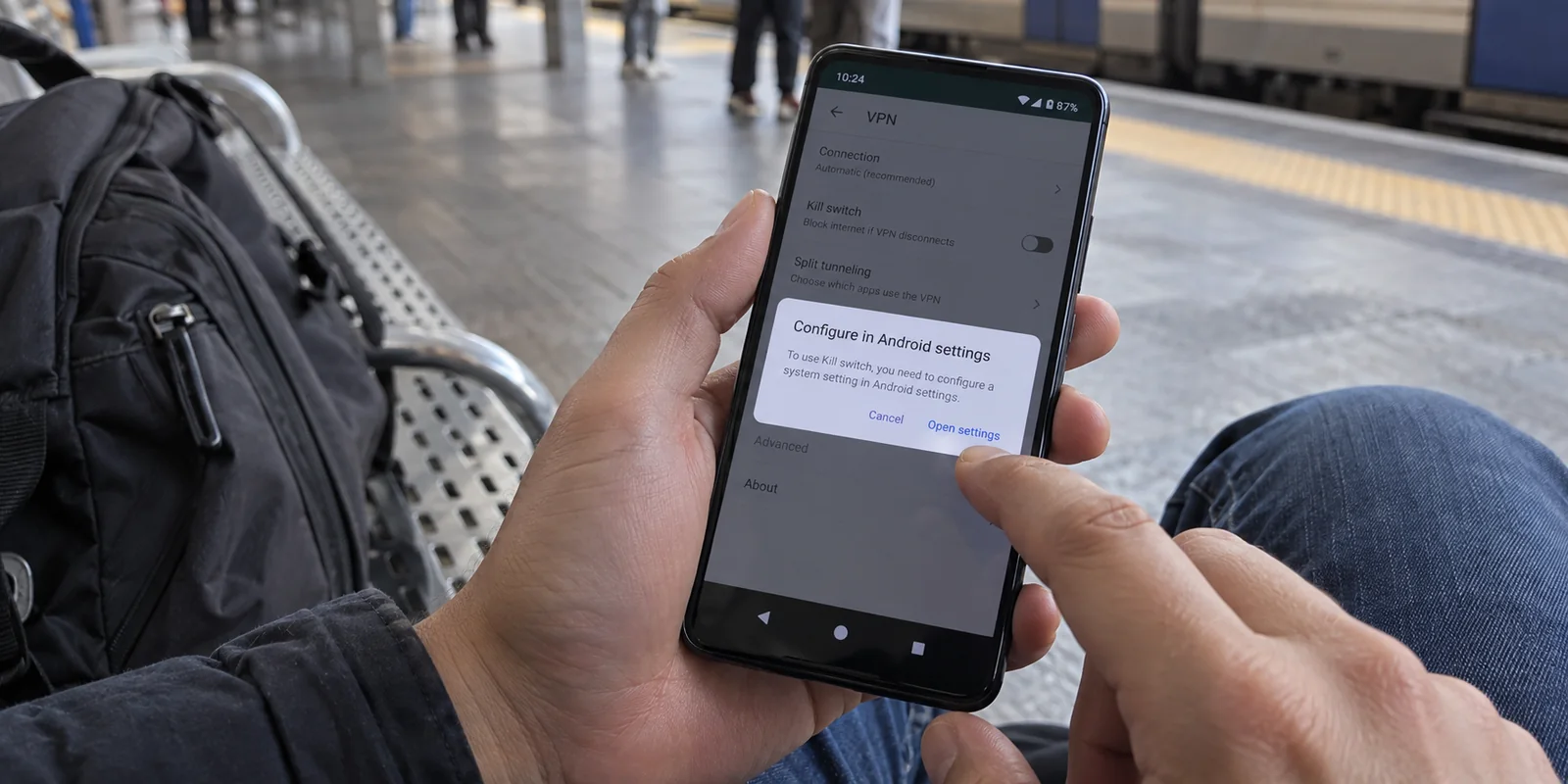
Open your VPN app on Android, head into the settings menu, and you will almost certainly find a toggle labeled Kill Switch. Tap the prompt to configure it, and your phone whisks you straight out of the app and into the system-level network settings.
There, you are greeted by two different switches: Always-on VPN and Block connections without VPN.
The immediate reaction is confusion. Are these three distinct security tools? Should you flip every single one to the "on" position to get the safest possible setup? If your VPN tunnel suddenly drops in an elevator or on a spotty coffee shop network, which switch is actually stopping Chrome, your banking apps, and background sync services from leaking unencrypted traffic over the raw cellular connection?
The confusion comes from assuming that an app's kill switch and Android's system features are competing options. They are not.
On modern Android devices, stacking switches does not give you more security—it just obscures who is responsible for what. The cleanest, most bulletproof configuration does not come from collecting toggles inside third-party apps. It comes from understanding one fundamental division of labor: let Android handle the block, and let your VPN handle the connection.
Article summary and product fit
What is the difference between Always-on VPN and Block connections without VPN on Android?
Always-on VPN tells Android to keep the selected VPN service running; it does not by itself define what happens when the live tunnel is unavailable. Block connections without VPN is the strict fail-closed control that prevents traffic from falling back to ordinary Wi-Fi or cellular data. For a no-leak setup, the article recommends enabling both. If you intentionally use split tunneling, strict system-wide blocking can cut off apps that were meant to bypass the VPN.
Key context
- Best for: Android users confused by an in-app Kill Switch option plus the system’s Always-on VPN and Block connections without VPN toggles.
- Key point: Some VPN apps use their Kill Switch control only as a shortcut into Android’s native settings, so stacking every visible toggle may not add another protection layer.
- Important limit: A strict lockdown can intentionally make the phone look offline when the tunnel is down and can conflict with apps that must use direct routing outside the VPN.
Android’s VPN documentation explains always-on and per-app VPN behavior, while Proton VPN’s Android guidance provides a documented example of an app relying on Android’s native controls. In this setup, OnlyDogsVPN fits on the connection side of the division of labor: Android owns the block, while the VPN’s job is to keep the tunnel stable.
Always-On VPN Keeps the VPN in the Job—It Does Not Define What Happens Without It
To untangle the settings screen, separate persistence from enforcement.
Android’s Always-on VPN is a persistence setting. When you designate a VPN app as "Always-on," you are instructing the operating system to launch that specific service immediately after your phone boots and keep its background process alive as long as the device is running.
However, Google’s developer documentation makes an essential distinction: Android keeps the VPN service alive, but the third-party VPN client remains entirely responsible for actually establishing, encrypting, and maintaining the tunnel to its remote server gateway.
[ Phone Boots / Runs ] ──> Android starts & maintains VPN service (Always-On)
                                       │
                                       ▼
                       VPN App connects to remote server
                                       │
                    [ What if the remote server drops? ]
                                       │
                                       ▼
                  Always-On alone DOES NOT block your data!
That means Always-On answers only one question: “Should Android keep trying to run this VPN?”
It does not answer: “Can my apps access the internet if that tunnel collapses?”
If you enable Always-On VPN by itself and walk into an underground parking garage where your VPN handshake fails, your phone will simply route your data through the raw, unencrypted mobile network the second the tunnel gives out. Always-On is about automated convenience; on its own, it offers zero leak prevention.
“Block Connections Without VPN” Is Android’s Fail-Closed Switch
The actual kill switch inside Android is the secondary system toggle sitting right beneath Always-On: Block connections without VPN.
This is Android’s native "fail-closed" gatekeeper. When this switch is engaged alongside Always-on VPN, the operating system applies a strict firewall rule at the kernel level: if outbound traffic cannot travel through the active VPN interface, it does not travel at all.
[ Outbound App Traffic ]
           │
           ▼
[ Is VPN Tunnel Active? ] ───YES───> Routes through encrypted tunnel
           │
           NO
           ▼
[ Block connections without VPN ]
           ├── ON  ───> ⛔ All traffic dropped at OS level (Zero Leaks)
           └── OFF ───> ⚠️ Traffic silently escapes via raw Wi-Fi / 5G
If your tunnel drops, this setting ensures that not a single packet from Chrome, your messaging clients, or background operating system tasks slips out over unsecured Wi-Fi or cellular data.
For anyone whose objective is simple—"I never want my phone to silently fall back to an unencrypted connection when my VPN falters"—this native Android pair is the gold standard:
- Always-on VPN: ON
- Block connections without VPN: ON
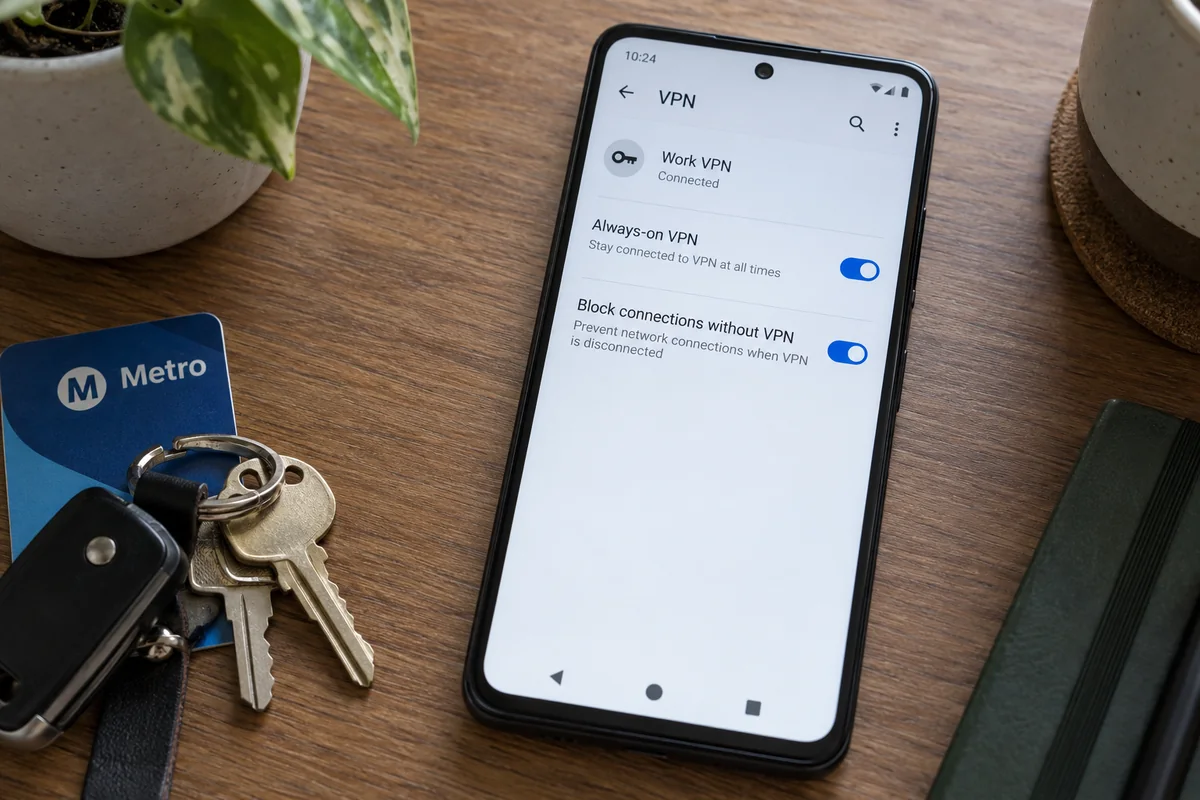
Keep in mind the practical reality of a true fail-closed setup: if your VPN server suffers an outage or you are stuck on a captive portal network, your phone will look completely offline. Webpages will refuse to resolve, and apps will report connection timeouts despite full Wi-Fi bars. That is not a malfunction. It is the system delivering the exact, uncompromising protection you asked for.
Before You Enable the App’s Kill Switch Too, Find Out Whether It Is the Same Switch
Once you understand Android's built-in controls, return to the VPN app itself. Why does it still have a menu item called "Kill Switch"?
In many cases, it doesn't actually have one. It has a shortcut.
Because Android handles network routing at a deep system level, many reputable VPNs do not build proprietary, brittle firewall hacks into their Android apps. Instead, their in-app "Kill Switch" button simply redirects you to Android’s native system settings.
Proton VPN is a clear, documented example of this design. Its documentation explains that its Android kill switch relies directly on the operating system's built-in framework. Tapping the setting in the Proton app simply prompts you to enable Android’s native Always-on VPN and Block connections without VPN switches.
[ App "Kill Switch" Toggle ] ──( Redirects )──> [ Android System Settings ]
                                                          │
                                     ┌────────────────────┴────────────────────┐
                                     ▼                                         ▼
                             [ Always-on VPN ]                 [ Block connections without VPN ]
When you see this, understand what is happening: you are not choosing between an "app kill switch" and an "Android kill switch." You are looking at a single policy through two different doorways.
If flipping an app's kill switch merely routes you to the Android system settings, stop hunting for more buttons. There is no second layer of armor to activate. Android is already enforcing the rule.
Strict Lockdown Can Turn a VPN Bypass Into “No Internet”
System-level lockdown is absolute, and that rigidity introduces one critical operational conflict: split tunneling.
Many Android users rely on split tunneling to route specific apps outside the VPN. You might want local food-delivery services, mobile banking, or smart-home controllers to use your direct home internet connection while everything else stays safely encrypted.
Under standard conditions, that works cleanly:
- Protected apps → VPN tunnel
- Excluded apps → Direct local internet
However, the moment you flip Android’s native Block connections without VPN toggle, that balance can break.
Google’s enterprise documentation and Android developer guides note that when system-level lockdown is combined with per-app VPN routing, applications placed on an exclusion list do not automatically fall back to normal internet. Instead, because Android is strictly forbidding any traffic that avoids the VPN, those excluded apps can be cut off from the network entirely.
Strict Privacy (Default). No app should ever transmit data outside an encrypted tunnel. Always-on VPN: ON. Block connections without VPN: ON. Complete leak protection. If the VPN disconnects, the phone goes totally dark until it recovers.
Split-Tunnel Flexibility. Specific apps must bypass the VPN and connect directly. Always-on VPN: ON. Block connections without VPN: OFF. (Rely on app-level routing rules.) Excluded apps reach the local network normally, but general traffic may briefly touch raw Wi-Fi if the VPN drops.
If you need intentional direct-routing bypasses for specific tools, do not blindly activate Android's system-wide blocking. In that specific scenario, an app-level kill switch that selectively drops only protected traffic—while letting whitelisted apps bypass freely—earns its keep.
If you don't use split tunneling, skip the complexity and let Android enforce the hard lockdown.
Let Android Own the Block; Let Your VPN Own the Connection
Once you realize that Android’s native architecture provides the definitive kill switch, evaluating a VPN on Android becomes much simpler.
You no longer need to audit whether a VPN client features a flashy proprietary kill-switch toggle or a branded security dashboard. Android already owns the security perimeter. What you actually need is a VPN capable of holding up its end of the bargain: maintaining a stable, resilient tunnel so Android’s fail-closed gate rarely has to slam shut.
Instead of bogging you down with redundant kill-switch settings that merely duplicate Android's built-in controls, OnlydogVPN↗ focuses its resources entirely on connection stability:
- Native Always-On Integration: It registers cleanly with Android’s system-level
VpnService, allowing Android to govern persistence and lockdown without driver conflicts or orphaned background processes. - Smart Global Routing: A strict Android lockdown means dropped connections turn your phone into an offline brick. OnlydogVPN avoids unnecessary dropouts by automatically selecting optimized, high-throughput paths suited to your immediate environment.
- Weak-Network and Handover Recovery: When you move from home Wi-Fi to a spotty 5G cell tower, legacy VPN tunnels frequently collapse, triggering Android's kill switch and stalling your apps. Built on a modern, responsive networking architecture, OnlydogVPN absorbs packet jitter and recovers from interface handovers smoothly, keeping the tunnel alive so your data continues flowing uninterrupted.
The Final Buying & Setup Rule
Stop collecting security switches like trophies. Configure your Android device based on how you actually use it:
- For absolute privacy: Open Android Settings, tap the gear icon next to your VPN, and turn on both Always-on VPN and Block connections without VPN. Pair this with a low-friction service like OnlydogVPN to keep the tunnel stable and prevent unnecessary offline freezes.
- For split-tunneling setups: Turn on Always-on VPN, leave Block connections without VPN off, and let your VPN client manage your app exclusions.
Android has already built the lock. You don't need a third-party app to reinvent the bolt—you just need a dependable connection that keeps the door open.
Frequently Asked Questions
Does Always-on VPN prevent traffic from leaking if the tunnel drops?
Not by itself. Always-on keeps the selected VPN service running, but the separate Block connections without VPN setting is what prevents traffic from using the ordinary network when no VPN tunnel is available.
Which Android setting acts as the strict kill switch?
Block connections without VPN is the fail-closed control. For the article’s strict no-leak setup, enable it together with Always-on VPN.
Do I need to enable an app’s Kill Switch as well as Android’s settings?
Not necessarily. Some Android VPN apps use the in-app Kill Switch item as a shortcut to the same system-level Always-on and blocking controls. If it simply redirects you there, it is not a separate layer to stack.
Why can split-tunneled apps lose internet when Block connections without VPN is enabled?
Because strict system lockdown forbids traffic that does not use the VPN interface. An app intentionally excluded from the tunnel may therefore be blocked instead of falling back to the direct connection.