How to Buy Canva Pro Cheaper with a VPN Without Payment Errors
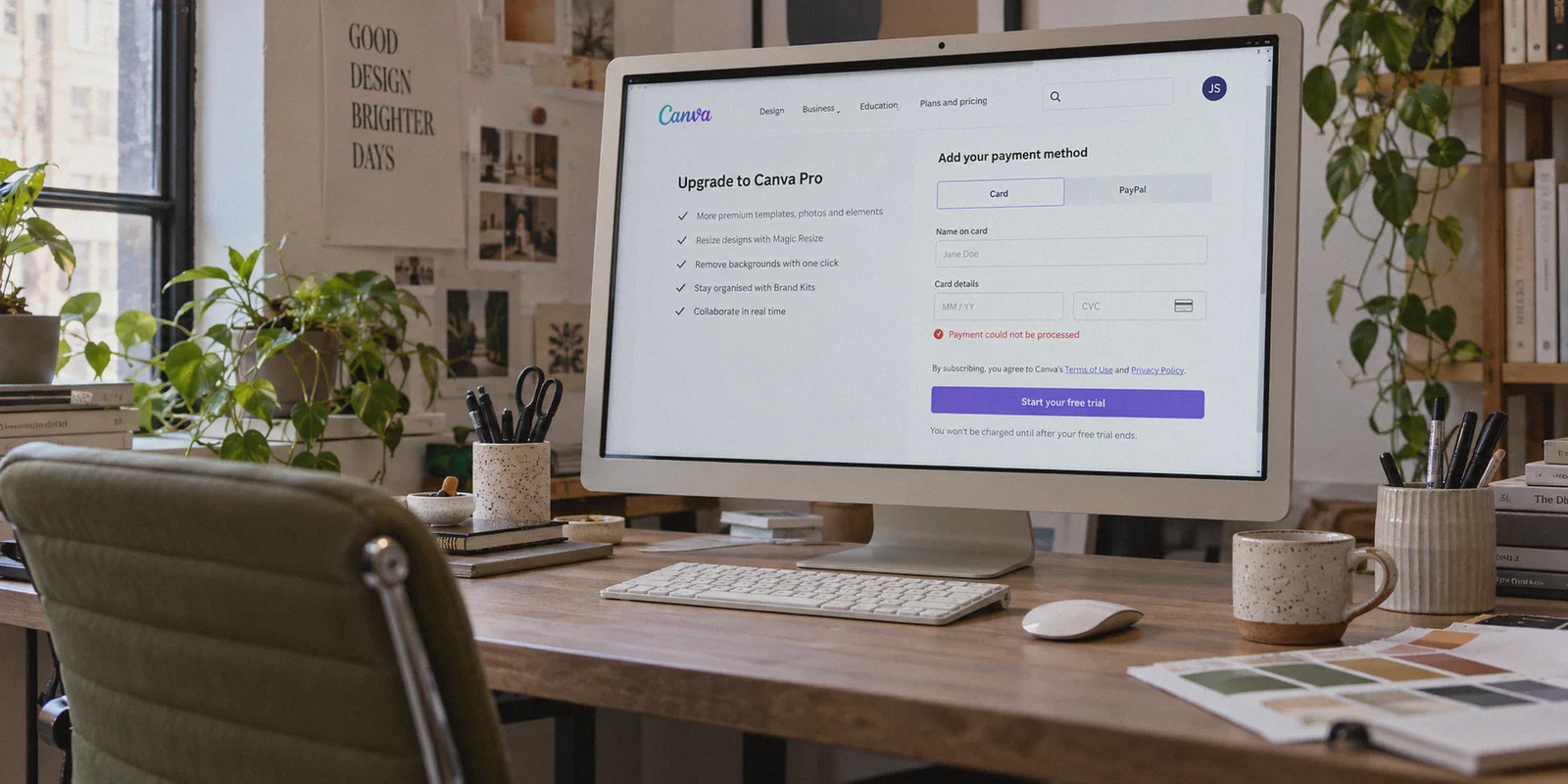
You’ve probably been staring at that Canva Pro checkout screen for the last twenty minutes, watching a little red banner blink back at you:
“Payment could not be processed. Please check your card details or try another card.”
You did everything the Reddit threads told you to do. You downloaded a VPN, switched your location to Turkey or Argentina, watched the subscription price miraculously drop from $120 a year down to twenty-something bucks, and felt like a financial genius for about thirty seconds.
Then you entered your credit card, hit submit, and slammed face-first into Canva’s payment wall.
Here is the truth that generic tech blogs won’t tell you: buying Canva Pro cheaper with a VPN isn't just an IP-switching trick anymore. It’s a fraud-scoring game.
Canva isn't stupid. In 2026, subscription platforms have hardened their payment gateways with strict card BIN checks, WebRTC leak detection, and proxy reputation scrapers. If you try to brute-force the checkout with a noisy, recycled IP from a generic VPN, your payment will bounce every single time—no matter how many different cards you throw at it.
If you actually want to lock in Canva Pro at 60% to 70% off without burning your afternoon or getting your account flagged, here is how the system actually works, which countries still work, and how to get your payment approved on the first try.
Article summary and product fit
Why can Canva Pro show a lower regional price but still reject the payment at checkout?
The article separates the displayed regional price from payment approval. It says some markets can require locally issued cards, while payment processors can also react to datacenter IP reputation, shared VPN nodes, browser-location leaks, or connection changes during verification. Its workflow therefore focuses on choosing a compatible market, using a fresh session, confirming the displayed currency, and keeping the route stable through payment.
Key points and limits
- Best for: Readers who already see a localized Canva price but are encountering generic payment or card-declined errors.
- What the article says: A lower price does not prove the payment method is eligible; card BIN checks and network-risk signals can stop the transaction before the issuer bank completes it.
- Preparation: Use a clean browser session, verify the target currency before checkout, make sure the card supports international transactions, and avoid repeated rapid submissions after a decline.
- Important limit: The article specifically treats Turkey and Argentina as poor choices without a compatible local card, and it does not claim that every foreign card or region will be accepted.
- Product fit: The article positions OnlyDogs VPN as a fit for the network side of checkout because of its obfuscated HTTP/3 transport, automated routing, leak-resistant setup, and connection recovery during verification.
Sources already linked in this article: Canva official website.
Why Your Card Got Declined (It’s Not What You Think)
When an international checkout fails, people almost always blame their bank: "My bank must be blocking international transactions."
Nine times out of ten, your bank never even saw the charge request. Canva’s payment processor (primarily Stripe and Adyen) dropped it before it reached the card network.
They use two distinct gatekeepers:
1. The Regional BIN Lock
Every payment card has a Bank Identification Number (the first 6–8 digits). In heavy-arbitrage countries like Turkey and Argentina, Canva flipped on a strict BIN filter. Unless your card was physically issued by a bank in Istanbul or Buenos Aires, the gateway rejects it outright. Trying to use your standard US, UK, European, or Australian Visa card in Turkey is a dead end.
2. The VPN Threat Score
Even in countries that don’t lock local cards, payment processors run an instant background check on your connection the second you click "Subscribe." They check:
- Does this IP belong to a known commercial datacenter (like AWS or DigitalOcean)?
- Are hundreds of other users routing transactions through this exact same node?
- Is the user's browser timezone and WebRTC location leaking a different country than their IP?
If your connection scores high on their fraud meter, the checkout silently fails with a generic "card declined" message. Standard commercial VPNs get burned here because their public WireGuard and OpenVPN protocols carry obvious signature packets that payment processors flag instantly.
The Countries That Actually Work Right Now
Forget Turkey and Argentina unless you happen to hold a local bank account or an active local virtual card.
The secret to buying Canva Pro cheap is targeting Tier-2 price-adjusted regions—countries where Canva offers substantial purchasing-power discounts, but without imposing the hyper-strict local BIN lock.
Here is how the pricing landscape currently shakes out:
| Region | Approx. Annual Cost (USD Equivalent) | Discount vs. US/EU Price | Local Card Required? | Risk of Checkout Failure |
|---|---|---|---|---|
| United States / EU (Standard) | ~$120.00 / year | 0% (Baseline) | No | Extremely Low |
| Turkey / Argentina | ~$20.00 – $28.00 / year | ~80% | Yes (Strict BIN Lock) | Almost 100% on foreign cards |
| Brazil (BRL) | ~$45.00 – $55.00 / year | ~55% – 60% | Mixed (Card dependent) | Medium |
| Philippines / Malaysia / Vietnam | ~$40.00 – $50.00 / year | ~60% – 65% | No (Friendly to Intl. Cards) | Low (with clean IP) |
| Egypt (EGP) | ~$35.00 – $45.00 / year | ~65% – 70% | Mostly No | Low-Medium |
The sweet spot for international users is Southeast Asia (Philippines or Malaysia) and Egypt. You won’t get the mythical "$15/year" rate that got patched two years ago, but you will reliably get Canva Pro for around $40 to $48 a year instead of $120. That is an instant $70+ saved, and your transaction actually goes through.
Why Your VPN Matters More Than Your Credit Card
You can pick the perfect country and hold a flawless international Mastercard, but if your VPN leaks a single packet or serves you a flagged IP address, Canva's checkout will kill the transaction.
This is where most mainstream VPNs fail. They are built for general streaming, not for sneaking past high-sensitivity financial fraud filters.
When you're running this kind of transaction, your network tool needs three specific capabilities:
- Protocol Obfuscation & HTTP/3: Payment firewalls easily identify standard OpenVPN handshakes. You need an encrypted, obfuscated transport that disguises your VPN tunnel as routine HTTPS web traffic.
- Zero DNS & WebRTC Leaks: If your IP points to Manila but your browser reveals a DNS resolver in London, Stripe flags the mismatch as high-risk fraud.
- Connection Stability During Checkout: If a VPN micro-drops or swaps nodes while Canva is processing the 3D Secure / OTP verification, the transaction aborts and your card gets a 24-hour cooldown lock.
This is why OnlyDogs VPN has become the go-to utility for cross-border subscription setups.
Rather than forcing you to sift through dozens of crowded server lists and test ping rates, OnlyDogs uses scenario presets and automated smart routing. You don’t need to configure ports or troubleshoot leak vectors manually; you select your target region, and the client deploys its proprietary protocol with built-in traffic obfuscation.
Because OnlyDogs routes traffic through an HTTP/3-based transport designed specifically to bypass aggressive protocol-filtering firewalls, its connections do not carry the obvious "proxy footprint" that payment gateways love to block. Furthermore, its network failover is built to handle jittery connections seamlessly—so you don't get disconnected mid-transaction while waiting for your bank's SMS authorization code.
It runs smoothly across Windows, Mac, iOS, and Android with a lightweight, passwordless email-code login, meaning you can configure your setup and complete the checkout on whichever device holds your payment credentials.
Step-by-Step: How to Execute the Purchase Without Errors
Follow this exact sequence. Do not skip steps or change the order, because payment processors track session history.
Step 1: Prep a Clean Browser Environment
Do not use your everyday browser window with dozens of logged-in tabs, tracking cookies, and saved cache.
- Open an Incognito / Private Window (or better yet, a secondary browser you rarely use, like Brave or Edge).
- If you already have a free Canva account, make sure it has never had a domestic credit card linked to it. If it has, create a brand-new free account using a fresh email address.
Step 2: Establish a Clean Tunnel
Launch OnlyDogs VPN before opening the Canva website.
- Choose a high-success region (e.g., Philippines, Egypt, or Malaysia).
- Allow the automated routing to lock into an optimized node. The proprietary obfuscation will ensure your connection looks like natural residential/consumer traffic rather than a noisy server hub.
Step 3: Verify Pricing and Currency on Canva
Navigate to canva.com and log in to your fresh account.
- Scroll to the pricing tab or click Try Canva Pro.
- Check the currency symbol. If you connected to the Philippines, you should see PHP (₱); if Egypt, EGP.
- If you still see USD, EUR, or GBP, do not proceed. Close the window, clear your browser cookies, check your VPN connection, and reopen.
Step 4: Complete the Checkout
- Choose the Annual Plan (yearly plans are heavily discounted compared to monthly billing in localized markets).
- Use an internationally enabled card. Cards from major issuers (Chase, Revolut, Wise, Monzo, or standard multi-currency bank cards) tend to have the highest clearance rates.
- When prompted for billing information, enter a realistic local address matching your chosen country (you can easily look up a postal code for a hotel or public business in that region).
- Hit submit. Complete the 3D Secure verification on your banking app if prompted.
Once the confirmation screen pops up: you're done.
What to Do After You Subscribe
Once the payment clears and your invoice is generated, the regional restrictions vanish.
- Disconnect the VPN: You do not need to keep OnlyDogs VPN running to use Canva Pro. Your account status is tied to your login, not your IP.
- Global Access: You can log in from your phone, your desktop app, your office laptop, or anywhere in the world. Your templates, Brand Kit, magic eraser, and cloud storage will function identically to a full-price subscription.
- Language & Content: Your interface language remains whatever you prefer (English, Spanish, etc.), and you retain full access to the complete global library of assets and fonts.
- Auto-Renewal: Your subscription will automatically renew at the local currency rate next year. Keep your payment method active, or cancel auto-renew a few weeks before the term ends if you only needed it for a single project cycle.
Three Traps to Avoid
Before you pull the trigger, keep these common pitfalls in mind:
- Never buy "$5 Lifetime Canva Pro" seats on marketplaces. You’ve seen them on eBay or Telegram: sellers offering permanent Canva Pro for five bucks. Those are virtually always abused Canva for Education or Enterprise team invites. The administrator can see all your private designs, and when Canva inevitably bans the umbrella team, every project and asset you created disappears overnight. Buying your own legitimate subscription through a price-adjusted region costs slightly more, but it is 100% private, legal, and under your direct control.
- Don’t spam the "Submit" button if declined. If your card fails once, stop. Do not hammer the button five times in a row. Repeated declines flag your Canva account and trigger a temporary anti-fraud freeze on your card. Switch regions, clear your browser profile, verify your VPN tunnel, and try again calmly.
- Ensure your bank allows foreign currency billing. Some domestic credit unions block transactions denominated in foreign currencies by default. Check your bank app’s toggle for "International Transactions" before running the checkout.
Saving money on essential design software shouldn't require an engineering degree. Pick a country with sensible card rules, use OnlyDogs VPN to ensure your connection arrives clean, stable, and undetectable to fraud filters, and grab your Pro features without paying the standard retail tax.
Frequently Asked Questions
Why can a Canva payment fail even when my bank has not blocked the card?
The article says a payment processor can reject the transaction before the bank completes it. It points to card BIN eligibility and connection-risk checks as possible reasons behind a generic decline message.
Why does the article warn against relying on Turkey or Argentina for Canva Pro?
It says those heavily used arbitrage markets can apply strict local-card BIN filtering. Under the article’s explanation, a foreign card can be rejected even if the page itself displays the local price.
What connection mismatches can increase checkout risk according to the article?
It highlights known datacenter IPs, many users sharing the same node, and browser signals such as timezone, DNS, or WebRTC location that do not match the selected region.
What should I verify before submitting the Canva Pro payment?
The article recommends starting from a clean browser session, connecting before opening Canva, confirming that the expected local currency is displayed, using an internationally enabled card, and keeping the connection stable through any 3D Secure or OTP step.