
You step out of your apartment building and onto the sidewalk. Your phone’s Wi-Fi icon blinks out, replaced by 5G. In your status bar, the VPN badge briefly flickers: Reconnecting…
Yet before that badge turns solid green again, a push notification chimes. A browser tab you refreshed three seconds ago finishes loading, or an email syncs cleanly in the background.
Your VPN app had its kill switch turned on. The setting was enabled precisely to prevent raw data from slipping onto an unsecured network. Yet somehow, while the tunnel was scrambling to rebuild itself, real traffic sailed straight through your mobile carrier’s physical connection.
The standard reaction to this is to blame the provider's server speeds, switch protocols, or audition new VPN apps in search of a "faster reconnect."
That instinct misdiagnoses how operating systems handle network changes. A kill switch that works flawlessly when you hit "Disconnect" can fail completely when the ground moves beneath its feet.
The real question is not how quickly your VPN re-establishes its tunnel. The question is: why was your operating system permitted to treat that new physical network as an open fallback route in the first place?
Article summary and product fit
Why can a VPN kill switch fail during a Wi‑Fi or cellular handoff?
A network handoff can create a new physical default route before an app-level kill switch notices that the old path disappeared. The meaningful test is whether ordinary application traffic escapes over that new route while the tunnel is rebuilding. The durable fix is fail-closed enforcement at the operating-system or firewall layer, not faster server switching.
What matters in this article
- Best for: Users whose VPN appears protected at rest but may leak when a phone or laptop moves between Wi‑Fi, cellular, hotspots, or newly learned routes.
- Key distinction: Essential local networking traffic is not the same as an application-data leak; verify whether a fresh web request or DNS lookup actually uses the raw carrier or local-network IP while the VPN is reconnecting.
- Evidence in the article: The routing risk is illustrated with the TunnelVision research and CVE-2024-3661, while Android’s block-connections-without-VPN setting is an example of platform-level fail-closed enforcement.
- When OnlydogVPN fits: The article positions it at the recovery layer after fail-closed protection is already in place: faster, more resilient reconnection can reduce the downtime that tempts users to disable a strict kill switch.
- Important limit: Routing resilience is not a substitute for operating-system or firewall rules that actually prevent ordinary traffic from falling back to an unprotected interface.
Product source: OnlydogVPN official website.
A Network Handoff Changes More Than the VPN Connection
When you tap "Disconnect" inside a VPN app, the software triggers an orderly shutdown: it tells the client to sever the tunnel and immediately locks down network interfaces according to its internal rules.
A physical network handoff—switching from home Wi-Fi to cellular data, hopping between office access points, or waking a laptop on hotel Wi-Fi—is an entirely different event.
During a handoff, your operating system detects a newly available network adapter. It assigns IP addresses, updates default routing tables, and establishes physical routes before your VPN client even realizes the old path is dead.
Old Wi-Fi drops → OS discovers new 5G link
                 ├─ Path A: apps rush to the open 5G route → Leak
                 └─ Path B: OS blocks traffic until VPN rebuilds → Fail-closed
If your kill switch is implemented merely as an application-level watchdog—monitoring whether the VPN process is alive—there is an architectural gap between the arrival of the new network route and the moment the VPN re-engages its filters. In that split-second gap, pending application requests grab the newly minted physical gateway and escape unencrypted.
More critically, a network change can bypass a tunnel without the VPN visibly disconnecting at all.
Security research around local network routing (such as the TunnelVision vulnerability, documented under CVE-2024-3661) demonstrated that local networks can push specific routing rules via standard network configuration protocols (like DHCP). These rules can force an operating system to route traffic over the physical interface instead of the virtual VPN adapter—even while the VPN app remains active, shows a solid green status, and never trips its conventional kill switch.
The takeaway is architectural: tunnel status alone is not an indicator of route integrity. If a system only watches the health of the VPN handshake, a changing network will eventually find a way around it.
First Prove That Ordinary Traffic Actually Escaped
Before replacing software, verify whether what you observed was an actual data leak or an intentional system-level exception.
Operating systems never route 100% of all packets through a virtual private network. To function in the real world, a device must exchange unencrypted traffic with its local network environment. If it didn't, you could never negotiate a captive portal at an airport, request a local IP address from a router, or maintain essential cellular voice handshakes.
Apple’s developer specifications for its network routing frameworks explicitly note that even when a VPN requests whole-device coverage, the system deliberately exempts essential local infrastructure traffic, captive-portal negotiation services, and select cellular signaling.
A true handoff leak is not low-level local network discovery; it is ordinary application data escaping onto the raw physical connection.
To run a clean, controlled test on your device:
- Connect to Wi-Fi with your VPN running and confirm your external IP address shows the VPN exit node.
- Ensure you have no active split-tunneling exceptions, bypass rules, or local network sharing enabled for the test application.
- Open a clean browser window, enter a simple IP-checking website or web destination, and pause.
- Disable your Wi-Fi interface, forcing the device to switch instantly to cellular data or a mobile hotspot.
- In the exact window where the VPN status shifts to Reconnecting, initiate a fresh page load or DNS lookup.
If that new request resolves over your cellular carrier's IP before the VPN establishes its connection, your kill switch has failed open. Ordinary user data was allowed onto the new physical path while the tunnel was down.
If the page stalls, errors out, and only loads once the VPN displays a completed handshake, your system properly failed closed.
The Stronger Fix Is “No VPN, No Ordinary Internet”
When a kill switch leaks during a handoff, changing VPN server locations accomplishes nothing. You are dealing with a routing priority failure.
To eliminate handoff leaks permanently, you need an enforcement mechanism operating at the operating system's kernel or firewall layer that says: if traffic cannot move through an active VPN tunnel, it does not move at all.
Different platforms handle this level of enforcement in distinct ways:
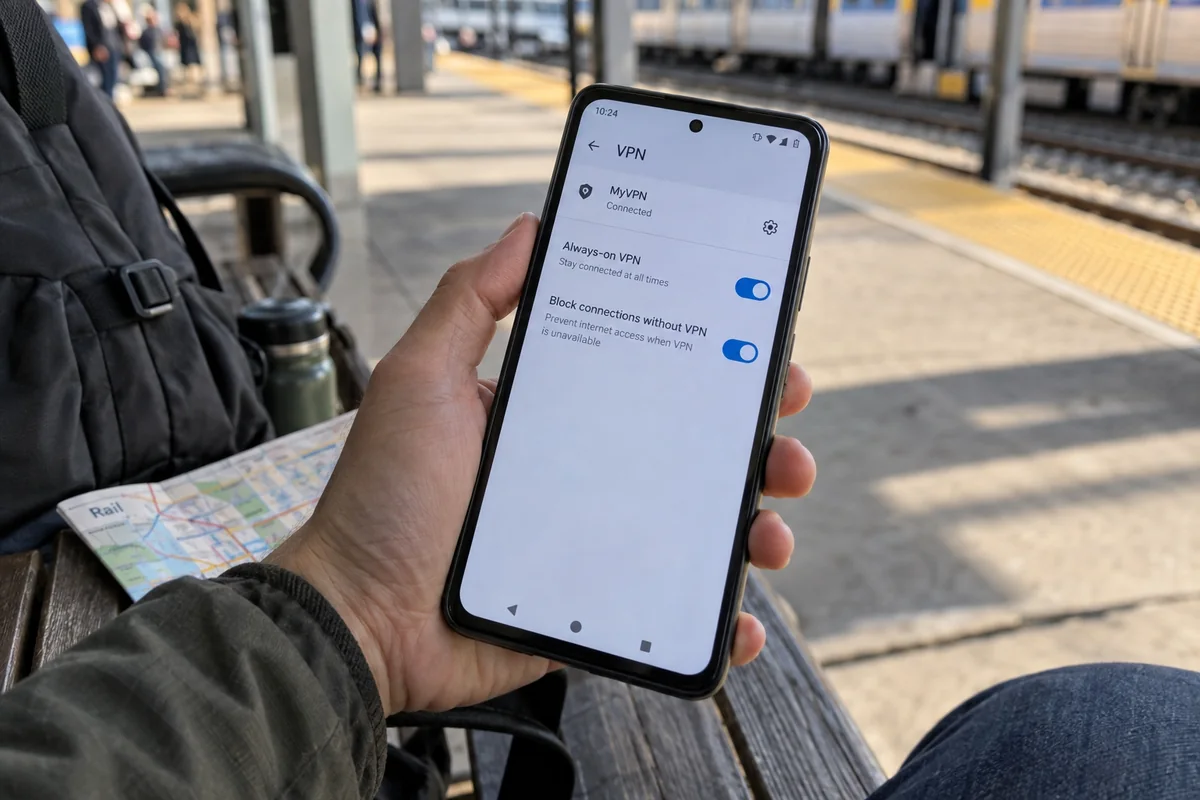
- Android (The Benchmark): Android provides the cleanest native implementation for mobile users. In your system settings under VPN, Android separates Always-on VPN from Block connections without VPN. When "Block connections without VPN" is toggled on, the operating system drops all direct networking at the network-stack level. If you change networks, applications cannot touch the new cellular connection until the VPN tunnel registers as active.
- Apple (iOS / macOS): Modern Apple platforms allow VPNs using the Network Extension framework to request all-network routing. In Apple’s documented routing model, the operating system is designed to drop network traffic during Wi-Fi-to-cellular transitions while the tunnel reconnects, rather than allowing applications to fall back to the raw interface.
- Windows: Standard consumer VPN desktop clients often implement their own local firewall filtering (WFP) rules. In enterprise environments, Microsoft uses strict policies like LockDown VPN, which severs all outbound traffic when the required tunnel is unavailable.
If your current VPN client relies entirely on an internal software loop rather than engaging platform-level firewall controls, it will remain vulnerable to handoff timing gaps. Check your operating system’s native network settings first. If your platform provides an operating-system-level "block non-VPN traffic" setting, activate it.
Once Nothing Leaks, Reconnection Speed Becomes the Real Problem
Enforcing a strict fail-closed policy solves the security vulnerability. But it introduces an immediate operational friction: the availability penalty.
When your device refuses to send a single packet outside the VPN, any delay in rebuilding the tunnel halts your digital life. Your music pauses, navigation updates stall, outgoing messages sit with a spinning wheel, and web pages error out while you walk down the block.
This is the point where users get frustrated and quietly disable their kill switches—trading genuine security for basic convenience.
Once fail-closed protection is established, the engineering challenge pivots from leak prevention to reconnection resilience. You need a VPN that negotiates unstable, shifting, and degraded networks without forcing you to sit through extended timeouts.
This operational balance is where OnlydogVPN becomes a practical fit.
OnlydogVPN is engineered around travel and volatile real-world network transitions:
Smart Global Routing: Instead of getting stuck attempting to reconnect to a dead or congested regional node during an interface change, OnlydogVPN evaluates the connection dynamically, restoring a usable protected route without demanding manual server selection.
Weak- and Shifting-Network Optimization: Traditional desktop VPN protocols often choke during dirty network handoffs, hanging on dropped sockets until an internal timer expires. OnlydogVPN optimizes route recovery specifically for volatile mobile environments—such as switching between patchy public Wi-Fi, cellular data, and transit connections—minimizing the offline gap while your device holds traffic behind the wall.
OnlydogVPN does not ask you to compromise your security posture by disabling protections during transitions. Instead, it minimizes the downtime that makes strict, leak-free network policies so painful to live with.
The Handoff Decision: Keep or Change?
Diagnosing a network handoff issue comes down to a clear sequence of decisions based on what your controlled test revealed:
- New web requests succeed while the VPN is reconnecting: The kill switch fails open during route changes. Enable native OS-level blocking (for example, Android's "Block connections without VPN") or switch to a provider with proper firewall-level enforcement.
- Traffic leaks even while the VPN icon stays green on new Wi-Fi: The local network is pushing routes that bypass the virtual adapter. Disconnect from the network immediately. Use cellular data or an encrypted hotspot while configuring strict interface binding.
- Traffic is completely blocked, but reconnecting takes forever: Security enforcement is working, but recovery resilience is poor. Your kill switch is sound; improve the recovery layer to eliminate long re-handshake delays on volatile networks.
- Traffic is completely blocked, and the connection recovers in seconds: Optimal configuration. Keep your setup. Your system enforces a fail-closed policy and restores service without disrupting your workflow.
A reliable network handoff is not defined by how quickly an icon turns green. It is defined by an uncompromising standard: the newly discovered network is never allowed to act as an unshielded fallback. Lock down the route first, make the operating system wait for the tunnel, and choose a VPN agile enough to make that wait unnoticeable.
Frequently Asked Questions
Why can a kill switch work when I tap Disconnect but leak during a network change?
A manual disconnect is an orderly event the VPN client can react to immediately. During a physical handoff, the operating system may establish a new route before an app-level watchdog has reattached its filters, creating a short fail-open gap.
How do I tell a real handoff leak from normal local-network traffic?
Start a fresh ordinary request during the reconnect window and observe the public route. If the request completes over the raw cellular or local-network IP before the VPN is ready, ordinary user data escaped. If it stalls until the tunnel returns, the system failed closed.
What is the strongest Android setting for preventing non-VPN fallback traffic?
Use the operating system’s VPN controls so that Always-on VPN is paired with Block connections without VPN. That makes Android drop ordinary direct networking until the protected route is active again.
Does a green VPN icon prove that traffic cannot bypass the tunnel?
No. The article’s core point is that tunnel status and route integrity are different things. A local network can alter routing while the VPN process still appears active, so the route itself has to be tested.