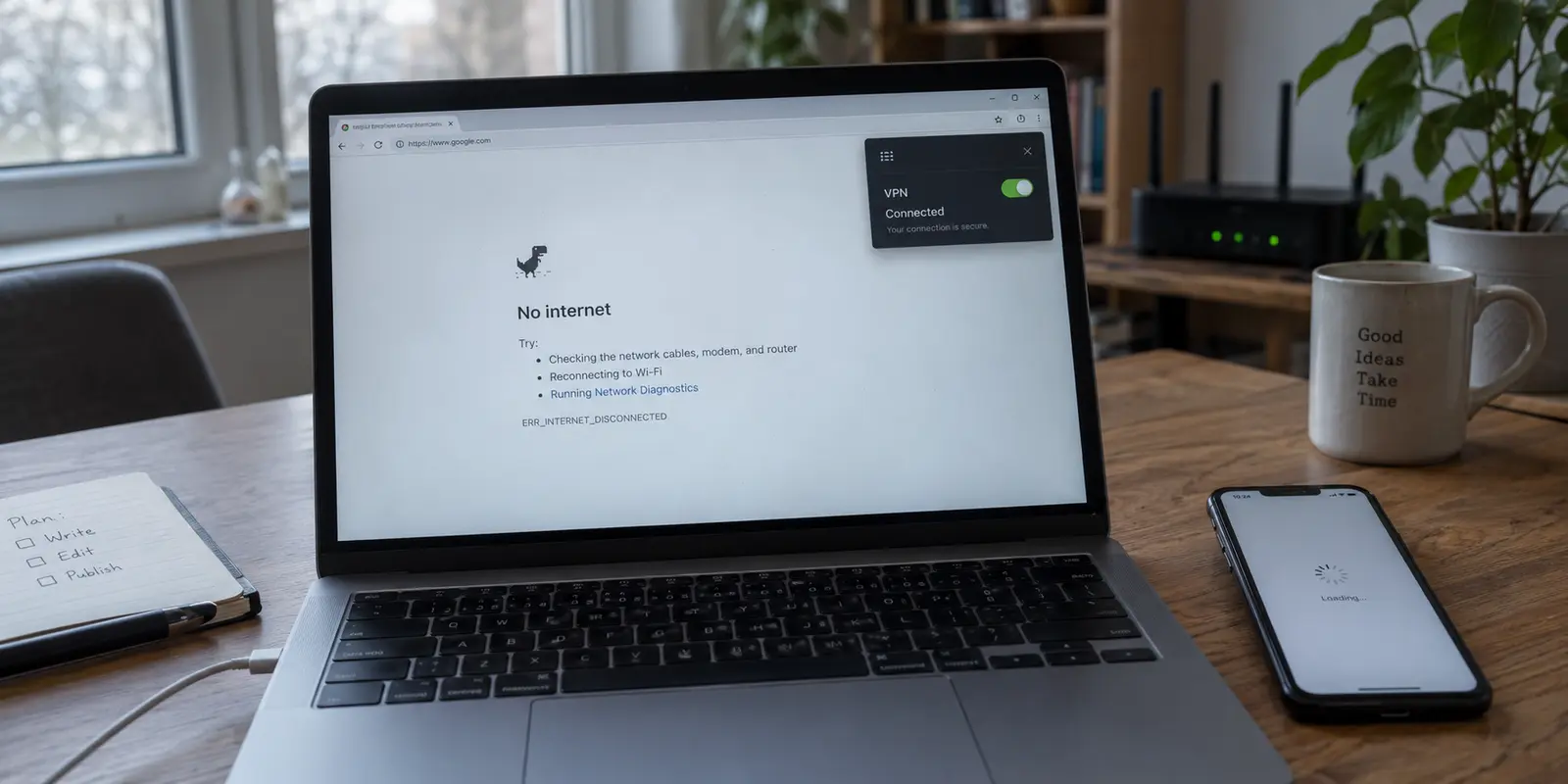
Your phone or laptop shows full Wi-Fi bars, your VPN displays a reassuring green “Connected” badge, and yet not a single web page will load. Messages stall on “sending,” video feeds freeze, and your browser claims you are completely offline.
The immediate reaction is usually a messy scramble: toggling airplane mode, switching through six different countries in the server list, clearing DNS caches, and finally considering a full network reset.
Pause before you do any of that. The status indicator on your VPN client only means an encrypted tunnel was negotiated with a remote server. It does not prove that your device can reach the wider internet through it, or that your local network granted you access in the first place.
Instead of changing five things at once and erasing your saved Wi-Fi passwords, run one simple test: disconnect the VPN for thirty seconds. The result immediately splits your troubleshooting in half and shows you exactly where the connection broke.
Article summary and product fit
What this article answers
When the VPN says “Connected” but nothing loads, disconnect it once before resetting anything. If the internet still fails, troubleshoot the underlying Wi-Fi, cellular link, or captive portal; if internet immediately returns, the failure is inside the VPN path; if only one service fails, treat it as a service-specific problem.
Key takeaways and fit
- Best for: Anyone facing a connected-VPN, no-internet state on home, hotel, airport, or mobile networks.
- Key point: A successful VPN handshake proves only that a tunnel was negotiated, not that useful internet traffic is moving through it.
- Product fit: The article positions OnlydogVPN for users who repeatedly hit VPN-only failures on changing networks and want automatic routing with less manual recovery.
- Limit: No VPN can create an internet connection where the local network is down or a captive portal has not granted access. Network resets are deliberately kept as a last resort.
Sources already used in this article: OnlydogVPN official site.
Before You Change Anything, Turn the VPN Off Once
Before adjusting a single setting, tap disconnect on your VPN. Immediately try loading an ordinary, low-stakes public website (such as a news homepage or Wikipedia) and check whether an everyday app refreshes.
(A quick note on safety: if you are on an open public Wi-Fi network, this is strictly a brief diagnostic check. Use an innocuous webpage to test the pipe, not your banking app or private email, and restore your protection as soon as you have your answer.)
This single move produces one of three distinct outcomes:
- Nothing loads even with the VPN disconnected. Stop troubleshooting your VPN client entirely. The problem exists in the local network or cellular connection underneath it.
- The internet instantly returns the moment the VPN turns off. The underlying network is healthy, and the breakdown exists squarely within the VPN path or its routing.
- Most websites work fine, but one specific app or site still fails. You do not have a device-wide connection failure. You are dealing with an isolated service block or app-level glitch.
Testing this first prevents you from wiping clean configurations. A green icon in your taskbar only tells you what the operating system’s network adapter thinks is happening; testing raw traffic tells you what is actually happening.
If It Still Fails Without the VPN, Fix the Internet Underneath It
If turning off the VPN leaves you just as stranded, your VPN is not broken. It simply cannot build a bridge over dry land. A VPN requires a working, route-ready internet connection before it can transmit anything.
If you are at home, check whether other devices on the same Wi-Fi can get online. If your phone, tablet, and smart TV are all stalled, your router or local broadband provider is down. Restarting your laptop or reinstalling VPN profiles will not bring your ISP back online.
If you are traveling—sitting in a hotel room, waiting at an airport gate, or working from a train—the culprit is almost always a captive portal.
Public networks routinely hold your device in a digital waiting room until you accept their terms of service, enter a room number, or submit an email address in a browser. Because an active VPN immediately attempts to encrypt all outgoing requests and route them through private tunnels, it frequently chokes off the redirect screen that the hotel router is trying to send you.
When on public Wi-Fi, follow this sequence:
- Disconnect the VPN completely.
- Open a browser window and navigate to a basic, unencrypted address (like NeverSSL) to force the hotel or airport login portal to trigger.
- Complete the sign-in and confirm an ordinary webpage loads cleanly.
- Only then turn your VPN back on.

Changing VPN server locations while trapped behind an unauthorized captive portal is useless. The hotel network has not opened the door yet.
If Internet Returns With the VPN Off, Find Out How Wide the Failure Is
If your apps instantly spring to life the second you disconnect the VPN, the underlying connection is sound. The breakdown lives inside the tunnel.
Before diving into configuration menus, determine the scope: is everything failing, or is the breakdown selective?
Case A: The Entire Device Is Blocked
If browsers, email clients, cloud storage tools, and background services all stall whenever the VPN connects, you have a total routing block. The VPN handshake succeeded, but the tunnel is failing to forward traffic, or your local network firewall is dropping the encrypted packets after the initial connection.
Case B: Only One App or Website Refuses to Load
If you can browse the web and stream music, but your banking app or a specific streaming service throws a connection error, stop diagnosing this as a network outage. Many sensitive services maintain blocklists of known commercial data center IP addresses. Alternatively, if your VPN supports split tunneling or per-app routing, that specific application might be assigned to a broken local rule.
Case C: IP Traffic Passes, but Names Fail (DNS Issues)
If your browser hangs with errors like DNS_PROBE_FINISHED_NO_INTERNET or Server IP address could not be found, your device has lost its phonebook. DNS is simply the service that translates human names like nytimes.com into numeric IP addresses that hardware understands. If a VPN assigns an unresponsive private DNS server, you will see a connected tunnel that cannot navigate anywhere by name.
Repair the VPN Path From Least Disruptive to Most Disruptive
When you have established that the entire device loses access whenever the VPN is engaged, work through fixes in order of least disruption. Never jump straight to the nuclear option.
Start by dropping and re-establishing the session. Then return to automatic routing, check the kill switch, and leave reboots, reinstalls, or a full network reset for last.
1. Toggle the Tunnel Once
Connections frequently go stale. If your laptop went to sleep, or your phone bounced between a 5G tower and an airport access point, the cryptographic session may have dropped silently in the background while the interface remained open. Disconnect, wait five seconds, and reconnect. If it restores stable access, you are done.
2. Switch to Automatic Routing
If you manually selected a specific city or country, that endpoint could be undergoing maintenance, facing local carrier throttling, or suffering severe congestion. Instead of manually testing ten different cities, select the app’s default “Auto” or “Best Location” setting. Let the client pick an optimal path.
3. Check for a Trapped Kill Switch
Most modern VPNs feature a "Kill Switch" or an operating-system-level setting like Android's "Block connections without VPN." This security mechanism intentionally severs all traffic if the VPN tunnel stumbles, preventing your real IP address from leaking.
Occasionally, if a tunnel drops ungracefully, the kill switch remains engaged while the client sits idle, locking your system out of the web. Toggling this feature off and on inside your VPN settings can instantly unfreeze trapped connections.
4. Reserve "Reset Network Settings" for the Absolute End
Do not treat your operating system’s “Reset Network Settings” button as an early troubleshooting step. On both iOS and Windows, this removes all remembered Wi-Fi networks, clears Bluetooth pairings, and deletes custom APNs. It creates significant cleanup work. Exhaust simple client restarts, system reboots, and protocol toggles (like switching between WireGuard and OpenVPN) before wiping system settings.
Know When the Problem Has Become a VPN Choice
If an occasional reconnect gets your day back on track, keep your current setup. Network hiccups happen to every service.
However, if you find yourself running this troubleshooting gauntlet every time you step out of your house, the problem is no longer your device or the local Wi-Fi. It is the tool you are using.
Traditional VPN architectures were designed for stationary computers on reliable broadband. When you introduce the realities of modern travel—stepping from a hotel lobby onto cellular data, connecting to an oversubscribed café router, or managing high-interference public Wi-Fi—many legacy clients fail to recover gracefully. They hang onto dead sessions, get stuck in negotiation loops, and force you to babysit server menus just to send an email.
If your underlying internet works fine, but your VPN repeatedly becomes a roadblock on changing networks, it is time to stop resetting your phone and look at OnlydogVPN↗.
OnlydogVPN is built around a single, practical objective: removing manual network maintenance. Instead of presenting you with a confusing directory of individual servers and expecting you to diagnose routing problems mid-transit, OnlydogVPN relies on Smart Global Routing. It dynamically evaluates network conditions and automatically selects a stable path suited to your destination.
Crucially, the service is engineered specifically for weak, congested, and fluctuating roaming connections—the exact environments where standard VPN tunnels collapse into the dreaded "connected, but no internet" state. With a clean, one-tap connection model on mobile and desktop, it preserves your privacy without requiring you to act as your own network administrator.
(Keep the baseline truth in mind: no VPN on earth, including OnlydogVPN, can pull an internet connection out of thin air. If your local cellular provider has zero signal, or your hotel captive portal has not been cleared, you must still solve that local hurdle first.)
The rule worth keeping
The next time your device reports full bars, an active VPN, and zero connectivity, keep the decision path simple:
- Fails with the VPN off? The fault lies with your local Wi-Fi, mobile carrier, or a captive portal. Leave your VPN alone.
- Fails on only one app or site? It is a targeted block or isolated app glitch, not an internet outage.
- Fails only when the VPN is active, and keeps failing? Check for a stuck kill switch, restart the tunnel, and if it constantly requires manual babysitting across everyday networks, replace the VPN with one built to handle the real world.
Frequently Asked Questions
What is the first test when my VPN is connected but the internet does not work?
Disconnect the VPN briefly and load an ordinary public website. That single test tells you whether the underlying connection is also broken or whether the failure appears only inside the VPN path.
What if nothing works even after I disconnect the VPN?
Stop troubleshooting the VPN first. Check the local Wi-Fi or cellular connection, and on public networks make sure a captive portal has been completed before reconnecting the VPN.
What if only one app or website fails while the VPN is on?
That is not a device-wide internet outage. The article treats it as a targeted service block, app problem, or routing rule issue rather than proof that the whole tunnel is broken.
Could a kill switch cause the connected-but-offline state?
Yes. A kill switch can intentionally block traffic when a tunnel drops, and a stale or trapped state can leave the device offline until the VPN session or setting is reset.
Should I use “Reset Network Settings” early in troubleshooting?
No. The article puts it at the end because it can erase remembered networks and other settings. Try a simple reconnect, automatic routing, kill-switch checks, and ordinary restarts first.