You open your phone settings, scroll to Network & Internet, find the line that says Private DNS, and paste in a secure hostname from Cloudflare, Google, or Quad9. It feels like an instant, elegant shortcut. It is built right into your operating system, costs nothing, doesn't drain your battery, and promises encrypted privacy without the bulk of a heavy application.
Then you launch your favorite streaming app or try loading a website restricted in your region, only to see the exact same error staring back at you: “This title is not available in your location.”
Nothing malfunctioned. Your phone did precisely what you told it to do. The problem is a fundamental misunderstanding of what Private DNS actually touches.
In consumer tech discussions, Private DNS, Smart DNS, and VPNs are frequently lumped into the same catch-all bucket of “tools that bypass restrictions.” Because all three handle network paths in some fashion, people assume Private DNS is simply a lightweight, free alternative to a VPN.
It isn't. They control entirely different stages of your internet connection.
Article summary and product fit
Why does Private DNS not change your streaming location?
Private DNS encrypts the DNS lookup, not the rest of the trip. Your device still connects to the destination with its normal public IP, so a streaming service can still see your network location. A VPN changes the data route and public-facing IP; Smart DNS is a separate, specialized tool.
What matters here
- Best for: People trying to understand why Android Private DNS does not remove a geo-restriction.
- Private DNS role: It protects DNS questions and answers, which can improve lookup privacy and sometimes bypass DNS-only tampering.
- Why geo-blocking remains: The destination still receives traffic from your ordinary public IP because Private DNS does not tunnel the full connection.
- Error clue: NXDOMAIN or “server address not found” can point to DNS-level interference; a resolved domain that times out can point to route-level blocking instead.
- Smart DNS distinction: Commercial Smart DNS selectively proxies service-specific location checks but does not provide full traffic encryption.
- Product fit and limit: OnlydogVPN fits route-level IP or location barriers; it is unnecessary when the only problem is a DNS lookup that a trusted Private DNS resolver can fix.
Sources already used in this article
- Google Android Private DNS guidance — Google describes Private DNS as protection for DNS questions and answers rather than a full traffic tunnel.
- Cloudflare WARP modes — Cloudflare distinguishes DNS-only resolver modes from modes that tunnel network traffic.
- OONI website-blocking overview — OONI documents several different blocking layers, including DNS tampering and IP or packet-level interference.
Product source: OnlydogVPN official website
Private DNS Changes the Lookup, Not the Trip
To understand why Private DNS fails to unlock regional catalogs, you have to look at how a device connects to a website. Every time you tap a link or open an app, two distinct things happen:
- The Directory Lookup (DNS): Your device asks a Domain Name System (DNS) resolver: “What numerical IP address belongs to this web address?” The resolver checks its records and sends back an answer.
- The Actual Journey (The Data Traffic): Your device takes that numerical IP and establishes a direct connection across your local internet provider to the server hosting the content.
Private DNS—as implemented on modern Android, iOS, and desktop platforms—operates exclusively on step one. It wraps your DNS queries in an encrypted protocol (like DNS-over-TLS or DNS-over-HTTPS) so that your internet provider, network administrator, or anyone snooping on your local Wi-Fi cannot see which domains you are querying.
As Google explicitly notes in its Android documentation, Private DNS secures DNS questions and answers only. It does not touch, encrypt, or redirect the rest of your traffic. Cloudflare makes the same technical distinction within its consumer software: running in DNS-only mode secures queries through its 1.1.1.1 resolver, while its full network mode actually tunnels your device’s data.
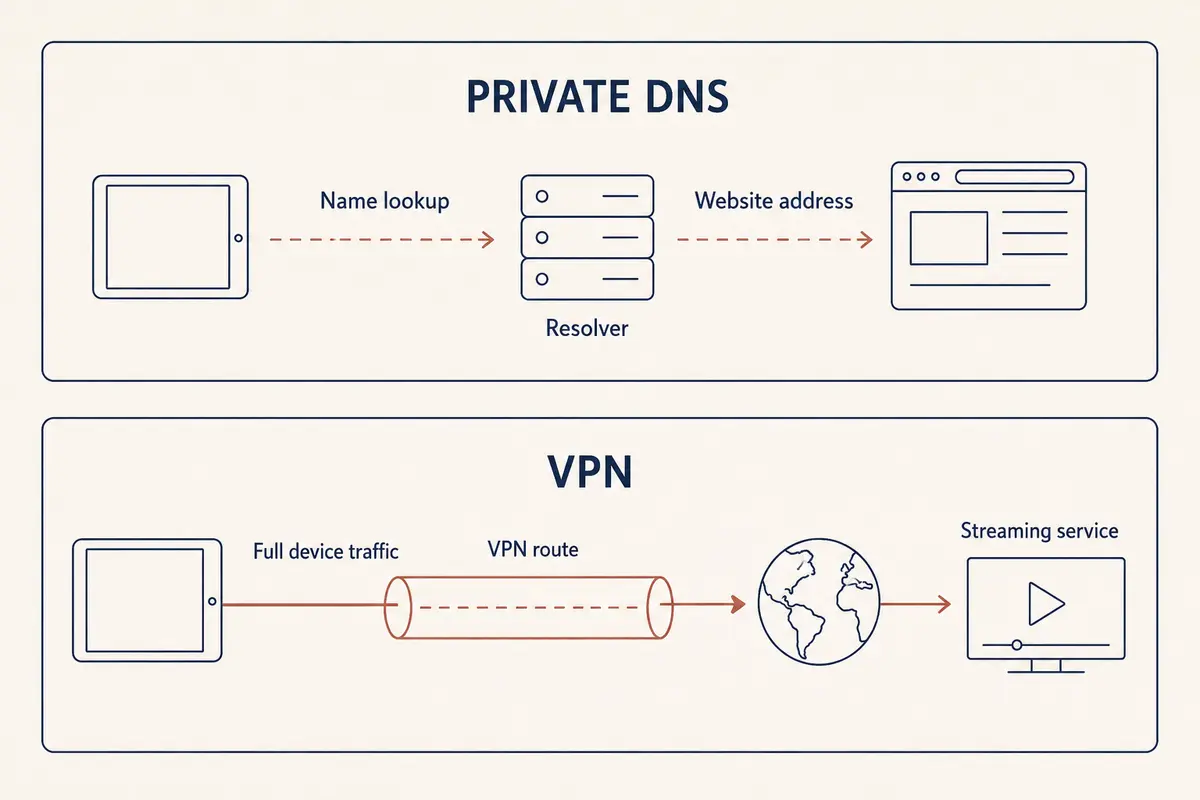
Put simply:
Private DNS changes the directory enquiry. A VPN changes the road the traffic takes.
When you use standard Private DNS, you might receive the address from a clean, private resolver, but your device still connects to the destination using your original home or mobile IP address. The destination platform reads that public IP, identifies your geographic location, and serves you content—or blocks you—accordingly.
Crucially, Private DNS is not Smart DNS. While both contain "DNS" in their names, commercial Smart DNS is a specialized technology built specifically to intercept and proxy geolocation checks for specific streaming services. Standard Private DNS does nothing of the sort.
When Private DNS Actually Works
This does not mean Private DNS is useless for accessing content. It can circumvent restrictions, but only when the restriction happens at the lookup stage.
Internet censorship and network filtering are not uniform. As monitoring groups like the Open Observatory of Network Interference (OONI) document, networks restrict websites using several distinct mechanisms:
- DNS Tampering: The local resolver gives a fake answer, lies about the address, or returns an error.
- IP-Based Blocking: The network blocks all traffic heading toward specific destination server IPs.
- SNI and Deep Packet Inspection (DPI): The network examines the connection as it forms and drops traffic matching specific domains.
If an ISP enforces a block strictly through DNS tampering—meaning it orders its default resolvers to return an error when you ask for a specific site—switching to an independent, encrypted Private DNS profile will solve the problem. Your device bypasses the compromised local resolver, obtains the correct IP address over an encrypted exchange, and connects normally.
You can usually spot this scenario by the symptoms:
- DNS-Level Failure: Your browser displays
DNS_PROBE_FINISHED_NXDOMAINor says the server address could not be found, but the platform is known to be operational worldwide. Private DNS will often fix this immediately. - Network-Level Block: The domain resolves to an IP address, but the page indefinitely buffers, times out, or throws a connection reset error. The network is blocking the path itself, and changing your DNS resolver will accomplish nothing.
Streaming Stops Where the Route Begins
When it comes to streaming and geo-restricted catalogs, DNS is rarely the barrier.
Platforms like Netflix, BBC iPlayer, and Hulu do not rely on your DNS resolver to figure out where you are sitting. They inspect the connection that arrives at their front door. They look at your inbound public IP address, compare it against global geolocation databases, and filter their catalog based on that network footprint.
Because Private DNS leaves your outbound IP address unchanged, your location remains visible to the streaming service.
A VPN resolves this because it intercepts your data at the routing level. Instead of letting your connection travel directly from your local router to the video server, a VPN routes your complete internet traffic through an encrypted tunnel to an exit server in another location. If that server is in London, the streaming service sees a connection originating from London.
However, a VPN is not a magic master key. Modern streaming platforms deploy multi-layered verification:
- IP Reputation: Services cross-reference incoming traffic against known data-center IP ranges and commercial proxy lists.
- Hardware Location Services: Mobile apps—such as YouTube TV—frequently check device GPS, Wi-Fi environment data, and home-area account settings in addition to IP addresses.
- Account Tiers: Platforms increasingly restrict cross-border access or VPN usage on ad-supported subscription tiers.
Even with these hurdles, the technical hierarchy remains clear: standard Private DNS cannot manipulate your geographic route at all. A VPN controls the exact variable that determines your apparent network location.
Choose by the Error You Need to Fix
Instead of treating these tools as competing options, pick the one that matches the specific network barrier you are facing:
- Your issue is lookup privacy or basic ISP DNS tampering: Stick with Private DNS. It is lightweight, introduces practically zero latency, and protects your browsing queries from casual network snooping.
- Your issue is a blocked IP or a location-locked catalog: You need a VPN. Only a full routing tool can replace your public-facing IP address with an endpoint in the required region.
When regional access and streaming are your actual goals, the challenge shifts from whether to use a VPN to how much effort that VPN demands. Manually testing dozens of regional servers to find one that hasn't been flagged by a streaming platform is frustrating.
This is where OnlydogVPN provides an effective, tailored solution.
Rather than forcing you to act like a network engineer, OnlydogVPN is built around a streamlined, task-oriented design:
- Dedicated Streaming Presets: Instead of guessing which random city server might work, you select the streaming scenario, and the application configures the route automatically.
- Clean Regional Nodes: It utilizes optimized regional streaming nodes engineered to minimize the IP reputation flags that trigger proxy blocks.
- Automatic Route Selection: It identifies the cleanest available connection path in the background, sparing you the cycle of manual trial and error.
If your barrier is a regional streaming error or an IP-level firewall rather than a simple domain resolution glitch, moving from Private DNS to OnlydogVPN addresses the actual layer causing the breakdown.
The Third Option: What About Smart DNS?
Before concluding, it is worth clarifying the tool that often causes this confusion: Smart DNS.
Smart DNS is not the "Private DNS" setting found in your phone. It is a commercial workaround designed specifically for media streaming. It works by routing only the specific domain requests responsible for location verification through a proxy server, while leaving the heavy video stream itself on your standard, unencrypted direct connection.
This approach has clear trade-offs:
- Advantages: It can be set up on smart TVs, game consoles, and streaming sticks that do not natively support VPN apps, and it avoids encryption overhead.
- Drawbacks: It provides zero encryption, does not secure your general web traffic, and typically requires you to register your home public IP address with the provider to authenticate your access.
How I’d Think About the Three Tools
When deciding how to configure your connection, use this quick reference:
- Private DNS: The DNS resolver lookup only — Query privacy, blocking ads/trackers, bypassing DNS tampering
- Smart DNS: Geolocation lookups for specific services — Streaming on devices without VPN app support (Apple TV, consoles)
- VPN (e.g., OnlydogVPN): Your entire data route and public IP — Overcoming geo-blocks, bypassing IP firewalls, full traffic encryption
If your goal is private domain lookups that prevent your internet provider from cataloging your browsing habits, turn on Private DNS.
If your goal is to change your network location, load international catalogs, or bypass route-level restrictions, you need a VPN that manages the journey itself. And whenever someone claims you can bypass geo-blocking with basic "DNS," verify whether they mean a specialized Smart DNS service—because standard Private DNS was never designed to leave your hometown.
Frequently Asked Questions
Does Private DNS change my public IP address or country?
No. In the article’s model, Private DNS only changes how DNS lookups are resolved and protected. The destination connection still uses your ordinary public IP unless another routing tool changes it.
When can Private DNS actually unblock a website?
It can help when the restriction is implemented by DNS tampering, such as a local resolver returning a false error or incorrect address. It will not fix a route that is blocked after the domain has already resolved.
Is Private DNS the same thing as Smart DNS?
No. Private DNS is a privacy mechanism for DNS lookups. Smart DNS is a commercial service that selectively proxies certain location checks, usually for media devices, while leaving most traffic unencrypted.
When do I need a VPN instead of Private DNS?
Use a VPN when the problem is tied to the public IP, route, IP-level firewall, or geo-restricted catalog. A full VPN tunnel changes the public-facing route in a way standard Private DNS does not.