The Saudi Arabia VPN Problem: Why “Best VPN” Lists Still Fail on Real Hotel Wi-Fi
I did not need the most impressive VPN on a review page. I needed one that could connect when the network was already fighting back.
Most VPN advice for Saudi Arabia sounds too easy.
Blocked apps? Use a VPN.
Public Wi-Fi? Use a VPN.
Netflix error? Use a VPN.
Privacy concern? Use a VPN.
Fine. But in Saudi Arabia, the real question is not:
Which VPN has the most servers?
It is:
Can it actually connect when the network is fighting you?
That is where many popular VPNs fail.
Saudi Arabia is not a casual internet environment. Comparitech notes blocked VoIP services, online restrictions, filtering, and the need to install a VPN before arriving because some VPN websites may be hard to access locally.
So yes, you probably need a VPN.
But you need one that still works on weak hotel Wi-Fi, airport Wi-Fi, unstable mobile data, and restricted networks that do not like VPN traffic.
When you are tired, jet-lagged, and trying to call home, you are not thinking about speed-test charts.
You are thinking:
- Why does the VPN say connected, but nothing loads?
- Why am I switching servers just to open Google?
- Why does Netflix detect the VPN again?
- Why does hotel Wi-Fi collapse the second I turn it on?
That is the real Saudi Arabia VPN problem: censorship + weak Wi-Fi + shared VPN IPs + streaming detection + unstable routing.
Quick answer and context
Core answer: Calls that do not break. YouTube that plays. Google without endless CAPTCHA. Hotel Wi-Fi that feels safer. Maps, banking, messages, and work tools that stop turning into troubleshooting sessions.
Key points
- Connect first. Everything else comes later.
- My trial-and-error test
- The takeaway
Where OnlyDogs VPN fits
The article considers OnlyDogs VPN only for this specific travel outcome: Calls that do not break. YouTube that plays. Google without endless CAPTCHA. Hotel Wi-Fi that feels safer. Maps, banking, messages, and work tools that stop turning into troubleshooting sessions.
Limits
OnlyDogs VPN has fewer servers than the major VPN brands.
Sources already cited in this article
Connect first. Everything else comes later.
A VPN does not only encrypt your traffic. It also changes how your traffic looks.
Some networks do not need to read your data to guess you are using a VPN. They can detect patterns: ports, handshakes, packet timing, and protocol behavior.
That is why obfuscation matters.
In simple terms, obfuscation makes VPN traffic look less like VPN traffic. QUIC-style obfuscation is useful because QUIC is already used by normal web traffic through HTTP/3, so it can help VPN traffic look less obvious to restrictive networks. Mullvad explains the idea in plain technical terms.
You do not need to care about the protocol name.
You only need the result:
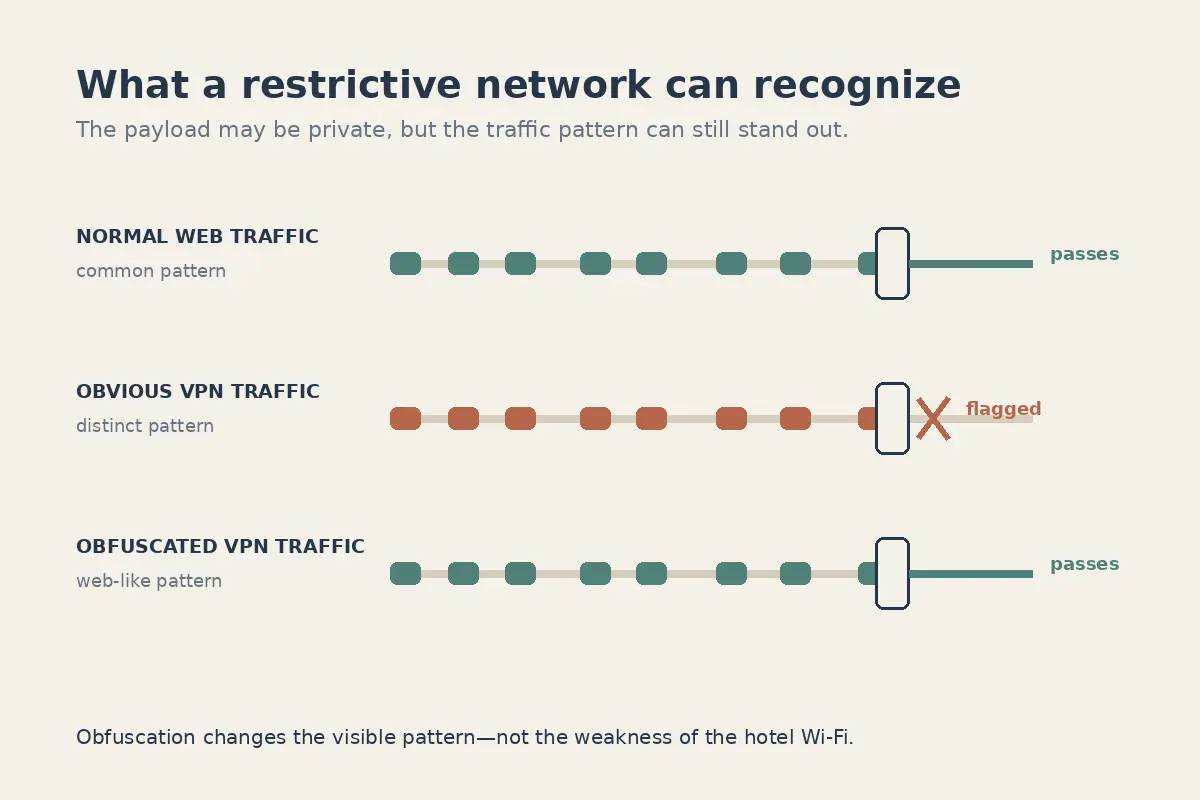
If the network is looking for VPN traffic, your VPN needs to stop looking obvious.
So I stopped asking:
Which VPN is fastest?
I started asking:
Which VPN connects with the least drama?
My trial-and-error test
I did not start with OnlyDogs VPN.
I tried the obvious choices first: a big-name VPN, then a free VPN, then a travel-first VPN.
| Option | Why I tried it | What worked | What failed in real use | Best for |
|---|---|---|---|---|
| Big-name VPN | Everyone recommends them. Big brand, many servers, many reviews. | Strong brand trust, huge server list, mature apps, many tutorials, refund policy. | Shared IPs often triggered Google CAPTCHA. Reddit users describe the same short version: “CAPTCHA every time” and shared VPN IP problems. Netflix was easier to detect and block; another Reddit thread had the familiar “keeps detecting my VPN” complaint. The usual fix was manually switching servers again and again. The Mac app also felt clunky and dated. | Power users who do not mind troubleshooting. |
| Free VPN | It cost nothing upfront. | No payment, no subscription, no commitment. | Slow speed, unstable connection, noisy app. The real cost may be data, ads, tracking, third-party sharing, or worse. The FTC warns that some VPN apps may share information with third parties, sell advertising, or redirect traffic. I would not trust it with banking, work accounts, or crypto wallets. | Low-risk testing only. |
| OnlyDogs VPN | I wanted something that connected first and required less fixing. | One-tap connection, simple setup, travel presets, weak-signal focus, smoother iOS/macOS experience, and an ad-blocking switch that made browsing and YouTube feel cleaner. Its App Store listing mentions Saudi Arabia, UAE, weak-signal stability, intelligent routing, and one-tap travel connection. | Fewer servers than major VPN brands. | Travelers who want less drama and faster usability. |
That table is the whole lesson.
The big VPN looked safest on paper.
The free VPN looked cheapest at checkout.
OnlyDogs VPN felt closest to what I actually needed in Saudi Arabia:
connect first, fix less, move on.
The takeaway
In Saudi Arabia, I do not care how impressive a VPN looks on a review page if I still have to babysit it.
A big VPN can work, but be ready to switch servers, clear cache, fight CAPTCHA, and test Netflix again and again.
A free VPN may cost nothing upfront, but I would not trust it with banking, work accounts, or anything sensitive.
OnlyDogs VPN has fewer servers than the major VPN brands. That is the trade-off.
But for my use case, it solved the first problem first:
getting connected with less trouble.
The cleaner app, ad blocking, and smoother iOS/macOS experience are nice extras. But they only matter after the VPN actually works.
That is what most VPN rankings miss.
People are not buying a protocol.
They are buying a normal internet day in Saudi Arabia:
Calls that do not break.
YouTube that plays.
Google without endless CAPTCHA.
Hotel Wi-Fi that feels safer.
Maps, banking, messages, and work tools that stop turning into troubleshooting sessions.
That is the win.
Not the fastest speed test.
Just the feeling that the internet works again.
Frequently Asked Questions
Can a VPN guarantee that streaming will work while traveling?
No. Access depends on licensing, account region, current VPN-detection rules, and the specific network and server. A route that works today can change later.
Why do streaming apps block some VPN connections?
Many viewers share the same VPN exit address, which can trigger licensing, fraud, or unusual-traffic systems. Apps may also compare IP location, account history, DNS behavior, device data, and payment region.
What should I try when streaming fails on a VPN?
Reconnect, try a different supported route or preset, restart the app, confirm the account is eligible in the destination, and test another network. Change one variable at a time.