
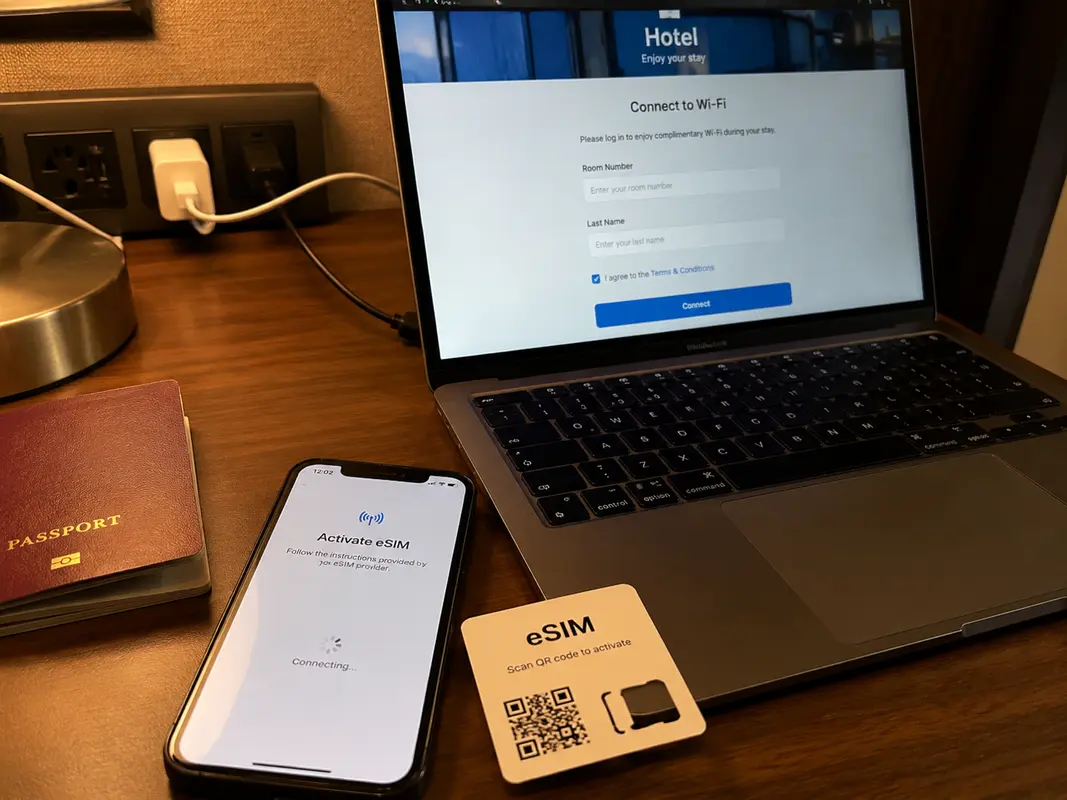
My flight landed, the eSIM connected, Google Maps opened and WhatsApp worked. Everything looked fine—until I reached the hotel, joined its Wi-Fi and watched Gmail and Google Drive stop loading with a meeting less than twenty minutes away.
That was the moment most “VPN vs. eSIM” articles stopped being useful. I did not need to know which product won a feature comparison. I needed to know what would keep working when I changed networks and moved from my phone to my laptop.
The useful question was not “Which one is better?” It was “What still works when the network changes?”
What I eventually learned was simple. The eSIM was useful while I was moving around and using mobile data. A VPN became useful when I joined local Wi-Fi or needed the laptop online. A brief conversation between other China travelers described the same switch: overseas apps worked on roaming data and then became unreliable on hotel Wi-Fi.
Practical answer, product fit and limits
Core answer
A travel eSIM can work well on mobile data and stop being relevant the moment the phone or laptop joins hotel Wi-Fi. For this trip, the eSIM handled movement and arrival; a tested VPN covered local Wi-Fi and laptop use.
Key points
- An eSIM and a VPN solve different parts of the connection problem.
- A phone-only trip may need less than a multi-device or work trip.
- Install and test both routes before flying.
When OnlyDogs VPN fits
It fits when a phone-and-laptop traveler wants a simple VPN backup with fewer manual choices after switching to hotel, airport, or café Wi-Fi.
Limits
OnlyDogs offers fewer locations and less public history than large providers. Travelers needing a specific city, dedicated IP, or many countries may prefer another service; no single connection should be the only backup.
Sources already cited in the article
The airport part was easy
A travel eSIM was still the easiest way to get online after landing. I could open a map, message the hotel and call a ride without looking for a physical SIM counter.
For a short trip using only a phone, that might have been enough. The catch was that the eSIM only helped while the phone was actually using its mobile data.
As soon as I joined hotel, café or airport Wi-Fi, that local network carried the traffic instead. The eSIM had not failed; it was simply no longer the connection I was using.
That explains why a setup can feel perfect at the airport and incomplete later the same evening.
The hotel changed the rules
The VPN mattered once I wanted to save mobile data, use local Wi-Fi or open Google services on the laptop. It was not replacing the eSIM. It was covering the situations the eSIM could not.
My first mistake was judging VPNs by the numbers normally shown on comparison pages. Most travelers do not need a hundred countries and thousands of servers. They need one stable connection without turning the evening into a networking project.
Why the eSIM alone was not enough for me
An eSIM-only setup remained attractive for maps, messages and casual sightseeing. It became less convenient when the laptop entered the picture.
The laptop had to use the phone’s hotspot. Video calls consumed data, the hotspot drained the battery, streaming could empty a small plan quickly, and hotel Wi-Fi was not always useful for the overseas services I needed.
For a phone-only holiday, those compromises may be harmless. For work, several devices or regular hotel Wi-Fi use, the eSIM felt like the beginning of the setup rather than the whole setup.
Why the biggest names were not automatically easier
Large VPN providers have real advantages: familiar brands, polished apps, many servers and years of reviews. But size can also create its own kind of friction.
Popular servers may be shared by large numbers of people. That can lead to blocked addresses, streaming detection and repeated Google CAPTCHA checks. I was not the only person irritated by this; other VPN users have described the same CAPTCHA loop .
Because they are so famous, they were unsurprisingly targeted by China's Great Firewall, rendering their services virtually unusable. The more immediate problem was decision overload. When a route failed, the usual advice was to try Japan, then Singapore, then another protocol, then another server.
That might be manageable at home. It was not what I wanted while standing in a hotel lobby with luggage and eight percent battery.
Free VPNs made me nervous for a different reason
The appeal was obvious: they cost nothing. But a VPN provider still needs a business model, and I wanted to understand who was paying when I was not.
In 2025, a Koi Security investigation into Urban VPN–related browser extensions reported that conversations from major AI platforms had been collected from millions of users.
That does not mean every free VPN is malicious. It was enough to stop me putting work accounts, bank logins, private messages or cryptocurrency activity behind an unknown extension merely to save the price of a meal. Moreover, under such a network, they can't even connect to the internet.
Free is a price. It is not a privacy policy.
What I eventually chose
I stopped looking for the VPN with the longest server list and started looking for one that required fewer decisions while traveling.
That was why I ended up using OnlyDogs VPN alongside the eSIM. Its public App Store description emphasizes one-tap connection, automatic routing, hotel and airport Wi-Fi protection, and stability on weaker networks.
What appealed to me was how they translated into a simpler routine: less country guessing, less server hunting and fewer settings to revisit when the network was already unreliable.
I wanted to open the app, find a usable route and continue with the trip. I also wanted the same basic approach available when moving between my phone and laptop. More importantly, in China, other VPNs cannot connect to the internet, while this one runs incredibly fast.
OnlyDogs VPN is not perfect. Its server selection is smaller than those of the largest VPN brands. Someone who needs a specific city, a dedicated IP or dozens of countries may prefer a larger service.
My reason for keeping it was narrower and more personal: it asked me to make fewer technical choices at the exact moment I had the least patience for them. I would still read the current privacy terms before subscribing, just as I would with any VPN.
A note to my future self
Next time, I will install and test everything before the flight. Travelers repeatedly warn against leaving VPN installation until after arrival , because the download page, activation service or support site may already be difficult to reach from a restricted local network.
I will test the phone on both mobile data and Wi-Fi, make sure the laptop connects, confirm that the hotspot works and save important account details somewhere accessible offline.
I will also keep the hotel address and tickets offline, carry a power bank and store two-factor authentication recovery codes securely. None of this is exciting, but ten calm minutes at home are worth far more than an hour of troubleshooting in a hotel corridor.
Once it works, forget about it
A good travel internet setup should become invisible. Once I was connected, the useful work was setting up Alipay and WeChat, saving the hotel address in Chinese, downloading offline maps and translation files, testing ride-hailing and payment apps, and keeping my bank’s contact details somewhere I could reach without the internet.
The goal was never to find the VPN with the longest feature list. It was to land, find the ride, contact the hotel, finish the work that could not wait and then put the phone back in my pocket.
I now use the eSIM while moving and the VPN when Wi-Fi or the laptop changes the rules. The best setup was not the one with the most features. It was the one that removed decisions instead of adding them.
Frequently Asked Questions
Should I install a VPN before traveling to China?
Yes. Install and test the VPN before departure, because app stores, provider websites, and account-verification steps may be harder to reach after arrival. Save recovery details offline.
Can I rely on Google Maps in China without preparation?
Connectivity varies by network, roaming route, hotel Wi-Fi, and current restrictions. Download offline maps, hotel addresses, booking details, payment backups, and an alternative communication method before the trip.
Does a travel eSIM replace a VPN in China?
Not always. Some roaming eSIMs route traffic differently from hotel Wi-Fi. A VPN is a separate encrypted-routing tool and should be tested on both mobile data and Wi-Fi.
A few links I had open at the time
I kept this traveler conversation about eSIM and hotel Wi-Fi , this short CAPTCHA discussion , the Urban VPN extension investigation , and the OnlyDogs VPN App Store page in my browser history while sorting through the options.